

Only 30% of AI agent pilots reach production. What separates them? (Sponsored)

Datadog’s free eBook covers what actually separates the agents that ship from the pilots that stall. Spoiler: it’s not the model. It’s durable execution, memory management, evaluation pipelines, and observability.
You’ll learn how to:
Identify the four failure modes that kill agent programs before they ship
Build evaluation pipelines that let you trust and govern agents at production scale
Instrument agent workflows with the observability needed to debug non-deterministic behavior in production
Measure the leading indicators that prove agent ROI to your team and leadership
Salesforce agents have completed 7 billion Agentic Work Units (AWUs), the unit the company uses to count work done by AI agents, across Agentforce and Slack. Of those, 3.2 billion came in its second quarter alone.
But getting agents to follow instructions consistently was a real challenge. The first version of Agentforce, Salesforce’s platform for building and running agents, put all instructions into one large prompt. As the rules piled up, the model began skipping some important ones. For customers using agents to interview job candidates or handle patient data, that was unacceptable.
Salesforce moved to a new design, a multi-layer system that combines deterministic code with reasoning models for maximum reliability. To understand how this works, we met two of the leaders behind it at Dreamforce 2026: Muralidhar Krishnaprasad (MK), President and CTO at Salesforce, and Khushwant Singh, SVP of Product Management for the AI application development platform. Thanks to MK and Khushwant for sharing the details with us.
In this article, you’ll learn:
Why a naive design that relies on prompting is not reliable
How to combine deterministic code with probabilistic reasoners to increase reliability
How to build a data layer that supports identity resolution and links records from many systems into one unified profile
How to build an efficient context engine
How Agent Identity gives an agent its own permissions
How AIforce and the Headless Toolkit let agents in tools such as Slack and Claude reach Salesforce data and actions
The naive design: one large prompt
The simplest way to build an agent is to write everything into a single prompt. That is how most teams build their first agent. Imagine you are building a support agent for a healthcare company. You can write the business rules as natural language instructions (e.g., only discuss the patient’s own records). Then add a description of available tools (e.g., “get scheduled appointments”). You also include other relevant info like patient data. The agent then includes all of this in the LLM’s context window. That’s the whole design. We just hope that the LLM does the right thing.
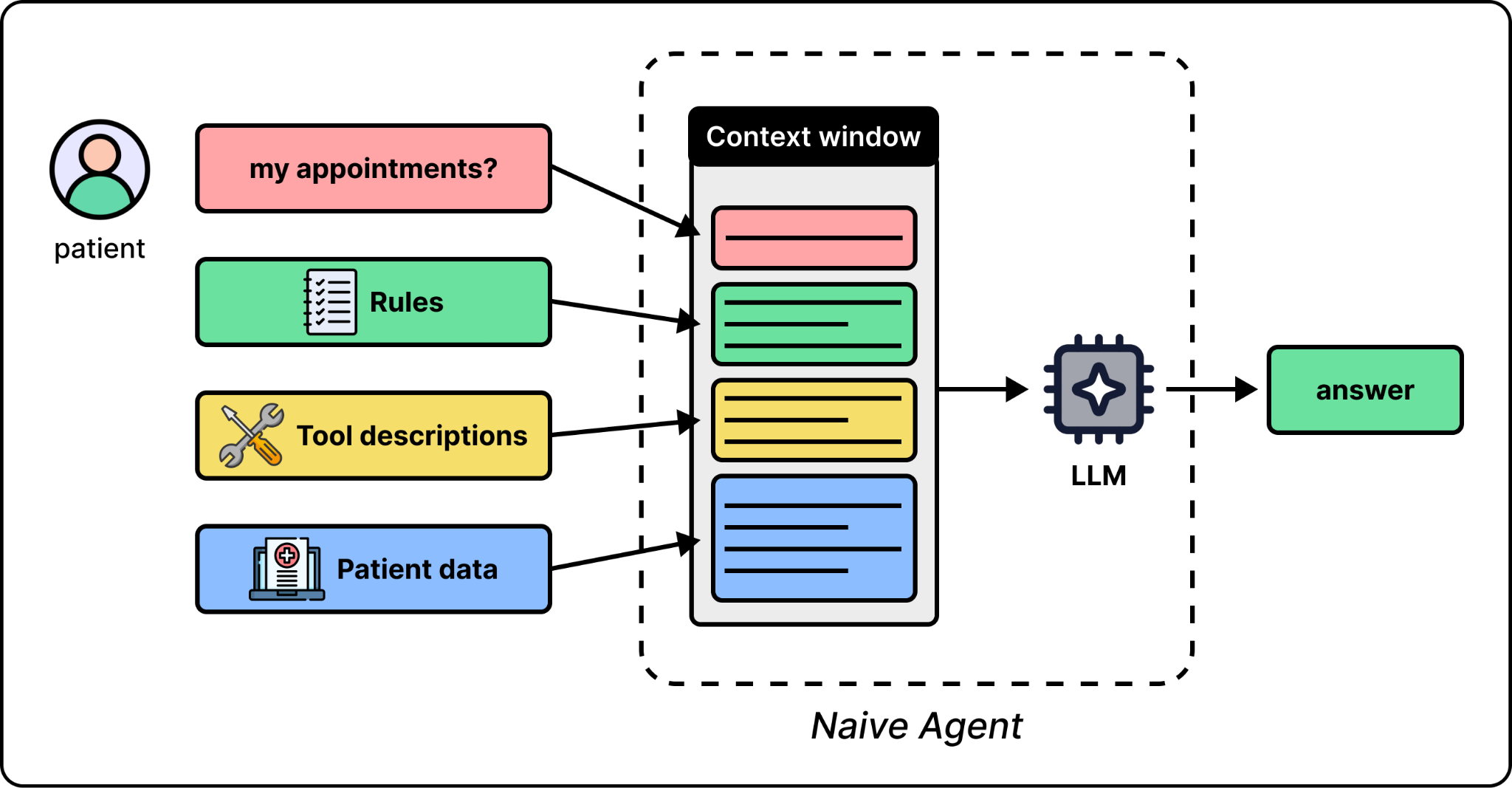
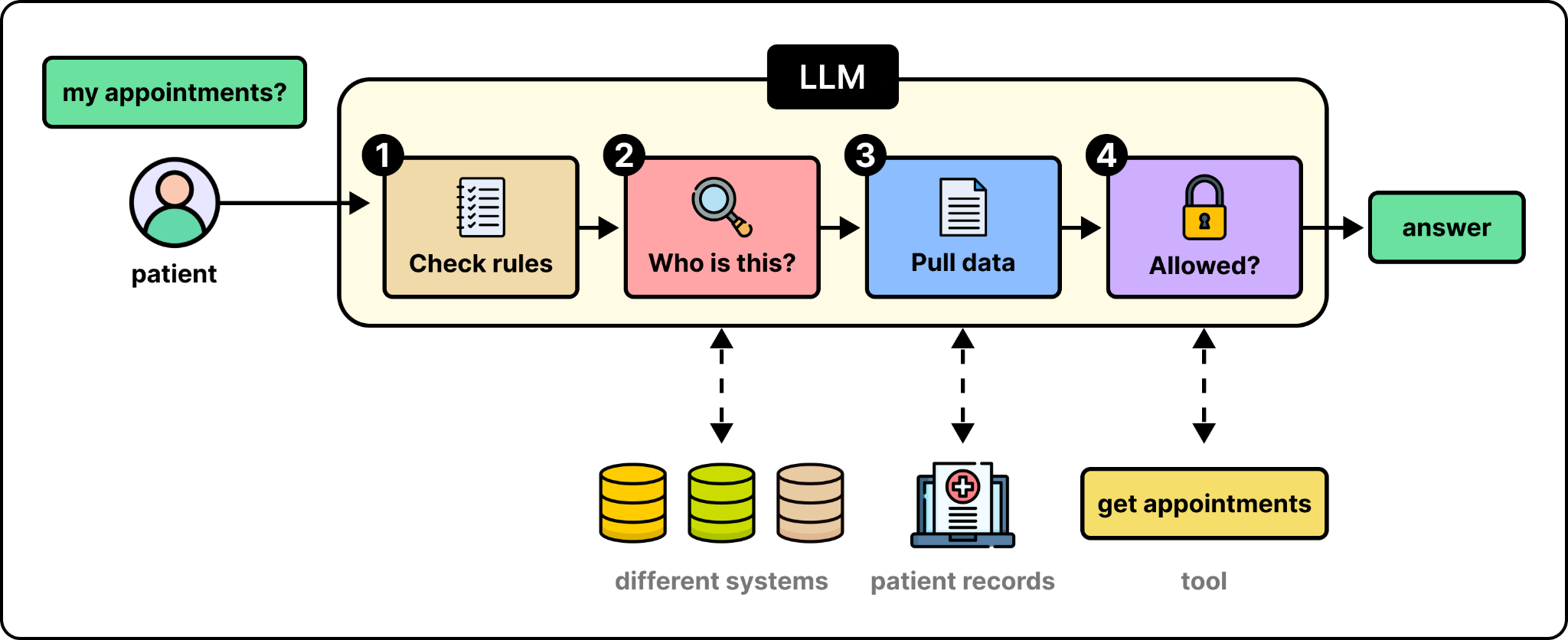
In this naive design, the model is expected to handle four things at once: 1) enforce the rules, 2) find who the customer is across different systems, 3) include the data the model may need, and 4) ensure the agent does what it is allowed to do.
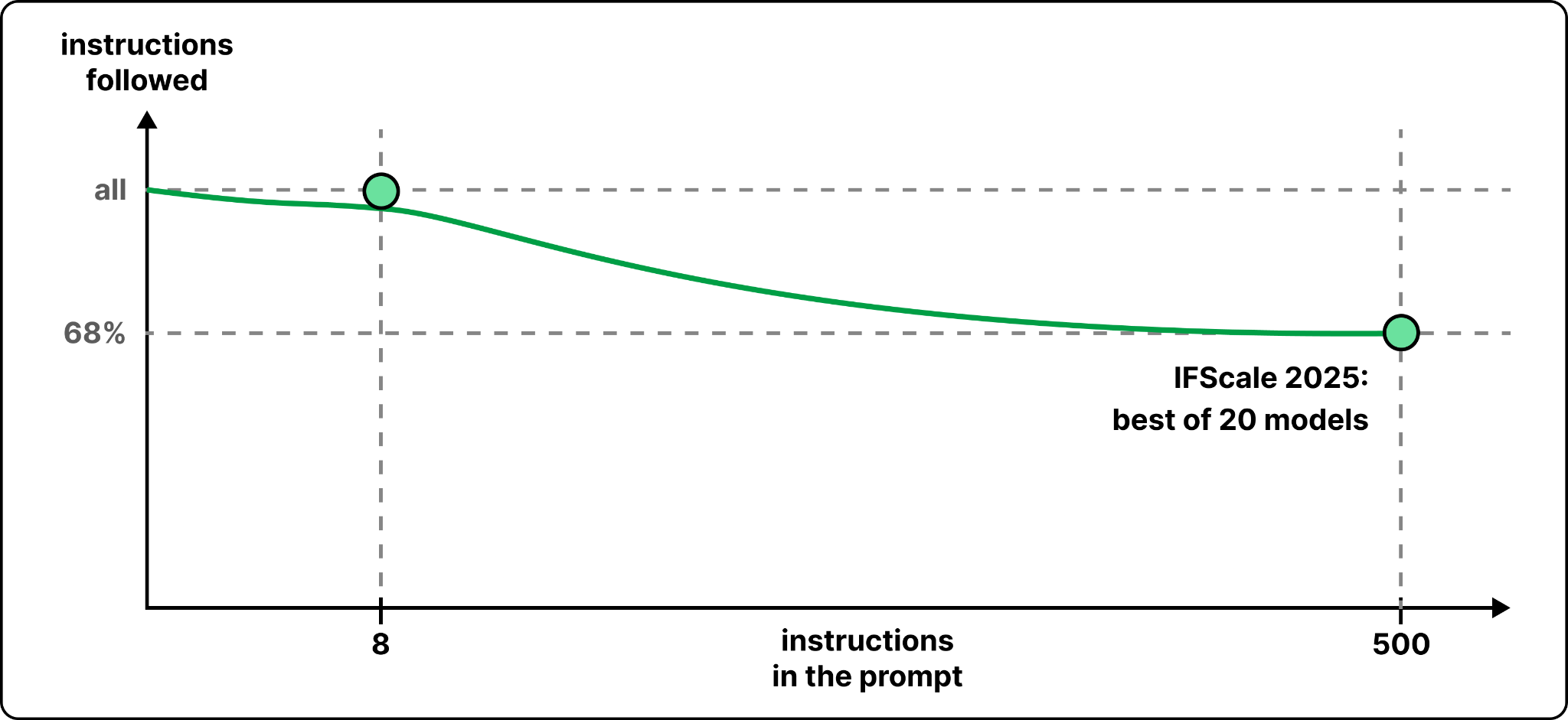
The first version of Agentforce handled everything this way. According to MK, the team kept adding instructions such as only do this, only do that, and first get all the appointments. An interesting observation from the team was that this worked fine for up to eight instructions. But beyond eight, the model would discard instructions.
But why would a model discard an instruction? To a model, an instruction is not necessarily a rule. It is just some text in the context. There is no guarantee that an instruction will actually be followed. Besides that, instruction following will also get worse as we add more instructions to the context. This is not specific to Salesforce. A benchmark called IFScale tested 20 models with up to 500 simple instructions in one prompt to measure instruction following, and even the best model followed only 68% of them at the full 500.
So a prompt only tries to shape the behavior of the LLM. It cannot enforce that behavior. Let’s see what Salesforce built around the model to fix this.
How Agentforce is built
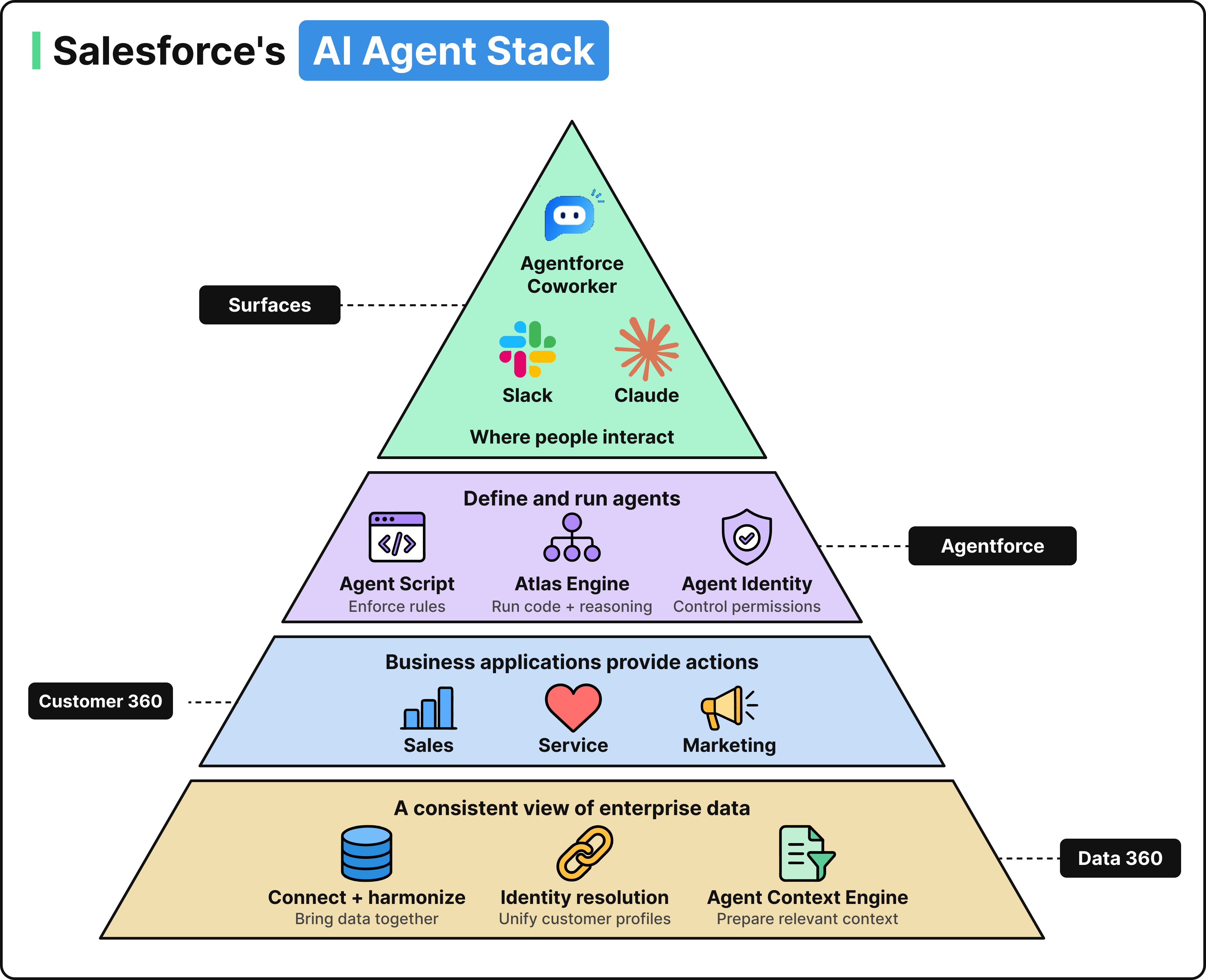
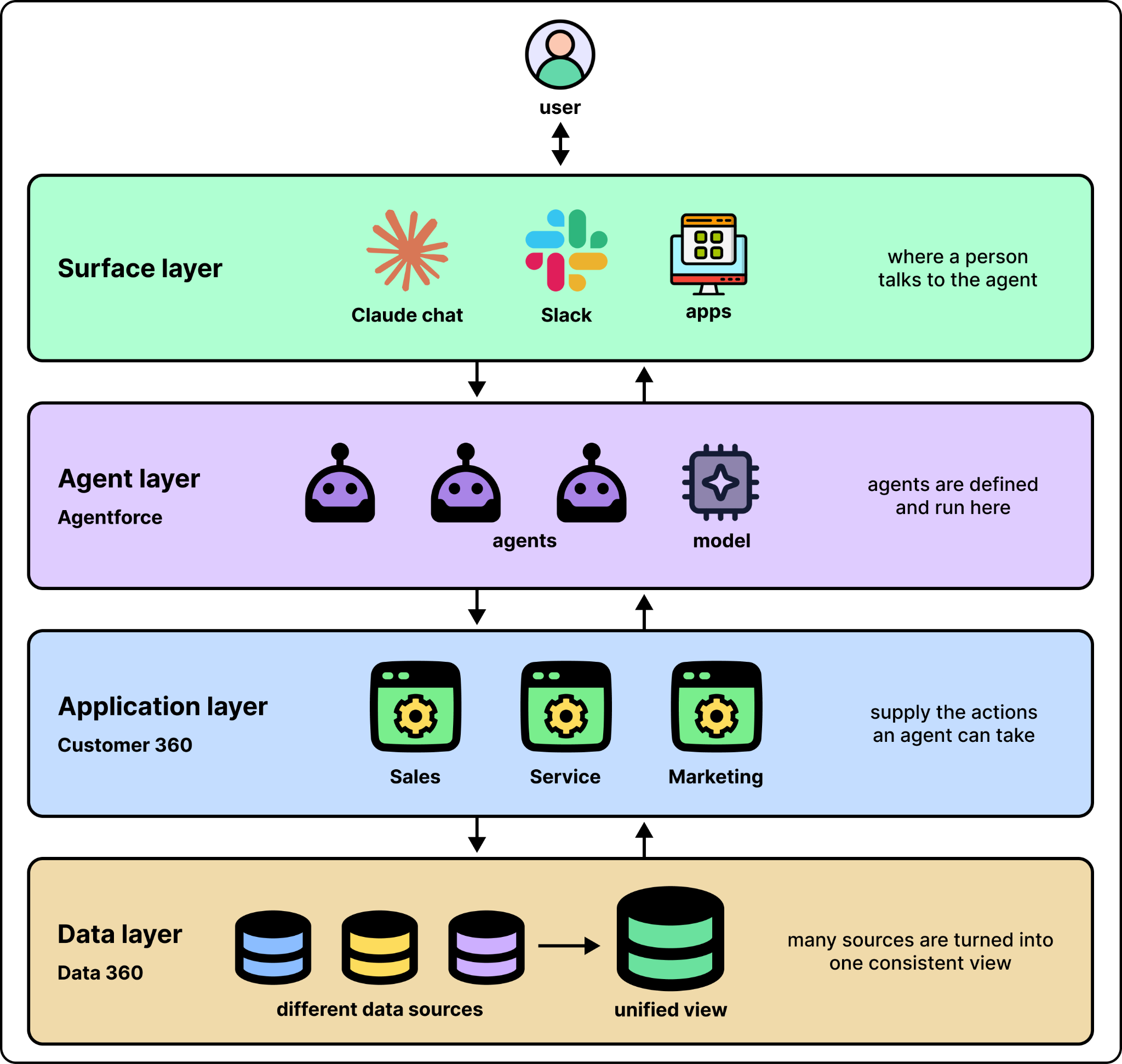
Salesforce’s new design handles reliability by taking the four jobs out of the prompt and having dedicated systems to handle each. To see where these systems are, let’s review the current Salesforce platform stack. The four main layers in the stack, from bottom to top, are:
Data layer: Turns a company’s data sources into one consistent view. Salesforce calls this Data 360.
Application layer: The business applications for sales, service, and marketing, which supply the actions an agent can take. Salesforce calls this Customer 360.
Agent layer: Where agents are defined and run. Salesforce calls this Agentforce.
Surface layer: The places where a person talks to the agent, such as a Claude chat or Slack.
Instead of putting everything in a prompt and expecting the model to handle every job, each job is handled separately by a system in one of these layers. For example, in the Agentforce layer, a scripting language called Agent Script ensures to enforce the rules. In the data layer, identity resolution is responsible for finding a unified profile of the customer. Agent Context Engine is a separate system that decides which data reaches the model. The model just handles steps that require reasoning.
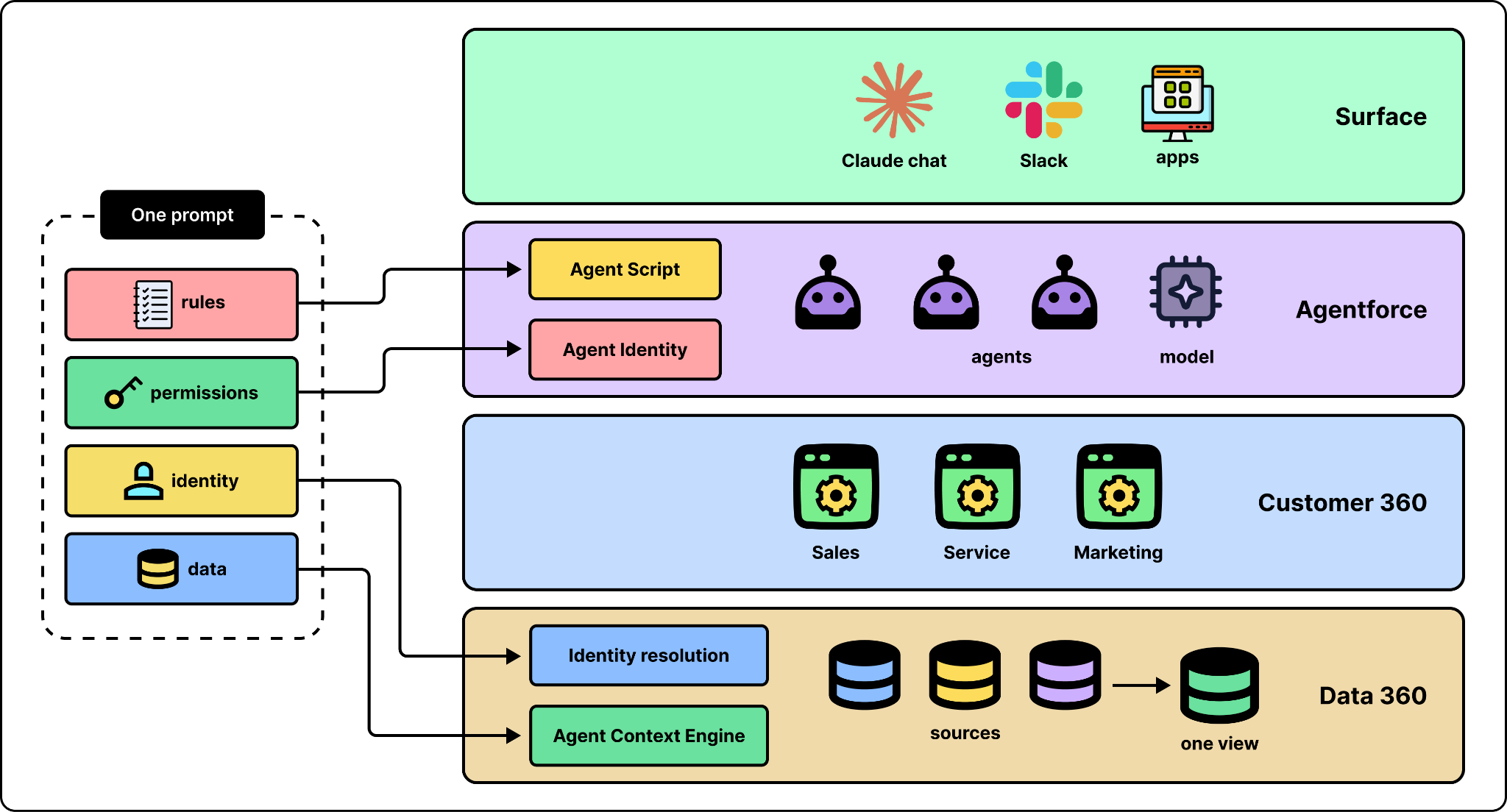
In the rest of this section, we go through the four systems built to handle each job one by one. To make it concrete, we follow the demo MK shared with us. The company is a simulated healthcare provider called Cumulus and the patient is Harper Clark, but according to MK everything behind it runs in production.
1. Deterministic instructions with Agent Script
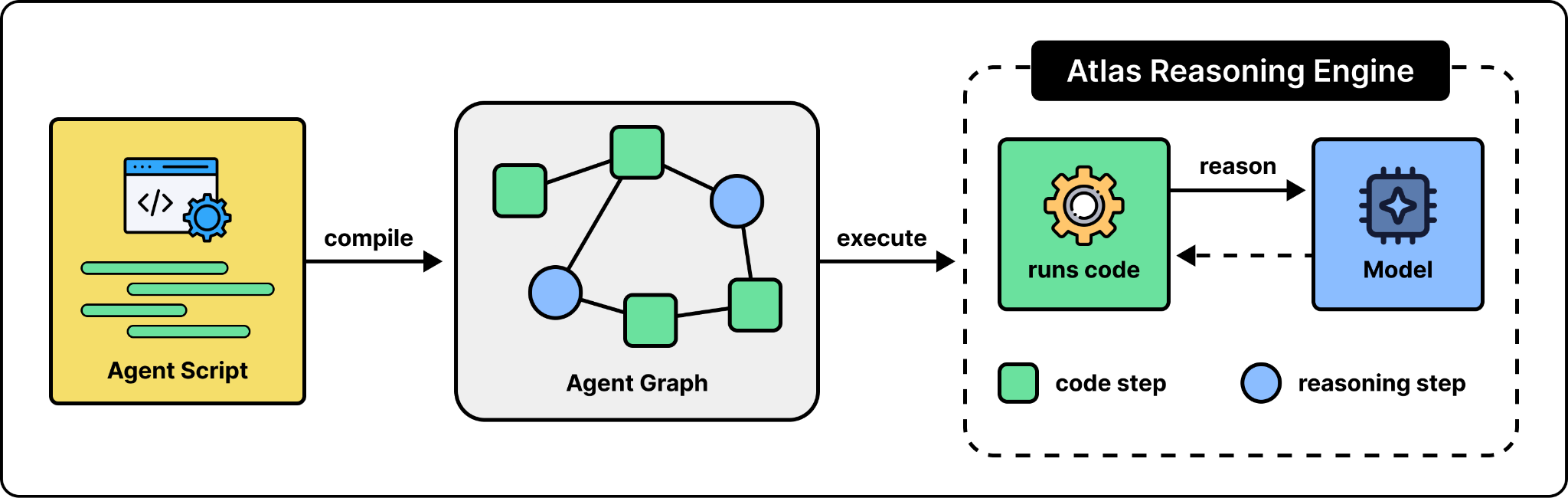
The first job that should be handled outside of the prompt is to enforce the rules. Many checks have to happen in every session turn, and they can be enforced deterministically. It is neither efficient nor reliable to expect the model to handle them. Another system can enforce them more reliably by just running code. That is the job of Agent Script, the language Salesforce built for describing agent behavior. According to MK, the team started working on it last year, after the first version of Agentforce ran into the instruction limit. It is open source and looks almost like Python [x].
How does it work? You just write the agent’s behavior in an Agent Script file. That file is compiled into a structured specification called the Agent Graph, and the Agent Graph is executed by the Atlas Reasoning Engine, the runtime behind Agentforce [x]. The engine runs the code parts and calls the model when reasoning is needed.
To better understand, compare this with SQL triggers. A trigger is code that the database runs automatically before or after updating a row. The application that issues the update cannot skip it. Agent Script follows a similar pattern.
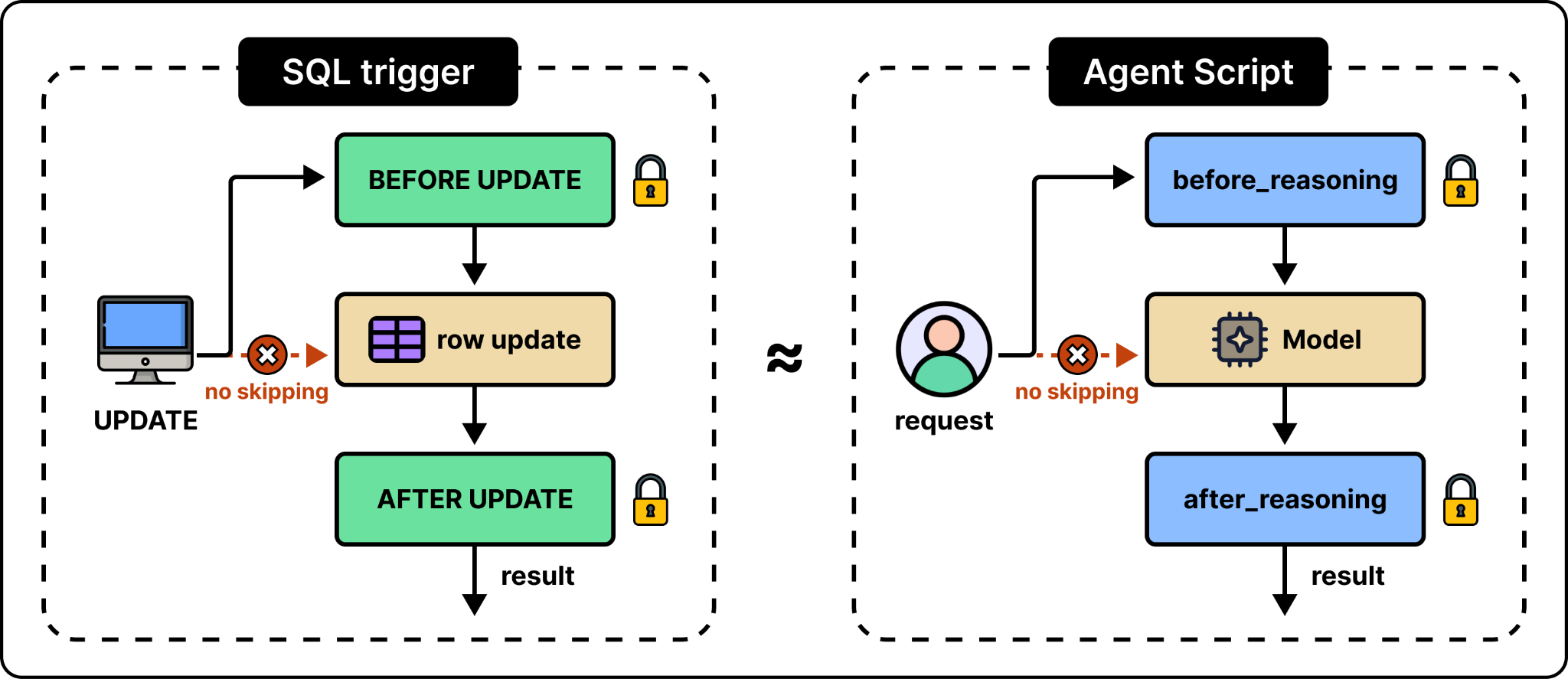
Let’s compare the naive design with Agent Script using a concrete example. Imagine Harper asks a question like “When is my upcoming appointment with Dr. Perl?” In the naive design, the prompt says “always fetch the appointments first” and we hope the model would follow. In Agent Script, the lookup is a line of code in the before_reasoning block of the medical appointments subagent. Because of that, it always runs reliably.
Putting the pieces together, here is what happens when Harper asks her question:
The model picks the medical appointments subagent.
The before_reasoning block runs (the appointment lookup executes as code)
The engine builds the prompt.
The model receives the prompt and writes the answer.
Lastly, the after_reasoning block executes. It may also send the conversation to a different subagent if needed.
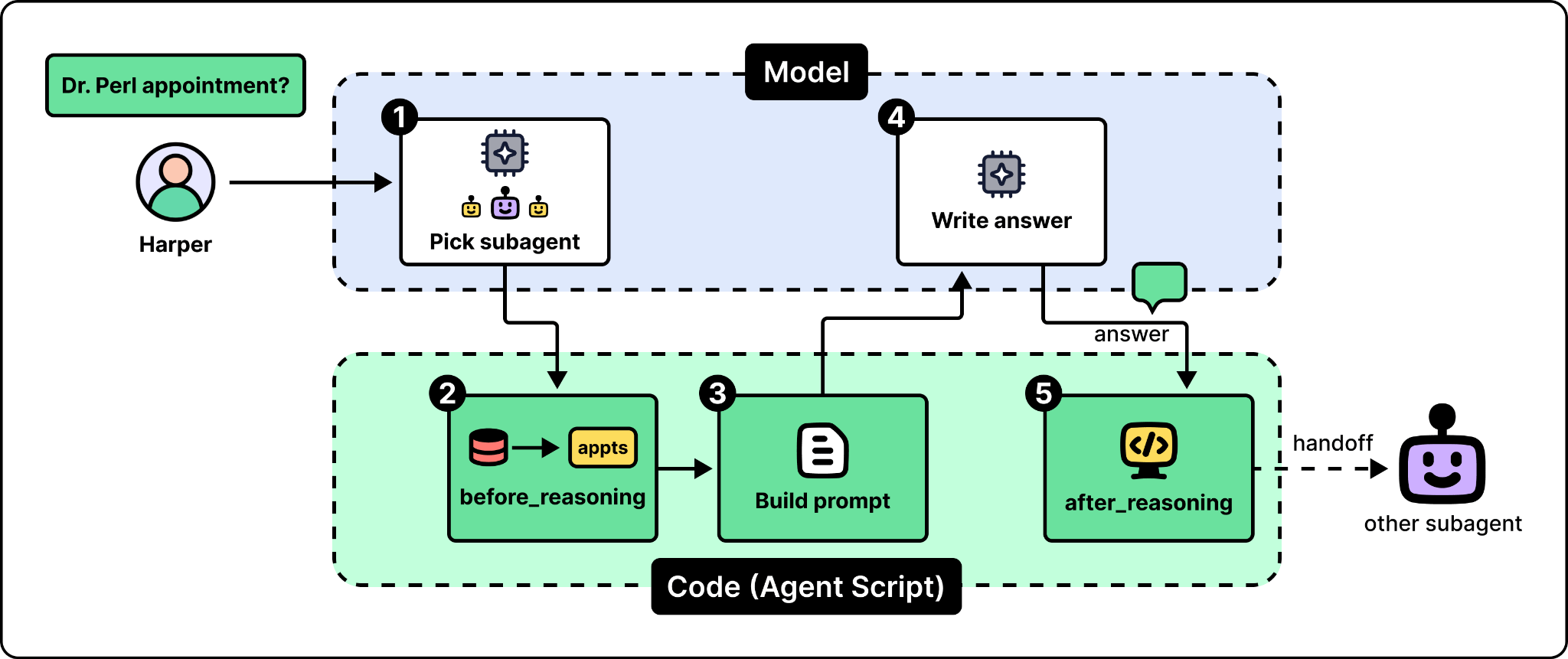
This separation between deterministic tasks and reasoning parts allows the system to stay reliable. The model only focuses on reasoning over the context prepared by the code, not things like fetching appointments or what should happen after the reply.
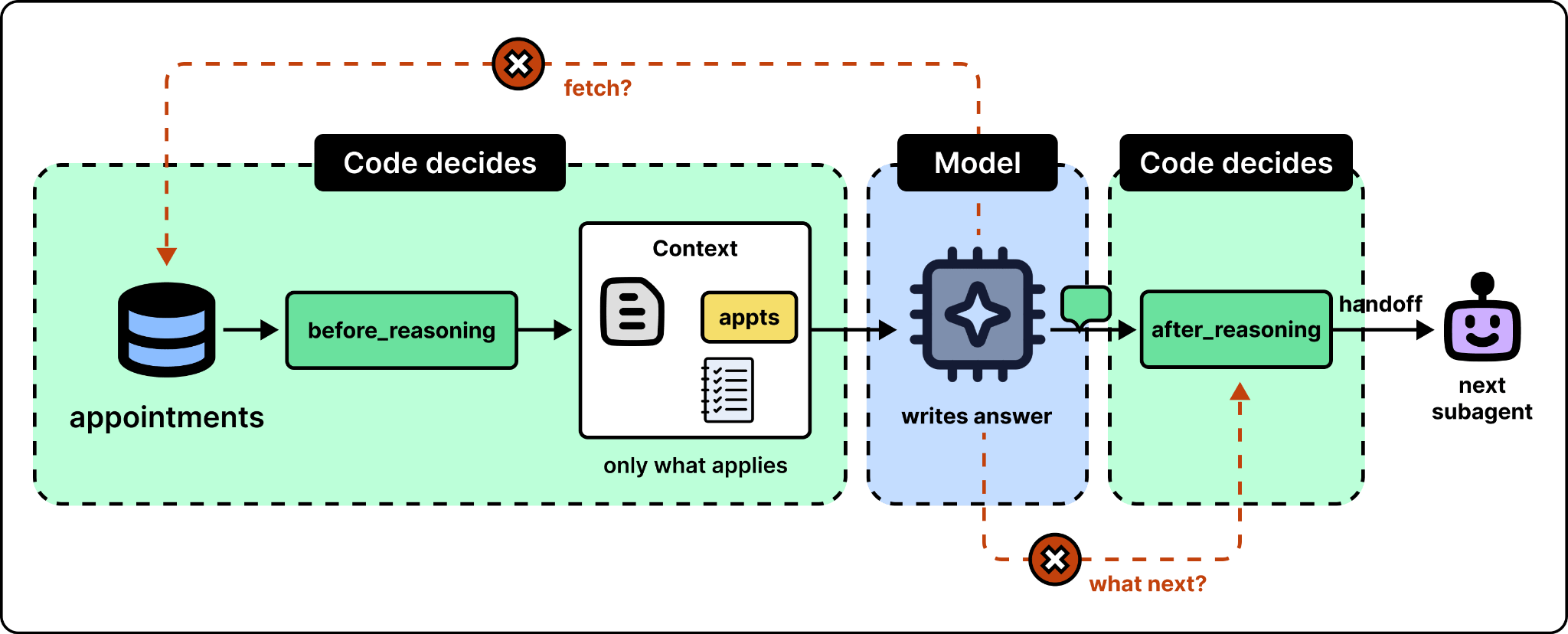
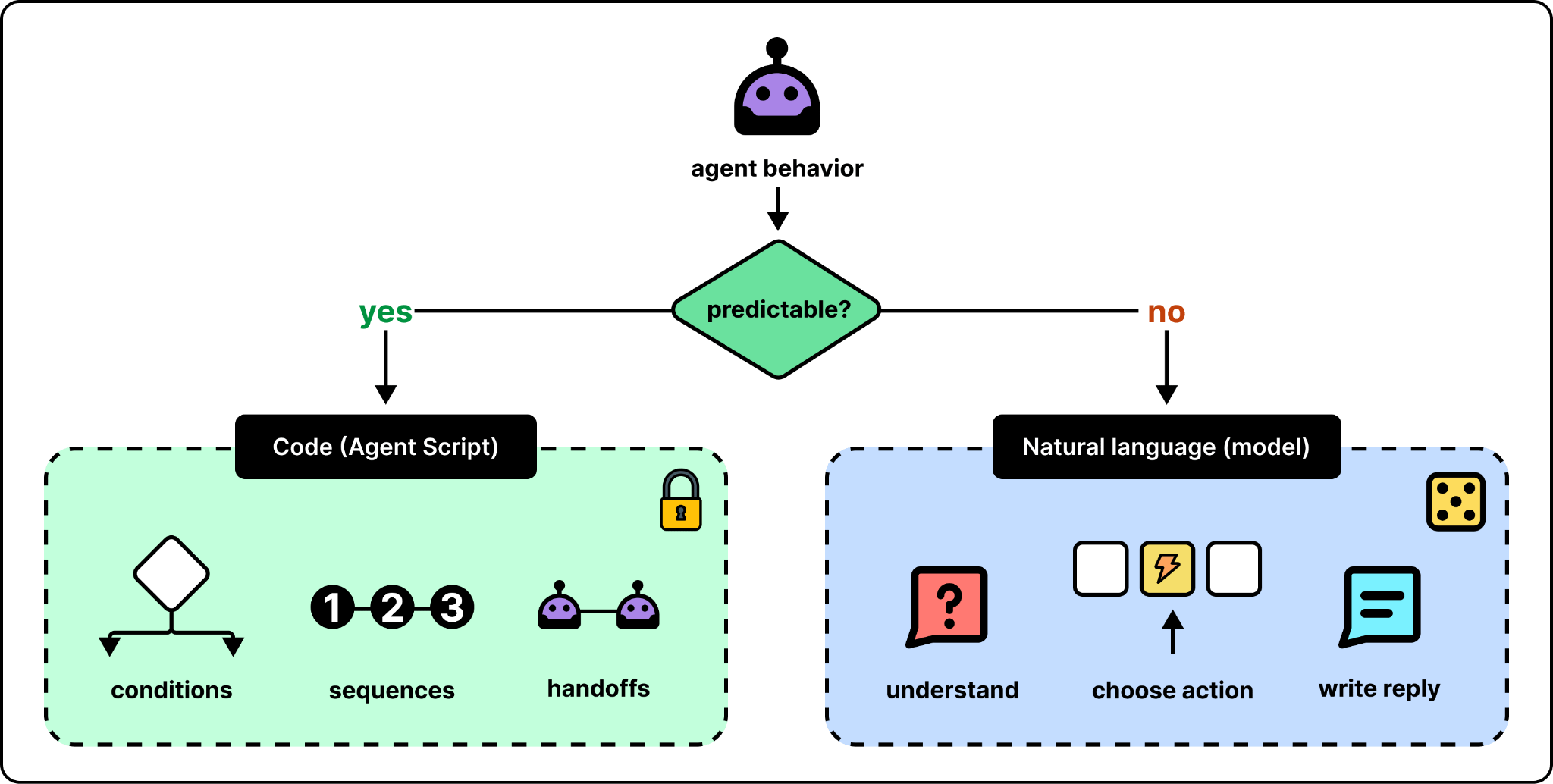
While deterministic instructions improve reliability, they should not be used everywhere. The best practice is to use code for the parts we want predictable behavior, such as conditions, and use natural language for the parts that need actual reasoning.
2. Unified profiles with Data 360
The second system handles “who the customer is.” Harper’s appointment question may look like a simple lookup, but the appointment data may not be in the CRM (customer relationship management) system at all. It may be in Snowflake, a cloud data warehouse. Harper may also exist many times, as shown below.
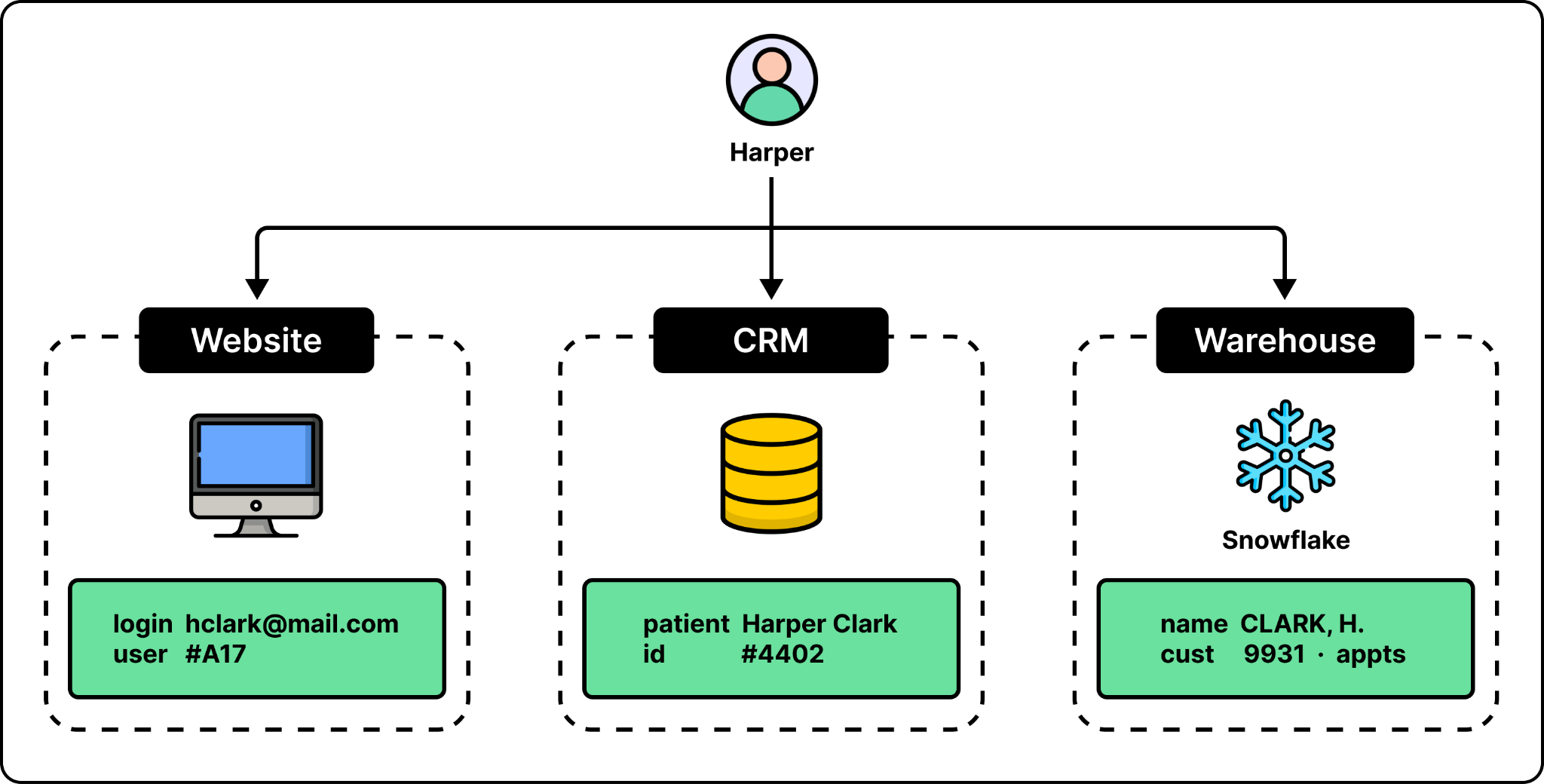
One approach is to hand the model different lists of records and ask which ones are the same person. But that becomes a source of unreliability. Instead, a data layer, in three steps, can handle this.
Step 1: Reach the data. The data an agent needs is usually not in one place. The data layer connects to various sources and reads from them directly. This way, the agent has an updated view of the records. To show this, MK changed the insurance plan on Harper’s record in Snowflake and the change was reflected immediately.
Step 2: Harmonize. Different sources may have inconsistent views of the same record. For example, one system may store a full name in a single field while another splits it into two columns. The data layer maps each source onto a shared data model with common objects such as person, lead, and maybe account. According to MK, this mapping is automatic and works across thousands of sources.
Step 3: Resolve identities. This step handles situations where records from different sources describe the same person. In Data 360, this is done by match rules that an admin can configure. A rule can be an exact match (such as the same email address), a fuzzy rule that allows small differences, or a normalized rule, which cleans up a field before comparing it. This way, two phone numbers written in different formats will match. Note that the source records are never changed, and the output is a unified profile that links back to each of them.
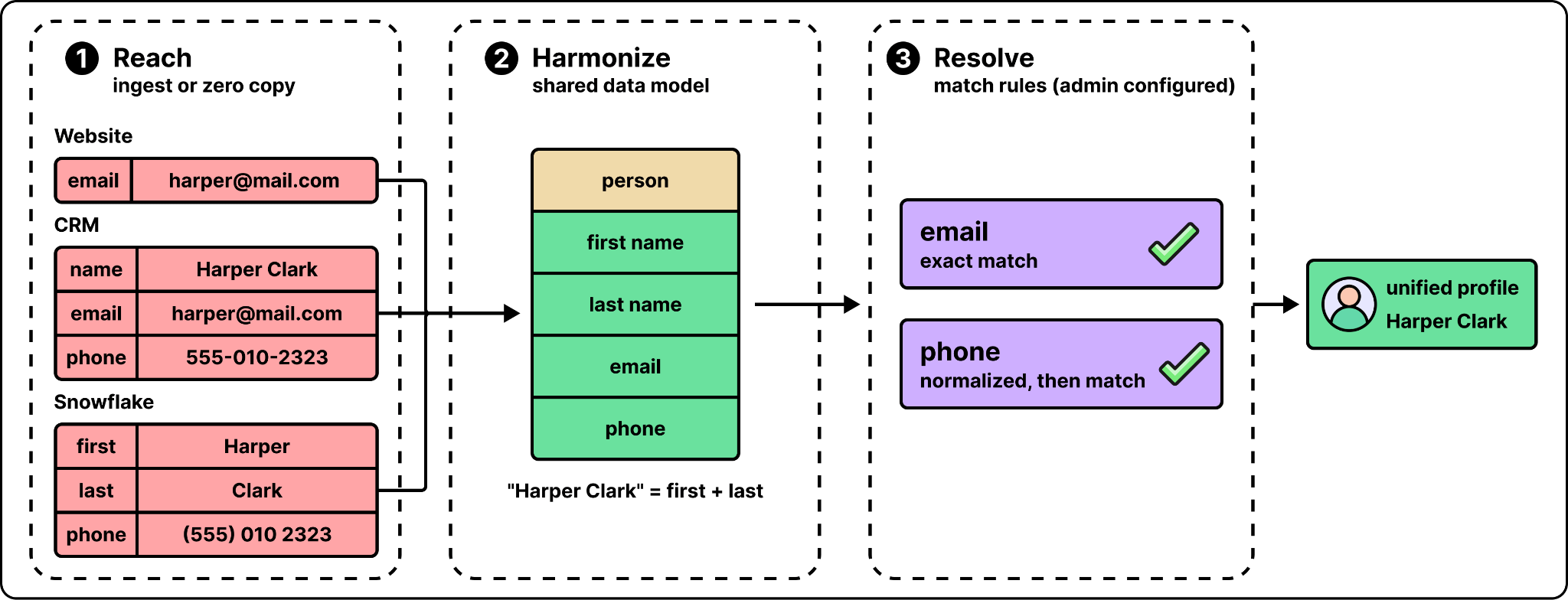
With these steps, when Harper’s appointments are needed, it is obtained from the unified profile, instead of the model figuring out who Harper Clark is.
3. Relevant context with Agent Context Engine
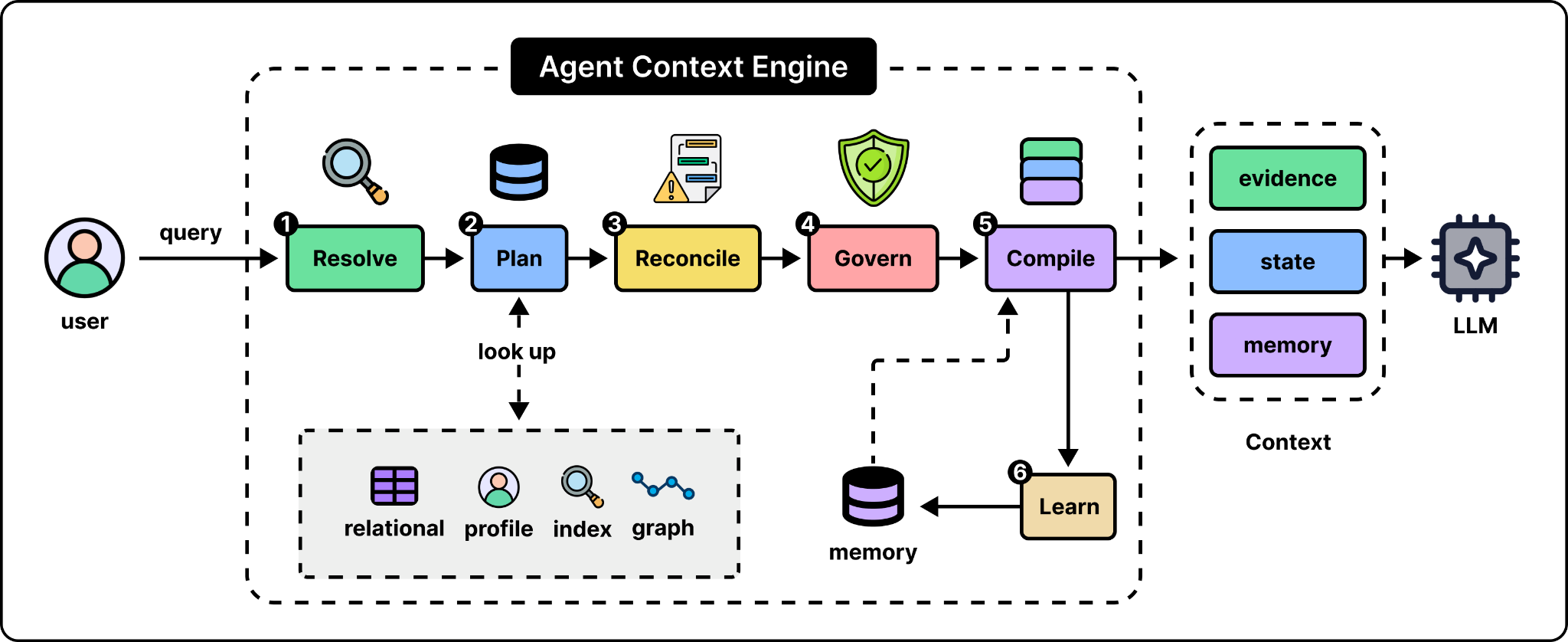
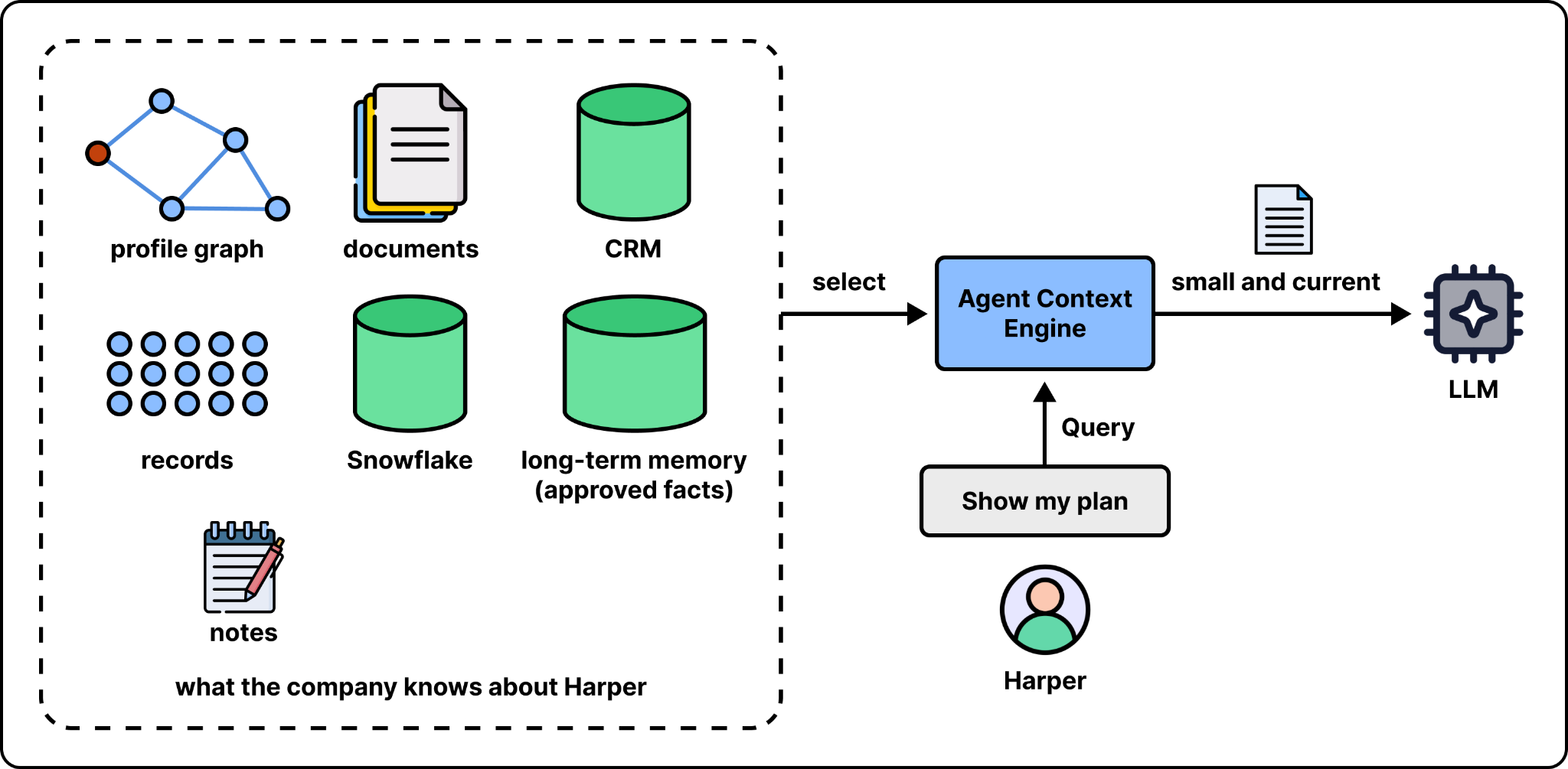
The third job is to decide what data should go into the prompt. If we put everything into a prompt, it adds to the latency and may bury the relevant facts. A context management system has to sit between the data and the prompt and decide what a question needs. That is the job of the Agent Context Engine (ACE), a new component of Data 360.
The context engine handles a request in six steps:
Resolve: Identify the user, the agent, the purpose, and the entities the question is about.
Plan: Choose where to look for that information (e.g., relational queries, the profile, search indexes)
Reconcile: Rank findings by some metric (e.g., relevance, authority, freshness)
Govern: Apply rules (e.g., access, masking, consent)
Compile: Create the context that includes working state, memory, etc.
Learn: Decide what from this interaction should be remembered or updated.
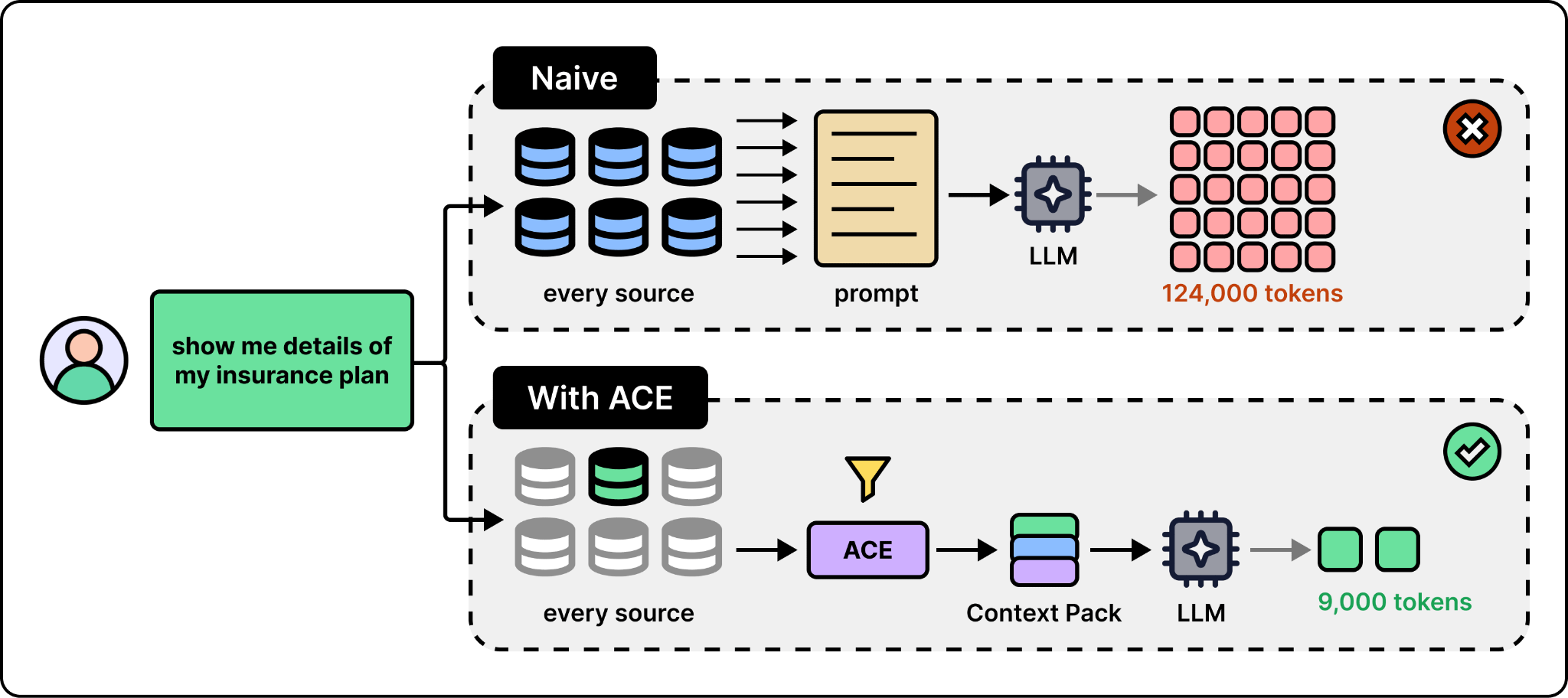
MK compared this with the naive design of an insurance support agent. In the naive version, with no context management, the question “show me details of my insurance plan” made the agent pull data from various sources, leading to 124,000 tokens. With the context engine, the same question ended up with 9,000 tokens. After a follow-up about moving to Florida, the naive session had used about 300,000 tokens in two questions, while the session with the context engine used 65,000 after a third step to process an enrollment. The gap between the two designs grows as the conversation continues, which shows the importance of having context management in place.
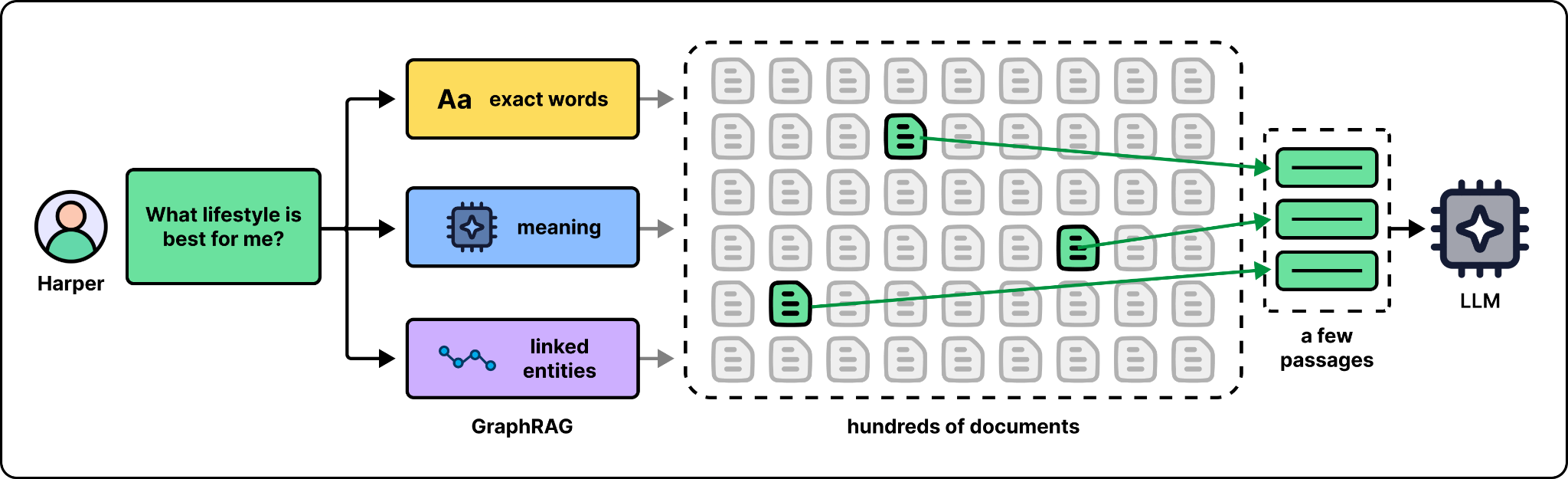
So how does the context engine pick what to send?
There are different implementations in practice. One is to hold the customer’s profile as a graph in memory, where the nodes are things like the person or the plan. Then we select only the nodes that relate to the question. Documents can be filtered in a similar way. When Harper asks “What lifestyle is best for me?” three indexes that match exact words, meaning, and linked entities (an approach known as GraphRAG) select relevant passages out of hundreds of documents.
The context engine can also handle memory. For example, after the Florida question, it can store a note that this customer may be moving to Florida. MK pointed out that this is a memory, not yet a fact. It became a fact only when the customer went ahead with the enrollment, and only approved facts like this are promoted into long-term memory. Either way, the model only ever sees a small, current slice of what the company knows about the customer.
4. Permission management with Agent Identity
The last job is to ensure the agent does what it is allowed to do. In most agent setups today, the agent acts as the user. Imagine Alex is a sales rep who connects an agent to Salesforce. The agent gets Alex’s credentials and can do everything Alex can do.
This setup is not ideal because with Alex’s full credentials, any mistake it makes becomes a real problem. A human with broad permissions is at least limited by how fast they can work. An agent is not. It can make a mistake and repeat it many times. According to Khushwant, what customers want is: “This agent is working on behalf of Alex, but I don’t want the agent to have the same rights as Alex.”
The fix is to give the agent an identity of its own. Salesforce already controls what users can do with permission sets. A new system, Agent Identity, lets an admin attach rules and permissions to an agent too, so each agent ends up having a unique identity with unique permissions.
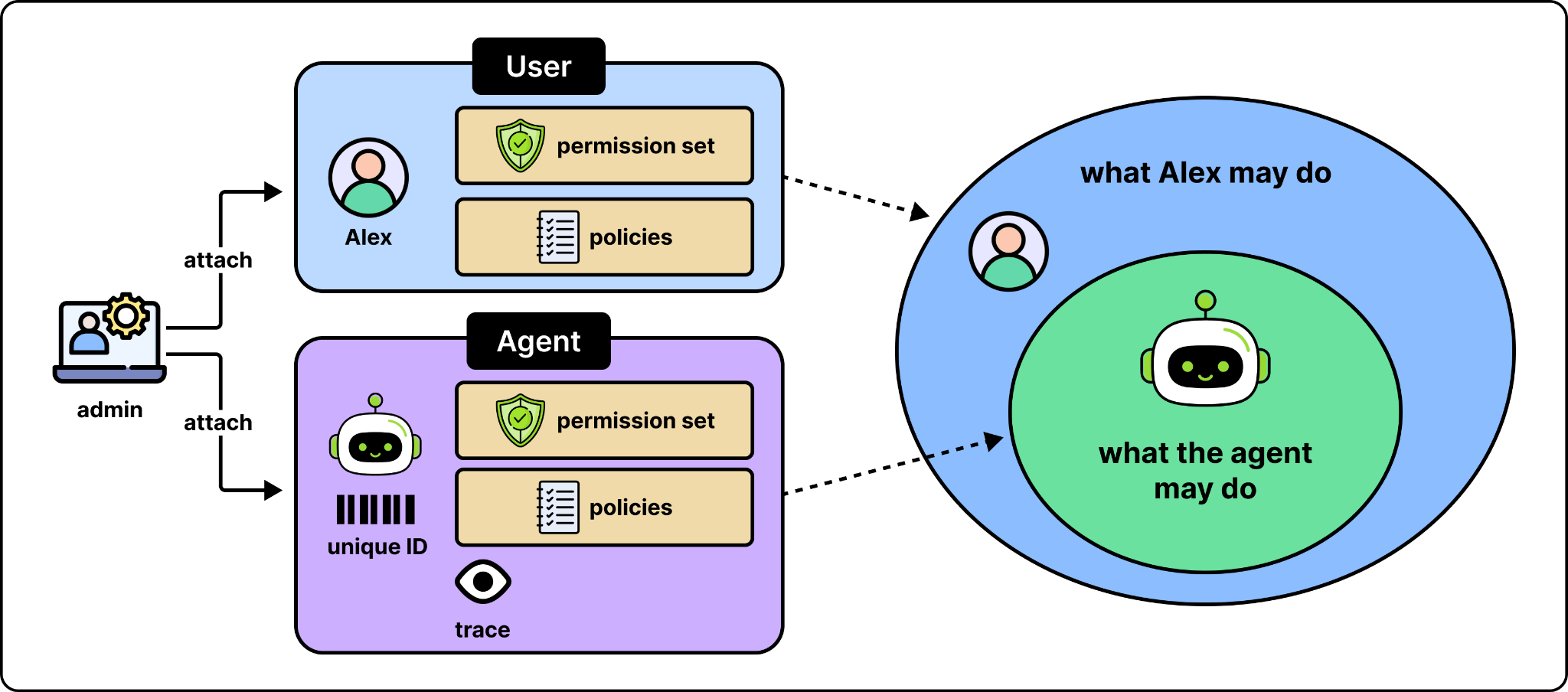
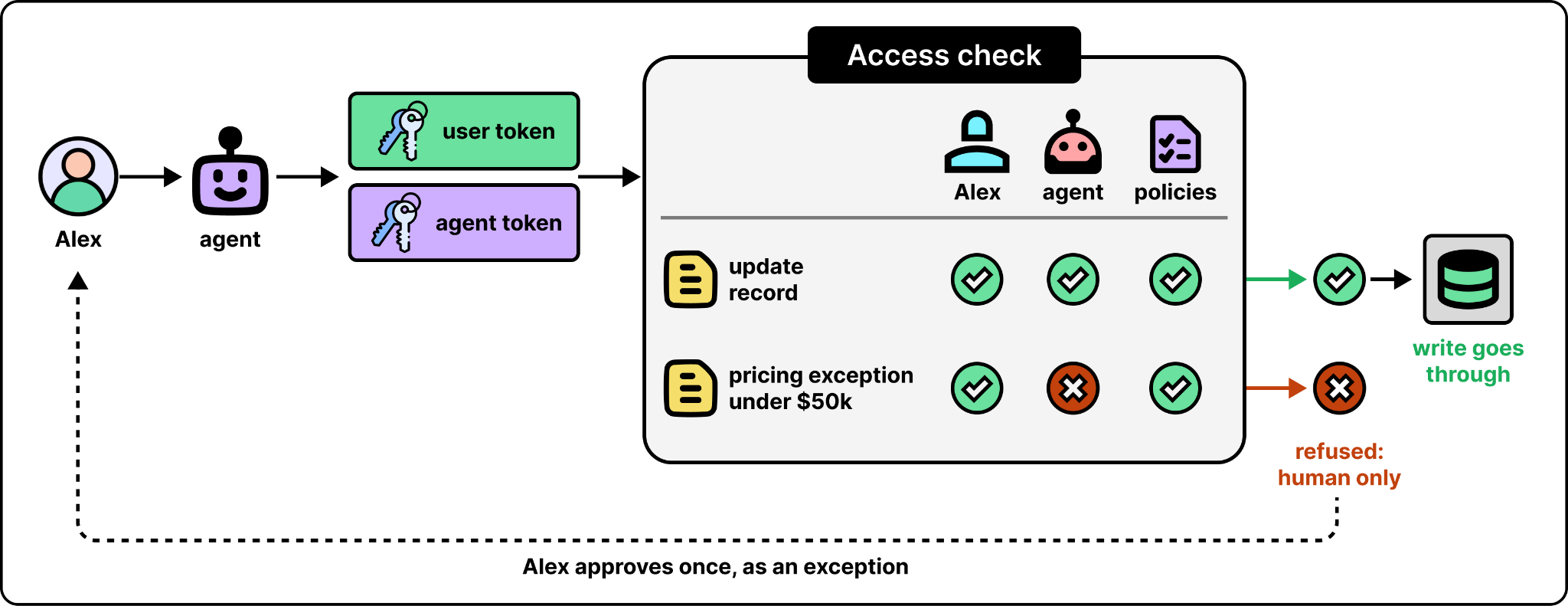
With Agent Identity, when an agent authenticates, there are two tokens, one for the agent and one for the user it is acting for. Before an operation runs, Salesforce checks the user’s permissions, the agent’s permissions, and the data policies. The operation runs only if none of them deny it.
Where the agent runs
So far, we have looked at what happens inside a reliable agent platform. But users using an agent may work from somewhere else, like Slack or Claude. Some companies build their agents on other platforms entirely. Customers generally want Salesforce to meet their users where they are.
The way to do this is to separate the platform from its own interface. Software built this way is called headless. Instead of running on its own user interface, it exposes its functions through APIs to make it available to other surfaces. To make this happen, Salesforce developed a live interface layer, called AIforce, that brings the platform’s data, workflows, and logic to wherever people and agents already work.
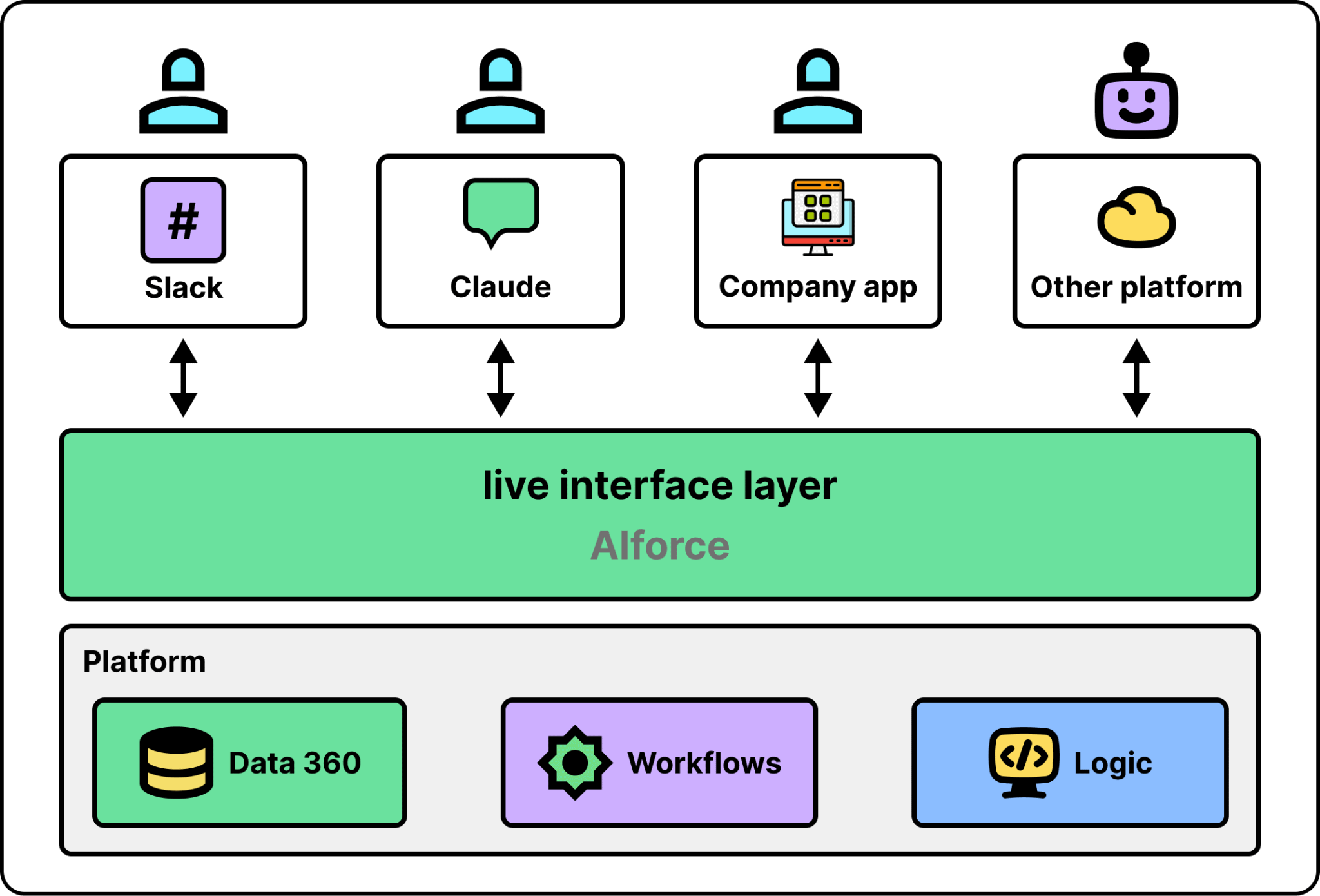
For an outside agent to use a headless platform, it needs a few things. The first is APIs, the functions the platform exposes. The second is skills. An API tells an agent what it can call, but not which calls a task needs or in what order. A skill fills this gap by listing the APIs, their parameters, and the order of the steps. The third is MCP (Model Context Protocol), an open standard where a server publishes a list of tools and agents can call them.
Salesforce developed the set of building blocks behind AIforce, named Headless Toolkit, that provides all of the above. Salesforce’s APIs already serve 9.6 billion calls a day, and its skills are published in a public GitHub repository called sf-skills.
A separate challenge is tool count. MCP makes it easy to expose tools to an agent, but every tool the agent can call is typically loaded into its context window as a definition. It may contain things like a name, a description, and a parameter schema. Those definitions are sent each time a request is sent to the model, which is costly. When there are hundreds of tools, they will consume a large share of the context with definitions the agent will rarely use.
A common solution is to create a small index of tools instead of all tools. The agent first searches for what it needs, then reads the details of what it found, and finally runs it. The Salesforce MCP Server works this way with just four tools.
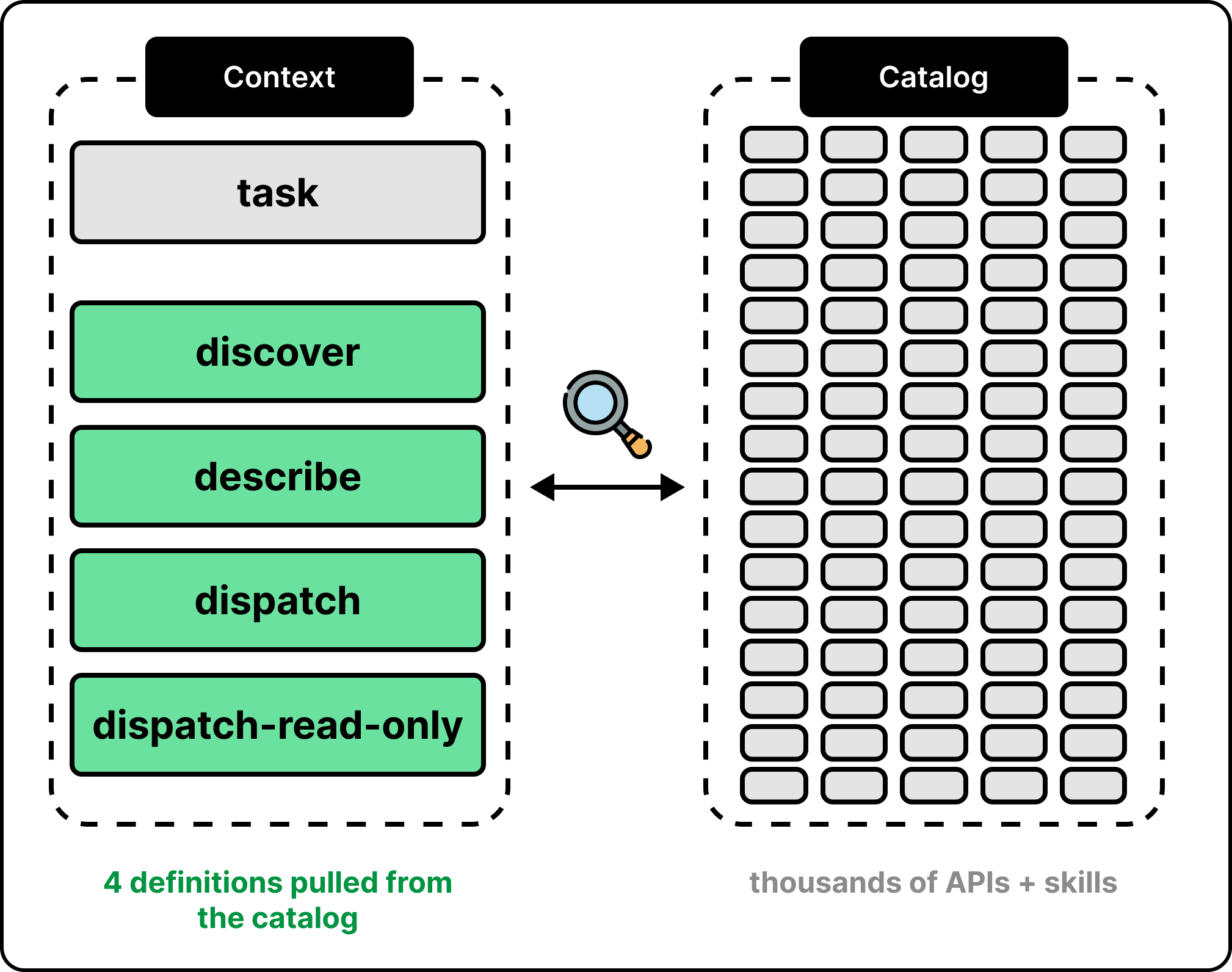
Suppose you are in Claude with the Salesforce plugin, and you ask for the 20 best opportunities from the last 100 days. The request goes through three steps:
Claude calls “discover” with its interpretation of your request. The server runs a semantic search over an index of available API and skill, and returns a short ranked list.
Claude calls “describe” on the best match. The server returns the skill’s contract, which lists the APIs, the parameters, the dependencies, and the order of the steps.
Claude calls dispatch. The server routes the call to the right endpoint, checks the user’s access, and returns the result.
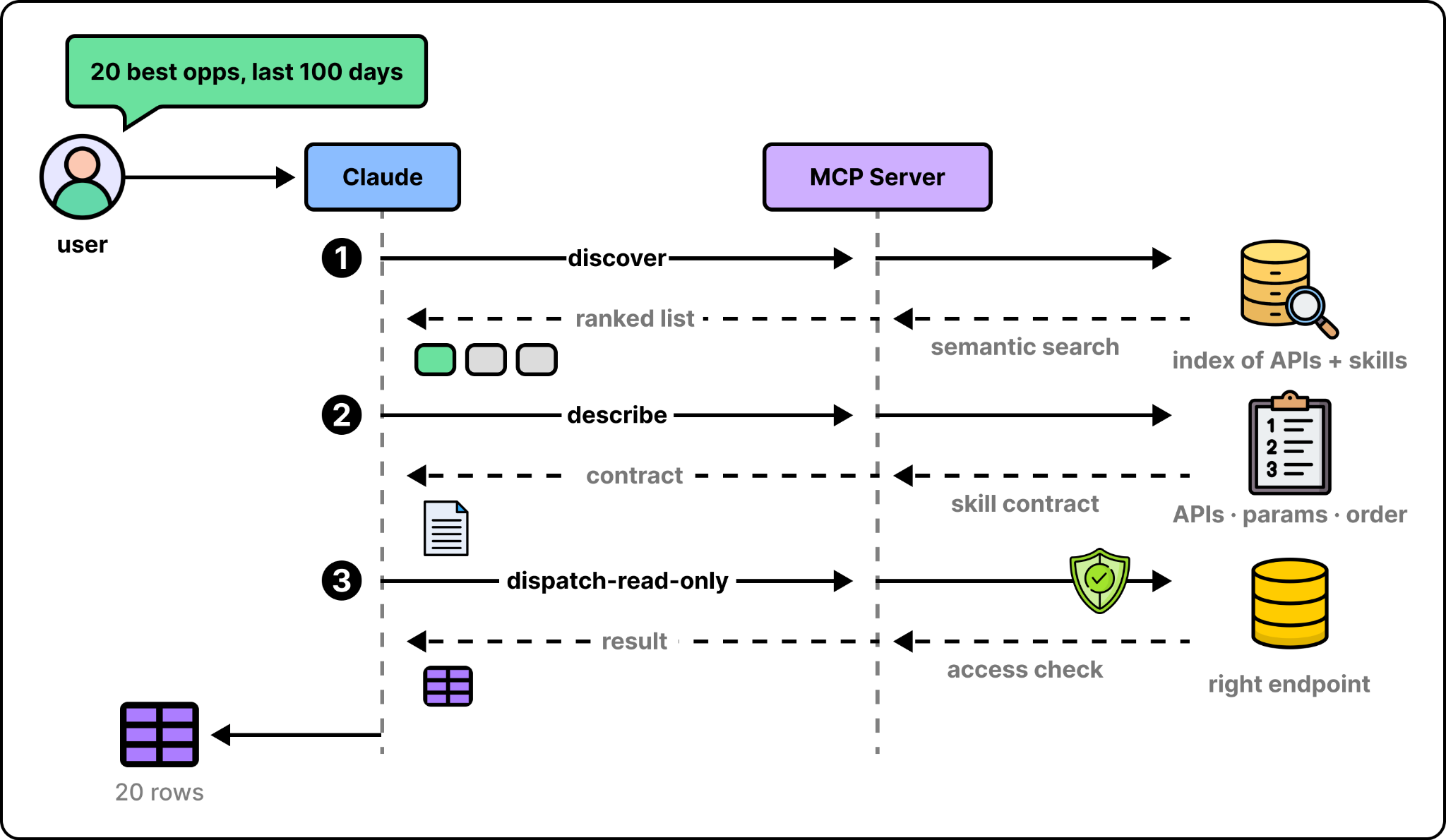
This way, the agent’s context holds only four tool definitions instead of containing tool definitions for all available tools.
What’s next
Everything in this article is a piece of scaffolding around the model. Today those pieces live in different products. The next step, according to both MK and Khushwant, is to make them one system. That is Enterprise AI Harness. A single place that enterprises can flexibly use. They plug in their agents and their data, and get eval, tracing, and other functionalities, applied to all of them at once, whether the agents run on Agentforce or somewhere else.