

Get full visibility into your AWS containers and serverless apps (Sponsored)

Running containerized and serverless workloads on AWS? This free Datadog eBook shows how to monitor complex, cloud-native environments—so you can improve performance, reduce latency, and spot issues before they escalate.
You’ll also learn how to:
Monitor EKS, ECS, Lambda, and Fargate in one unified view
Trace requests across containers, services, and functions
Optimize resource usage and reduce overhead at scale
This week’s system design refresher:
ICYMI: How Does a URL Shortener Work? (Youtube video)
What is Prompt Engineering? (Youtube video)
What is a REST API?
How Java HashMaps Work?
Virtualization Explained: From Bare Metal to Hosted Hypervisors
SPONSOR US
How Does a URL Shortener Work?
What is Prompt Engineering?
What is a REST API?
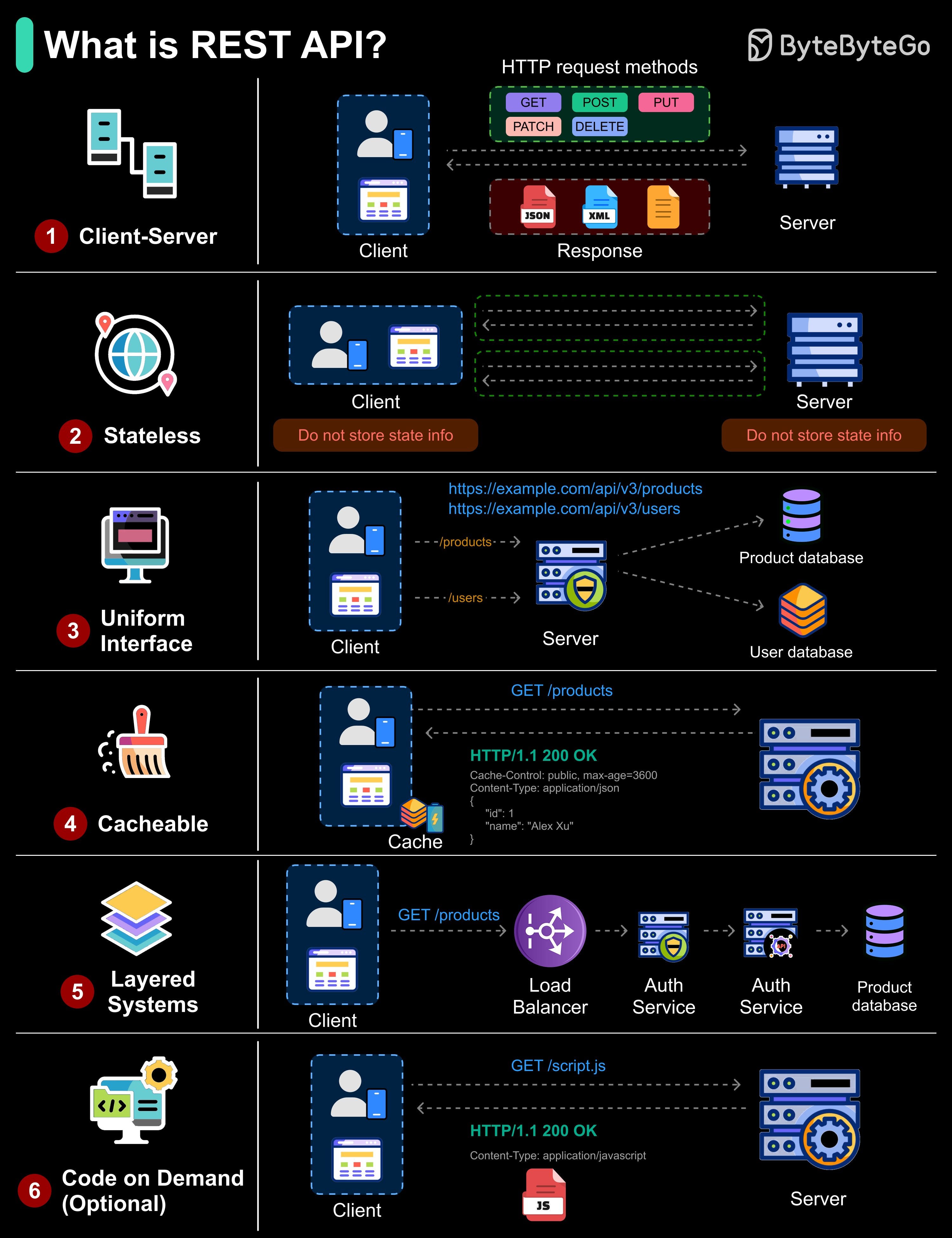
REST (Representational State Transfer) is an architectural style for building APIs that use HTTP for communication. To be considered RESTful, an API should follow six key constraints:
Client-Server: Separates the user interface from data storage and processing. This allows each side to evolve independently.
Stateless: Each request contains all the information needed to process it; the server does not store session state between requests.
Uniform Interface: Consistent resource naming and formats across the API, e.g., “/products”, “/users”.
Cacheable: Responses explicitly indicate if they can be cached (e.g., Cache-Control) to improve performance.
Layered System: Requests may pass through multiple layers (load balancers, auth services, etc.) before reaching the API server, but to the client it appears as a single endpoint.
Code on Demand (Optional): The server can send executable code (like JavaScript) to the client to extend its functionality.
Over to you: Which REST constraint do you think is most often overlooked in real-world APIs?
Big news coming out of AWS re:Invent in ☀️ Las Vegas this week. (Sponsored)

AWS just dropped Agent Mode in its Marketplace - and it’s a game changer for anyone building or scaling with AI. Instead of digging through dozens of vendors, solutions, and integrations, Agent Mode lets you discover, compare, and deploy AI agents & tools instantly.
There are already 2,300+ AI agents & tools available: pre-build agents, dev tools and AI infra solutions from companies like Anthropic, Langchain, Neo4j and many others. All in one place and fully integrated with your AWS Cloud
🛒 Explore 2,300+ AI Agents & Tools in AWS Marketplace
How Java HashMaps Work?
A HashMap is a data structure that stores key-value pairs, allowing fast lookup, insertion, and deletion. It uses a hash function to map each key to a bucket index, making access efficient.
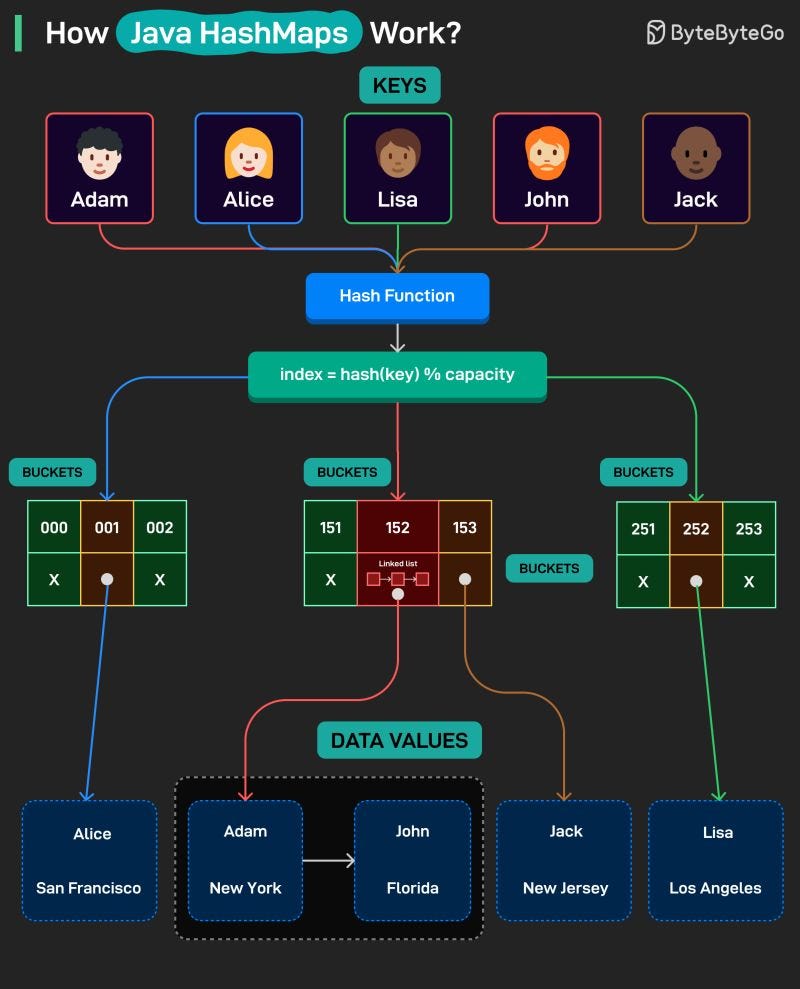
Here’s how it works:
Keys are given to a HashMap
A hash function converts each key into a number that points to a bucket index that points to the data value.
When two keys map to the same bucket index, a collision occurs.
Collisions are handled by linking entries together in a chain within the same bucket. This is done using a linked list or even trees in some cases.
Finally, values are retrieved quickly by hashing the key and looking up the correct bucket.
Over to you: What else will you add to better understand the working of Hash Maps?
Virtualization Explained: From Bare Metal to Hosted Hypervisors
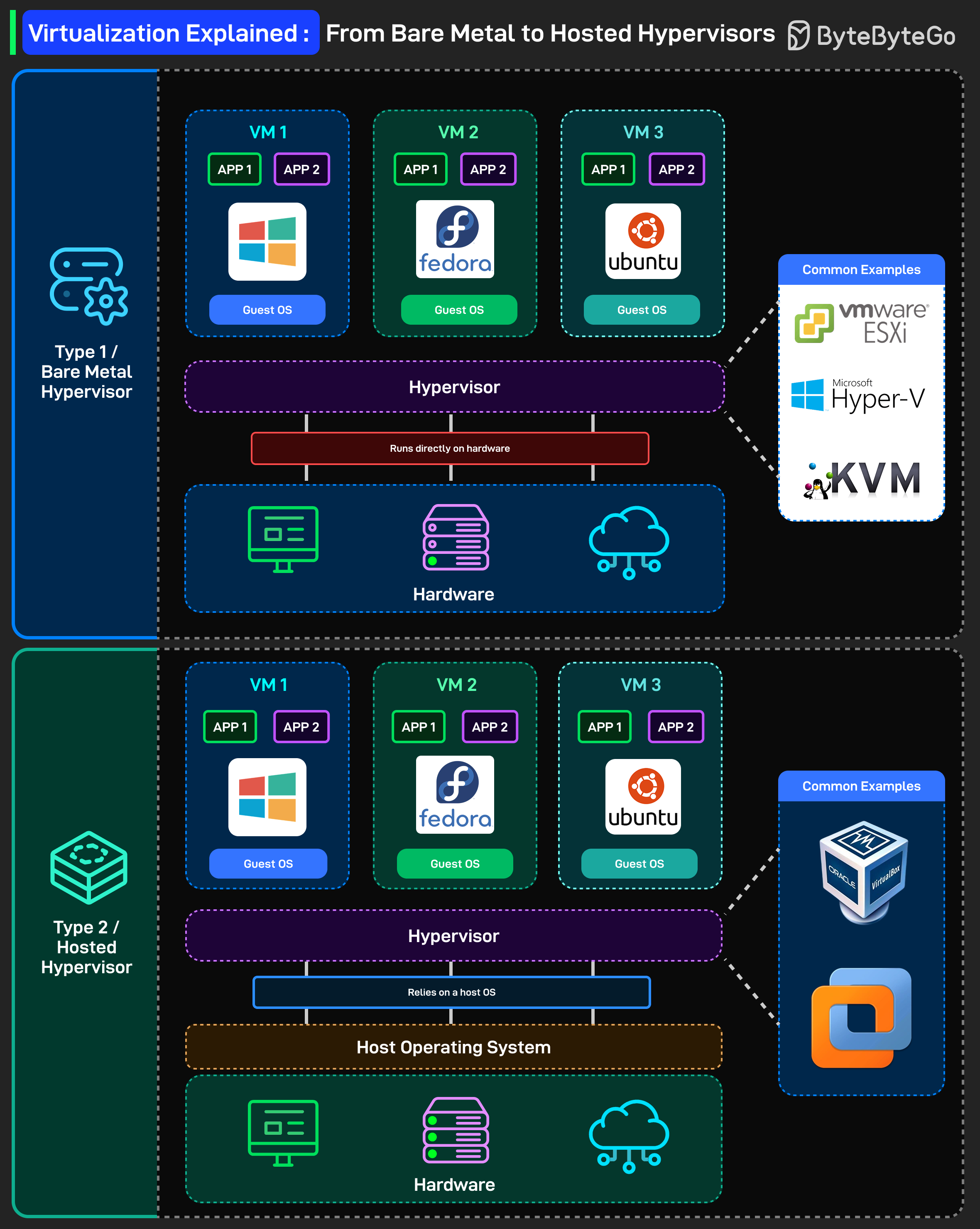
Before containers and serverless, there was virtualization, the foundation of modern cloud computing. Here’s a simple breakdown of how virtualization works, from bare metal to hosted hypervisors:
Type 1 / Bare Metal Hypervisor: The hypervisor runs directly on hardware. No operating system underneath it. The hypervisor is the operating system layer. VMware ESXi, Microsoft Hyper-V, and KVM are all Type 1 hypervisors. They boot up on physical servers and manage VMs with direct hardware access.
Each VM gets its own full operating system. Windows, Fedora, Ubuntu. Complete isolation between VMs. One crashes? The others keep running.
This is what runs in data centers and cloud providers. When you spin up an EC2 instance on AWS, it’s running on Type 1 virtualization (they use their custom Nitro hypervisor now, but same concept).
Type 2 / Hosted Hypervisor: The hypervisor runs as an application on top of a host operating system. You’re running Windows or macOS, then you install VirtualBox or VMware Workstation on top of it.
Guest VMs still get full operating systems, but now there’s an extra layer. Your VM talks to the hypervisor, which talks to the host OS, which talks to the hardware.
More overhead, slightly lower performance, but way more convenient for development and testing. This is what you use on your laptop. Running a Linux VM on your MacBook? That’s Type 2.
Over to you: What’s your go-to hypervisor for local development?
SPONSOR US
Get your product in front of more than 1,000,000 tech professionals.
Our newsletter puts your products and services directly in front of an audience that matters - hundreds of thousands of engineering leaders and senior engineers - who have influence over significant tech decisions and big purchases.
Space Fills Up Fast - Reserve Today
Ad spots typically sell out about 4 weeks in advance. To ensure your ad reaches this influential audience, reserve your space now by emailing sponsorship@bytebytego.com.
I appreciate the effort with the content... Good job with covering rest APIs - thank you. I understand it but I already had knowledge of it... The thing I think is that peeps without knowledge.. I don't think they will understand that explanation or that it just might not be the best explanation... You may want to rewrite that..
<h1>HTML</h1>