

8 Insights into Real-World Cloud Security Postures (Sponsored)

To better understand the vulnerabilities and threats facing modern DevOps organizations, Datadog analyzed security posture data from a sample of thousands of organizations that use AWS, Azure, or Google Cloud.
In this report, you’ll gain valuable cloud security insights based on this research including:
How long-lived credentials create opportunities for attackers to breach cloud environments
Adoption of proactive cloud security mechanisms such as S3 Public Access Block or IMDSv2 in AWS
Most common risks when using managed Kubernetes distributions
This week’s system design refresher:
Transformers Step-by-Step Explained (Youtube video)
Database Types You Should Know in 2025
Apache Kafka vs. RabbitMQ
The HTTP Mindmap
How DNS Works
SPONSOR US
Transformers Step-by-Step Explained (Attention Is All You Need)
Database Types You Should Know in 2025
There’s no such thing as a one-size-fits-all database anymore. Modern applications rely on multiple database types, from real-time analytics to vector search for AI. Knowing which type to use can make or break your system’s performance.
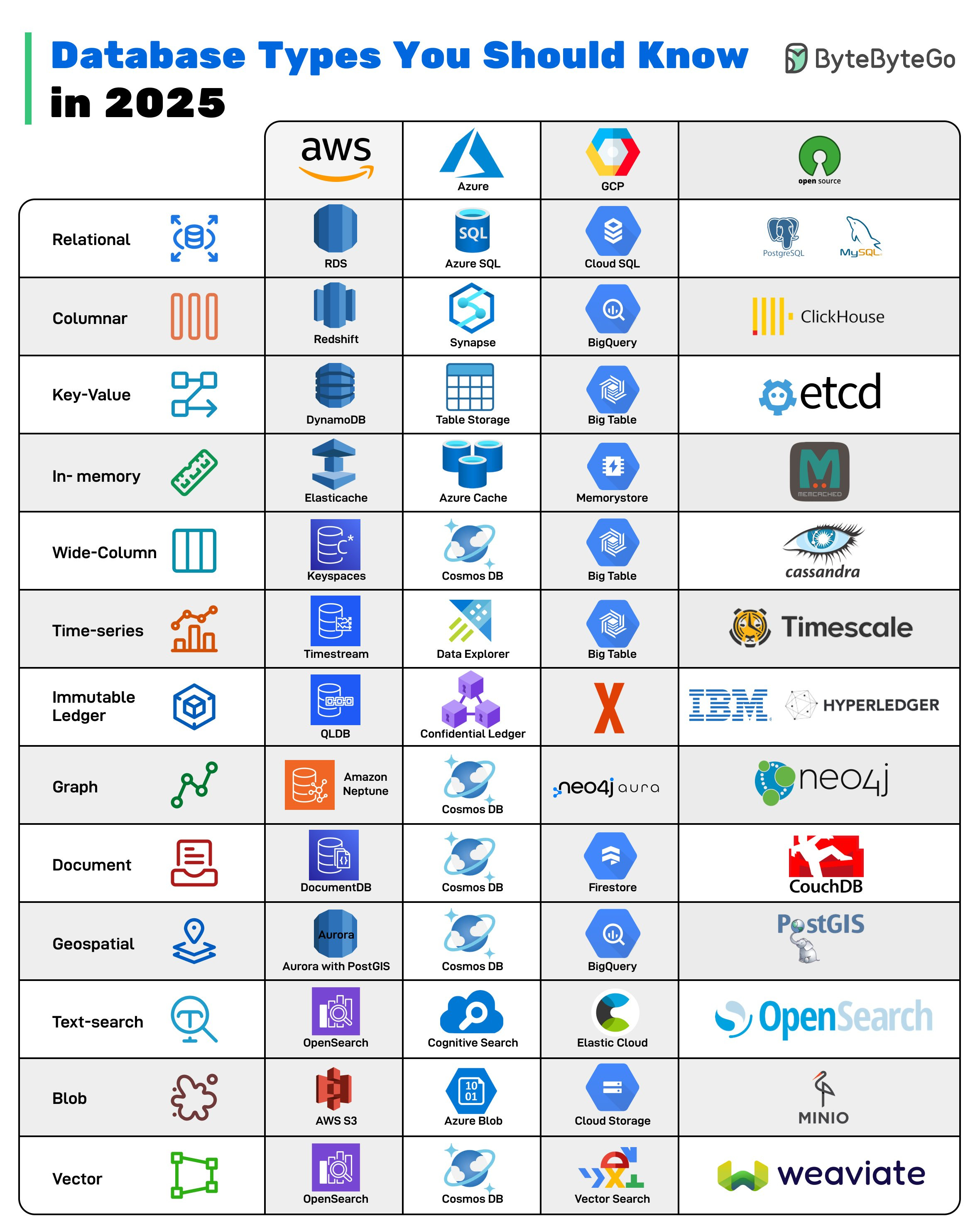
Relational: Traditional row-and-column databases, great for structured data and transactions.
Columnar: Optimized for analytics, storing data by columns for fast aggregations.
Key-Value: Stores data as simple key–value pairs, enabling fast lookups.
In-memory: Stores data in RAM for ultra-low latency lookups, ideal for caching or session management.
Wide-Column: Handles massive amounts of semi-structured data across distributed nodes.
Time-series: Specialized for metrics, logs, and sensor data with time as a primary dimension.
Immutable Ledger: Ensures tamper-proof, cryptographically verifiable transaction logs.
Graph: Models complex relationships, perfect for social networks and fraud detection
Document: Flexible JSON-like storage, great for modern apps with evolving schemas.
Geospatial: Manages location-aware data such as maps, routes, and spatial queries.
Text-search: Full-text indexing and search with ranking, filters, and analytics.
Blob: Stores unstructured objects like images, videos, and files.
Vector: Powers AI/ML apps by enabling similarity search across embeddings.
Over to you: Which database type do you think will grow fastest in the next 5 years?
Apache Kafka vs. RabbitMQ
Kafka and RabbitMQ both handle messages, but they solve fundamentally different problems. Understanding the difference matters when designing distributed systems.
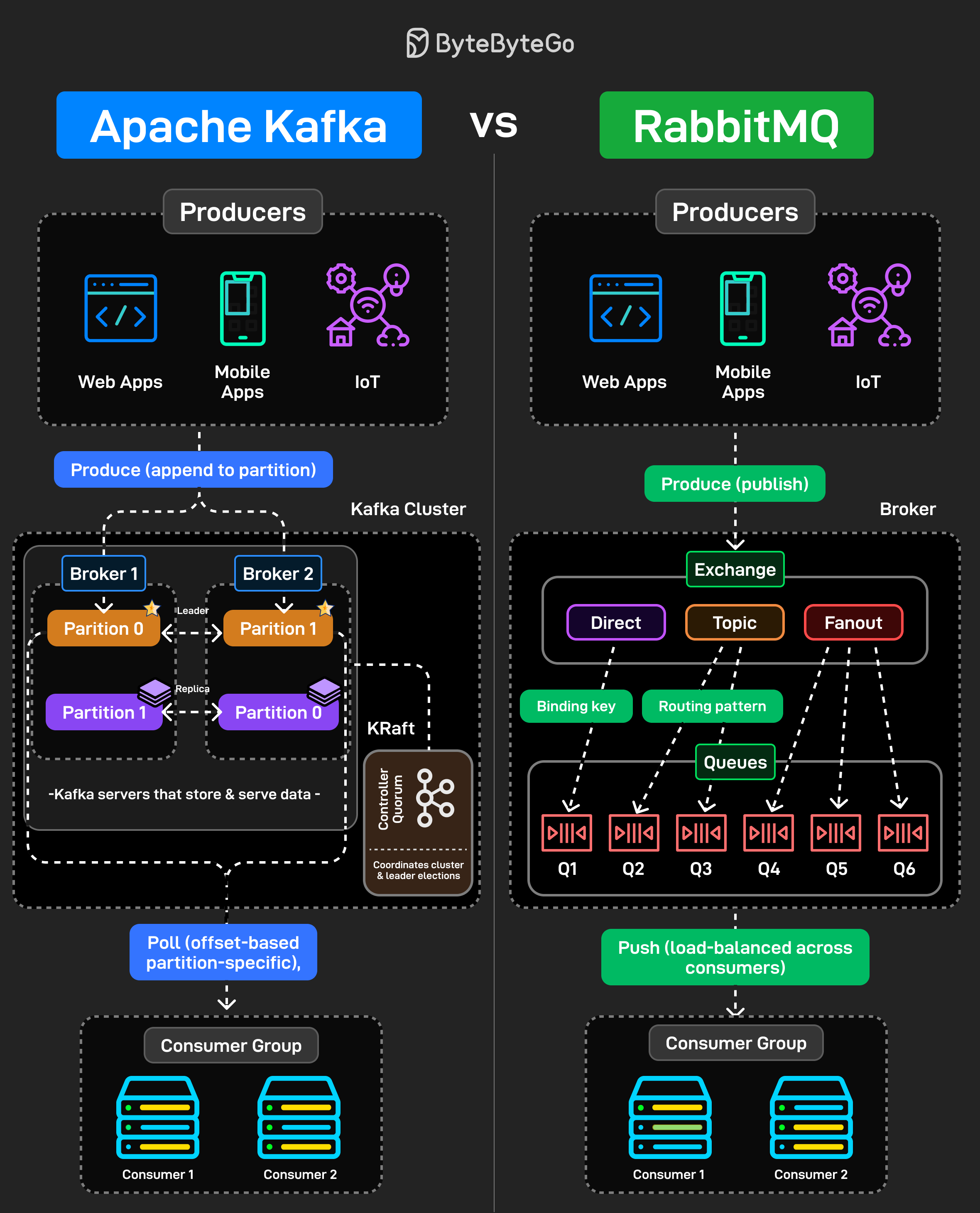
Kafka is a distributed log. Producers append messages to partitions. Those messages stick around based on retention policy, not because someone consumed them. Consumers pull messages at their own pace using offsets. You can rewind, replay, reprocess everything. It is designed for high throughput event streaming where multiple consumers need the same data independently.
RabbitMQ is a message broker. Producers publish messages to exchanges. Those exchanges route to queues based on binding keys and patterns (direct, topic, fanout). Messages get pushed to consumers and then deleted once acknowledged. It is built for task distribution and traditional messaging workflows.
The common mistake is using Kafka like a queue or RabbitMQ like an event log. They’re different tools built for different use cases.
Over to you: If you had to explain when NOT to use Kafka, what would you say?
The HTTP Mindmap
HTTP has evolved from HTTP/1.1 to HTTP/2, and now HTTP/3, which uses the QUIC protocol over UDP for improved performance. Today, it’s the backbone of almost everything on the internet, from browsers and APIs to streaming, cloud, and AI systems.
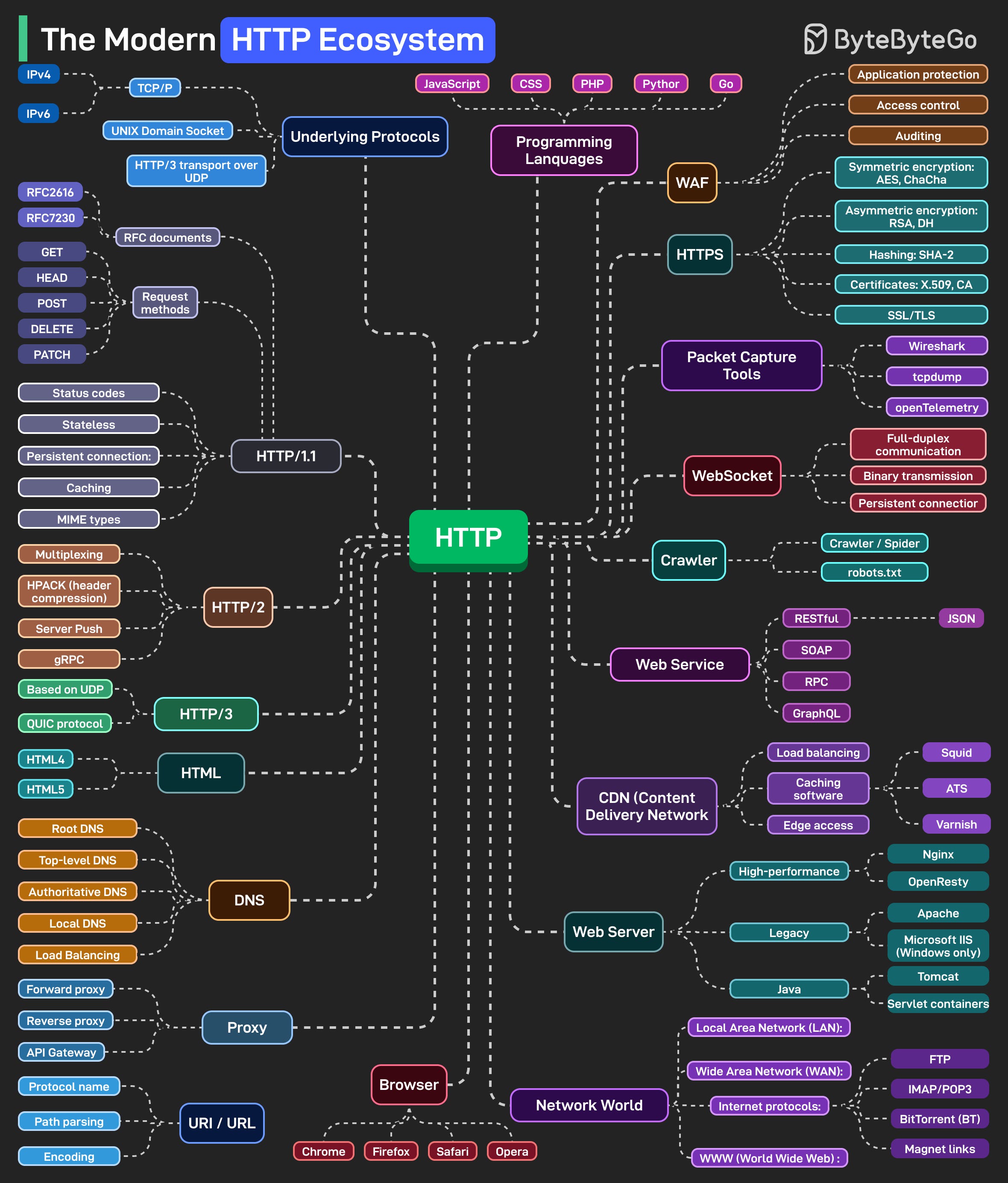
At the foundation, we have underlying protocols. TCP/IP for IPv4 and IPv6 traffic. Unix domain sockets for local communication. HTTP/3 running over UDP instead of TCP. These handle the actual data transport before HTTP even comes into play.
Security wraps around everything. HTTPS isn’t optional anymore. WebSockets power real-time connections. Web servers manage workloads. CDNs distribute content globally. DNS resolves everything to IPs. Proxies (forward, reverse, and API gateways) route, filter, and secure traffic in between.
Web services exchange data in different formats, REST with JSON, SOAP for enterprise systems, RPC for direct calls, and GraphQL for flexible queries. Crawlers and bots index the web, guided by robots.txt files that set the boundaries.
The network world connects everything. LANs, WANs, and protocols like FTP for file transfers, IMAP/POP3 for email, and BitTorrent for peer-to-peer communication. For observability, packet capture tools like Wireshark, tcpdump, and OpenTelemetry let developers peek under the hood to understand performance, latency, and behavior across the stack.
Over to you: HTTP has been evolving for 30+ years, what do you think the next big shift will be?
How DNS Works
You type a domain name and hit enter, but what actually happens before that webpage loads is more complex than most people realize. DNS is the phonebook of the internet, and every request you make triggers a chain of lookups across multiple servers.
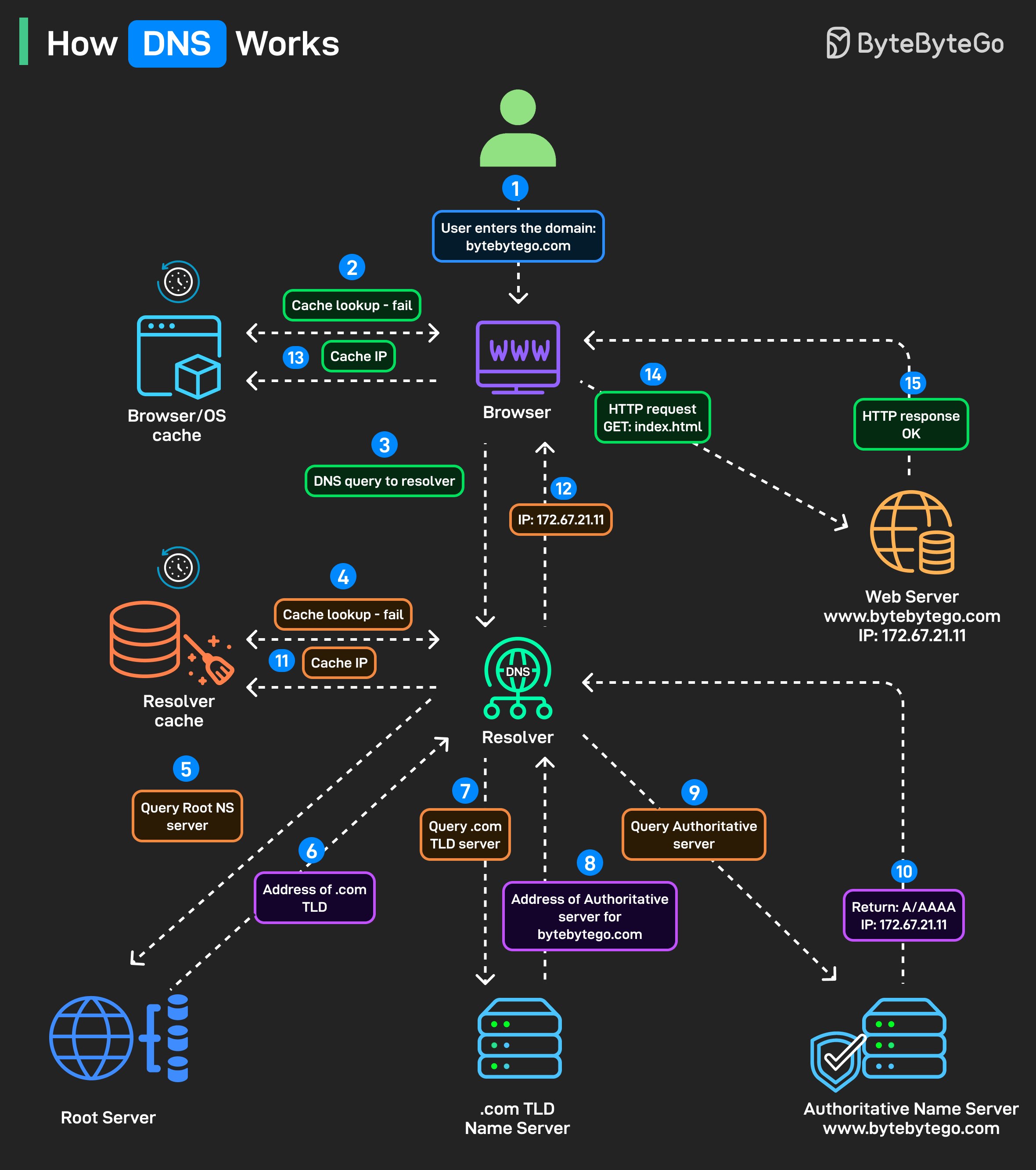
Step 1: Someone types bytebytego. com into their browser and presses enter.
Step 2: Before doing anything, the browser looks for a cached IP address. Operating system cache gets checked too.
Step 3: Cache miss triggers a DNS query. The browser sends a query to the configured DNS resolver, usually provided by your ISP or a service like Google DNS or Cloudflare.
Step 4: Resolver checks its own cache.
Step 5-6: If the resolver doesn’t have the answer cached, it asks the root servers, “Where can I find .com?” For bytebytego. com, the root server responds with the address of the .com TLD name server.
Step 7-8: Resolver queries the .com TLD server. TLD server returns the authoritative server address.
Step 9-10: This server has the actual A/AAAA record mapping the domain to an IP address. The resolver finally gets the answer: 172. 67. 21. 11 for bytebytego. com.
Step 11-12: The IP gets cached at the resolver level for future lookups, and returned to the browser.
Step 13-14: The browser stores this for its own future use, and uses the IP to make the actual HTTP request.
Step 15: The web server returns the requested content.
All this happens in milliseconds, before your first page even starts loading.
Over to you: Which DNS tools or commands do you rely on most, dig, nslookup, or something else?
Can a web server provide real-time updates?
An HTTP server cannot automatically initiate a connection to a browser. As a result, the web browser is the initiator. What should we do next to get real-time updates from the HTTP server?
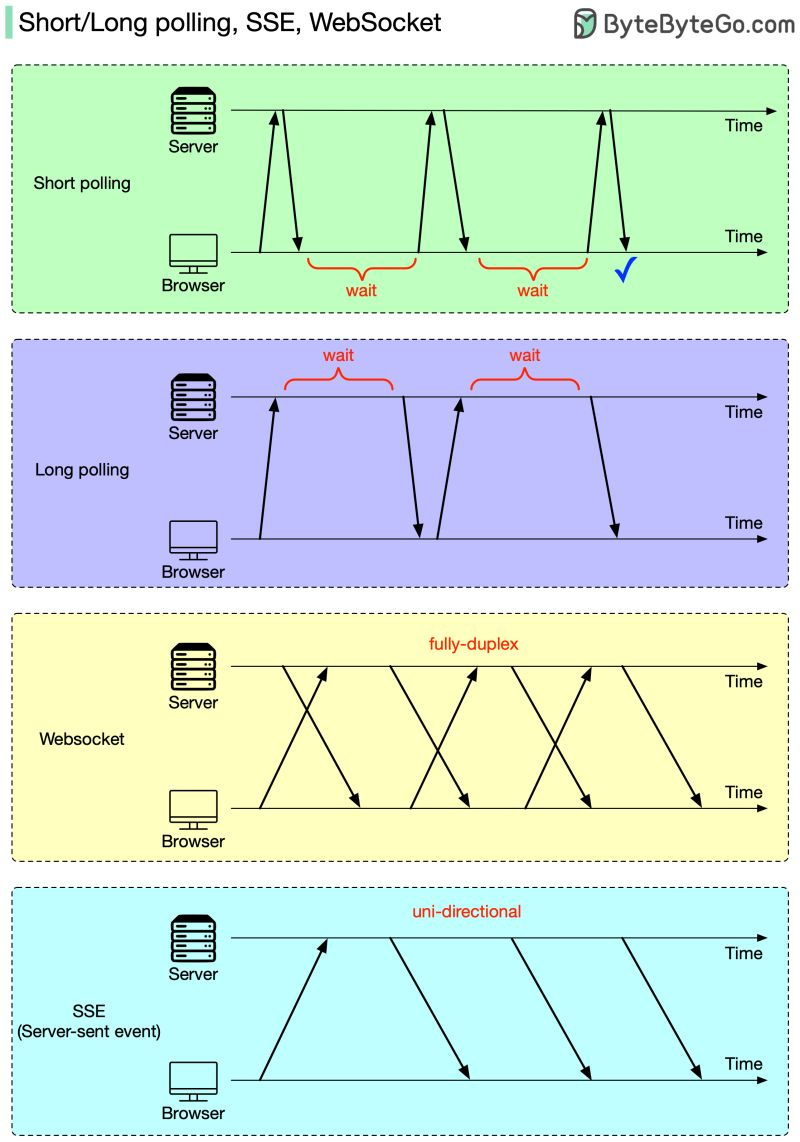
Both the web browser and the HTTP server could be responsible for this task.
Web browsers do the heavy lifting: short polling or long polling. With short polling, the browser will retry until it gets the latest data. With long polling, the HTTP server doesn’t return results until new data has arrived.
HTTP server and web browser cooperate: WebSocket or SSE (server-sent event). In both cases, the HTTP server could directly send the latest data to the browser after the connection is established. The difference is that SSE is uni-directional, so the browser cannot send a new request to the server, while WebSocket is fully-duplex, so the browser can keep sending new requests.
Over to you: of the four solutions (long polling, short polling, SSE, WebSocket), which ones are commonly used, and for what use cases?
SPONSOR US
Get your product in front of more than 1,000,000 tech professionals.
Our newsletter puts your products and services directly in front of an audience that matters - hundreds of thousands of engineering leaders and senior engineers - who have influence over significant tech decisions and big purchases.
Space Fills Up Fast - Reserve Today
Ad spots typically sell out about 4 weeks in advance. To ensure your ad reaches this influential audience, reserve your space now by emailing sponsorship@bytebytego.com.
Redis? no?
Hierarchical?