

✂️ Cut your QA cycles down to minutes with QA Wolf (Sponsored)

If slow QA processes bottleneck you or your software engineering team and you’re releasing slower because of it — you need to check out QA Wolf.
QA Wolf’s AI-native service supports web and mobile apps, delivering 80% automated test coverage in weeks and helping teams ship 5x faster by reducing QA cycles to minutes.
QA Wolf takes testing off your plate. They can get you:
Unlimited parallel test runs for mobile and web apps
24-hour maintenance and on-demand test creation
Human-verified bug reports sent directly to your team
Zero flakes guaranteed
The benefit? No more manual E2E testing. No more slow QA cycles. No more bugs reaching production.
With QA Wolf, Drata’s team of 80+ engineers achieved 4x more test cases and 86% faster QA cycles.
This week’s system design refresher:
Evolution of HTTP
System Performance Metrics Every Engineer Should Know
Why Is Nginx So Popular?
Network Debugging Commands Every Engineer Should Know
Hub, Switch, & Router Explained
SPONSOR US
Evolution of HTTP
The Hypertext Transfer Protocol (HTTP) has evolved over the years to meet the needs of modern applications, from simple text delivery to high-performance, real-time experiences.
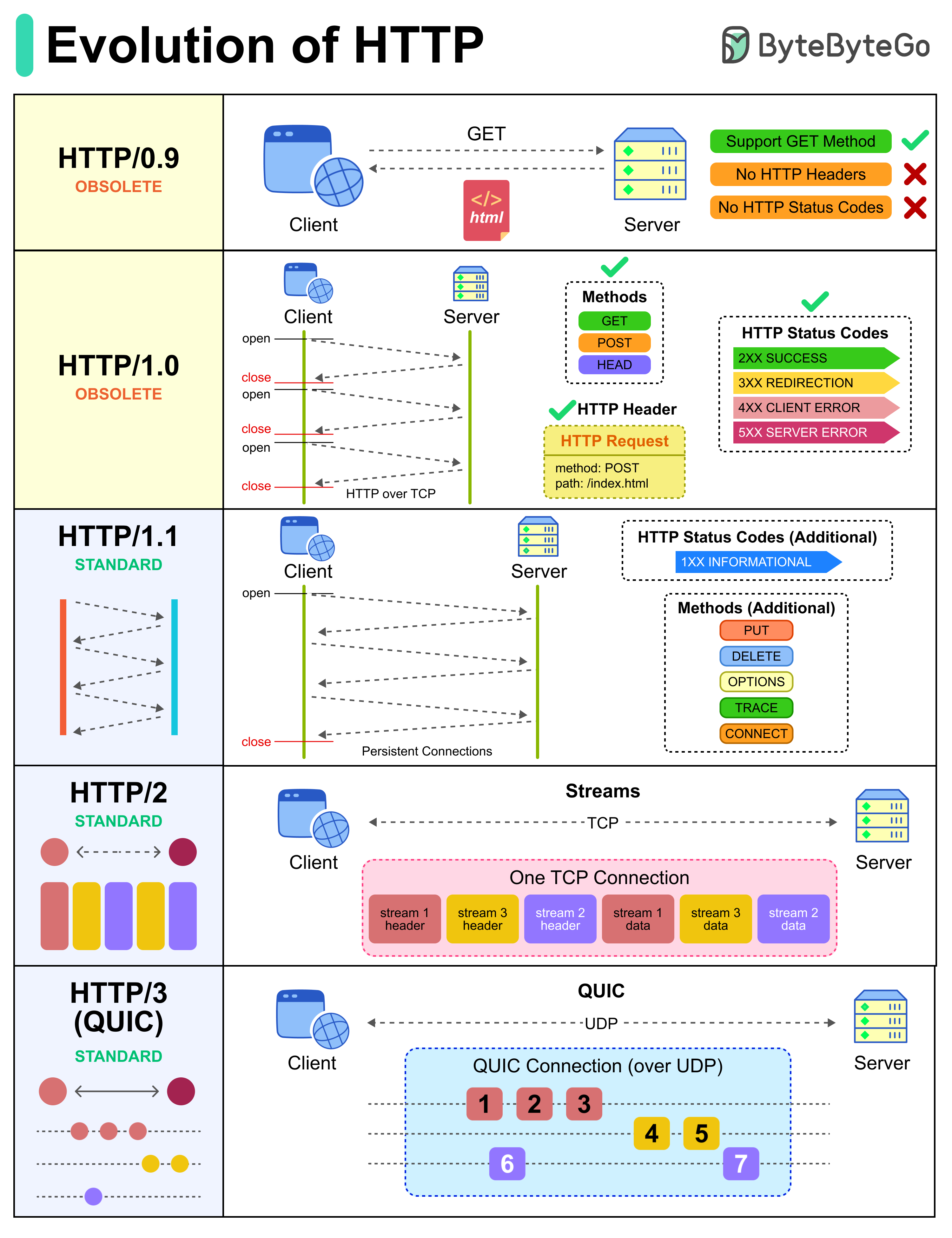
Here is how HTTP has progressed:
HTTP/0.9: Built to fetch simple HTML documents with a single GET request.
HTTP/1.0: Added headers and status codes to support richer interactions, but every request still required a new connection.
HTTP/1.1: Introduced persistent connections and more methods, making the web faster and more efficient for everyday browsing.
HTTP/2: Solved performance bottlenecks with multiplexing, enabling multiple requests to share one connection.
HTTP/3 (QUIC): Shifted to UDP with QUIC to reduce latency and improve reliability, especially for mobile and real-time apps.
Over to you: Are you already taking advantage of HTTP/3 in your projects?
2026 OKR: Use AI to make MTTR 70% faster & optimize costs (Sponsored)

Code from Claude is about to hit prod, but it doesn’t have to be painful.
Engineering teams at Coinbase, Toast, Gametime, MSCI, and Zscaler use Resolve AI to resolve incidents, optimize costs, and build with production context using AI that works across code, infra, and telemetry
The results mean 70% faster MTTR, 30% fewer engineers pulled in per incident, and thousands of saved engineering hours. Imagine what you could ship with that time in 2026
Learn more about AI for prod, workflow-autonomous multi-agent systems, and how you can cut orchestration tax, improve investigations, and shift engineering time from grunt work to great work.
System Performance Metrics Every Engineer Should Know
Your API is slow. But how slow, exactly? You need numbers. Real metrics that tell you what's actually broken and where to fix it.
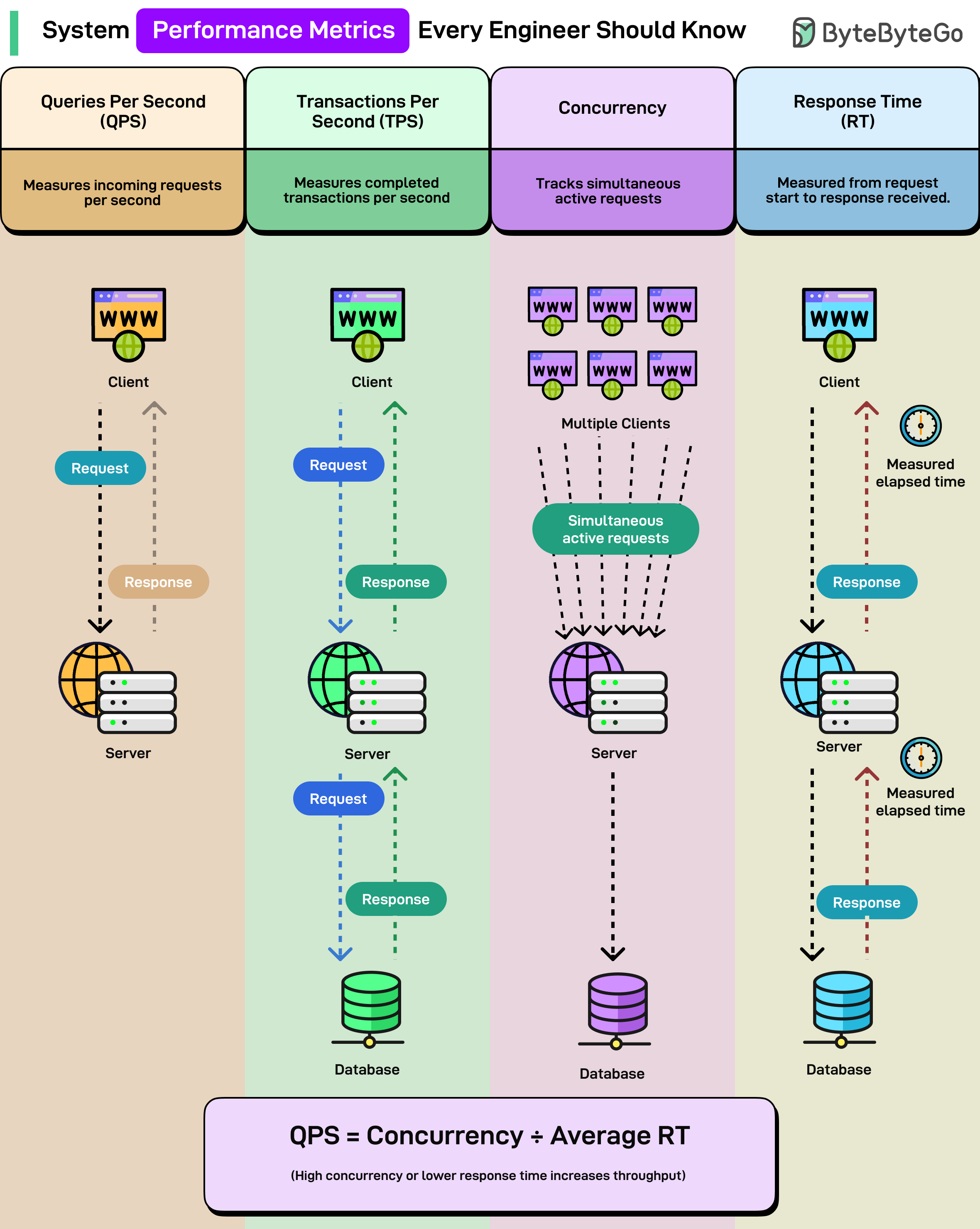
Here are the four core metrics every engineer should know when analyzing system performance:
Queries Per Second (QPS): How many incoming requests your system handles per second. Your server gets 1,000 requests in one second? That's 1,000 QPS. Sounds straightforward until you realize most systems can't sustain their peak QPS for long without things starting to break.
Transactions Per Second (TPS): How many completed transactions your system processes per second. A transaction includes the full round trip, i.e., the request goes out, hits the database, and comes back with a response.
TPS tells you about actual work completed, not just requests received. This is what your business cares about.
Concurrency: How many simultaneous active requests your system is handling at any given moment. You could have 100 requests per second, but if each takes 5 seconds to complete, you're actually handling 500 concurrent requests at once.
High concurrency means you need more resources, better connection pooling, and smarter thread management.
Response Time (RT): The elapsed time from when a request starts until the response is received. Measured at both the client level and server level.
A simple relationship ties them all together: QPS = Concurrency ÷ Average Response Time
More concurrency or lower response time = higher throughput.
Over to you: When you analyze performance, which metric do you look at first, QPS, TPS, or Response Time?
Why Is Nginx So Popular?
Apache dominated web servers for 20 years, then Nginx showed up and changed everything. Now Nginx powers some of the largest sites on the internet, including Netflix, Airbnb, Dropbox, and WordPress. com. Not because it's newer or trendier, but because it solves problems that Apache couldn't handle efficiently.
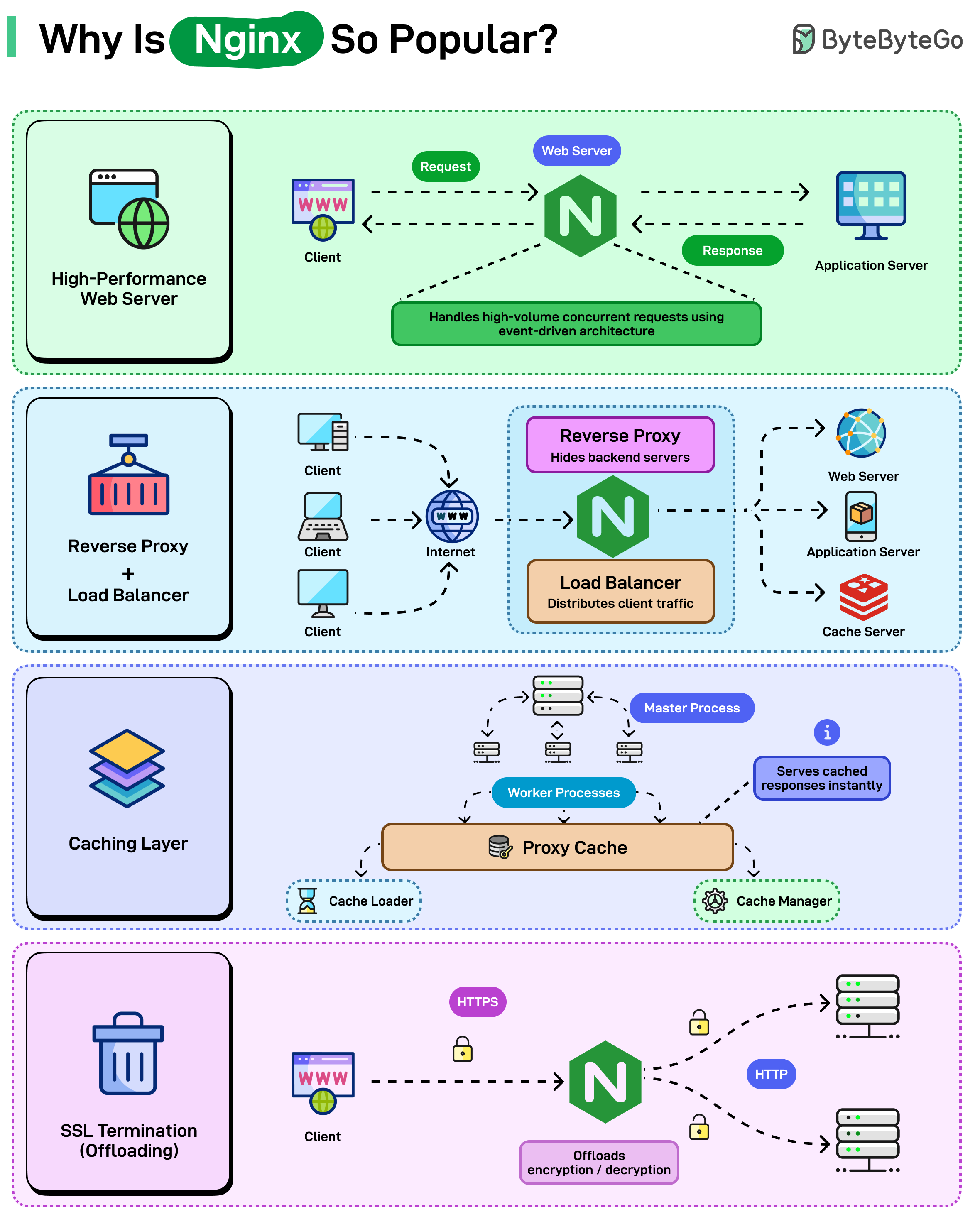
Here’s what makes Nginx so popular:
High-Performance Web Server
Reverse Proxy & Load Balancer
Caching Layer
SSL Termination (Offloading)
Over to you: What’s your primary use for Nginx today, web server, reverse proxy, or load balancer?
Network Debugging Commands Every Engineer Should Know
When someone says “It’s a network issue,” these commands help you find what’s wrong fast.
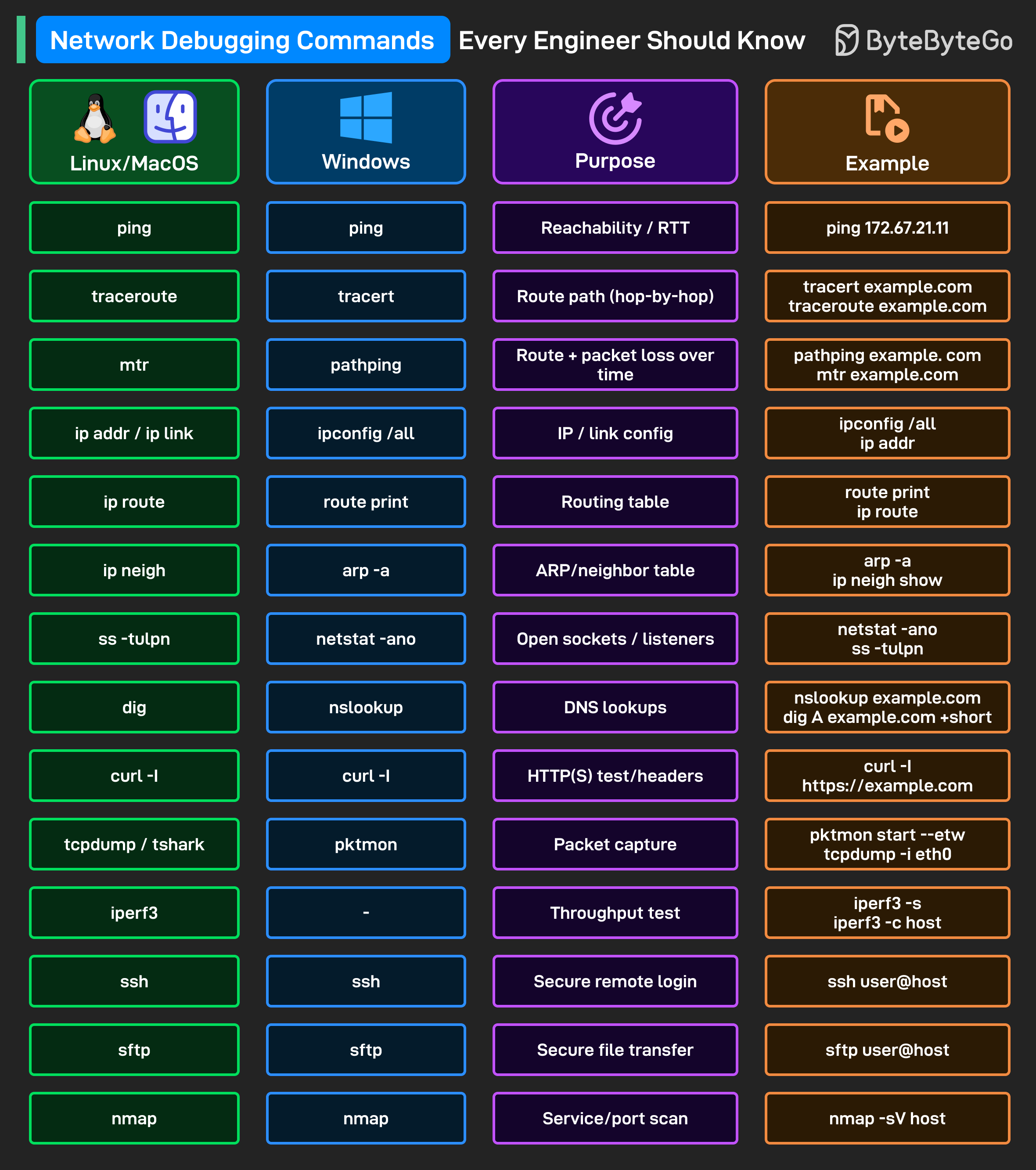
ping: Checks if the destination responds and reports the round-trip time for basic reachability.
traceroute / tracert: Shows each hop on the path so you can see where packets slow down or stop.
mtr / pathping: Continuously measures latency and loss per hop to catch intermittent issues.
ip addr, ip link / ipconfig /all: Prints local IPs, MACs, and interface status so you can verify the machine’s network identity.
ip route: Reveals the routing table to confirm which gateway and next hop the system will use.
ip neigh: Displays IP-to-MAC entries to detect duplicates or stale ARP records on the LAN.
ss -tulpn: Lists listening sockets and PIDs so you can confirm a service is actually bound to the expected port.
dig: Resolves DNS records to verify the exact IPs clients will connect to.
curl -I: Fetches only HTTP(S) headers to check status codes, redirects, and cache settings.
tcpdump / tshark: Captures packets so you can inspect real traffic and validate what’s sent and received.
iperf3: Measures end-to-end throughput between two hosts to separate bandwidth limits from app issues.
ssh: Opens a secure shell on the remote machine to run checks and apply fixes directly.
sftp: Transfers files securely so you can pull logs or push artifacts during an incident.
nmap: Scans open ports and probes versions to confirm which services are exposed and responding.
Over to you: What's your go-to command when debugging network issues?
Hub, Switch, & Router Explained
Every home and office network relies on these three devices, hub, switch, and router, yet their roles are often mixed up.
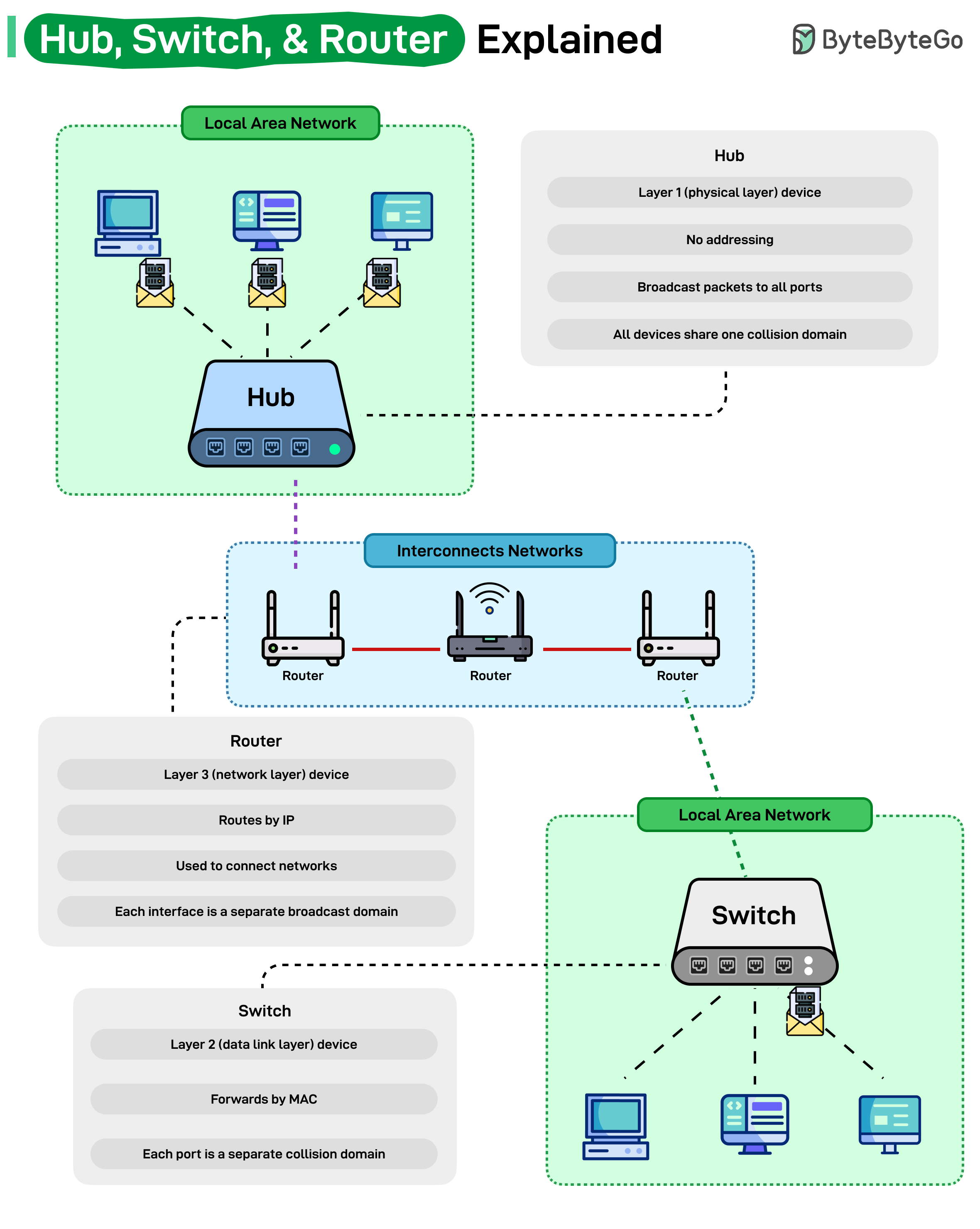
A hub operates at Layer 1 (Physical Layer). It’s the simplest of the three, it doesn’t understand addresses or data types. When a packet arrives, it simply broadcasts it to every connected device, creating one big collision domain. That means all devices compete for the same bandwidth, making hubs inefficient in modern networks.
A switch works at Layer 2 (Data Link Layer). It learns MAC addresses and forwards frames only to the correct destination device. Each port on a switch acts as its own collision domain, improving efficiency and speeding up communication within a LAN.
A router operates at Layer 3 (Network Layer). It routes packets based on IP addresses and connects different networks together, for example, your home network to the Internet. Each router interface forms a separate broadcast domain, keeping local and external traffic isolated.
Understanding how these three layers work together is the foundation of every modern network, from your home Wi-Fi to the global Internet backbone.
Over to you: How do you usually figure out whether a network issue is caused by the router or the switch?
SPONSOR US
Get your product in front of more than 1,000,000 tech professionals.
Our newsletter puts your products and services directly in front of an audience that matters - hundreds of thousands of engineering leaders and senior engineers - who have influence over significant tech decisions and big purchases.
Space Fills Up Fast - Reserve Today
Ad spots typically sell out about 4 weeks in advance. To ensure your ad reaches this influential audience, reserve your space now by emailing sponsorship@bytebytego.com.
I'm kinda confused. The title is "Evolution of HTTP," but there's one graphic and four small bullet points devoted to it? That's it?
Barely get any information out of this - compare to https://developer.mozilla.org/en-US/docs/Web/HTTP/Guides/Evolution_of_HTTP
The Mozilla post is so much more informative and explanatory.
Here’s an article I wrote about HTTP and its evolution -
Part 1 - https://pradyumnachippigiri.substack.com/p/understanding-http-for-backend-engineers
Part 2 - https://pradyumnachippigiri.substack.com/p/all-about-http-part-2