

Cut Code Review Time & Bugs in Half (Sponsored)

Code reviews are critical but time-consuming. CodeRabbit acts as your AI co-pilot, providing instant Code review comments and potential impacts of every pull request.
Beyond just flagging issues, CodeRabbit provides one-click fix suggestions and lets you define custom code quality rules using AST Grep patterns, catching subtle issues that traditional static analysis tools might miss.
CodeRabbit has so far reviewed more than 10 million PRs, installed on 2 million repositories, and used by 100 thousand Open-source projects. CodeRabbit is free for all open-source repo’s.
This week’s system design refresher:
Cloud Load Balancer Cheat Sheet
How CQRS Works?
How does Docker Work?
6 Practical AWS Lambda Application Patterns You Must Know
Containerization Explained: From Build to Runtime
🚀 Learn AI in the New Year: Become an AI Engineer Cohort 3 Now Open
Cloud Load Balancer Cheat Sheet
Efficient load balancing is vital for optimizing the performance and availability of your applications in the cloud.

However, managing load balancers can be overwhelming, given the various types and configuration options available.
In today's multi-cloud landscape, mastering load balancing is essential to ensure seamless user experiences and maximize resource utilization, especially when orchestrating applications across multiple cloud providers. Having the right knowledge is key to overcoming these challenges and achieving consistent, reliable application delivery.
In selecting the appropriate load balancer type, it's essential to consider factors such as application traffic patterns, scalability requirements, and security considerations. By carefully evaluating your specific use case, you can make informed decisions that enhance your cloud infrastructure's efficiency and reliability.
This Cloud Load Balancer cheat sheet would help you in simplifying the decision-making process and helping you implement the most effective load balancing strategy for your cloud-based applications.
Over to you: What factors do you believe are most crucial in choosing the right load balancer type for your applications?
How CQRS Works?
CQRS (Command Query Responsibility Segregation) separates write (Command) and read (Query) operations for better scalability and maintainability.

Here’s how it works:
The client sends a command to update the system state. A Command Handler validates and executes logic using the Domain Model.
Changes are saved in the Write Database and can also be saved to an Event Store. Events are emitted to update the Read Model asynchronously.
The projections are stored in the Read Database. This database is eventually consistent with the Write Database.
On the query side, the client sends a query to retrieve data.
A Query Handler fetches data from the Read Database, which contains precomputed projections.
Results are returned to the client without hitting the write model or the write database.
Over to you: What else will you add to understand CQRS?
How does Docker Work?
Docker’s architecture is built around three main components that work together to build, distribute, and run containers.
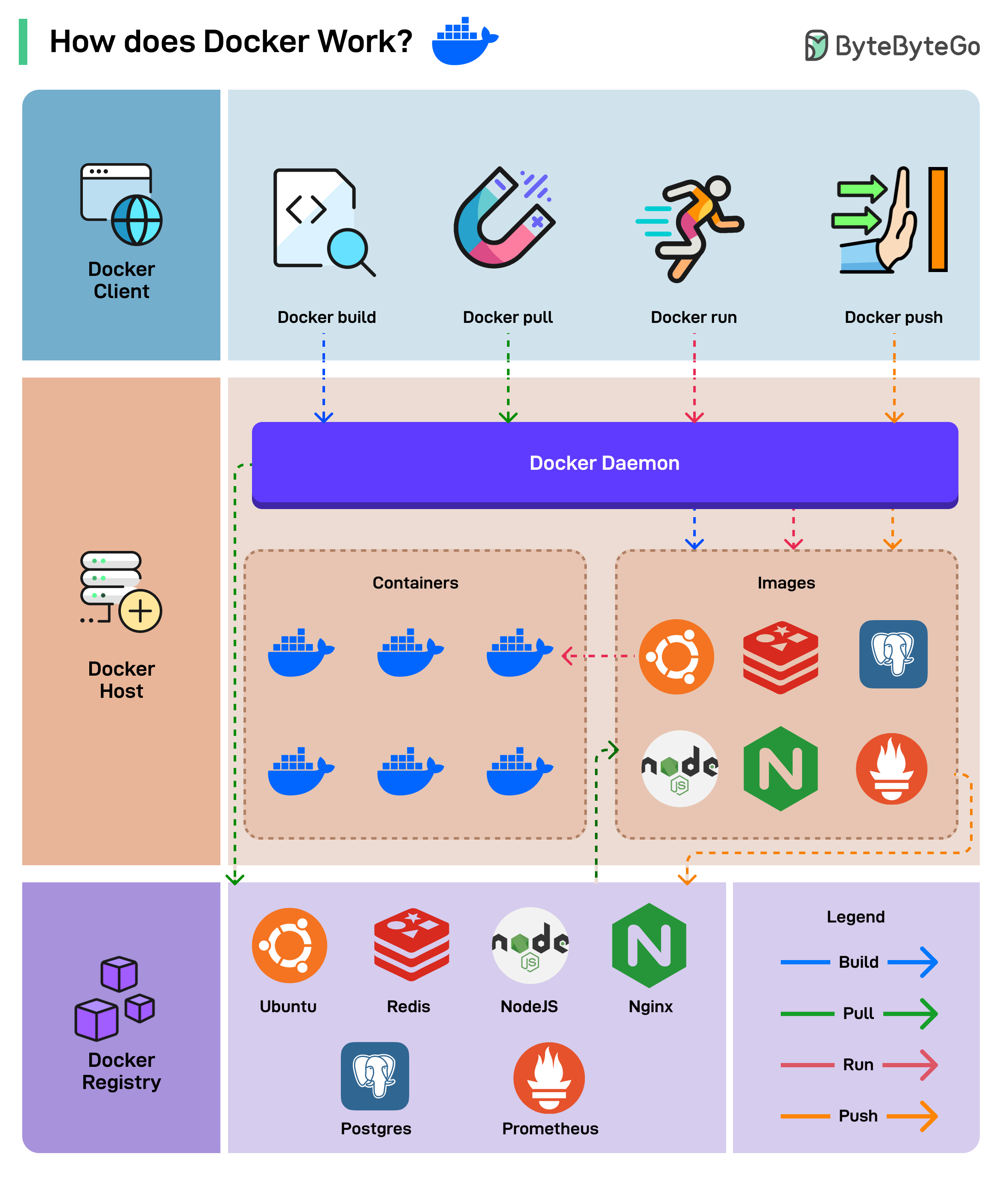
Docker Client
This is the interface through which users interact with Docker. It sends commands (such as build, pull, run, push) to the Docker Daemon using the Docker API.Docker Host
This is where the Docker Daemon runs. It manages images, containers, networks, and volumes, and is responsible for building and running applications.Docker Registry
The storage system for Docker images. Public registries like Docker Hub or private registries allow pulling and pushing images.
Over to you: Do you use Docker in your projects?
6 Practical AWS Lambda Application Patterns You Must Know
AWS Lambda pioneered the serverless paradigm, allowing developers to run code without provisioning, managing, or scaling servers. Let’s look at a few practical application patterns you can implement using Lambda.
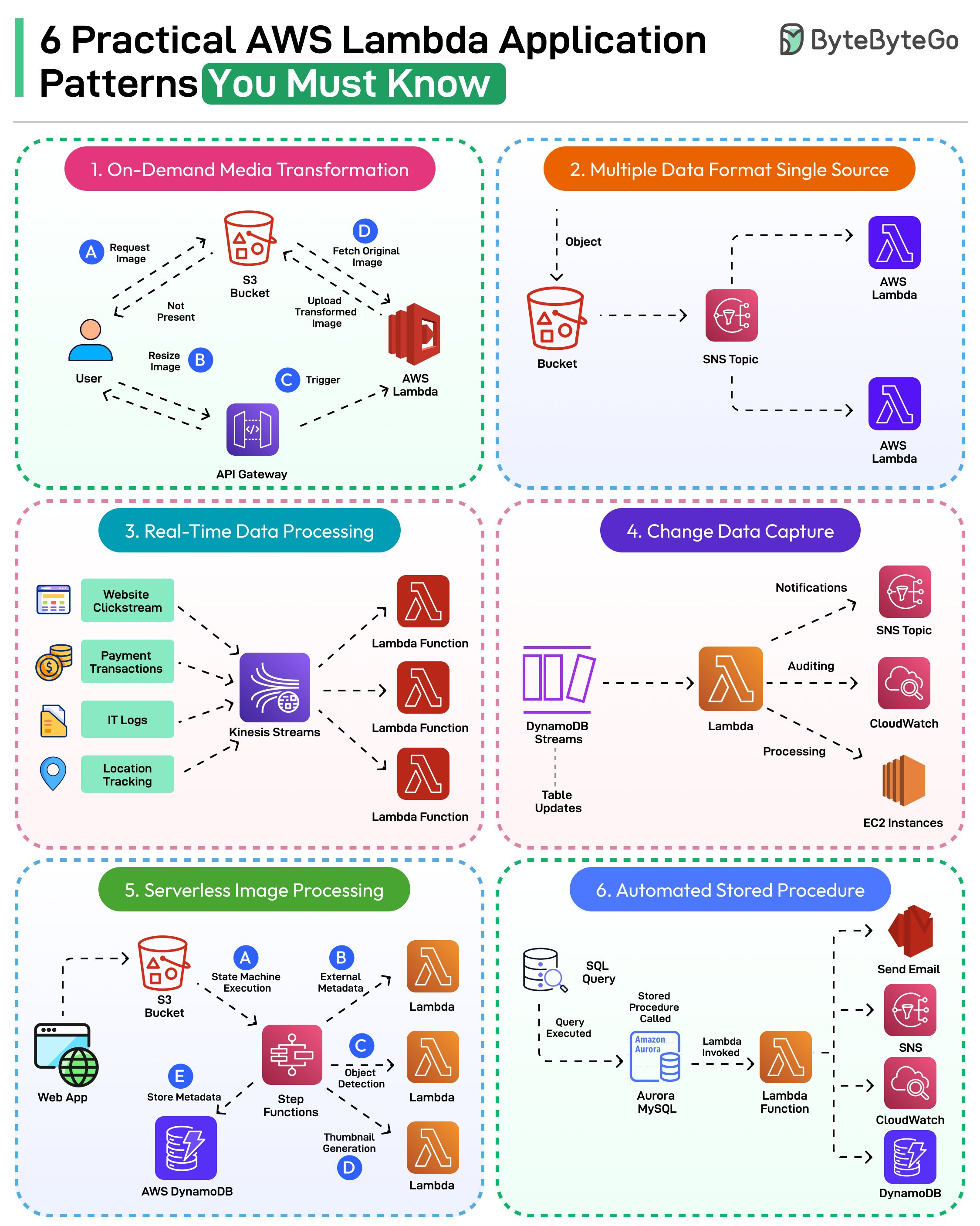
On-Demand Media Transformation
Whenever a user requests an image from S3 in a format that isn’t available, an on-demand transformation can be done using AWS Lambda.Multiple Data Format from Single Source
AWS Lambda can work with SNS to create a layer where data can be processed in the required format before sending to the storage layer.Real-time Data Processing
Create a Kinesis stream and corresponding Lambda function to process different types of data (clickstream, logs, location tracking, or transactions) from your application.Change Data Capture
Amazon DynamoDB can be integrated with AWS Lambda to respond to database events (inserts, updates, and deletes) in the DynamoDB streams.Serverless Image Processing
Process and recognize images in a serverless manner using AWS Lambda. Integrate with AWS Step Functions for better workflow management.Automated Stored Procedure
Invoke Lambda as a stored procedure to trigger functionality before/after some operations are performed on a particular database table.
Over to you: Have you used AWS Lambda in your project?
Containerization Explained: From Build to Runtime
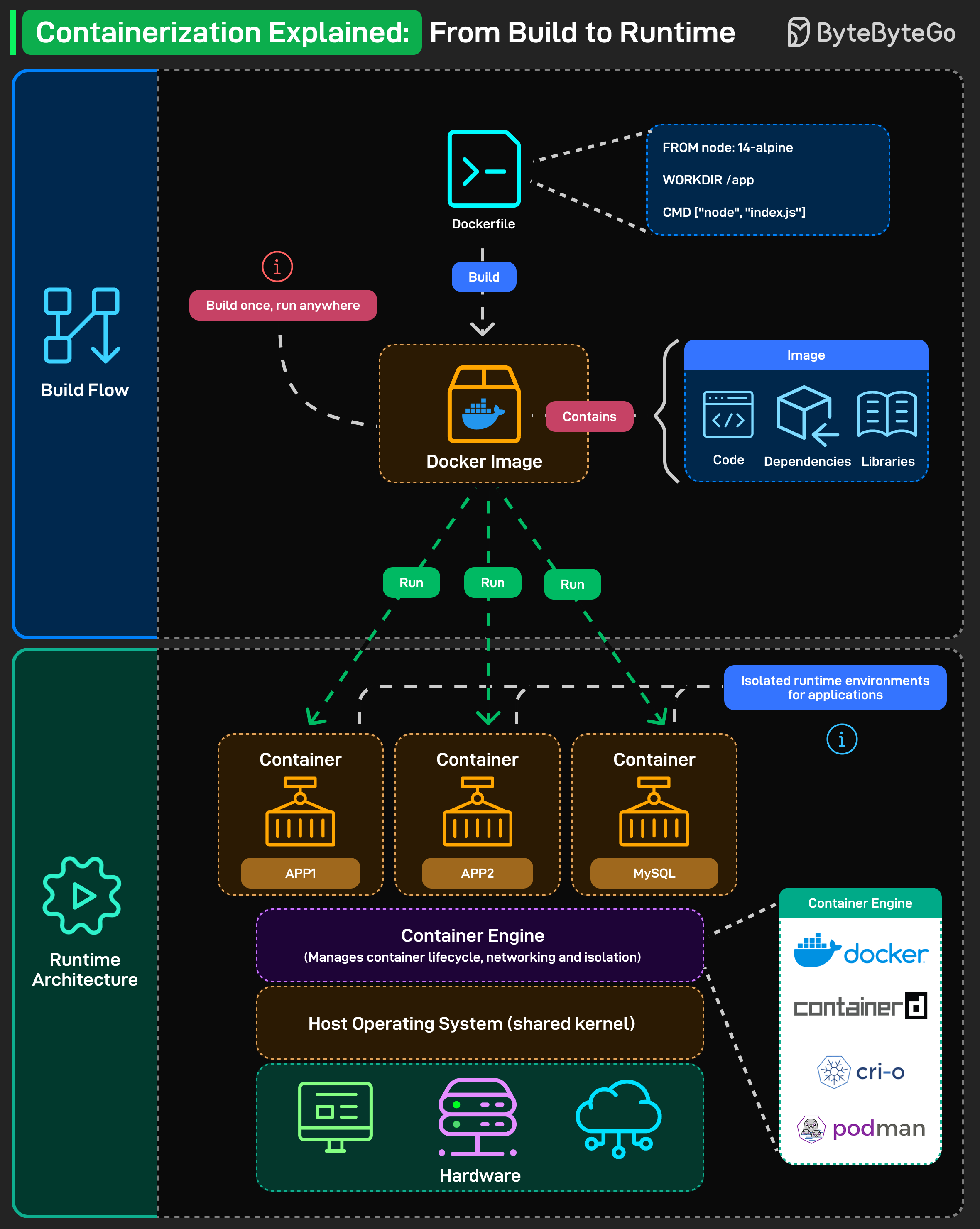
“Build once, run anywhere.” That’s the promise of containerization, and here’s how it actually works:
Build Flow: Everything starts with a Dockerfile, which defines how your app should be built. When you run docker build, it creates a Docker Image containing:
Your code
The required dependencies
Necessary libraries
This image is portable. You can move it across environments, and it’ll behave the same way, whether on your local machine, a CI server, or in the cloud.
Runtime Architecture: When you run the image, it becomes a Container, an isolated environment that executes the application. Multiple containers can run on the same host, each with its own filesystem, process space, and network stack.
The Container Engine (like Docker, containerd, CRI-O, or Podman) manages:
The container lifecycle
Networking and isolation
Resource allocation
All containers share the Host OS kernel, sitting on top of the hardware. That’s how containerization achieves both consistency and efficiency, light like processes, but isolated like VMs.
Over to you: When deploying apps, do you prefer Docker, containerd, or Podman, and why?
🚀 Learn AI in the New Year: Become an AI Engineer Cohort 3 Now Open
After the amazing success of Cohorts 1 and 2 (with close to 1,000 engineers joining and building real AI skills), we are excited to announce the launch of Cohort 3 of Become an AI Engineer!
