

You.com Founders Predict an AI Winter Is Coming in 2026

Richard Socher and Bryan McCann are among the most-cited AI researchers in the world. They just released 35 predictions for 2026. Three that stand out:
The LLM revolution has been “mined out” and capital floods back to fundamental research
“Reward engineering” becomes a job; prompts can’t handle what’s coming next
Traditional coding will be gone by December; AI writes the code and humans manage it
This week’s system design refresher:
HTTP/2 over TCP vs HTTP/3 over QUIC
How Cursor Agent Works
How Git Really Stores Your Data
How NAT Works
Building a Computer Vision App on Ring APIs
We’re hiring at ByteByteGo
HTTP/2 over TCP vs HTTP/3 over QUIC
HTTP/2 vs HTTP/3 looks like an HTTP upgrade. It’s actually a transport-layer rethink.
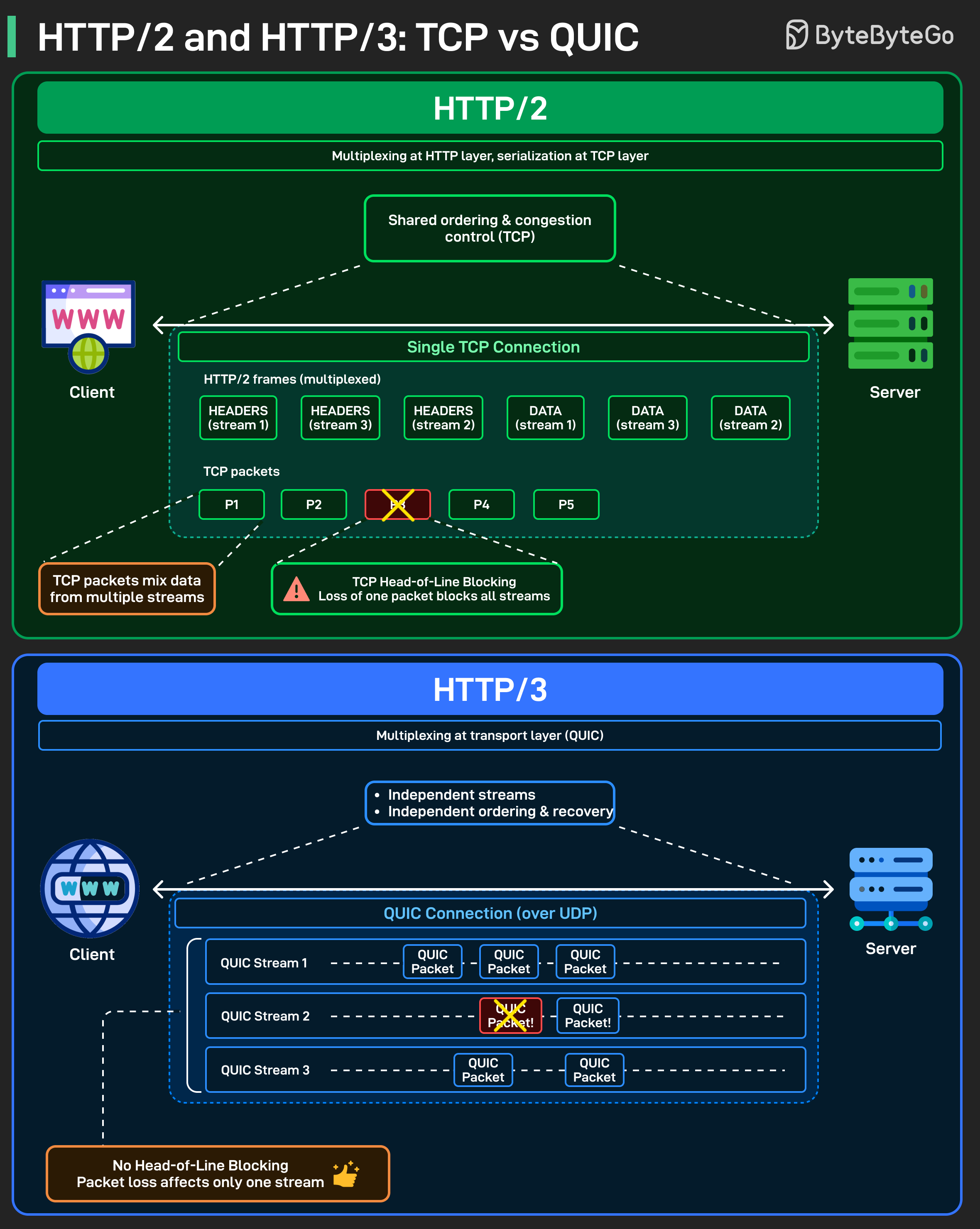
HTTP/2 fixed a big problem in HTTP/1.1: too many connections. It introduced multiplexing, allowing multiple requests and responses to share a single connection. On paper, that sounds ideal.
But under the hood, HTTP/2 still runs on TCP. All streams share the same TCP connection, the same ordering, and the same congestion control. When a single TCP packet is lost, TCP pauses delivery until it’s retransmitted.
Since packets can carry data from multiple streams, one loss ends up blocking all streams. That’s TCP head-of-line blocking. Multiplexed at the HTTP layer, serialized at the transport layer.
HTTP/3 takes a different approach. Instead of TCP, it runs over QUIC, which is built on UDP. QUIC moves multiplexing down into the transport layer itself.
Each stream is independent, with its own ordering and recovery. If a packet is lost, only the affected stream waits. The others keep flowing. Same idea at the HTTP layer. Very different behavior on the wire.
HTTP/2: multiplexing above TCP
HTTP/3: multiplexing inside the transport
Over to you: Have you actually seen TCP head-of-line blocking show up in real systems, or is it mostly theoretical in your experience?
How Cursor Agent Works
Cursor recently shipped Composer, its agentic coding model, and shared that the agent can be ~4× faster!
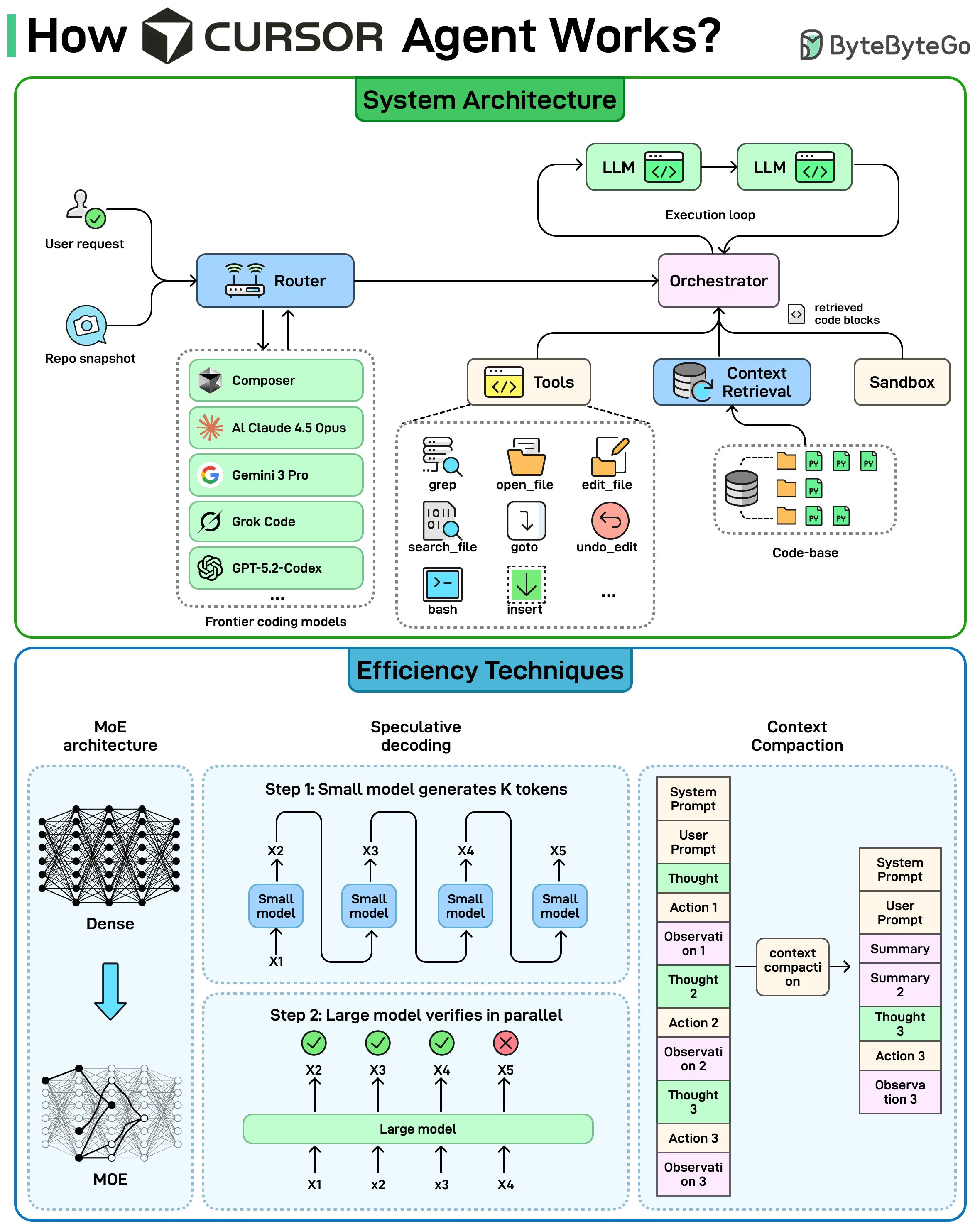
We worked with the Cursor team, particularly Lee Robinson, to understand how the system is put together, and what drives the speed.
A coding agent is a system that can take a task, explore a repo, edit multiple files, and iterate until the build and tests pass.
Inside Cursor, a router first picks a suitable coding model (including Composer) to handle the request.
The system then starts a loop: retrieve the most relevant code (context retrieval), use tools to open and edit files, and run commands in a sandbox. Once the tests pass, the task is complete.
Cursor uses three key techniques to keep this loop fast:
Mixture-of-Expert (MoE): A sparse MoE architecture activates only a subset of model weights per token.
Speculative decoding: a smaller model drafts multiple tokens at once, then a larger model verifies them in parallel to reduce latency.
Context compaction: summarize older steps and keep only the active working set so the prompt stays relevant and short as iterations continue.
How Git Really Stores Your Data
Ever wondered what actually happens inside Git when you run commands like add, commit, or checkout? Most developers use Git every day, but very few know what’s going on under the hood.
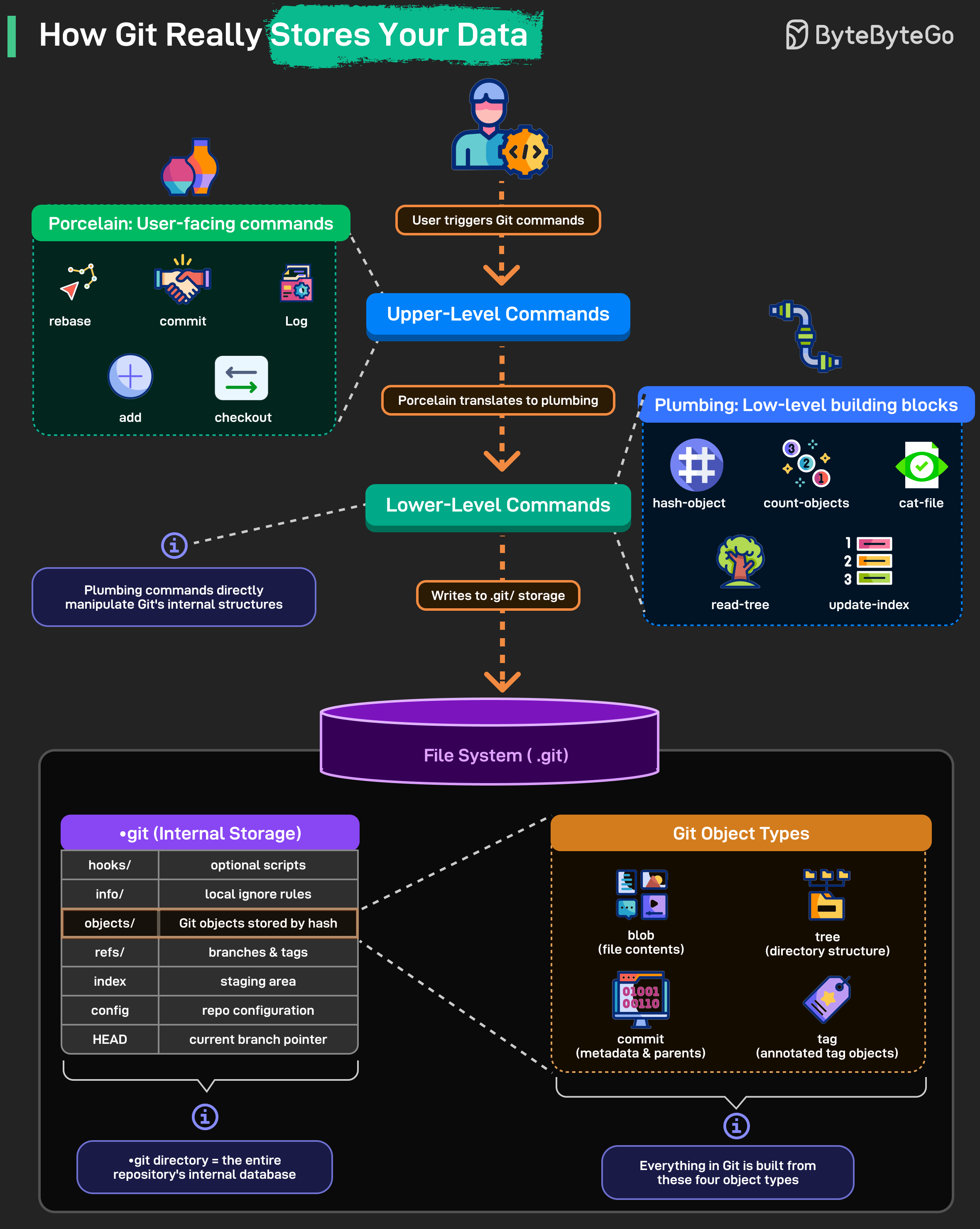
Git has two layers:
Porcelain (user-facing commands): add, commit, checkout, rebase, etc.
Plumbing (low-level building blocks): hash-object, cat-file, read-tree, update-index, and more.
When you trigger a Git command:
Your porcelain command is translated by Git
It calls lower-level plumbing operations
Plumbing writes directly into the .git directory (Git’s entire internal database)
Inside the .git directory: Git stores everything it needs to reconstruct your repo.
objects/ : all file content and metadata stored by hash
refs/ : branches and tags
index : staging area
config : repo configuration
HEAD : current branch pointer
The .git folder is your repository. If you delete it, the project loses its entire history.
Everything in Git is built from just four objects:
blob : file contents
tree : directories
commit : metadata + parents
tag : annotated reference
Over to you: Which Git command has confused you the most in real-world projects?
How NAT Works
Every device in your home probably shares the same public IP, yet each one browses, streams, and connects independently.
Ever wondered how that’s even possible?
That magic is handled by NAT (Network Address Translation), one of the silent workhorses of modern networking. It’s the reason IPv4 hasn’t run out completely, and why your router can hide dozens of devices behind a single public IP.
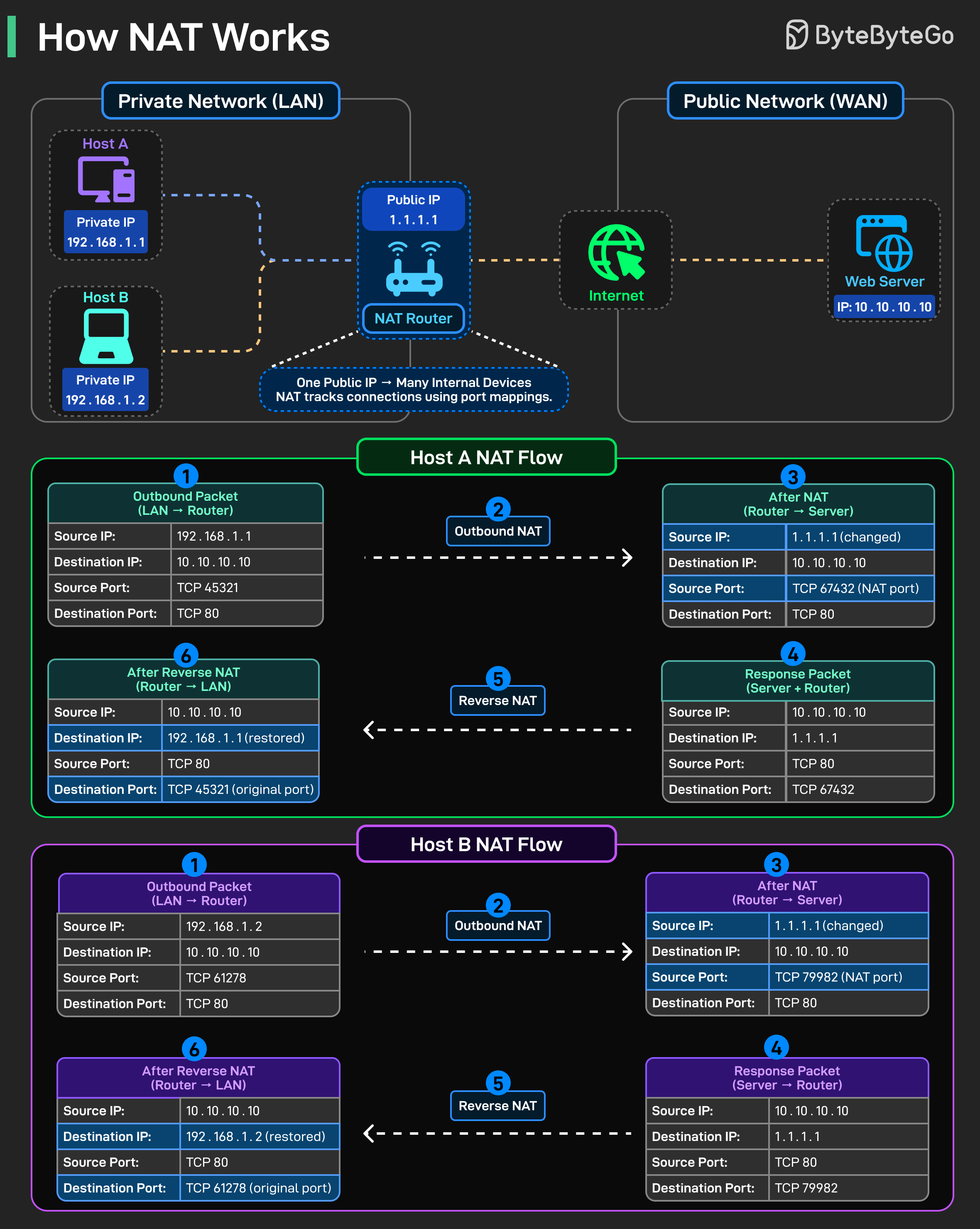
The Core Idea: Inside your local network, devices use private IP addresses that never leave your home or office. Your router, however, uses a single public IP address when talking to the outside world.
NAT rewrites each outbound request so it appears to come from that public IP address, assigning a unique port mapping for every internal connection.
Outbound NAT (Local to Internet)
When a device sends a request:
NAT replaces the private IP address with the public one
Assigns a unique port so it can track the connection
Sends the packet out to the internet as if it originated from the router
Reverse NAT (Internet to Local)
When the response returns:
NAT checks its translation table
Restores the original private IP address and port
Delivers the packet to the correct device on the local network
Building a Computer Vision App on Ring APIs
Ring just announced a new Appstore. For the first time, third party developers can request early access to Ring APIs.
This changes Ring from a closed product into a programmable platform.
We are one of the first teams working with early Ring API access.
We explored what developers can build with Ring event data and how quickly we can take it to production.
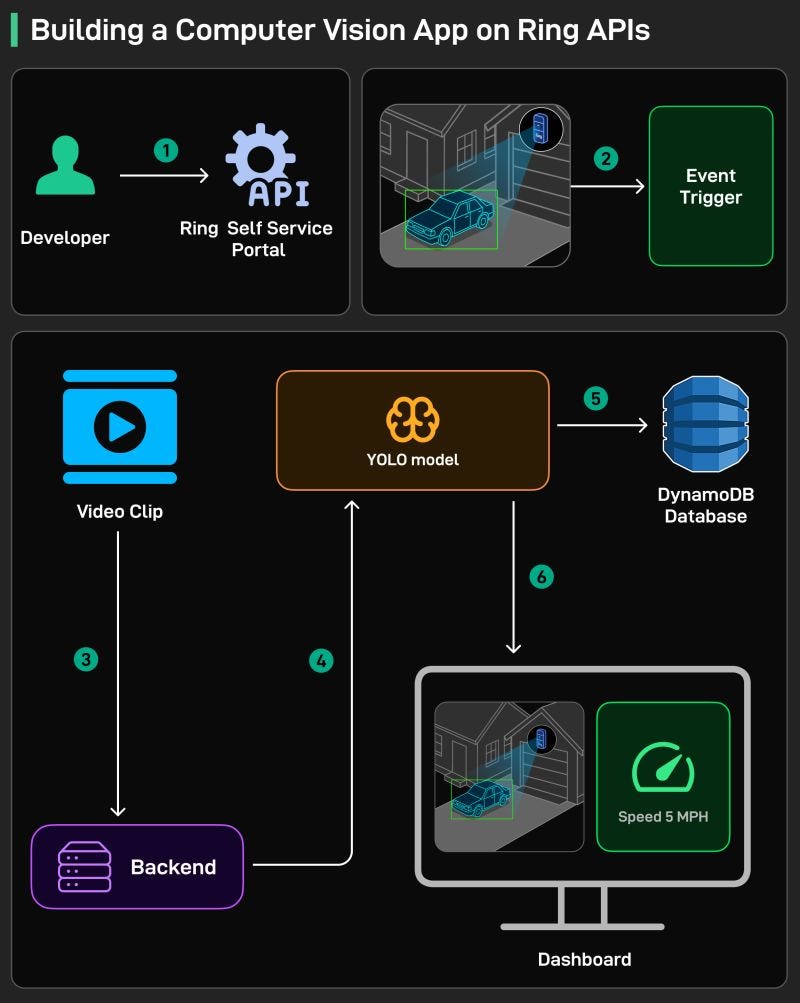
We built a Driveway Derby Detector. Here is how it works at a high level:
We registered our endpoints and received client credentials for Developer APIs (Self-serve through developer.amazon.com/ring)
When the camera detects motion, we get notified on the webhook (< 30 min integration)
We pull the associated video clips (< 30 min integration)
We run the clip through YOLO based object detection model (YMMV based on your application)
We emit the data from the model to a DynamoDB database
We wrote an application which creates visuals with various graphs to detect high speeds of wild drivers in our family when they enter our driveway
If you want to try this yourself, you can request early access here
We’re Hiring
I am hiring for 2 roles: Technical Deep Dive Writer (System Design or AI Systems), and Lead Instructor (Building the World’s Most Useful AI Cohort).
We are looking for exceptional people who love teaching and enjoy breaking down complex ideas. You will work very closely with me to produce deep, accurate, and well structured technical content. The goal is not volume. The goal is to set the quality bar for how system design and modern AI systems are explained.
If you are interested, please send your resume along with a short note on why you are excited about the role to jobs@bytebytego.com
Job descriptions are below.
Technical Deep Dive Writer
Lead Instructor, Building the World’s Most Popular AI Cohort
For Http2 vs http3, see my detailed article
https://open.substack.com/pub/beyondthestacknow/p/http3-promised-lightning-speed-why?utm_source=share&utm_medium=android&r=2284m2
It's interesting how direct these AI predictions are. "Traditional coding will be gone by December; AI writes the code and humans manage it" really made me paus. As a teacher, it's both exciting and a little daunting to think about. You always present these complex ideas so clearly. Great read!