

Unblocked: Context that saves you time and tokens (Sponsored)

AI coding tools are fast, capable, and completely context-blind. Even with rules, skills, and MCP connections, they generate code that misses your conventions, ignores past decisions, and breaks patterns. You end up paying for that gap in rework and tokens.
Unblocked changes the economics.
It builds organizational context from your code, PR history, conversations, docs, and runtime signals. It maps relationships across systems, reconciles conflicting information, respects permissions, and surfaces what matters for the task at hand. Instead of guessing, agents operate with the same understanding as experienced engineers.
You can:
Generate plans, code, and reviews that reflect how your system actually works
Reduce costly retrieval loops and tool calls by providing better context up front
Spend less time correcting outputs for code that should have been right in the first place
This week’s system design refresher:
11 Ways To Use AI To Increase Your Productivity
Al Topics to Learn before Taking Al/ML Interviews
PostgreSQL versus MySQL
Why AI Needs GPUs and TPUs?
Network Protocols Explained
11 Ways To Use AI To Increase Your Productivity
AI is changing how we work. People who use AI get more done in less time. You do not need to code. You need to know which tool to use and when.
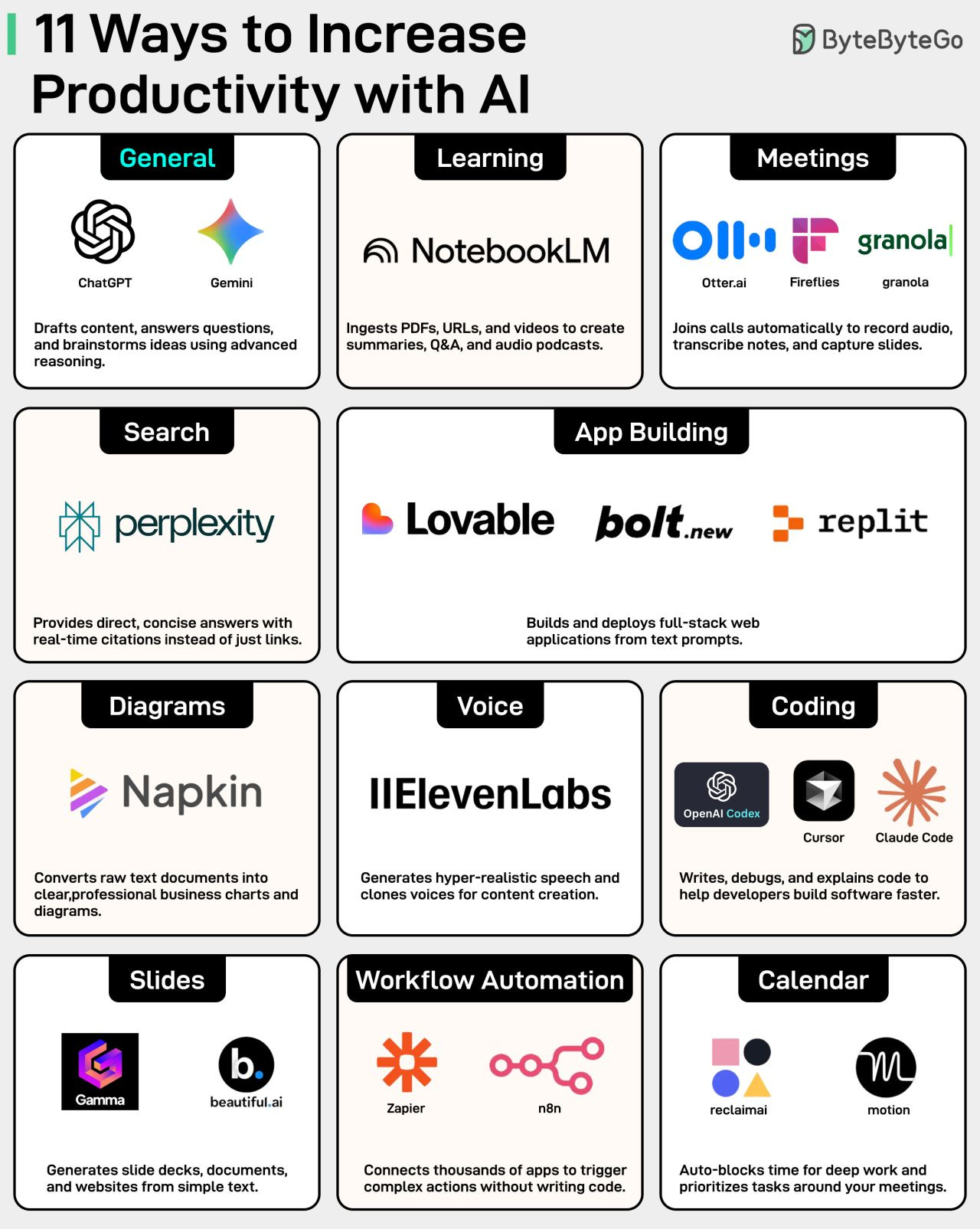
For example, instead of reading long technical blogs, you can upload them to Google’s NotebookLM and ask it to summarize the key points.
Or you can use Otter.ai to turn meeting transcripts into action items, decisions, and highlights.
Here is a list of 19 tools that can speed up your daily workflow across different areas. Save this for the next time you feel stuck getting started.
Over to you: What’s the underrated AI tool that others might not know about?
Al Topics to Learn before Taking Al/ML Interviews
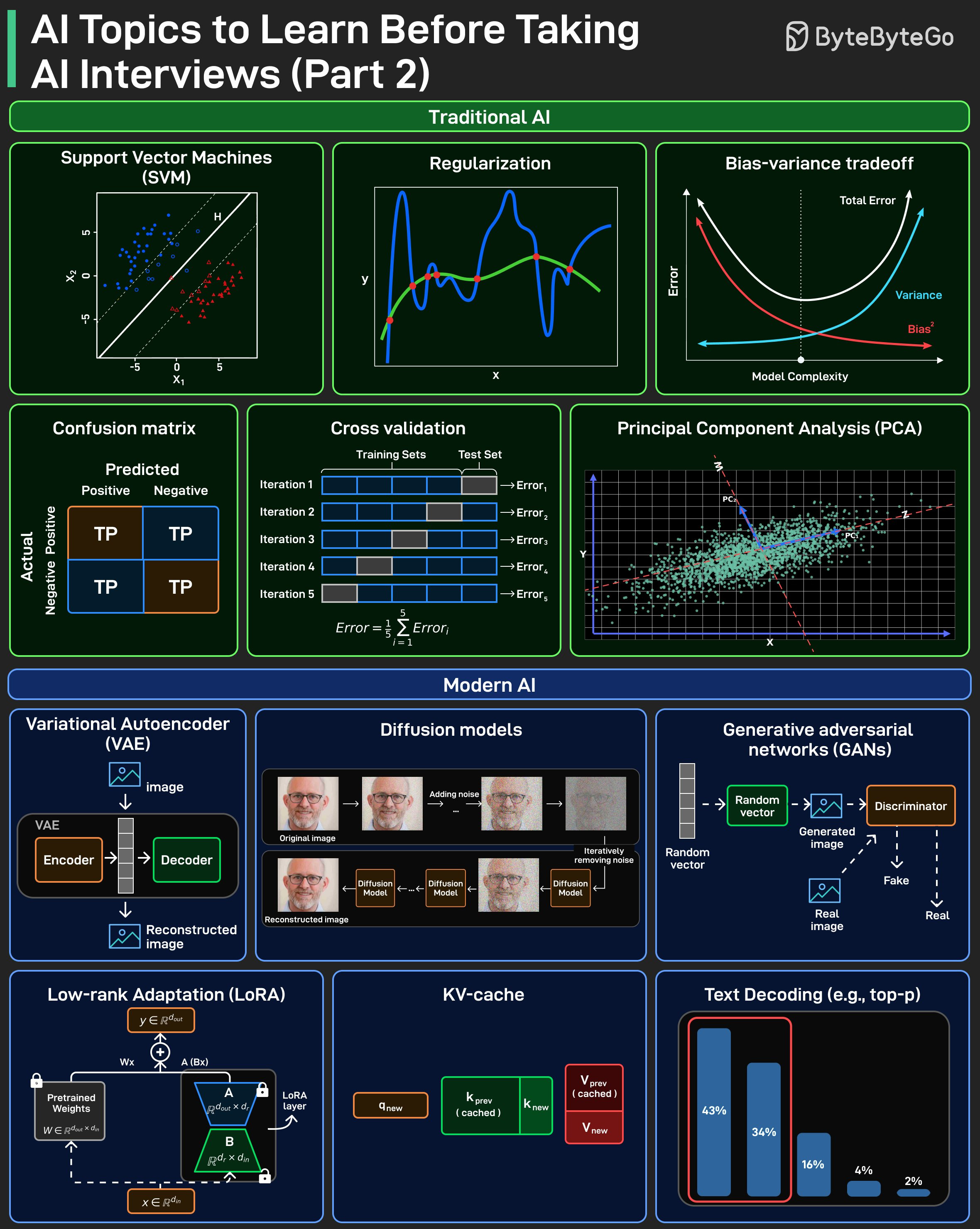
AI interviews often test fundamentals, not tools. This visual splits them into two buckets that show up repeatedly: Traditional AI and Modern AI.
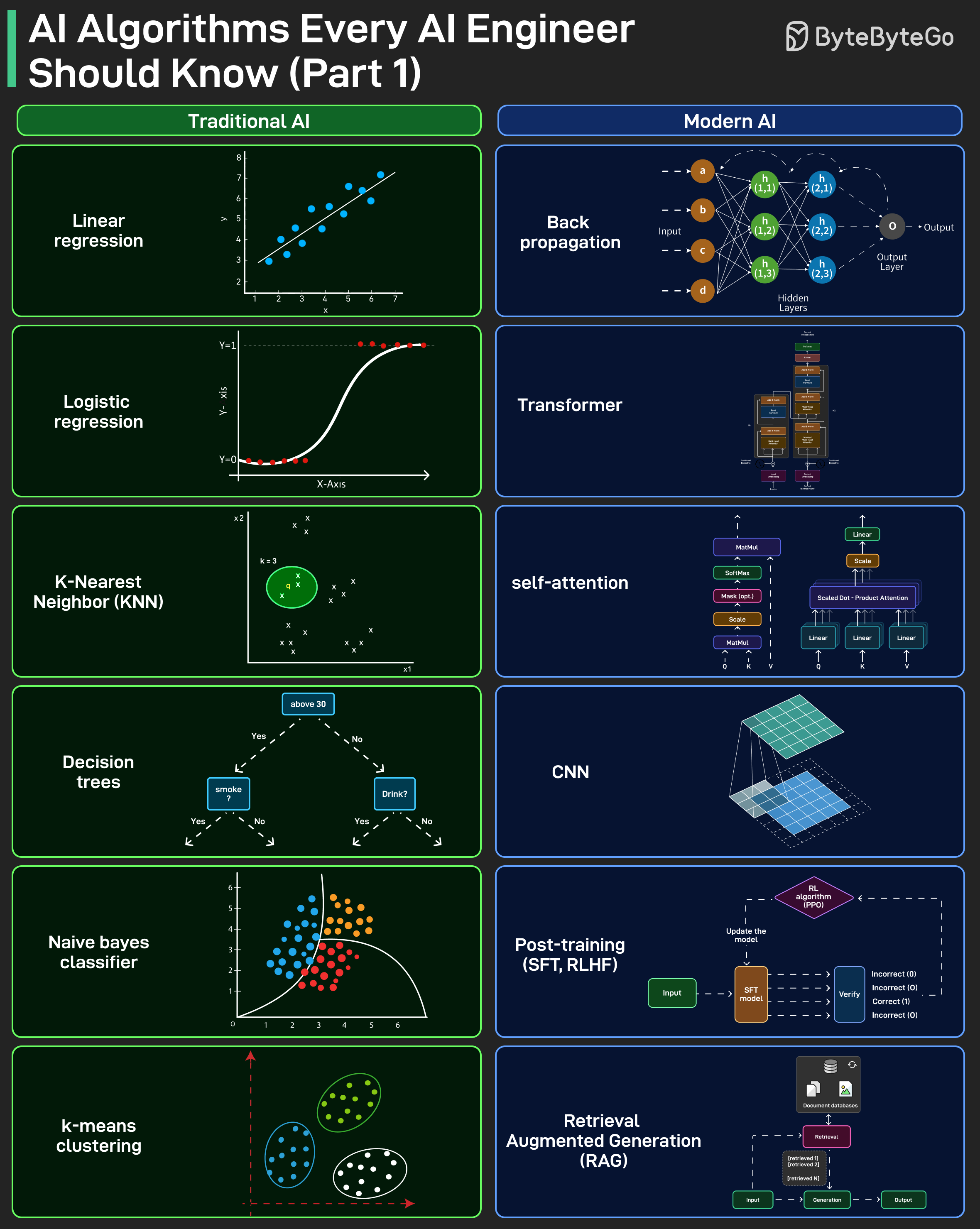
Traditional AI focuses on fundamental ML topics, mostly from before neural networks became dominant.
Modern AI focuses on neural network foundations and newer concepts like transformers, RAG, and post-training.
Interviewers generally expect you to know both. They expect you to explain how they work, when they break, and the trade-offs.
Use this as a checklist, and make sure you can explain each topic clearly before your next AI interview.
Over to you: which topic here do you find hardest to explain under interview pressure? What else is missing?
PostgreSQL versus MySQL
Built using the C language, PostgreSQL uses a process-based architecture.
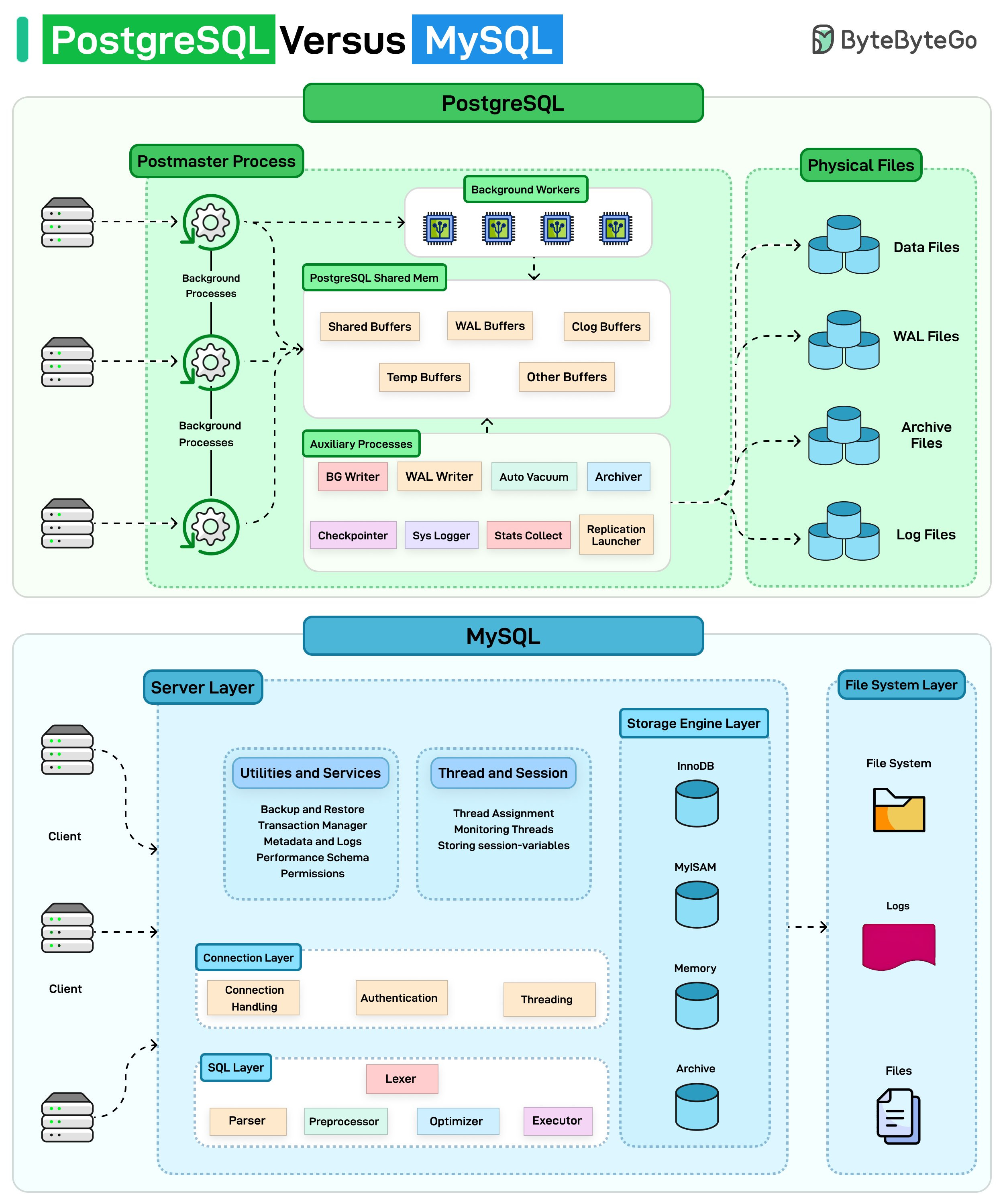
You can think of it like a factory with a manager (Postmaster) coordinating specialized workers. Each connection gets its own process and shares a common memory pool. Background workers handle tasks like writing data, vacuuming, and logging independently.
MySQL takes a thread-based approach. Imagine a single multi-tasking brain.
It uses a layered design with one server handling multiple connections through threads. The magic happens using pluggable storage engines (such as InnoDB, MyISAM) that you can swap based on your needs.
Over to you: Which database do you prefer?
Why AI Needs GPUs and TPUs?
When AI processes data, it’s essentially multiplying massive arrays of numbers. This can mean billions of calculations happening simultaneously.
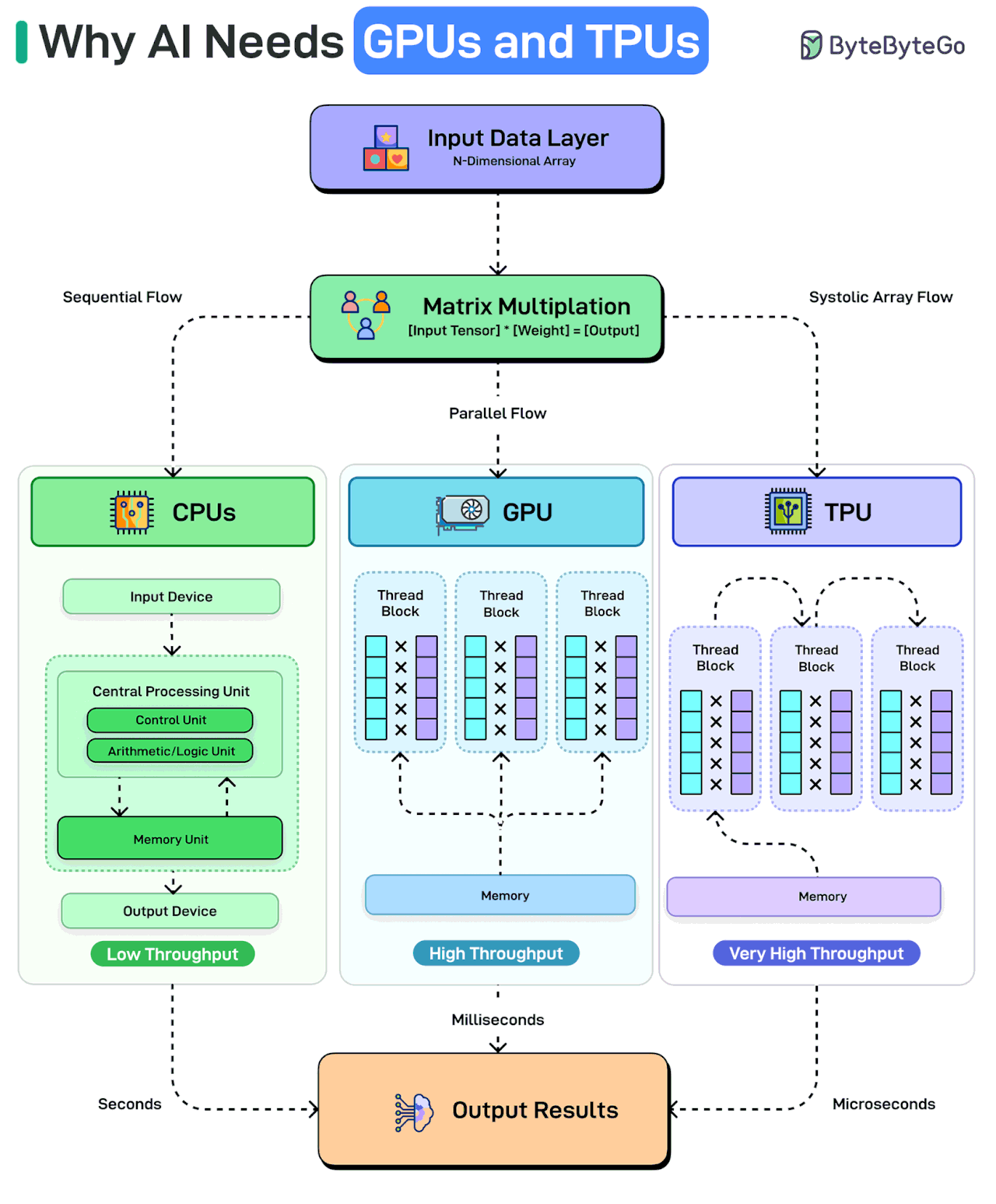
CPUs can handle such calculations sequentially. To perform any calculation, the CPU must fetch an instruction, retrieve data from memory, execute the operation, and write results back. This constant transfer of information between the processor and memory is not very efficient. It’s like having one very smart person solve a giant puzzle alone.
GPUs change the game with parallel processing. They split the work across hundreds of cores, reducing processing time to milliseconds.
However, TPUs take it even further with a systolic array architecture that’s thousands of times faster than CPUs. Each unit in a TPU multiplies its stored weight by incoming data, adds to a running sum flowing vertically, and passes both values to its neighbor. This cuts down on I/O costs and reduces processing times even further.
Over to you: What else will you add to explain the need for GPUs and TPUs to run AI workloads?
Network Protocols Explained
Every time you type a URL and hit Enter, half a dozen network protocols quietly come to life. We usually talk about HTTP or HTTPS, but that’s just the tip of the iceberg. Under the hood, the web runs on a carefully layered stack of protocols, each solving a very specific problem.
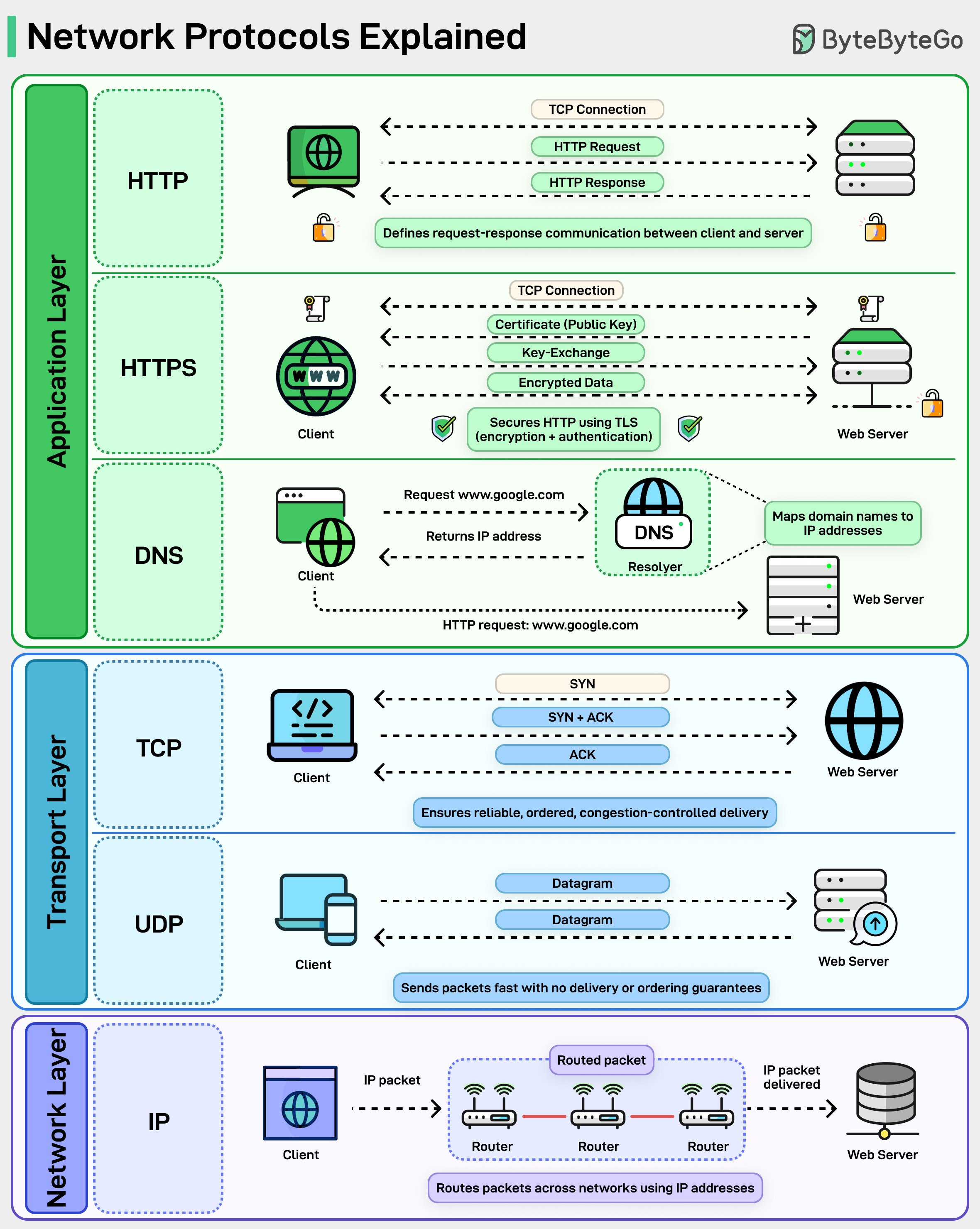
At the top is HTTP. It defines the request-response model that powers browsers, APIs, and microservices. Simple, stateless, and everywhere.
When security is added, HTTP becomes HTTPS, wrapping every request in TLS so data is encrypted and the server is authenticated before anything meaningful is exchanged.
Before any of that can happen, DNS steps in. Humans think in domain names, machines think in IP addresses. DNS bridges that gap, resolving names into routable IPs so packets know where to go.
Then comes the transport layer. TCP sets up a connection, performs the three-way handshake, retransmits lost packets, and ensures everything arrives in order. It’s reliable, but that reliability comes with overhead.
UDP skips all of that. No handshakes, no guarantees, just fast datagrams. That’s why it’s used for streaming, gaming, and newer protocols like QUIC.
At the bottom sits IP. This is the postal system of the internet. It doesn’t care about reliability or order. Its only job is to move packets from one network to another through routers, hop by hop, until they reach the destination.
Each layer is deliberately limited in scope. DNS doesn’t care about encryption. TCP doesn’t care about HTTP semantics. IP doesn’t care if packets arrive at all. That separation is exactly why the internet scales.
Over to you: When something breaks, which layer do you usually blame first, DNS, TCP, or the application itself?
These were some very useful infographics. Thanks.
NotebookLM is definitely one of the best tools I’ve used for my research.
But for me, the real breakthrough in AI use cases comes when you can connect it to all external tools via MCPs.
I never realized how significant the overhead of context switching is.