

✂️ Cut your QA cycles down to minutes with QA Wolf (Sponsored)

If slow QA processes bottleneck you or your software engineering team and you’re releasing slower because of it — you need to check out QA Wolf.
QA Wolf’s AI-native service supports web and mobile apps, delivering 80% automated test coverage in weeks and helping teams ship 5x faster by reducing QA cycles to minutes.
QA Wolf takes testing off your plate. They can get you:
Unlimited parallel test runs for mobile and web apps
24-hour maintenance and on-demand test creation
Human-verified bug reports sent directly to your team
Zero flakes guarantee
The benefit? No more manual E2E testing. No more slow QA cycles. No more bugs reaching production.
With QA Wolf, Drata’s team of 80+ engineers achieved 4x more test cases and 86% faster QA cycles.
This week’s system design refresher:
CPU vs GPU vs TPU
How OAuth 2 Works
How Distributed Tracing Works at the High Level?
How GPUs Work at a High Level
Top 4 API Gateway Use Cases
CPU vs GPU vs TPU
Why does the same code run fast on a GPU, slow on a CPU, and leave both behind on a TPU? The answer is architecture. CPUs, GPUs, and TPUs are designed for different workloads.
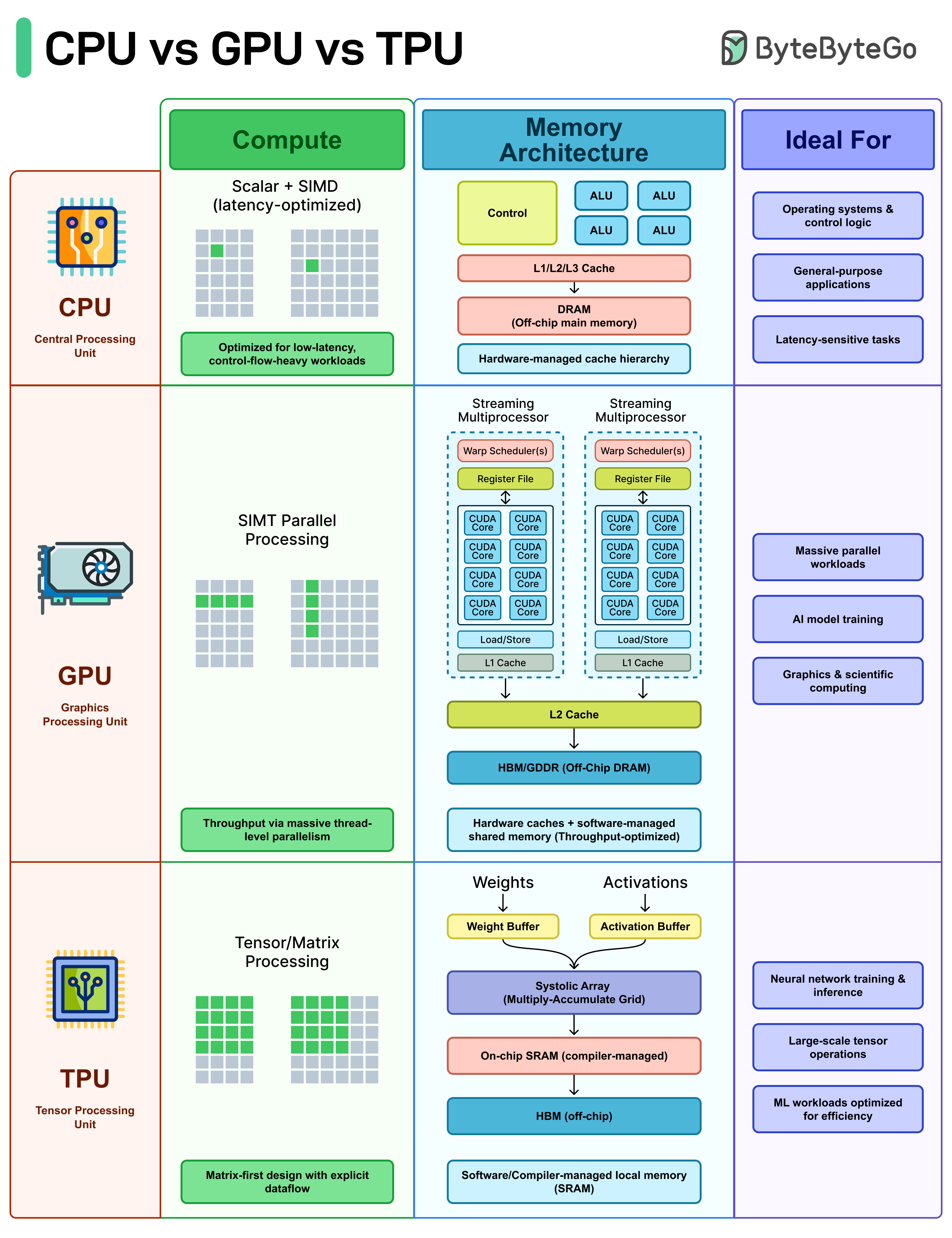
CPU (Central Processing Unit): The CPU handles general-purpose computing. It's built for low latency and complex control flow, branching logic, system calls, interrupts, and decision-heavy code.
Operating systems, databases, and most applications run on the CPU because they need that flexibility.
GPU (Graphics Processing Unit): GPUs work differently. Instead of a few cores, they spread the work across thousands of cores that execute the same instruction across huge datasets (SIMT/SIMD-style).
If your workload is repetitive like matrix math, pixel shading, tensor operations, GPUs handle it quickly.
TPU (Tensor Processing Unit): TPUs are specialized hardware. The architecture is designed around matrix multiplication using systolic arrays, with compiler-controlled dataflow and on-chip buffers for weights and activations.
They are fast at neural network training and inference, as long as the workload fits the hardware well.
Over to you: When designing systems today, how do you decide what runs on CPU vs GPU vs specialized accelerators?
How OAuth 2 Works
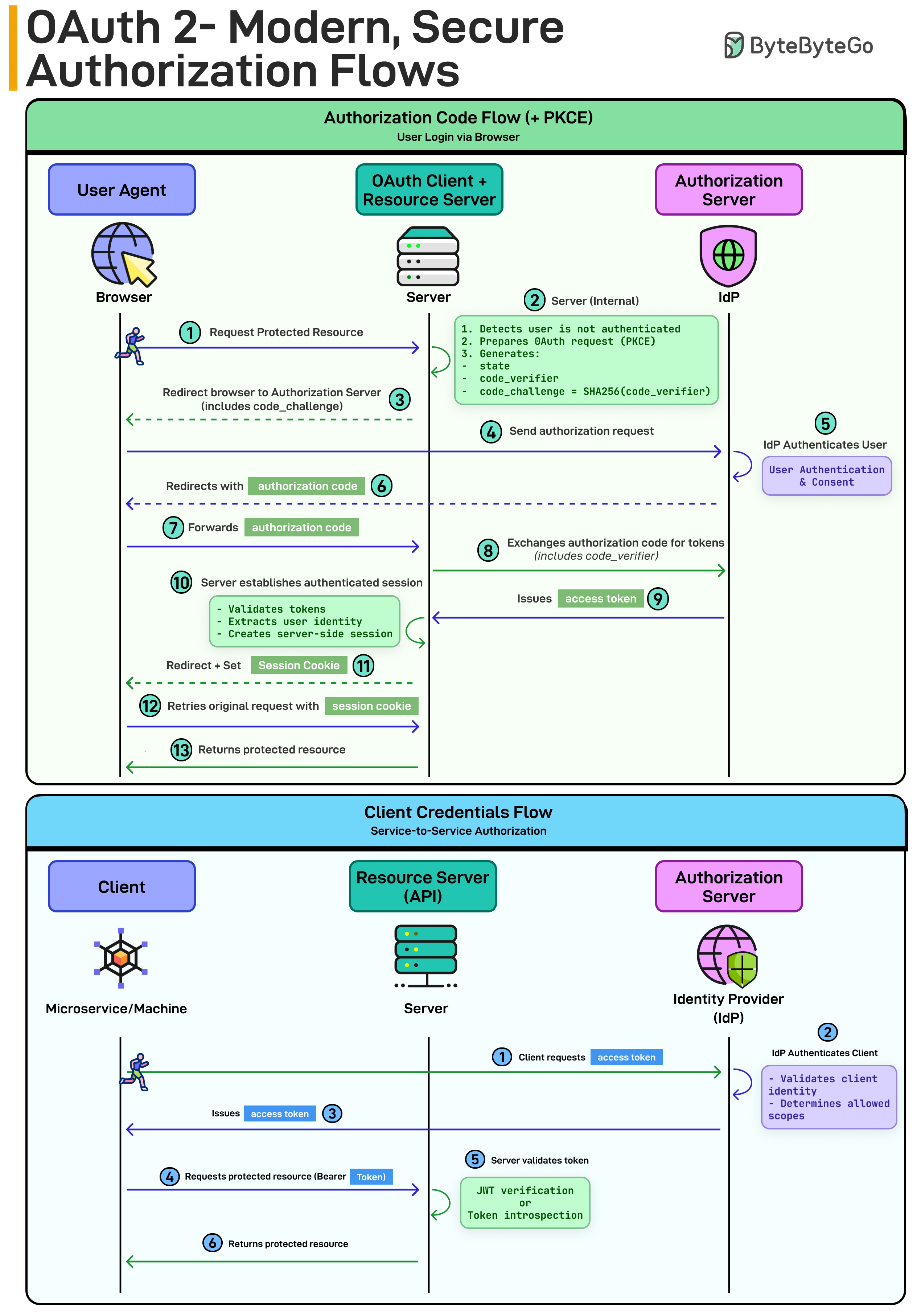
Authorization Code Flow (+ PKCE) - for user login:
User requests a protected resource
Server redirects to the Authorization Server (IdP)
Client generates a code_verifier and code_challenge (PKCE)
User authenticates and gives consent
IdP returns an authorization code
Server exchanges the code (with the verifier) for tokens
Server validates tokens and creates a session
PKCE prevents intercepted authorization codes from being reused. That’s why it’s the modern default for web and mobile apps.
Client Credentials Flow - for service-to-service:
A service requests an access token
The IdP authenticates the client
It issues a token
The service calls the API using a Bearer token
No user. Just machine identity.
How Distributed Tracing Works at the High Level?
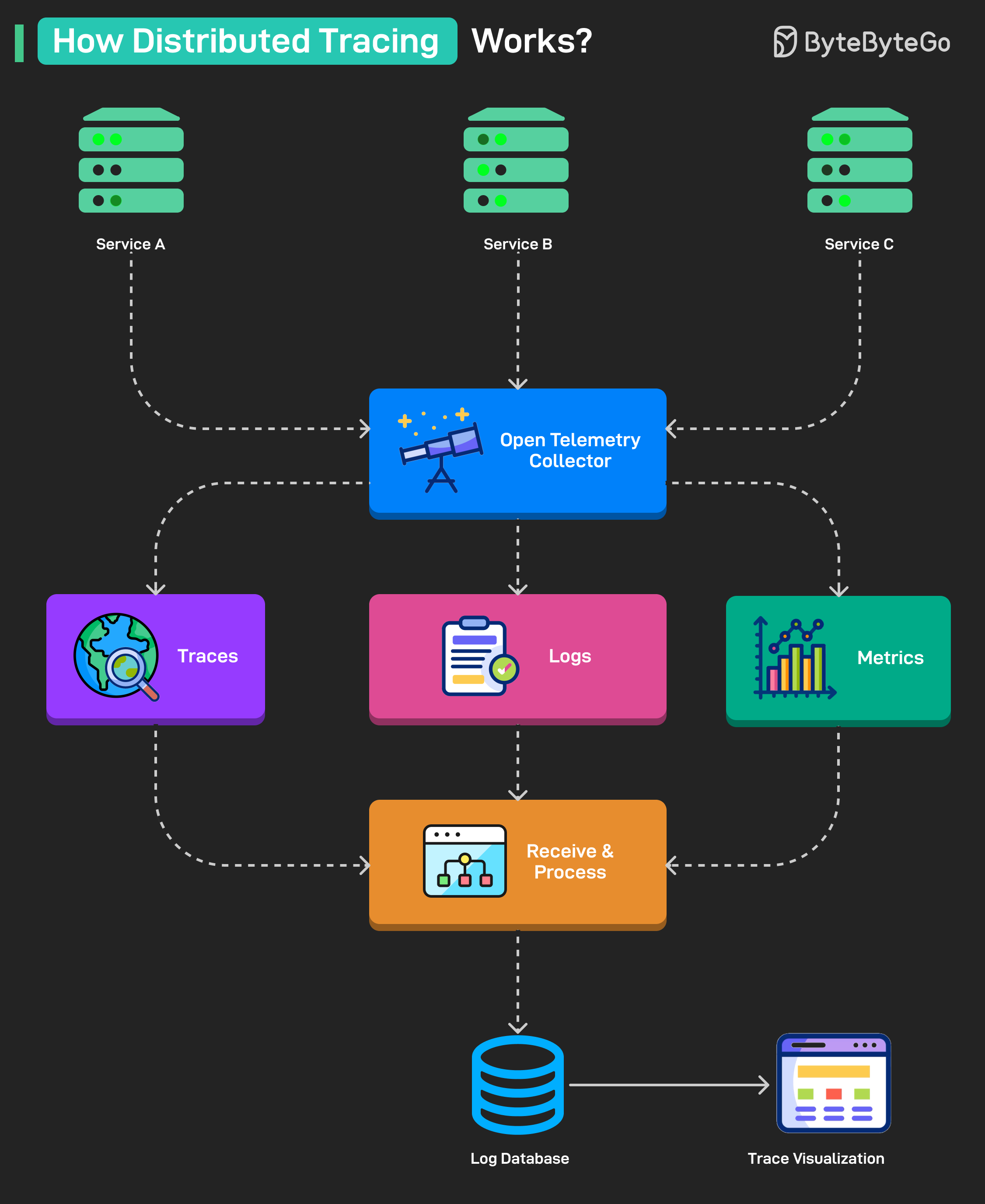
Services generate telemetry data (traces, logs, metrics) as they handle requests.
The OpenTelemetry Collector receives this data from all services in a unified format.
The collector splits the data into three streams: traces, logs, and metrics.
Each stream is sent to a Receive & Process unit that prepares it for storage and analysis.
Processed data is stored in a Log Database for querying and long-term access.
Data from the database is visualized through a Visualization dashboard for monitoring and debugging.
Over to you: What else will you add to better understand distributed tracing?
How GPUs Work at a High Level
When people say GPUs are powerful, what they really mean is this: GPUs are built for massive parallelism from the ground up.
Let’s break down what’s happening under the hood.
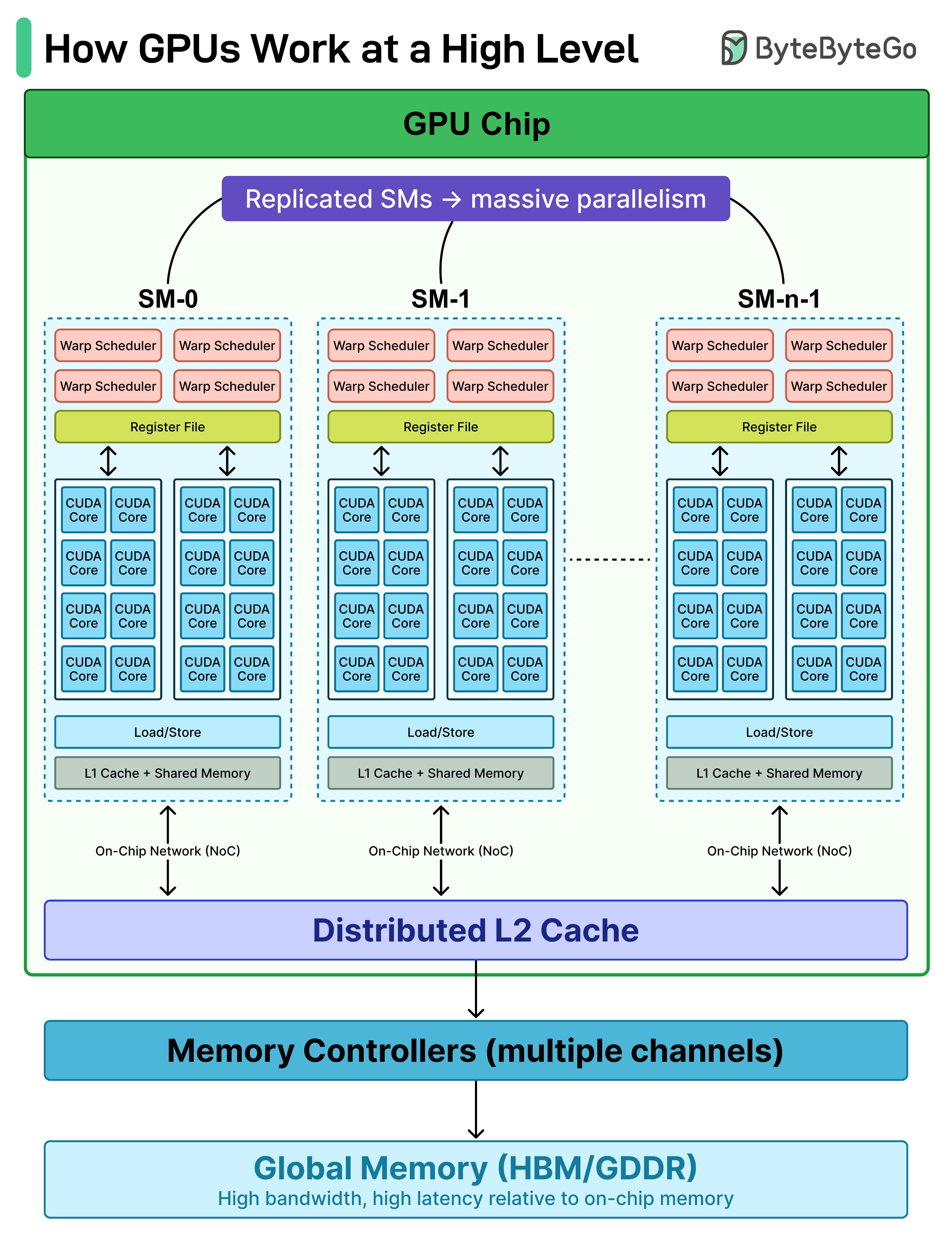
At the top level, a GPU chip is made up of many Streaming Multiprocessors (SMs). Think of SMs as mini parallel engines replicated across the chip. Instead of one big brain, you get dozens of smaller ones working simultaneously.
Inside each SM:
A Warp Scheduler decides which group of threads (a warp) runs next.
Dozens of CUDA Cores execute instructions in parallel.
A Register File stores thread-local data at ultra-low latency.
Load/Store units move data between registers and memory.
Texture units handle specialized memory operations.
L1 Cache provides fast, on-SM data access.
Each SM works independently, but they’re connected through an on-chip interconnect. Below that sits the L2 Cache, shared across all SMs. This is the coordination layer. If one SM misses in L1, it checks L2 before going to global memory.
Then come the Memory Controllers, which interface with Global Memory. This is where things get interesting:
Extremely high bandwidth
Much higher latency than on-chip memory
That’s why GPUs rely on massive parallelism. While some threads wait on memory, thousands of others keep executing.
Top 4 API Gateway Use Cases
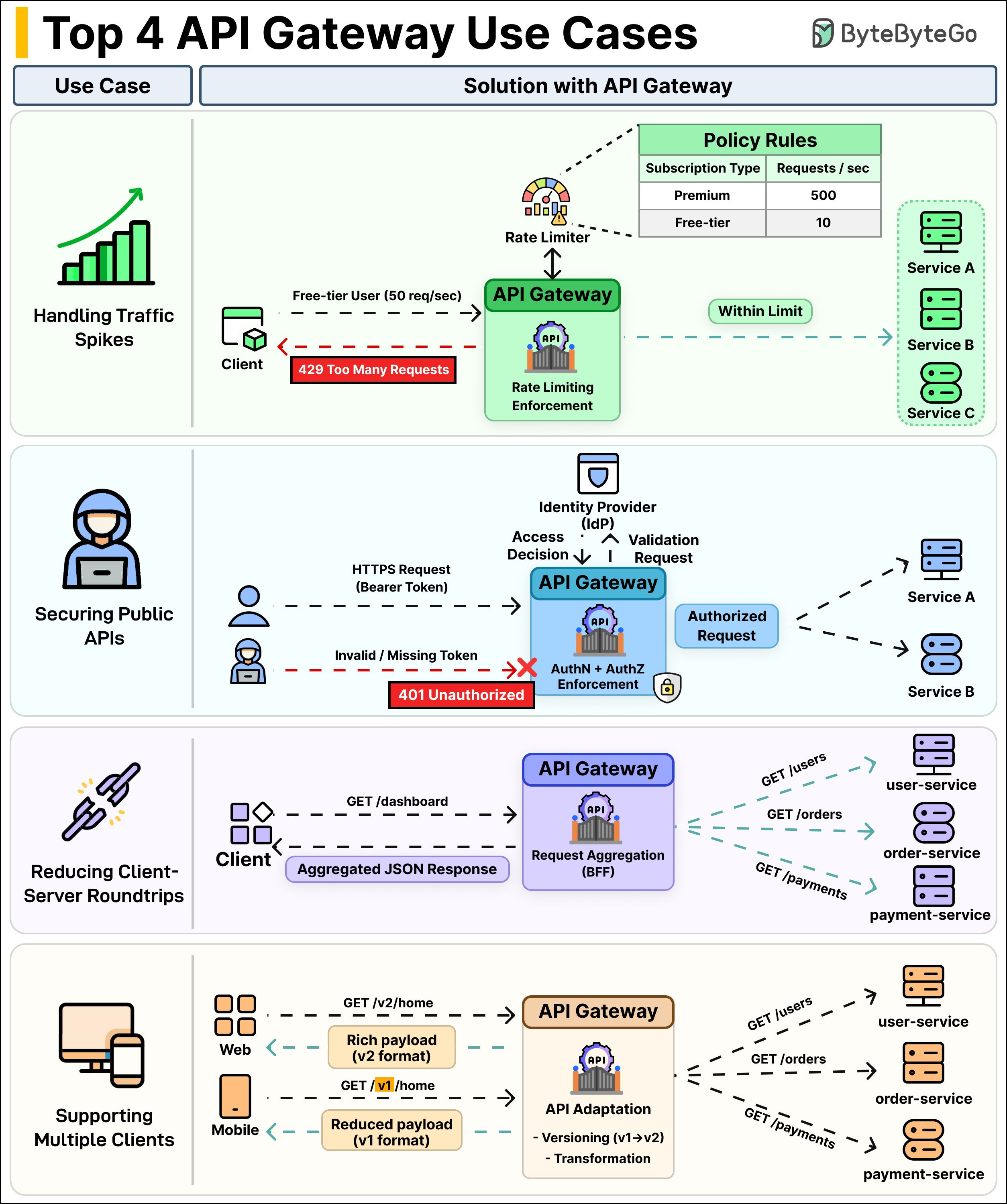
An API Gateway sits between your clients and your services, and it does a lot more than just routing. Here are four use cases where it actually matters:
Handling Traffic Spikes: Without rate limiting, one misbehaving client can take down your entire system. The API Gateway enforces rate limits based on policies you define, such as per user, per IP, per subscription tier and so on. Exceed the limit? You get a 429 Too Many Requests.
Your backend services never even see that traffic. They stay healthy while the gateway takes the hit.Securing Public APIs: Every request hits the gateway first. It checks the bearer token, validates it against the Identity Provider (IdP), and makes the access decision right there. No need to duplicate auth logic across every microservice. The gateway handles AuthN and AuthZ in one place.
Reducing Client-Server Roundtrips: A dashboard page might need user data, order history, and payment info. Without a gateway, the client makes three separate calls. With request aggregation, the client sends one GET /dashboard request. The gateway fans out to user-service, order-service, and payment-service internally, then combines everything into a single JSON response back to the client.
Supporting Multiple Clients: Web and mobile apps don't need the same data. A web client might call GET /v2/home and get a rich payload with full details. A mobile client hits GET /v1/home and gets a lighter response that doesn't burn through data.
The gateway handles versioning and payload transformation so your backend services don't need to know which client is calling.
Over to you: Are you running an API gateway in production? What's the biggest win it gave you?
One thing to note is that modern GPU's include Tensor units. Most of the Ai work is sent there, so your diagram is too simplified. Perhaps you can do a followup to this and map out the GB300.