

On-call Best Practices for SREs (Sponsored)

On-call shouldn’t feel like constant firefighting. This guide from Datadog breaks down how high-performing SRE teams reduce alert fatigue, streamline incident response, and design rotations that don’t burn engineers out.
You’ll learn how to:
Cut alert noise by tying signals to real user impact
Improve response with clear roles and smarter escalation paths
Turn incidents into feedback loops that improve system reliability
This week’s system design refresher:
What’s Next in AI: 5 Trends to Watch in 2026 (Youtube video)
Git Workflow: Essential Commands
How can Cache Systems go wrong?
Top Cyber Attacks Explained
How AI Actually Generates Images
What’s Next in AI: 5 Trends to Watch in 2026
Git Workflow: Essential Commands
Git has a lot of commands. Most workflows use a fraction of them. The part that causes problems isn't the commands themselves, it's not knowing where your code sits after running one.
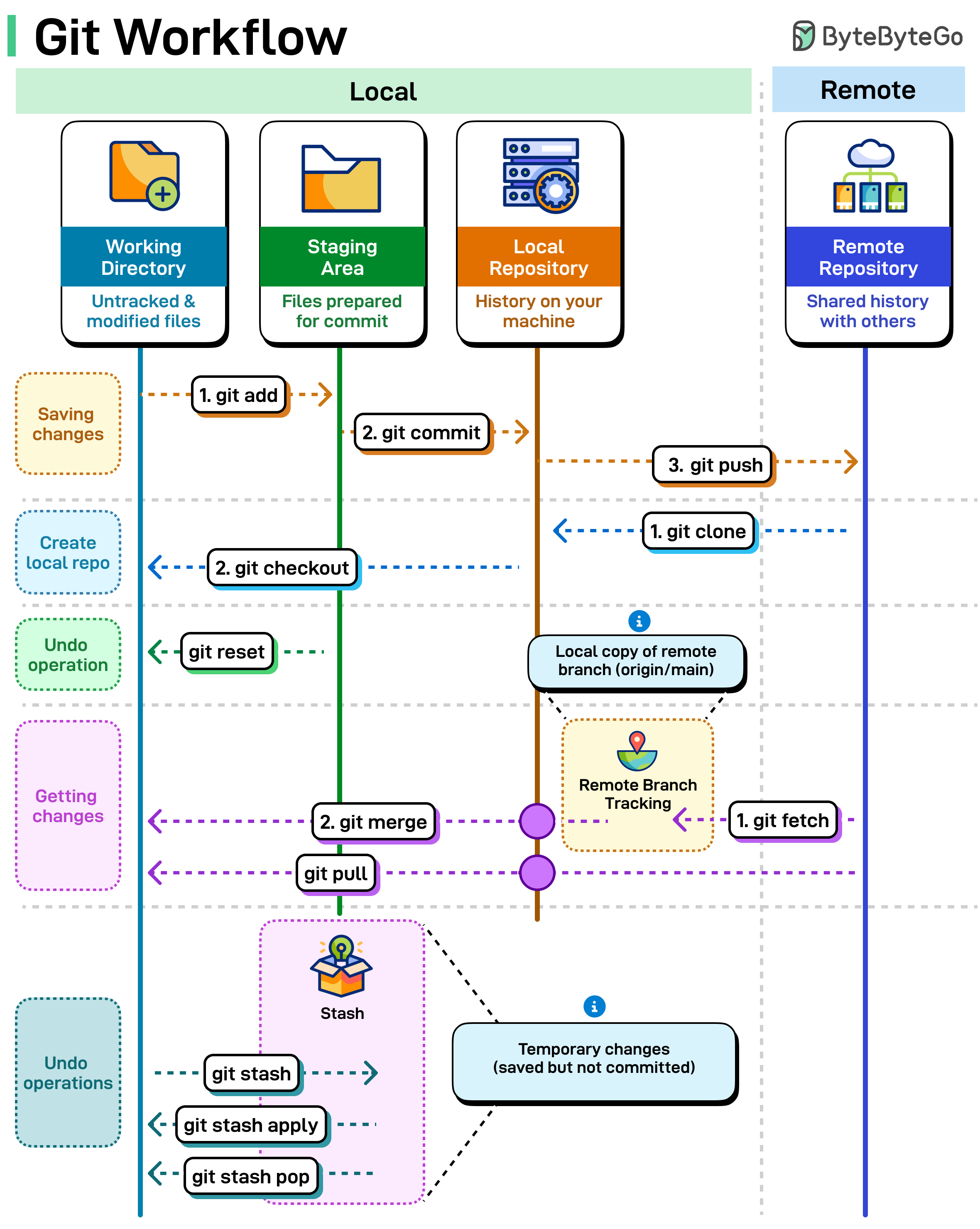
Working directory, staging area, local repo, remote repo. Each command moves code between these. Here's what each one does.
Saving Your Work: “git add” moves files from your working directory to the staging area. “git commit” saves those staged files to your local repository. “git push” uploads your commits to the remote repository
Getting a Project: “git clone” pulls down the entire remote repository to your machine. “git checkout” switches you to a specific branch.
Syncing Changes: “git fetch” downloads updates from remote but doesn't change your files. “git merge” integrates those changes. “git pull” does both at once.
The Safety Net: “git stash” is your undo button. It temporarily saves your uncommitted changes so you can switch contexts without losing work. “git stash apply” brings them back. “git stash pop” brings them back and deletes the stash.
Crawl an Entire Website With a Single API Call (Sponsored)

Building web scrapers for RAG pipelines or model training usually means managing fragile fleets of headless browsers and complex scraping logic. Cloudflare’s new Browser Rendering endpoint changes that. You can now crawl an entire website asynchronously with a single API call. Submit a starting URL, and the endpoint automatically discovers pages, renders them, and returns clean HTML, Markdown, or structured JSON. It fully respects robots.txt out of the box, supports incremental crawling to reduce costs, and includes a fast static mode. Stop managing scraping infrastructure and get back to building your application.
How can Cache Systems go wrong?
The diagram below shows 4 typical cases where caches can go wrong and their solutions.
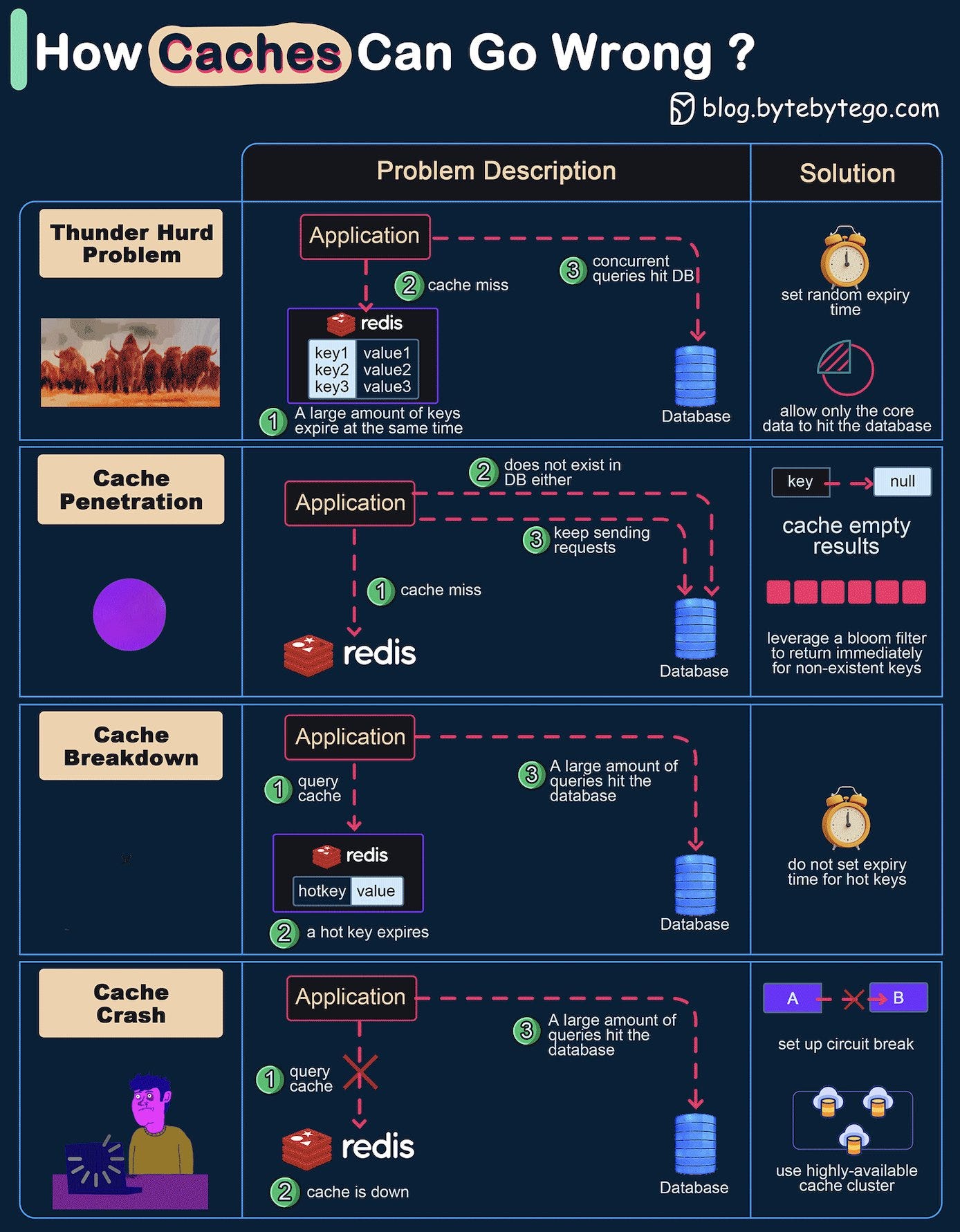
Thunder herd problem
This happens when a large number of keys in the cache expire at the same time. Then the query requests directly hit the database, which overloads the database.
There are two ways to mitigate this issue: one is to avoid setting the same expiry time for the keys, adding a random number in the configuration; the other is to allow only the core business data to hit the database and prevent non-core data to access the database until the cache is back up.Cache penetration
This happens when the key doesn’t exist in the cache or the database. The application cannot retrieve relevant data from the database to update the cache. This problem creates a lot of pressure on both the cache and the database.
To solve this, there are two suggestions. One is to cache a null value for non-existent keys, avoiding hitting the database. The other is to use a bloom filter to check the key existence first, and if the key doesn’t exist, we can avoid hitting the database.Cache breakdown
This is similar to the thunder herd problem. It happens when a hot key expires. A large number of requests hit the database.
Since the hot keys take up 80% of the queries, we do not set an expiration time for them.Cache crash
This happens when the cache is down and all the requests go to the database.
There are two ways to solve this problem. One is to set up a circuit breaker, and when the cache is down, the application services cannot visit the cache or the database. The other is to set up a cluster for the cache to improve cache availability.
Over to you: Have you met any of these issues in production?
Top Cyber Attacks Explained
Most attacks follow a sequence of steps. Understanding each step makes it easier to spot where detection or prevention is possible.
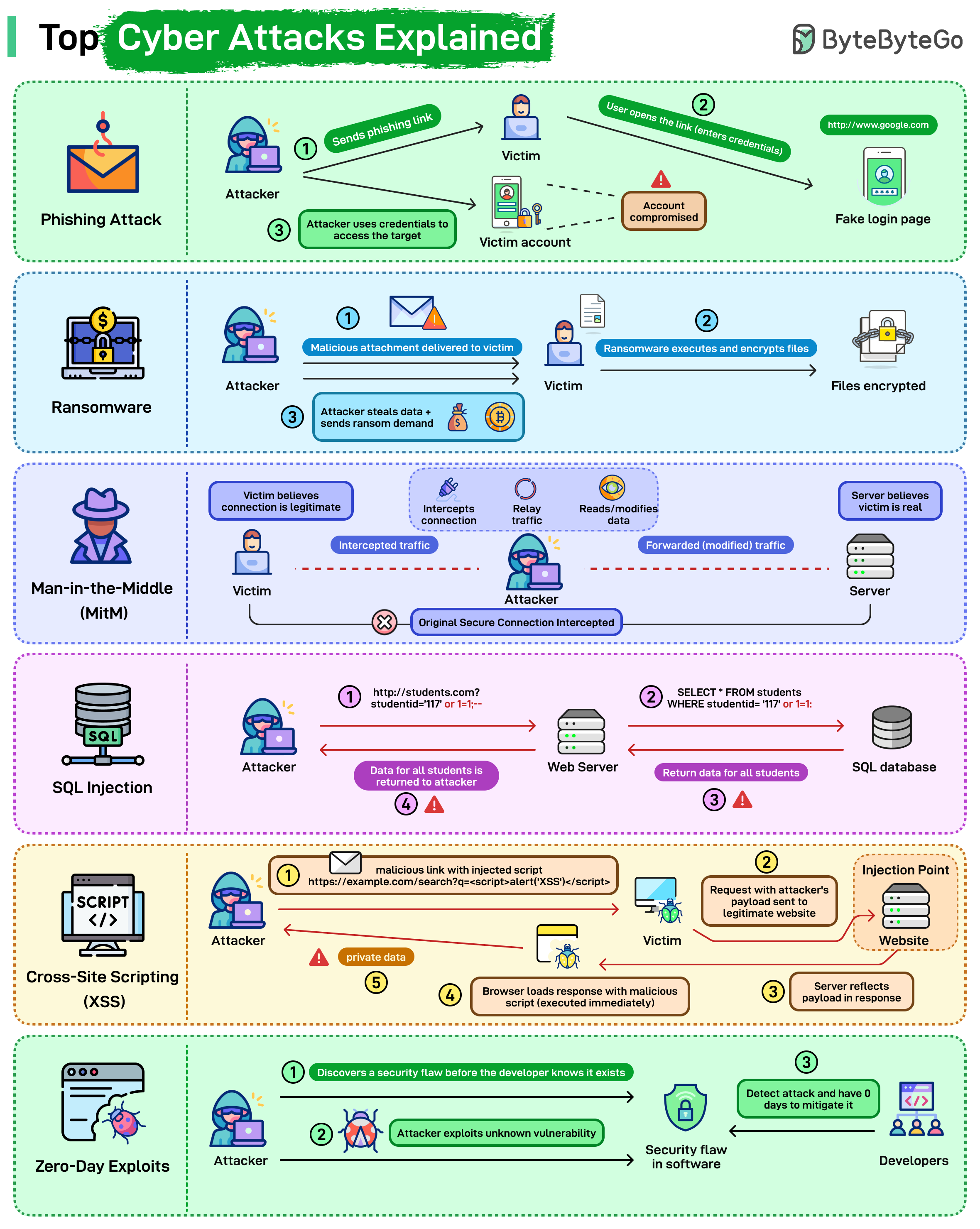
Here’s a quick breakdown of how the most common attacks unfold:
Phishing: The attacker sends a fake link pointing to a spoofed login page. The victim enters credentials, the attacker captures them, and uses them to access the real system.
Ransomware: The victim opens a malicious attachment or file. The ransomware encrypts local data and demands payment to restore access. Files stay locked until the ransom is paid or a backup is restored.
Man-in-the-Middle (MitM): The attacker positions themselves between the victim and the server, intercepting traffic in both directions. Neither side detects the interception. The attacker can read or modify data as it passes through.
SQL Injection: Malicious SQL gets inserted into an input field, for example, studentId=117 OR 1=1. The database executes it as a valid query and returns data it shouldn't. A single vulnerable input field can expose an entire table.
Cross-Site Scripting (XSS): A malicious script gets injected into a legitimate page. When another user loads that page, their browser executes the script. Session tokens, cookies, and private data can be stolen this way.
Zero-Day Exploits: The attacker finds a vulnerability the vendor hasn't discovered yet. No patch exists. The attack runs until the vendor identifies the issue and ships a fix, which can take days or weeks.
Over to you: Which of these attacks have you seen most often in real environments, and which one do you think is the hardest to defend against today?
How AI Actually Generates Images
There are two main ways modern models generate images: auto-regressive and diffusion.
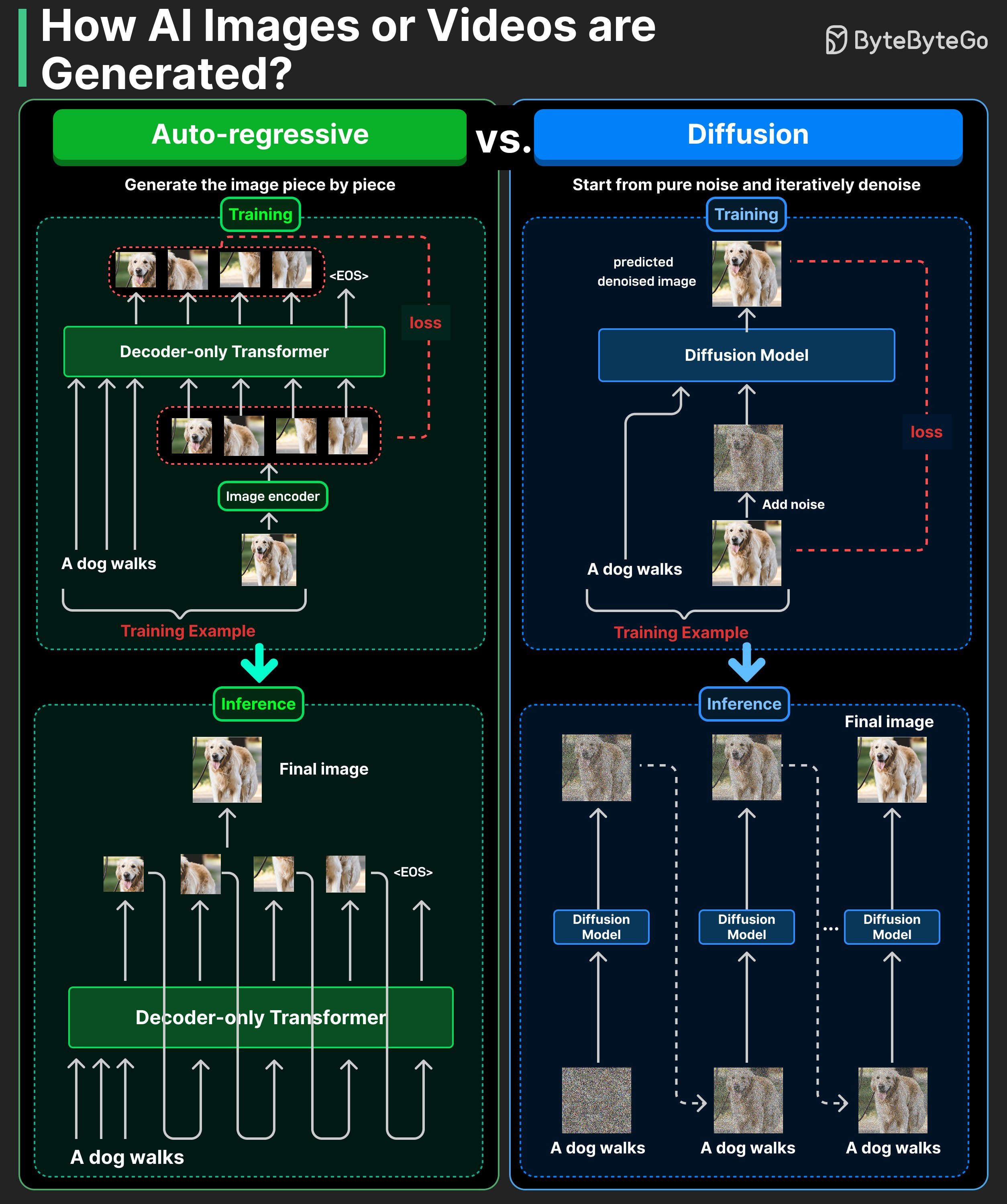
Auto-regressive models generate an image piece by piece.
During training, an image is split into tokens, and the model learns to predict them one by one, just like text. It minimizes next-token prediction loss over image tokens.
At inference time, the model predicts one image token at a time until the full image is formed.
Diffusion models start from pure noise and iteratively denoise it.
During training, we add noise to real images and train the model to predict that noise.
At inference time, the model starts from random noise and iteratively denoises it into a clean image.
Auto-regressive is like drawing a dog stroke by stroke in sequence. Diffusion is like starting with a rough sketch (coarse shapes), then progressively adding detail and cleaning up the picture.
Over to you: Which text-to-image model do you find most powerful?
Don't forget this advanced git resource -> https://git-man-page-generator.lokaltog.net