

✂️ Cut your QA cycles down to minutes with QA Wolf (Sponsored)

If slow QA processes bottleneck you or your software engineering team and you’re releasing slower because of it — you need to check out QA Wolf.
QA Wolf’s AI-native service supports web and mobile apps, delivering 80% automated test coverage in weeks and helping teams ship 5x faster by reducing QA cycles to minutes.
QA Wolf takes testing off your plate. They can get you:
Unlimited parallel test runs for mobile and web apps
24-hour maintenance and on-demand test creation
Human-verified bug reports sent directly to your team
Zero flakes guarantee
The benefit? No more manual E2E testing. No more slow QA cycles. No more bugs reaching production.
With QA Wolf, Drata’s team of 80+ engineers achieved 4x more test cases and 86% faster QA cycles.
This week’s system design refresher:
Top 12 GitHub AI Repositories
Where Different Types of Tests Fit
How Single Sign-On (SSO) Works
How LLMs Use AI Agents with Deep Research
How Hackers Steal Passwords
Top 12 GitHub AI Repositories
These repositories were selected based on their overall popularity and GitHub stars.
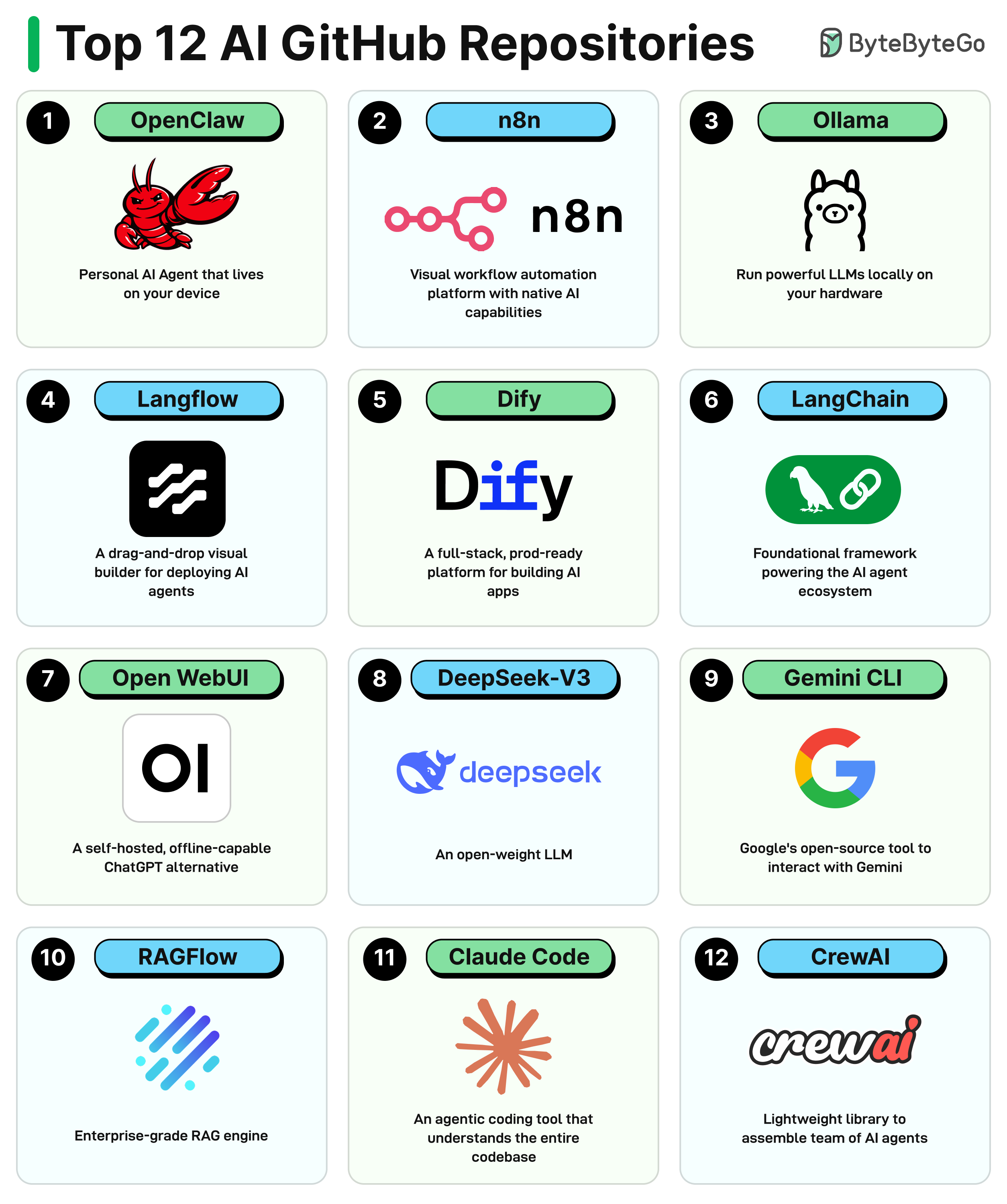
OpenClaw: The always-on personal AI agent that lives on your device and talks to you through WhatsApp, Telegram, and 50+ other platforms.
N8n: A visual workflow automation platform with native AI capabilities and 400+ integrations.
Ollama: Run powerful LLMs locally on your own hardware with a single command.
Langflow: A drag-and-drop visual builder for designing and deploying AI agents and RAG workflows.
Dify: A full-stack prod-ready platform for building and deploying AI-powered apps and agentic workflows.
LangChain: The foundational framework powering the AI agent ecosystem with modular building blocks.
Open WebUI: A self-hosted, offline-capable ChatGPT alternative
DeepSeek-V3: An open-weight LLM that rivals GPT on benchmarks and is free for commercial use.
Gemini CLI: Google’s open-source tool to interact with the Gemini model right from your terminal.
RAGFlow: An enterprise-grade RAG engine that grounds AI answers in real documents with citation tracking.
Claude Code: An agentic coding tool that understands your entire codebase and executes engineering tasks from the terminal.
CrewAI: A lightweight Python framework for assembling teams of role-playing AI agents to collaborate on tasks.
Over to you: Which other repository will you add to the list?
Where Different Types of Tests Fit
Writing code is easy now, but testing code is hard.
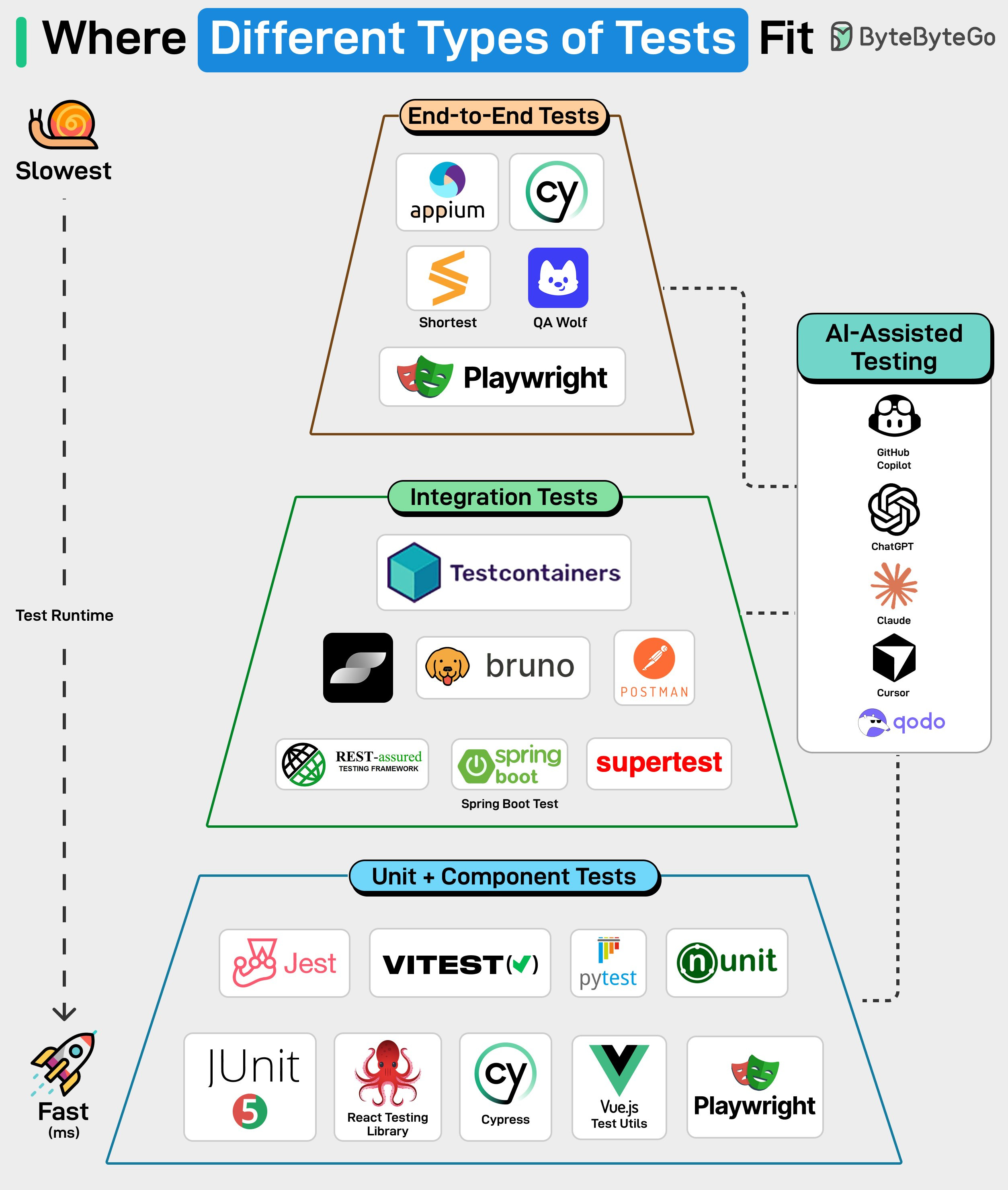
Let’s take a look at where different types of tests fit.
Unit + Component Tests: These test individual functions or UI components in isolation. They’re fast, inexpensive to run, and easy to maintain. Tools like Jest, Vitest, JUnit, pytest, React Testing Library, Cypress, Vue Test Utils, and Playwright are commonly used here, and most of your test coverage should come from this layer.
Integration Tests: These verify communication between services, APIs, and databases. Testcontainers, Postman, Bruno, Supertest. Unit tests won't catch a broken API contract, but integration tests will.
End-to-End Tests: Tools like Cypress, Playwright, Appium, and QA Wolf validate full user journeys across the whole system. They are expensive to run and maintain, which is why fewer tests live in this layer.
AI tools are becoming part of the testing workflow. Tools like GitHub Copilot, ChatGPT, Claude, Cursor, and Qodo can help draft tests, update suites, and spot gaps in coverage. They take care of repetitive tasks and give engineers more time to focus on the edge cases that may arise in production.
Over to you: How do you test your code?
Crawl an Entire Website With a Single API Call (Sponsored)

Building web scrapers for RAG pipelines or model training usually means managing fragile fleets of headless browsers and complex scraping logic. Cloudflare’s new Browser Rendering endpoint changes that. You can now crawl an entire website asynchronously with a single API call. Submit a starting URL, and the endpoint automatically discovers pages, renders them, and returns clean HTML, Markdown, or structured JSON. It fully respects robots.txt out of the box, supports incremental crawling to reduce costs, and includes a fast static mode. Stop managing scraping infrastructure and get back to building your application.
How Single Sign-On (SSO) Works
Single Sign-On (SSO) makes access feel effortless. One login, and you’re inside Slack and several other internal tools without logging in again.
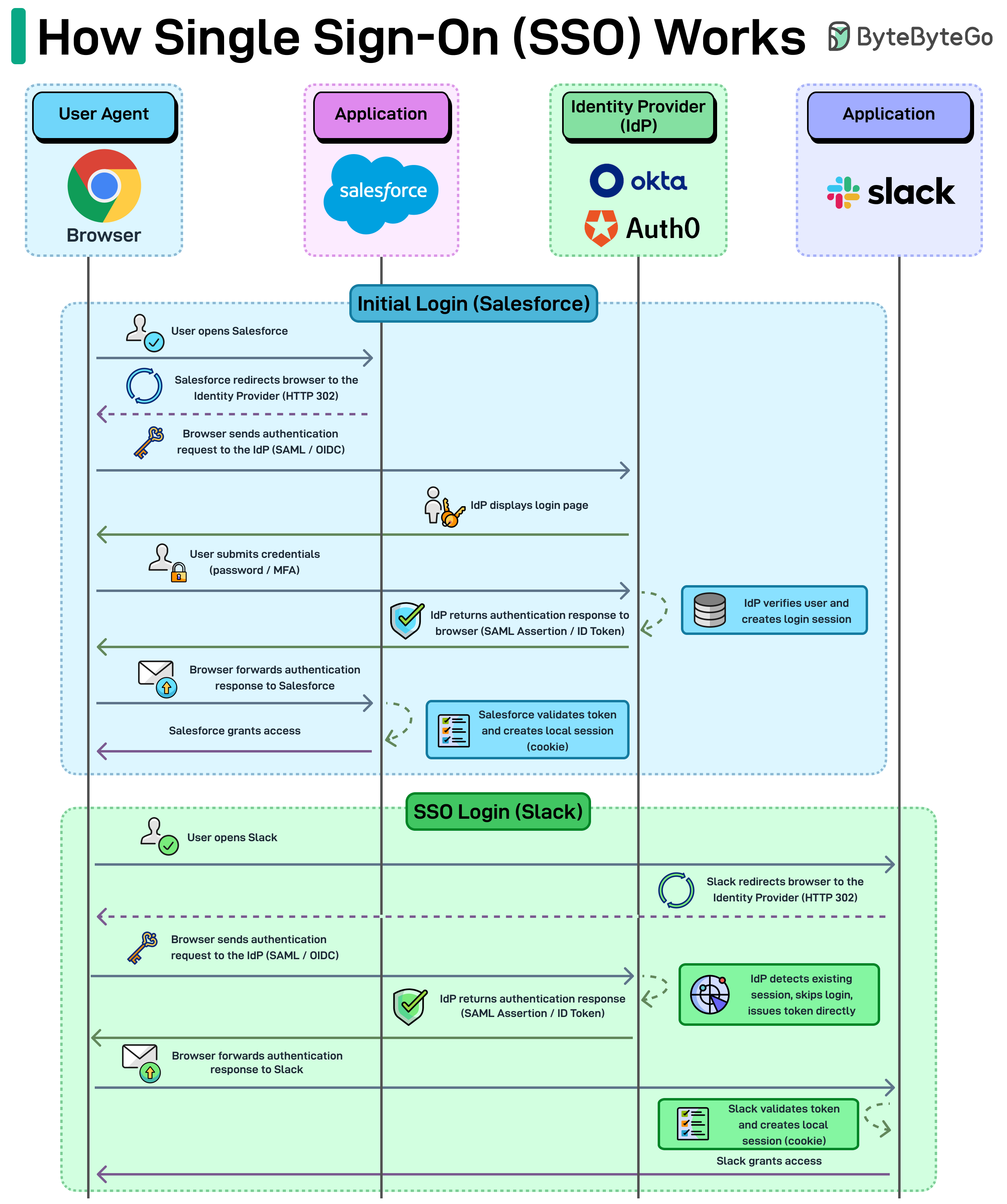
But there’s a lot going on behind that single login.
Step 1: The first login
A user opens an application, for example Salesforce.
Instead of asking for credentials directly, Salesforce redirects the browser to an Identity Provider (IdP) like Okta or Auth0. This redirect usually happens through an HTTP 302 response.
The browser then sends an authentication request to the IdP using protocols such as SAML or OpenID Connect (OIDC).
The IdP presents the login page. The user enters their credentials, sometimes along with MFA.
Once verified, the IdP creates a login session and sends back an authentication response (a SAML assertion or ID token) through the browser.
The browser forwards that response back to Salesforce.
Salesforce validates the token and creates its own local session, typically stored as a cookie, and grants access.
Step 2: The SSO magic
Now the user opens another app, say Slack.
Slack also redirects the browser to the same identity provider. But the IdP checks and sees the user already has an active session. So it skips the login step entirely and issues a new authentication token.
The browser forwards that token to Slack.
Slack validates it, creates its own session cookie, and grants access.
The key idea behind SSO is simple. Applications don’t authenticate users themselves. They rely on a central identity provider to verify the user and issue a token that other systems trust.
Over to you: What SSO solutions have you used, and which is your favorite?
How LLMs Use AI Agents with Deep Research
When you ask an LLM such as Claude, ChatGPT, or Gemini to do deep research on a complex topic, it’s not just one model doing all the work. It’s a coordinated system of specialized AI agents.
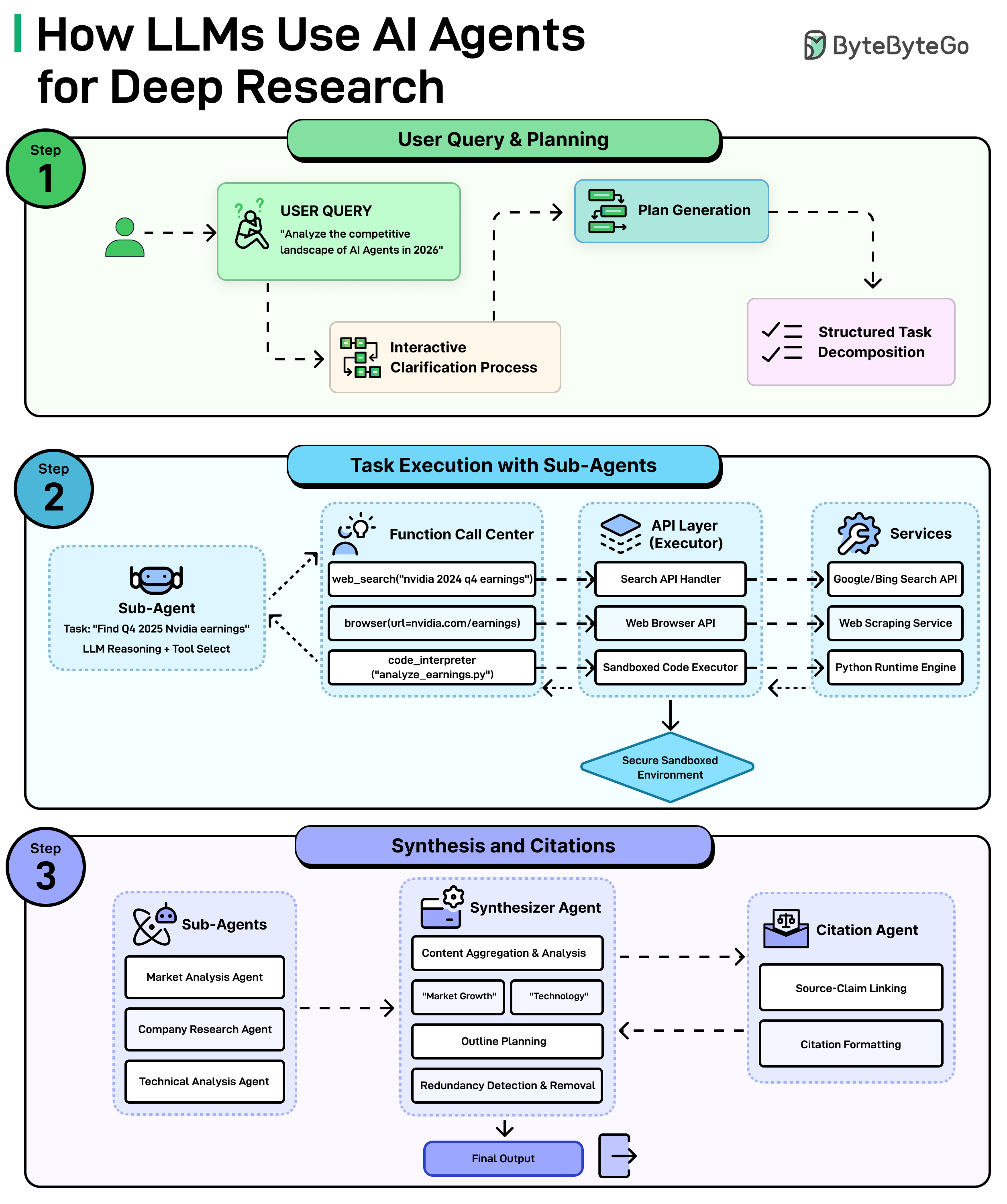
Here’s how it works:
Step 1: Understanding The Question and Making a Plan
It all starts with the query, something like “Analyze the competitive landscape of AI agents in 2026. The system doesn’t just dive in blindly. First, it may ask clarifying questions to understand exactly what is needed. Then, it generates a plan and breaks the big question down into smaller and manageable tasks.
Step 2: Sub-Agents Get to Work
Each small task gets assigned to a sub-agent, which is basically a mini AI worker with a specific job. For example, one sub-agent might be tasked with finding the latest Nvidia earnings. It figures out which tools to use, such as searching the web, browsing a specific page, or even run code to analyze data. All of this happens through a secure layer of APIs and services that connect the AI to the outside world.
Step 3: Putting it All Together
Once all the sub-agents finish their tasks, a Synthesizer Agent takes over. It aggregates everything, identifies key themes, plans an outline, and removes any redundant or duplicate information. At the same time, a Citation Agent makes sure every claim is linked back to its source and properly formatted. The end result is a polished, well-cited final output ready for use.
Over to you: Have you tried deep research in any LLM?
How hackers steal passwords
Most password attacks don't involve sophisticated hacking. They rely on automation, reused credentials, and predictable human behavior.
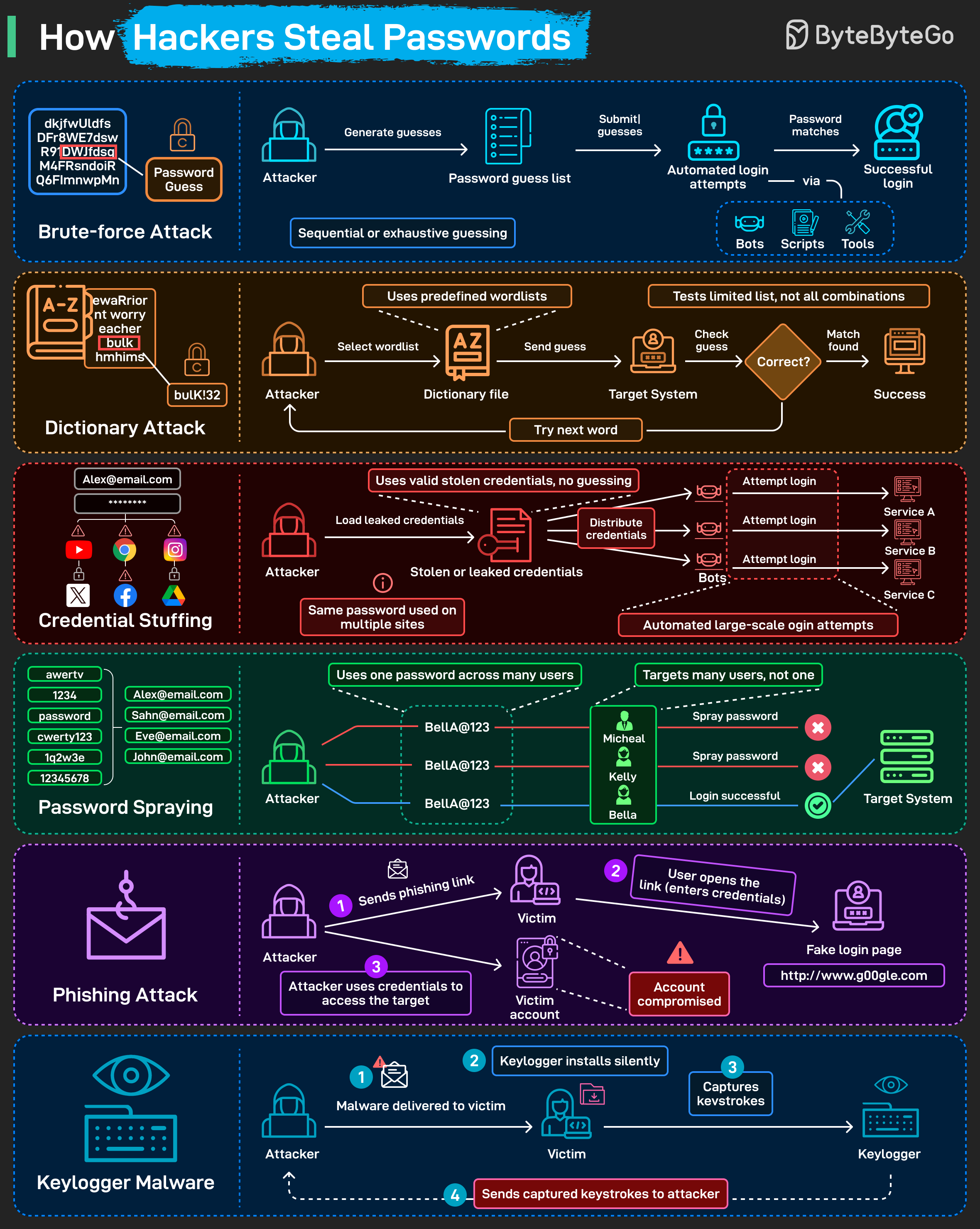
Here are six common techniques:
Brute-force attack: Automated tools cycle through password combinations at high speed until one works. No logic involved, just volume.
Dictionary attacks: Instead of random guesses, attackers use curated wordlists built from common passwords, leaked data, and predictable patterns.
Credential stuffing: When one site is breached, attackers reuse those stolen username–password pairs across many other services. It works because a large portion of users reuse passwords across multiple accounts.
Password spraying: One common password gets tried across many accounts in the same organization. Spreading attempts across accounts avoids triggering lockout thresholds.
Phishing: The victim lands on a fake login page and enters credentials. The attacker captures them in real time. No malware needed.
Keylogger malware: Malicious software records keystrokes and sends them to the attacker. Passwords, usernames, and anything else typed on the device are captured.
Over to you: Which attack have you seen most often?
Great list of repos here. So much has changed in just 1 year, but its awesome to see whats being actively developed right now.