

This week’s system design refresher:
LAST CALL FOR ENROLLMENT: Become an AI Engineer - Cohort 5
12 Claude Code Features Every Engineer Should Know (Youtube video)
Load Balancer vs API Gateway
What is MCP?
REST vs gRPC
Session-Based vs JWT-Based Authentication
A Cheat Sheet on The Most-Used Linux Commands
LAST CALL FOR ENROLLMENT: Become an AI Engineer - Cohort 5
Our 5th cohort of Becoming an AI Engineer starts today, March 28. This is a live, cohort-based course created in collaboration with best-selling author Ali Aminian and published by ByteByteGo.

Here’s what makes this cohort special:
Learn by doing: Build real world AI applications, not just by watching videos.
Structured, systematic learning path: Follow a carefully designed curriculum that takes you step by step, from fundamentals to advanced topics.
Live feedback and mentorship: Get direct feedback from instructors and peers.
Community driven: Learning alone is hard. Learning with a community is easy!
We are focused on skill building, not just theory or passive learning. Our goal is for every participant to walk away with a strong foundation for building AI systems.
If you want to start learning AI from scratch, this is the perfect platform for you to begin.
12 Claude Code Features Every Engineer Should Know
Load Balancer vs API Gateway
Load balancers and API gateways both sit between your clients and backend servers. But they do very different things, and mixing them up causes real problems in your architecture.
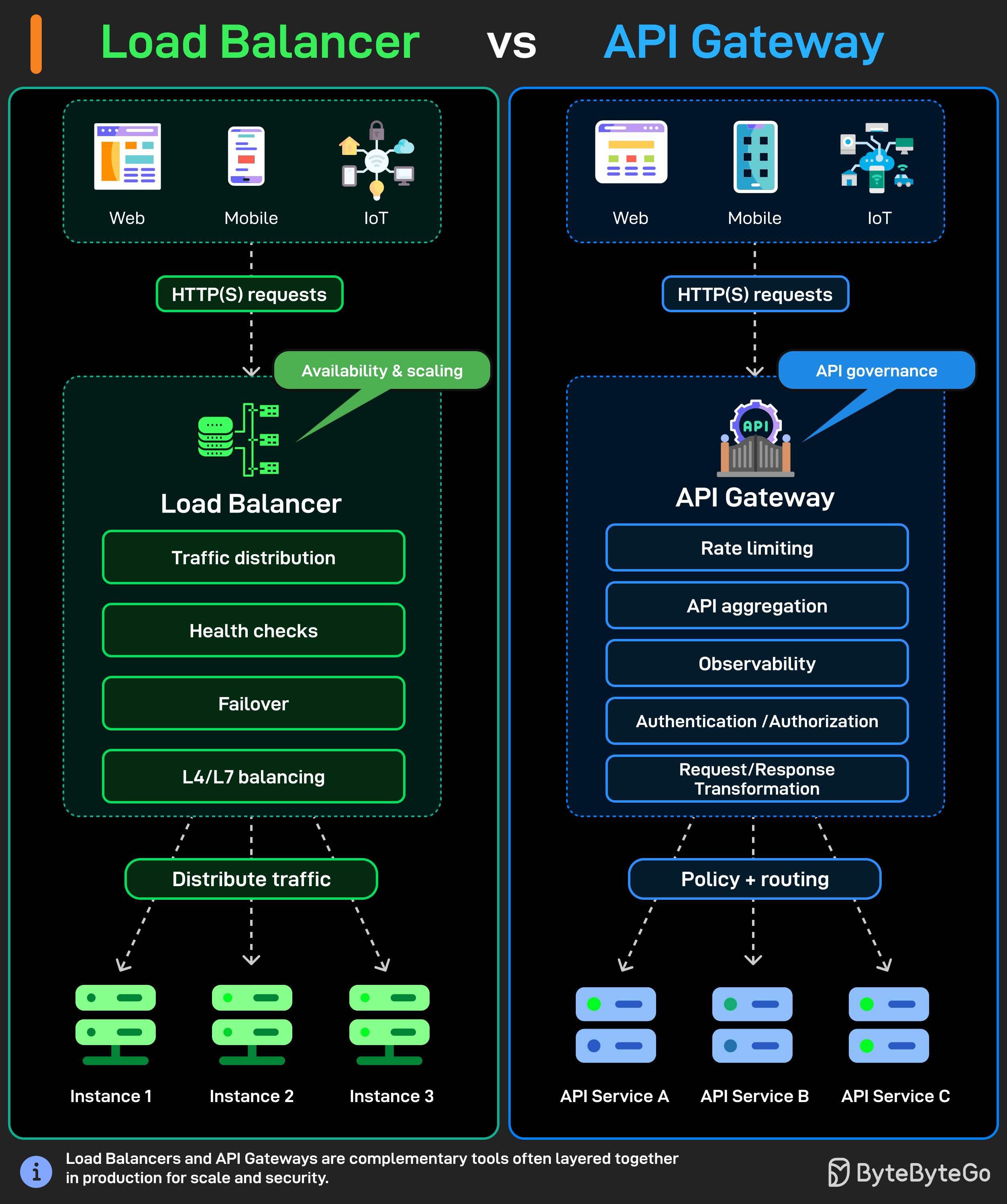
A load balancer has one job: distribute traffic. Clients send HTTP(s) requests from web, mobile, or IoT apps, and the load balancer spreads those requests across multiple server instances so no single server takes all the load.
It handles:
Traffic distribution
Health checks to detect downed servers
Failover when something breaks
L4/L7 balancing depending on whether you're routing by IP or by actual HTTP content.
An API gateway does a lot more than that. It also receives HTTP(s) requests from the same types of clients, but instead of just forwarding traffic, it controls what gets through and how.
Rate limiting to prevent abuse.
API aggregation so your client doesn't need to call five different services.
Observability for logging and monitoring.
Authentication and authorization before a request even touches your backend.
Request and response transformation to reshape payloads between client and service formats.
In most production setups, the load balancer and api gateway sit together. The API gateway handles the smart stuff up front, rate limits, auth, routing to the right microservice. Then the load balancer behind it distributes traffic across instances of that service.
They're not competing tools. They work best when used together.
What is MCP?
Model Context Protocol (MCP) is a new system introduced by Anthropic to make AI models more powerful.
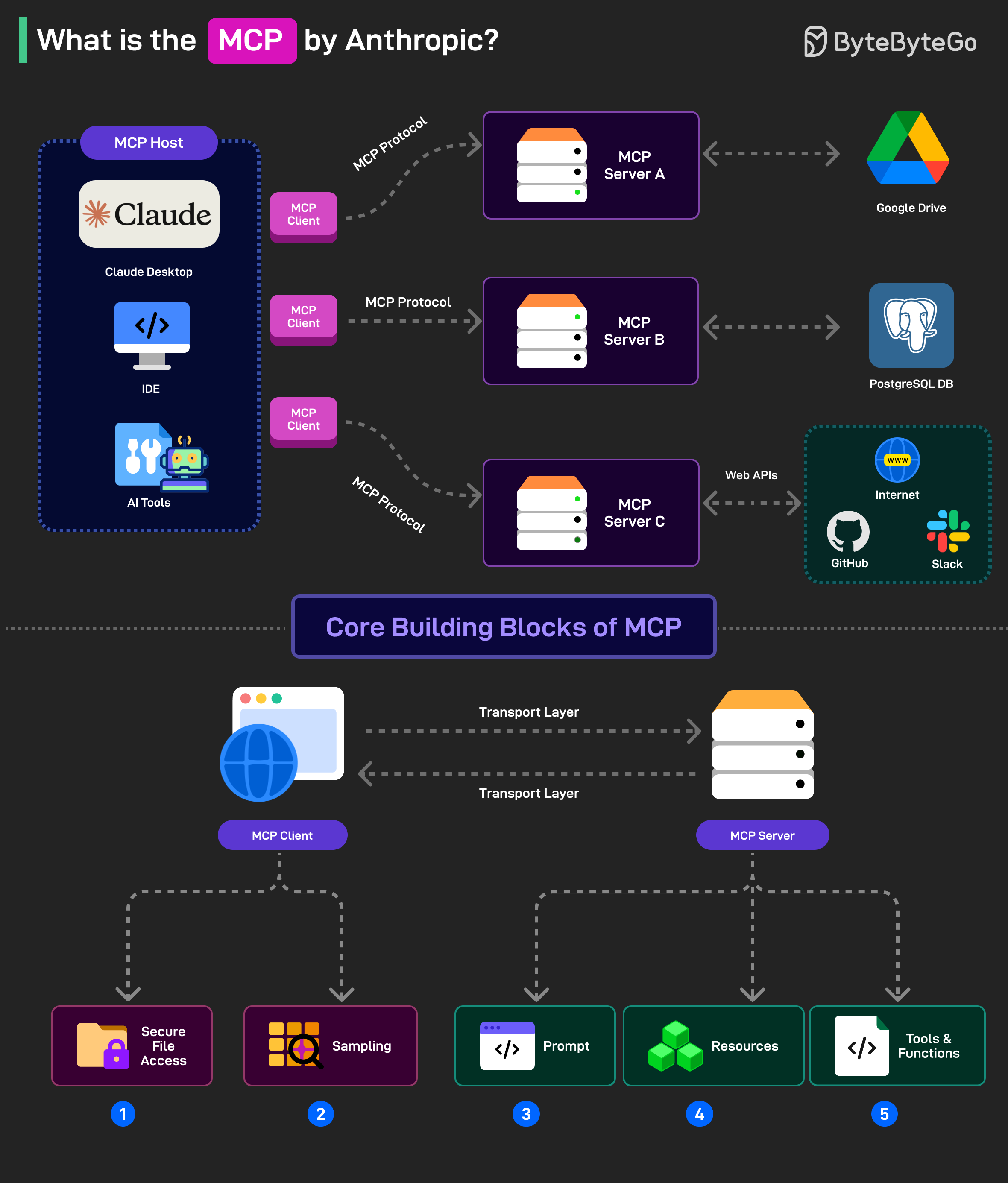
It is an open standard (also being run as an open-source project) that allows AI models (like Claude) to connect to databases, APIs, file systems, and other tools without needing custom code for each new integration.
MCP follows a client-server model with 3 key components:
Host: AI applications like Claude that provide the environment for AI interactions so that different tools and data sources can be accessed. The host runs the MCP Client.
MCP Client: The MCP client is the component inside an AI model (like Claude) that allows it to communicate with MCP servers. For example, if the AI model wants data from PostgreSQL, the MCP client formats the request into a structured message to send to the MCP Server
MCP Server: This is the middleman that connects an AI model to an external system like PostgreSQL, Google Drive, or an API. For example, if Claude analyzes sales data from PostgreSQL, the MCP Server for PostgreSQL acts as the connector between Claude and the database.
MCP has five core building blocks (also known as primitives). They are divided between the client and server.
For the clients, the building blocks are Roots (secure file access) and Sampling (ask the AI for help with a task such as generating a DB query).
For the servers, there are Prompts (instructions to guide the AI), Resources (Data Objects that the AI can reference) and Tools (functions that the AI can call such as running a DB query).
REST vs gRPC
Choosing between REST and gRPC seems simple at first, but it ends up affecting how your services communicate, scale, and even break.
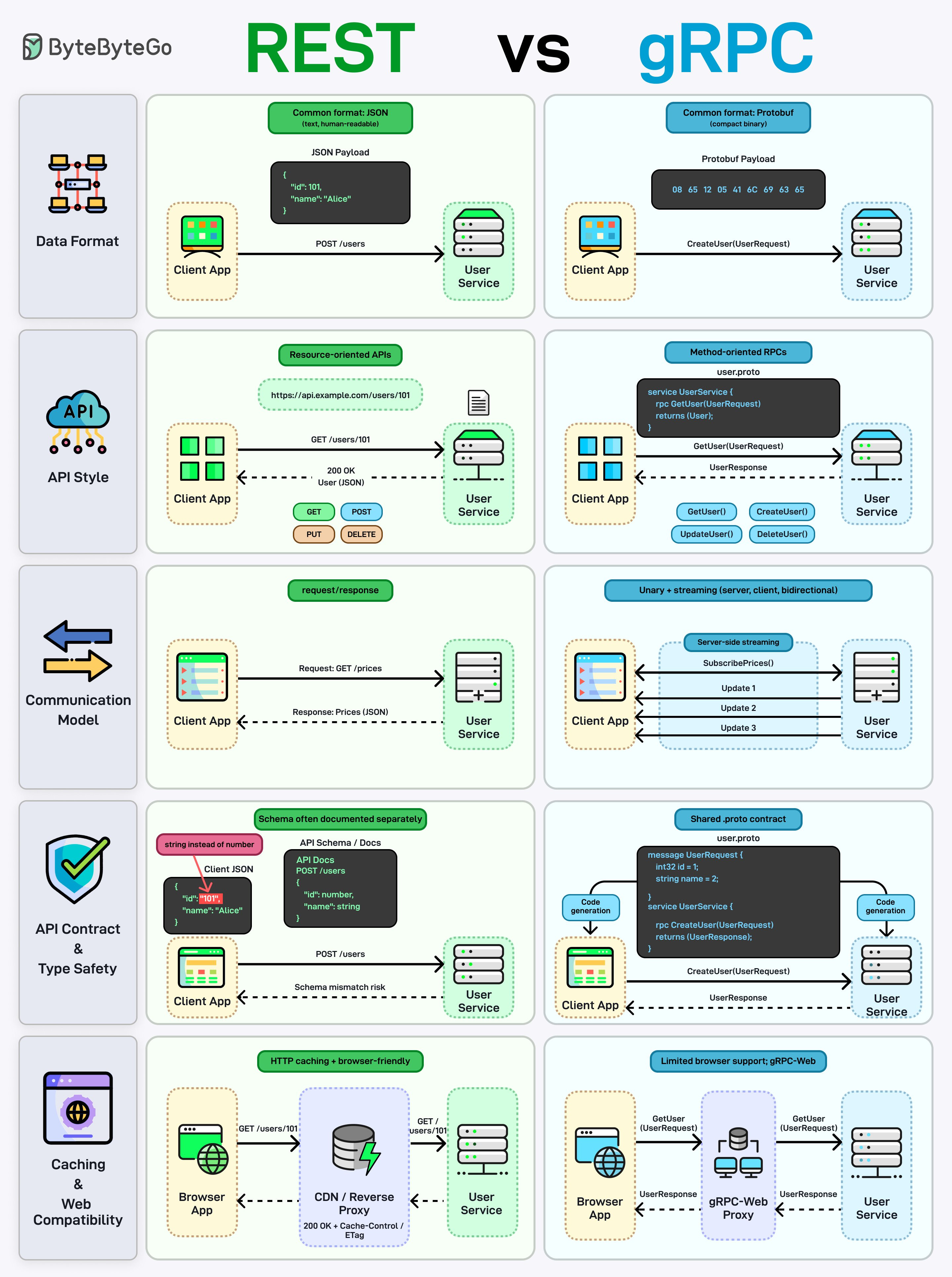
Both are trying to solve the same problem: how services talk to each other. But the way they approach it is different.
Data format
REST usually uses JSON. It’s human-readable, easy to debug, and works everywhere.
gRPC uses Protocol Buffers (Protobuf). It’s binary, smaller in size, and faster to process.
You start noticing this difference in performance-heavy systems. JSON is convenient, but Protobuf is built for efficiency.
API style
REST is resource-based: /users/101 with GET, POST, PUT, DELETE.
gRPC is method-based: GetUser(), CreateUser(), UpdateUser().
REST fits nicely for public APIs. gRPC, on the other hand, feels more like calling a function on another service.
Communication model
REST is simple request/response. One request, one response.
gRPC supports more patterns: unary, server streaming, client streaming, and bidirectional streaming.
Streaming becomes really useful when you need real-time updates or long-lived connections.
API contract & type safety
REST contracts are usually defined separately (OpenAPI/Swagger), and mismatches can still happen.
gRPC uses a shared .proto file with strict types and code generation.
With gRPC, both client and server come from the same definition, so you run into fewer issues during integration.
Caching & browser support
REST works well with HTTP caching, CDNs, and browsers.
gRPC has limited browser support (usually via gRPC-Web) and doesn’t naturally fit with HTTP caching.
Session-Based vs JWT-Based Authentication
Every web app needs authentication. But how you manage it after login matters more than most developers realize.
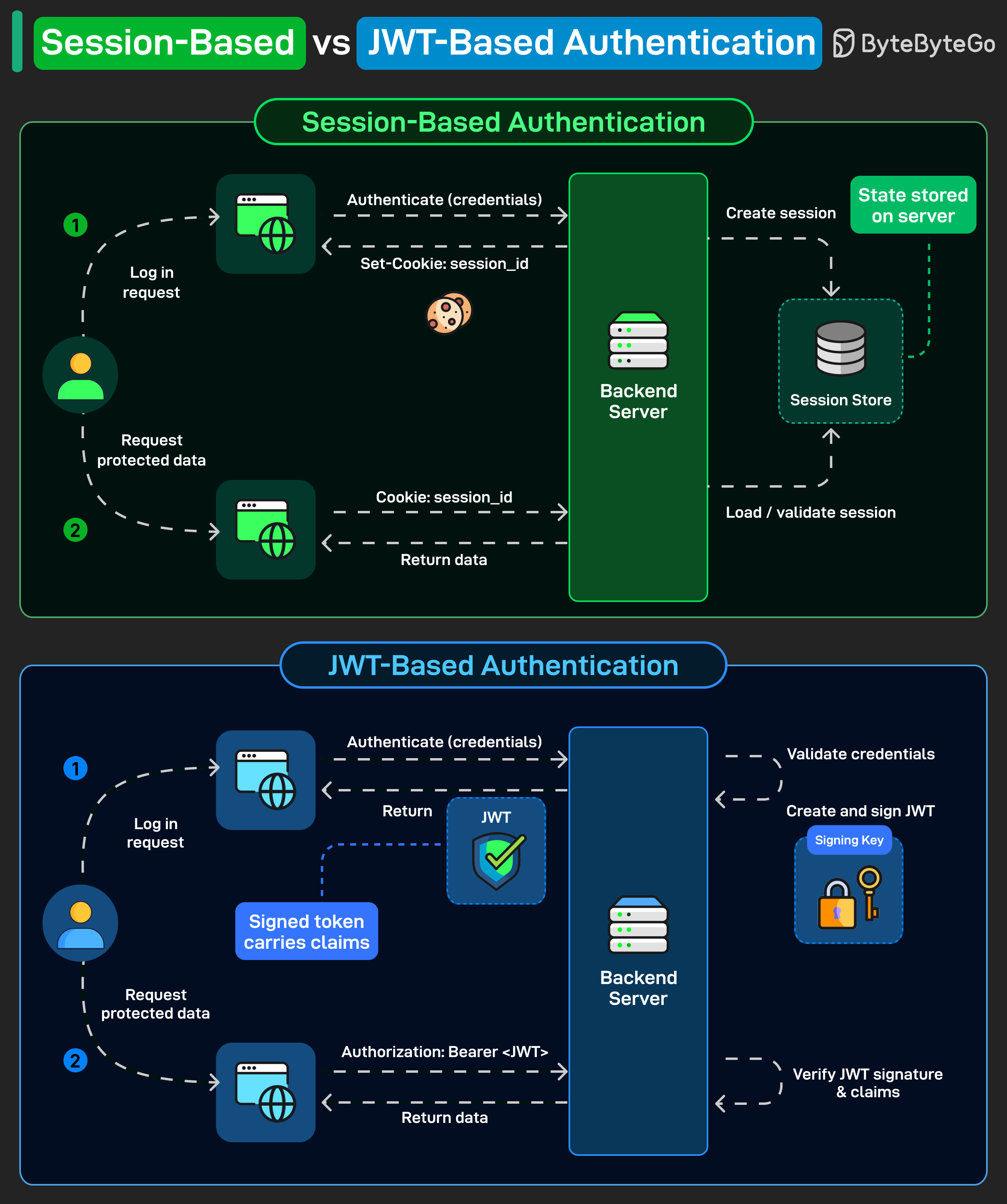
There are two dominant approaches: session-based and JWT-based. They solve the same problem differently.
Session-Based Authentication: The user logs in, and the server creates a session and stores it in a session store. The client gets a session_id cookie. On every subsequent request, the browser sends that cookie, and the server looks up the session to validate it.
The state lives on the server. That's the key tradeoff. It's simple and easy to revoke, but now your backend has to manage that session store.
JWT-Based Authentication: The user logs in, and the server validates credentials, then creates and signs a token using a secret or private key. That token is sent back to the client. On every subsequent request, the client sends it as a Bearer token in the Authorization header. The server verifies the signature and reads the claims. No session store needed.
The state lives in the token itself. The server stays stateless, which makes horizontal scaling straightforward.
Over to you: what’s your go-to approach for auth in microservices?
A Cheat Sheet on The Most-Used Linux Commands
Linux has thousands of commands. Most engineers use about 20 or so commands every day, not because Linux is limited, but because that core set handles the bulk of actual work: navigating files, inspecting logs, debugging processes, checking system health, and fixing things under pressure.
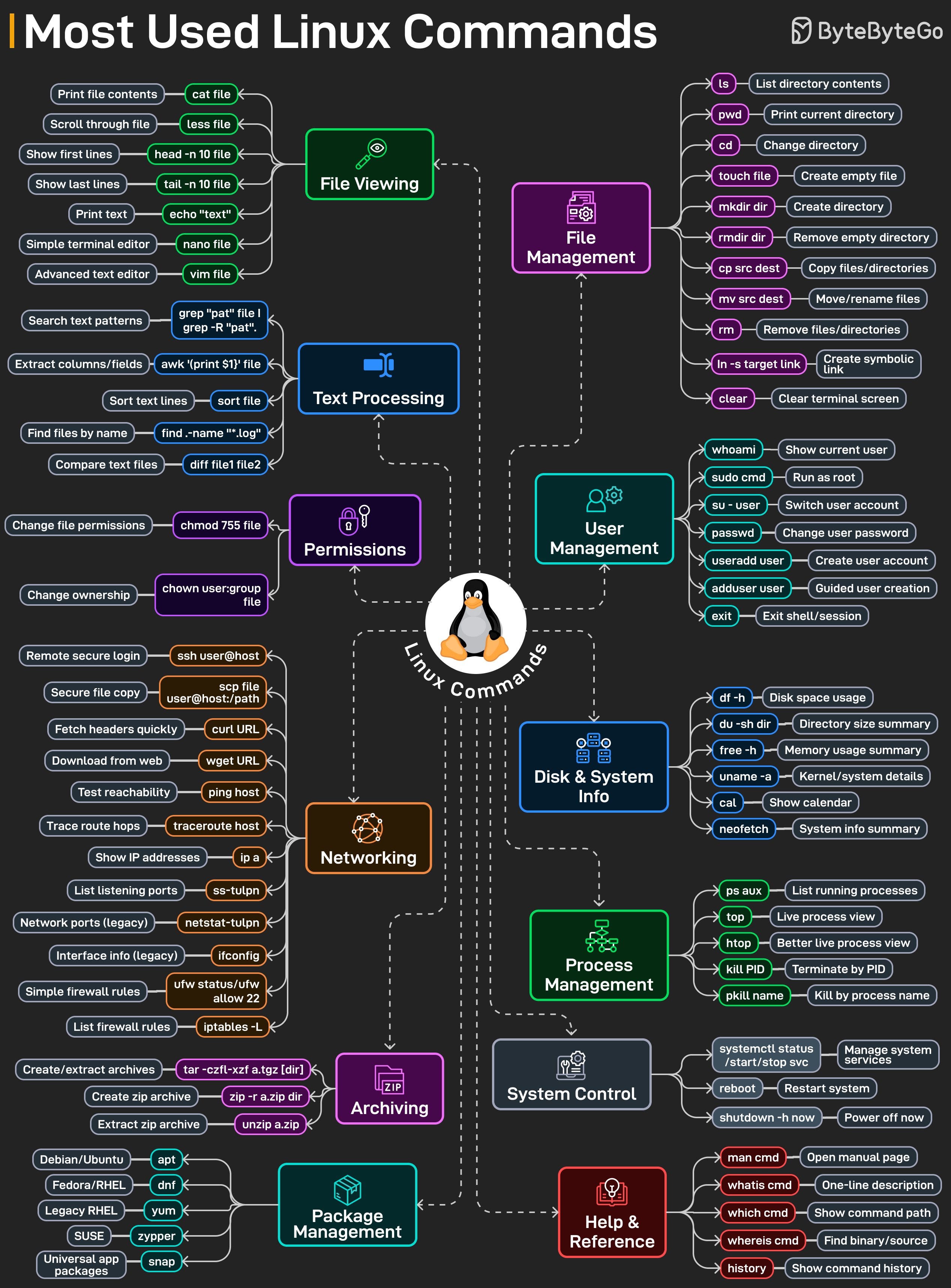
This cheat sheet maps out the most-used Linux commands by category:
File management basics like ls, cd, cp, mv, and rm that you touch constantly without thinking.
File viewing and editing with cat, less, head, tail, nano, and vim when logs are huge and time is short.
Text processing with grep, awk, sort, and diff to turn raw logs into answers.
Permissions with chmod and chown, because something always breaks due to access issues.
Networking commands like ssh, scp, curl, ping, ss, and ip for debugging remote systems.
Process and system inspection using ps, top, htop, df, free, and uname to see what the machine is really doing.
Archiving, package management, system control, and help commands that glue everything together.
Over to you: Which Linux command do you end up using the most during real incidents?
Great MCP explainer. One thing worth adding for the practical side: what you build with MCP matters as much as understanding the protocol.
The most impactful MCP server I've seen (biased, because I built it) solves a problem most Claude Code users don't realize they have: the agent reads your entire codebase for every prompt, consuming 180K tokens when only 50K are relevant. 70% waste rate.
vexp is an MCP server that sits in the architecture you described — Claude Code is the Host, the MCP Client sends a request like "give me the relevant code for this query with a 50K token budget," and the vexp MCP Server queries a local dependency graph (tree-sitter AST + SQLite) and returns only the relevant subgraph.
In your MCP diagram terms: the Resource is the pre-indexed codebase graph, the Tool is a run_pipeline function that accepts a query and returns ranked code, and the Prompt guides the agent to use vexp before doing its own file exploration.
Result: tool calls dropped from 23 (Read/Grep/Glob) to 2.3 (run_pipeline) per task. Cost from $0.78 to $0.33. On SWE-bench (100 real bugs): 73% pass rate at $0.67/task vs $1.98.
For anyone watching the "12 Claude Code Features" video: context pre-filtering via MCP is the 13th feature that isn't built in yet but probably should be. It works with Claude Code, Cursor, Copilot, and 9 other agents.
https://vexp.dev/benchmark