

✂️ Cut your QA cycles down to minutes with QA Wolf (Sponsored)

If slow QA processes bottleneck you or your software engineering team and you’re releasing slower because of it — you need to check out QA Wolf.
QA Wolf’s AI-native service supports web and mobile apps, delivering 80% automated test coverage in weeks and helping teams ship 5x faster by reducing QA cycles to minutes.
QA Wolf takes testing off your plate. They can get you:
Unlimited parallel test runs for mobile and web apps
24-hour maintenance and on-demand test creation
Human-verified bug reports sent directly to your team
Zero flakes guarantee
The benefit? No more manual E2E testing. No more slow QA cycles. No more bugs reaching production.
With QA Wolf, Drata’s team of 80+ engineers achieved 4x more test cases and 86% faster QA cycles.
This week’s system design refresher:
Monolithic vs Microservices vs Serverless
CLI vs MCP
Comparing 5 Major Coding Agents
Essential AWS Services Every Engineer Should Know
JWT Visualized
Monolithic vs Microservices vs Serverless
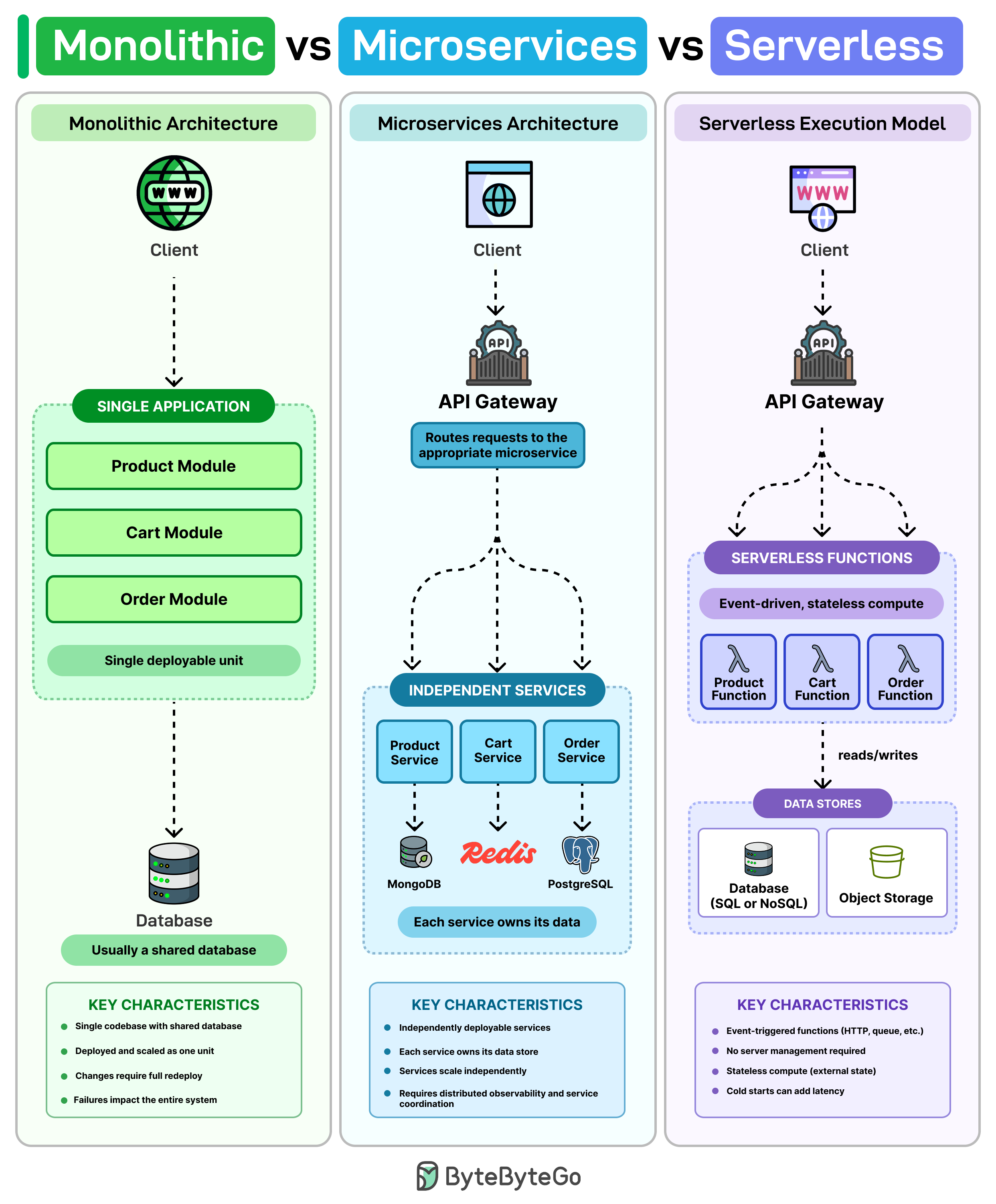
A monolith is usually one codebase, one database, and one deployment. For a small team, that’s often the simplest way to build and ship quickly. The problem arises when the codebase grows. A tiny fix in the cart code requires redeploying the whole app, and one bad release can take down everything with it.
Microservices try to solve that by breaking the system into separate services. Product, Cart, and Order run on their own, scale separately, and often manage their own data. That means you can ship changes to Cart without affecting the rest of the system.
But now you are dealing with multiple moving parts. You generally need service discovery, distributed tracing, and request routing between services.
Serverless is a different model. Instead of managing servers, you write functions that run when something triggers them, and the cloud provider handles the scaling. In many cases, you only pay when those functions actually run.
However, in serverless, cold starts can add latency, debugging across lots of stateless functions can get messy, and the more you build around one cloud’s runtime, the harder it gets to switch later.
Most production systems don't use just one approach. There's usually a monolith at the core, and over time teams spin up a few services where they need independent scaling or faster deploys. Serverless tends to show up later for things like notifications or background jobs.
CLI vs MCP
AI agents need to talk to external tools, but should they use CLI or MCP?
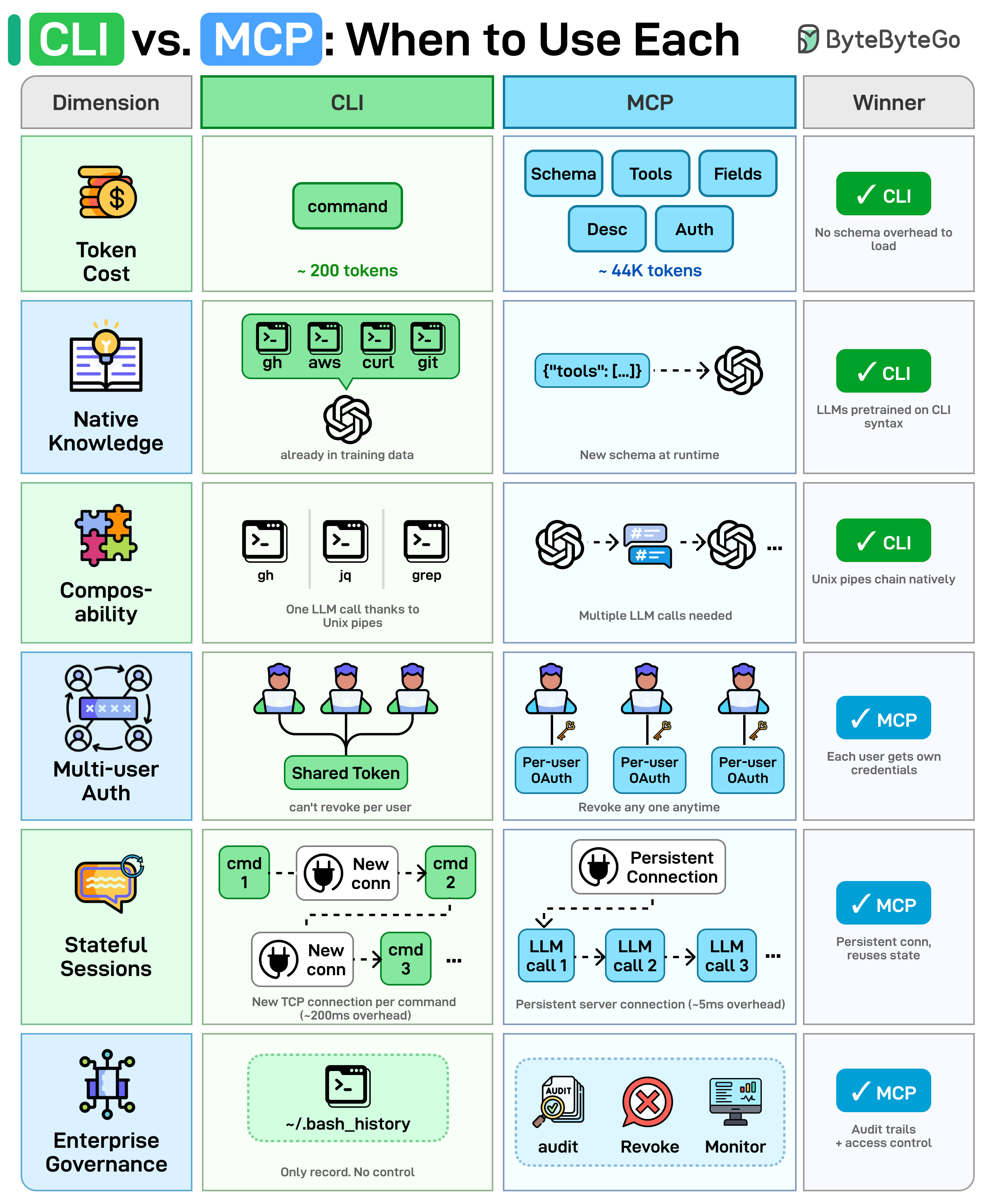
Both call the same APIs under the hood. The difference is how the agent invokes them.
Here's a side-by-side comparison across 6 dimensions:
Token Cost: MCP loads the full JSON schema (tool names, descriptions, field types) into the context window before any work begins. CLI needs no schema, so saves more context window.
Native Knowledge: LLMs were trained on billions of CLI examples. MCP schemas are custom JSON the model encounters for the first time at runtime.
Composability: CLI tools chain with Unix pipes. Something like gh | jq | grep runs in a single LLM call. MCP has no native chaining. The agent must orchestrate each tool call separately.
Multi-User Auth: CLI agents inherit a single shared token. You can't revoke one user without rotating everyone's key. MCP supports per-user OAuth.
Stateful Sessions: CLI spawns a new process and TCP connection per command. MCP keeps a persistent server with connection pooling.
Enterprise Governance: CLI's only audit trail is ~/.bash_history. MCP provides structured audit logs, access revocation, and monitoring built into the protocol.
Over to you: For which use cases do you prefer CLI over MCP, or vice versa?
Comparing 5 Major Coding Agents
The diagram below compares the 5 leading agents across interface, model, context window, autonomy, and more.
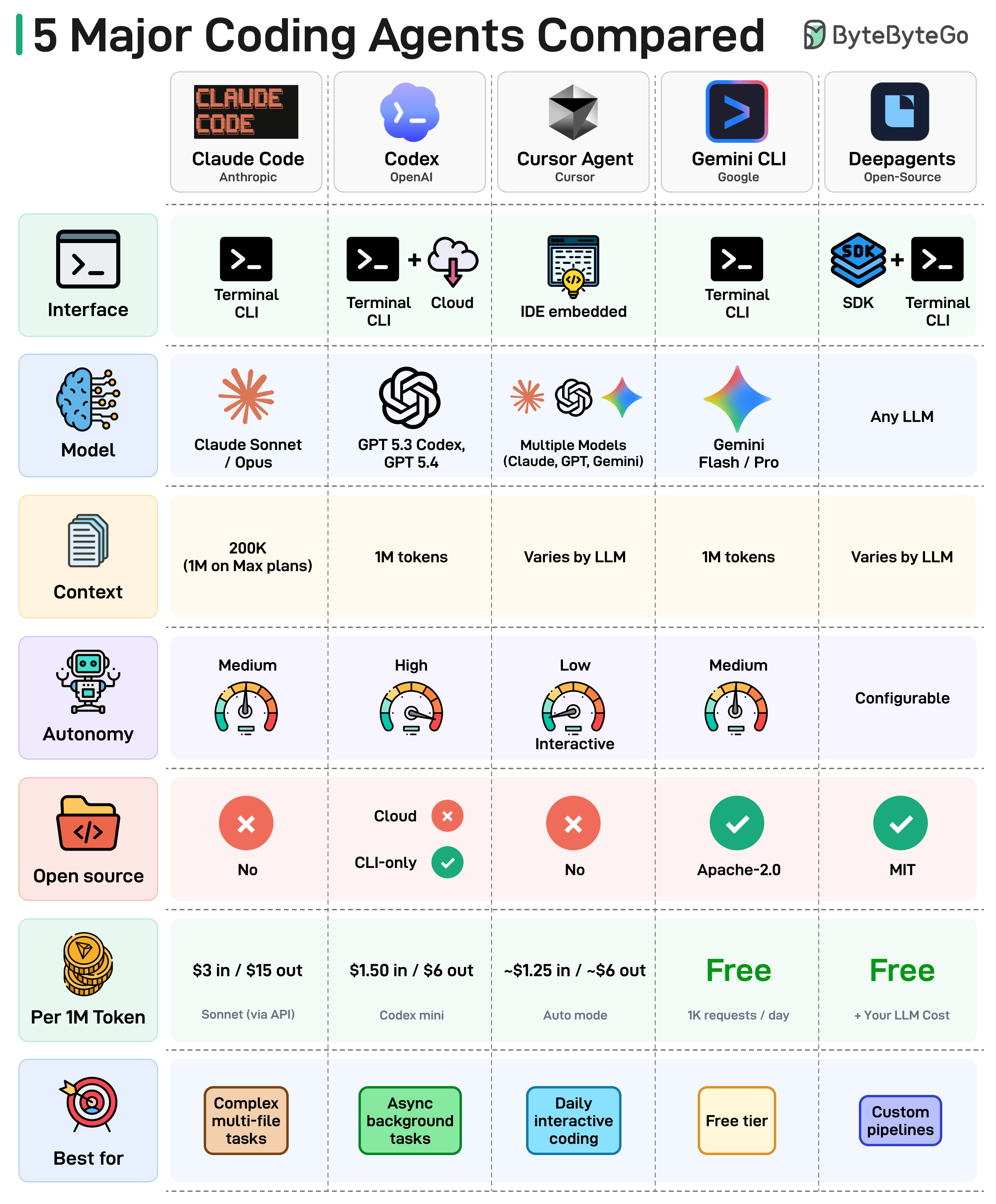
Here's what the landscape tells us:
The terminal is the new IDE. Most coding agents now live in your terminal, not inside an editor. The command line is back.
Context windows are getting massive. We've gone from 8K tokens to 1M in just two years. Agents can now reason over entire codebases in a single prompt.
Autonomy is a spectrum. Some agents run fully async in the background. Others keep you in the loop on every edit. Teams are still figuring out how much to delegate.
Open source is gaining ground. The open-source coding agent ecosystem is maturing fast, giving teams full control over their toolchain.
Pricing varies wildly. From completely free (Gemini CLI, Deep Agents) to $15 per 1M output tokens. Check the cost row before you commit.
There is no single winner. The best agent depends on your workflow, budget, and how much autonomy you're comfortable with.
Over to you: Which coding agent is your daily driver in 2026?
Essential AWS Services Every Engineer Should Know
AWS has 200+ services, but most production systems only use a small subset. In many setups, a request ends up going through API Gateway, then an ALB, executes on Lambda or ECS, reads from DynamoDB, and gets cached in ElastiCache.
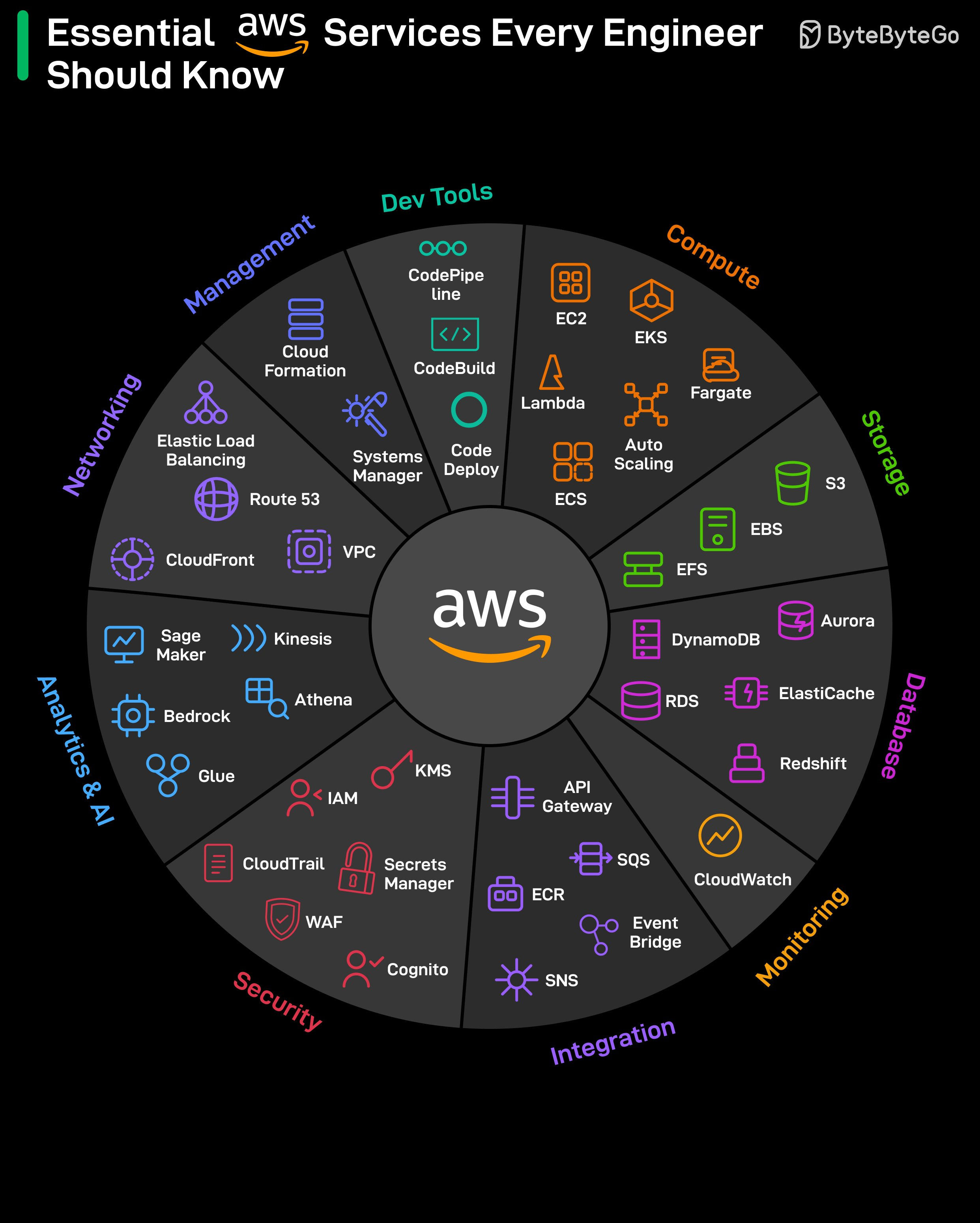
Each service on its own is straightforward. Deciding where it actually fits is where things get tricky.
EC2 and S3 are usually the starting point for a lot of people. But when things break, the focus shifts to services that didn’t get much attention early on, like CloudWatch for observability, IAM for access control, and KMS for encryption.
Networking tends to be where things get confusing. VPC, subnets, security groups, Route 53, and CloudFront run behind everything. When something is off, the errors don’t always help much.
Database choices are not easy to reverse later. RDS, DynamoDB, and Aurora solve different problems, and changing direction means redesigning a lot of what you've already built. It’s similar with the integration layer. SQS, SNS, and EventBridge each handle a different pattern (queuing vs fan-out vs event routing), and choosing the wrong one causes problems you notice when the system is under load.
SageMaker and Bedrock are newer services, but they're already part of the stack at many companies. SageMaker is for training and hosting models, and Bedrock is for calling foundation models directly.
CloudFormation lets you define infrastructure as code, and CodePipeline handles CI/CD. Once set up, deployments run without manual steps.
JWT Visualized
Imagine you have a special box called a JWT. Inside this box, there are three parts: a header, a payload, and a signature.
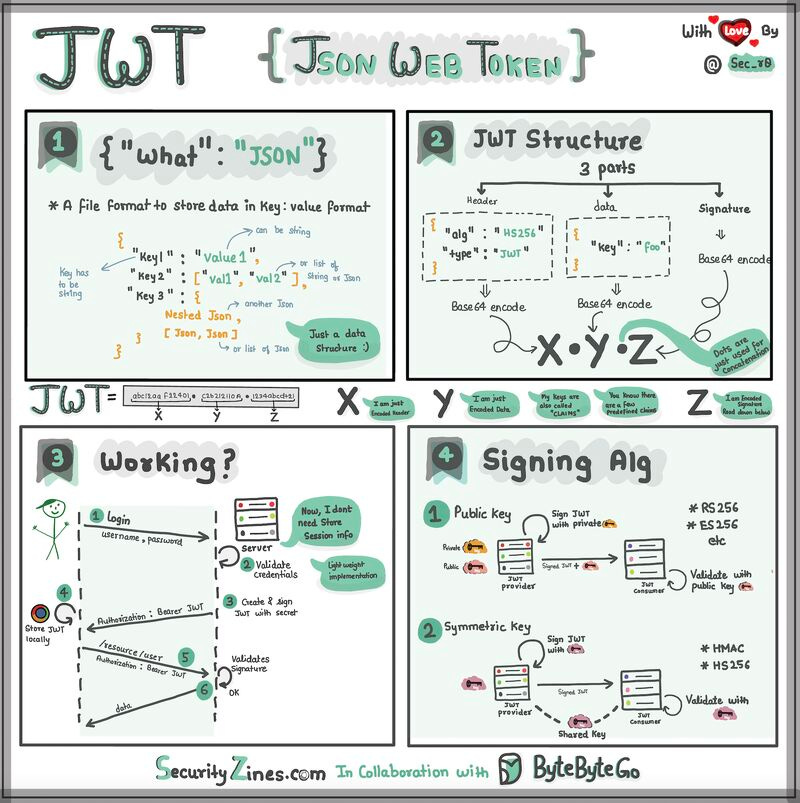
The header is like the label on the outside of the box. It tells us what type of box it is and how it's secured. It's usually written in a format called JSON, which is just a way to organize information using curly braces { } and colons : .
The payload is like the actual message or information you want to send. It could be your name, age, or any other data you want to share. It's also written in JSON format, so it's easy to understand and work with.
Now, the signature is what makes the JWT secure. It's like a special seal that only the sender knows how to create. The signature is created using a secret code, kind of like a password. This signature ensures that nobody can tamper with the contents of the JWT without the sender knowing about it.
When you want to send the JWT to a server, you put the header, payload, and signature inside the box. Then you send it over to the server. The server can easily read the header and payload to understand who you are and what you want to do.
Over to you: When should we use JWT for authentication? What are some other authentication methods?
@ByteByteGo is really good. What makes it stand out is that, whether you come from a technical or non-technical background, you can still clearly understand the concepts.
Very insightful and easy to understand. Thanks for sharing!