

Map workflows, automate E2E tests, and ship faster with QA Wolf (Sponsored)

QA Wolf’s AI agent maps and tests your app’s most complex user flows.
It turns your prompts into real Playwright and Appium code that runs 12x faster and more reliably than other computer-use agents.
What sets our AI apart:
Maps 200+ test cases in minutes instead of weeks of manual planning.
Executes tests 12x faster than computer-use agents.
Runs entire suites 100% parallel with consistent results.
Produces open-source tests your team owns, with zero vendor lock-in.
This week’s system design refresher:
CPU vs GPU vs TPU (Youtube video)
Latency vs Throughput vs Bandwidth
What is Google’s TPU?
7 Permission Modes Every Claude Code User Should Know
Top AI Trends to Watch in 2026
We’re hiring at ByteByteGo
CPU vs GPU vs TPU
Latency vs Throughput vs Bandwidth
Ever wondered why your app feels slow even when the bandwidth looks fine? Latency, throughput, and bandwidth often get used interchangeably, but each one tells a different story about performance.
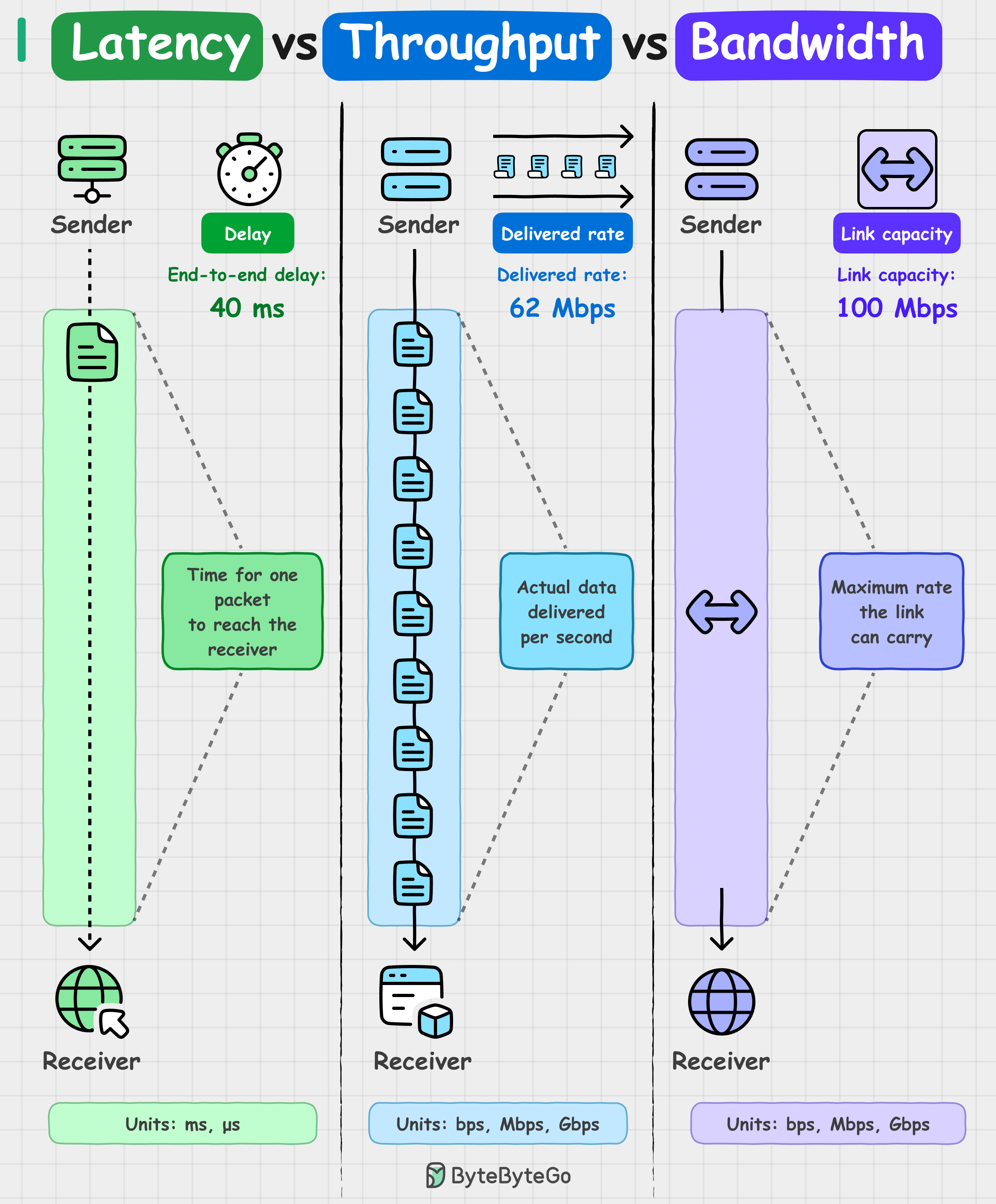
Latency is the delay. How long it takes for a single packet to travel from sender to receiver. If your ping shows 40 ms round-trip, that's latency.
Throughput is the actual delivery rate. How much data is successfully transferred per second. If your download shows 62 Mbps, that’s throughput.
Bandwidth is the maximum capacity of the link. For example, a 100 Mbps connection is the upper limit under ideal conditions.
Throughput is always less than bandwidth. Network congestion, packet loss, and protocol overhead all affect throughput, which is why you never actually hit the maximum bandwidth capacity in practice.
Similarly, low latency doesn't always mean high throughput. Small payloads, single connections, and tight window sizes can all keep throughput low, which is why fast responses don't guarantee you're sending a lot of data.
Another way to understand these three concepts: Bandwidth is the highway width. Throughput is the traffic flow. Latency is how long it takes a car to go from A to B.
All three matter, but they solve different problems.
Over to you: How do you measure these metrics in a way that actually predicts when things will break?
What is Google’s TPU?
A TPU (Tensor Processing Unit) is Google’s custom AI chip, designed from scratch for the giant matrix multiplications that modern models live on. GPUs were built for graphics first.
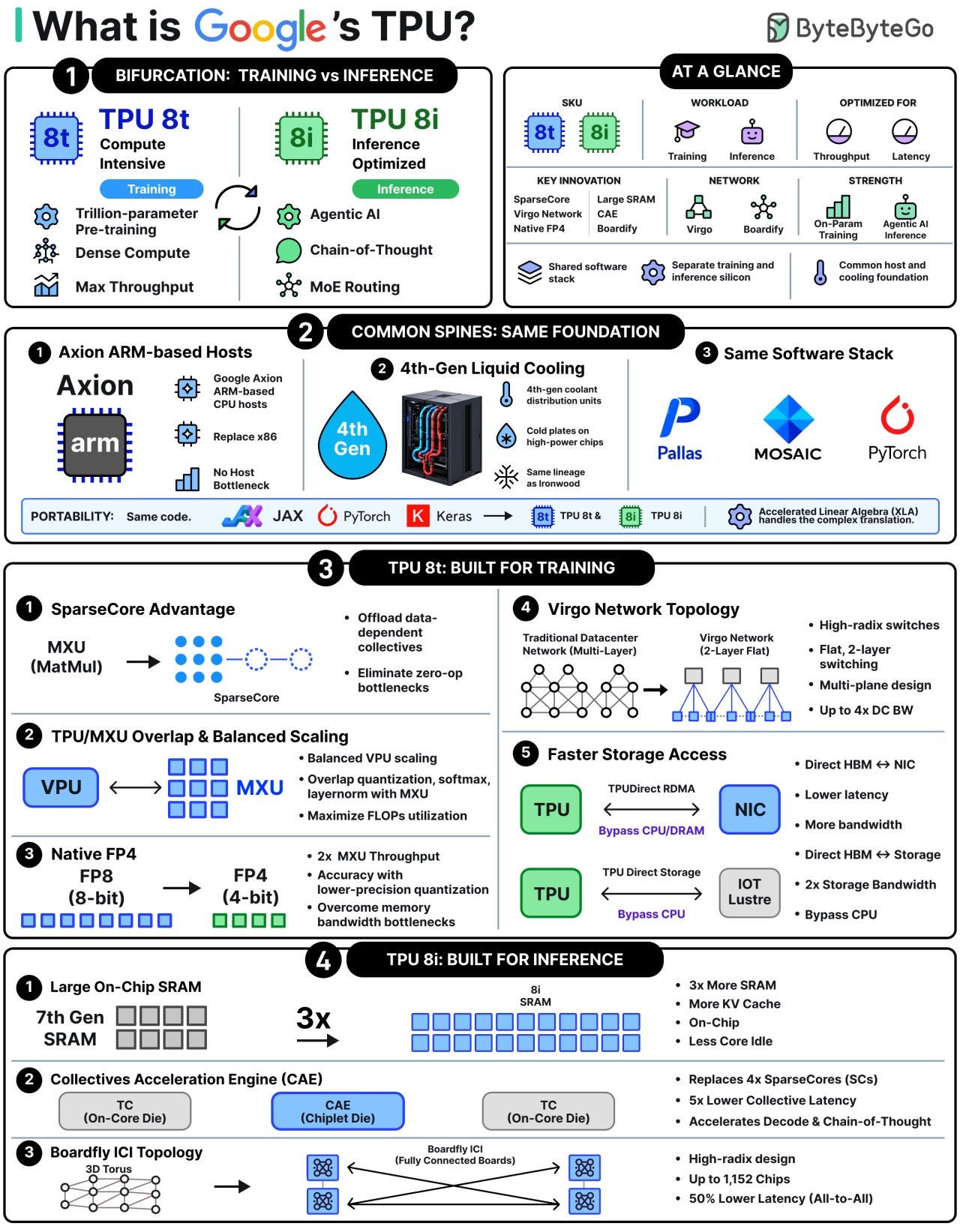
TPUs were built for deep learning from day one.
At Cloud Next ’26, Google unveiled its 8th generation, and for the first time it ships in two flavors. TPU 8t is built for training, where raw throughput wins. TPU 8i is built for inference, where latency and chip-to-chip speed matter most.
Both still share the same Axion CPUs, liquid cooling, and software stack, so code written for one runs on the other.
The diagram is a quick study guide to what’s the same, what’s different, and why, based on our understanding of published Google articles.
7 Permission Modes Every Claude Code User Should Know
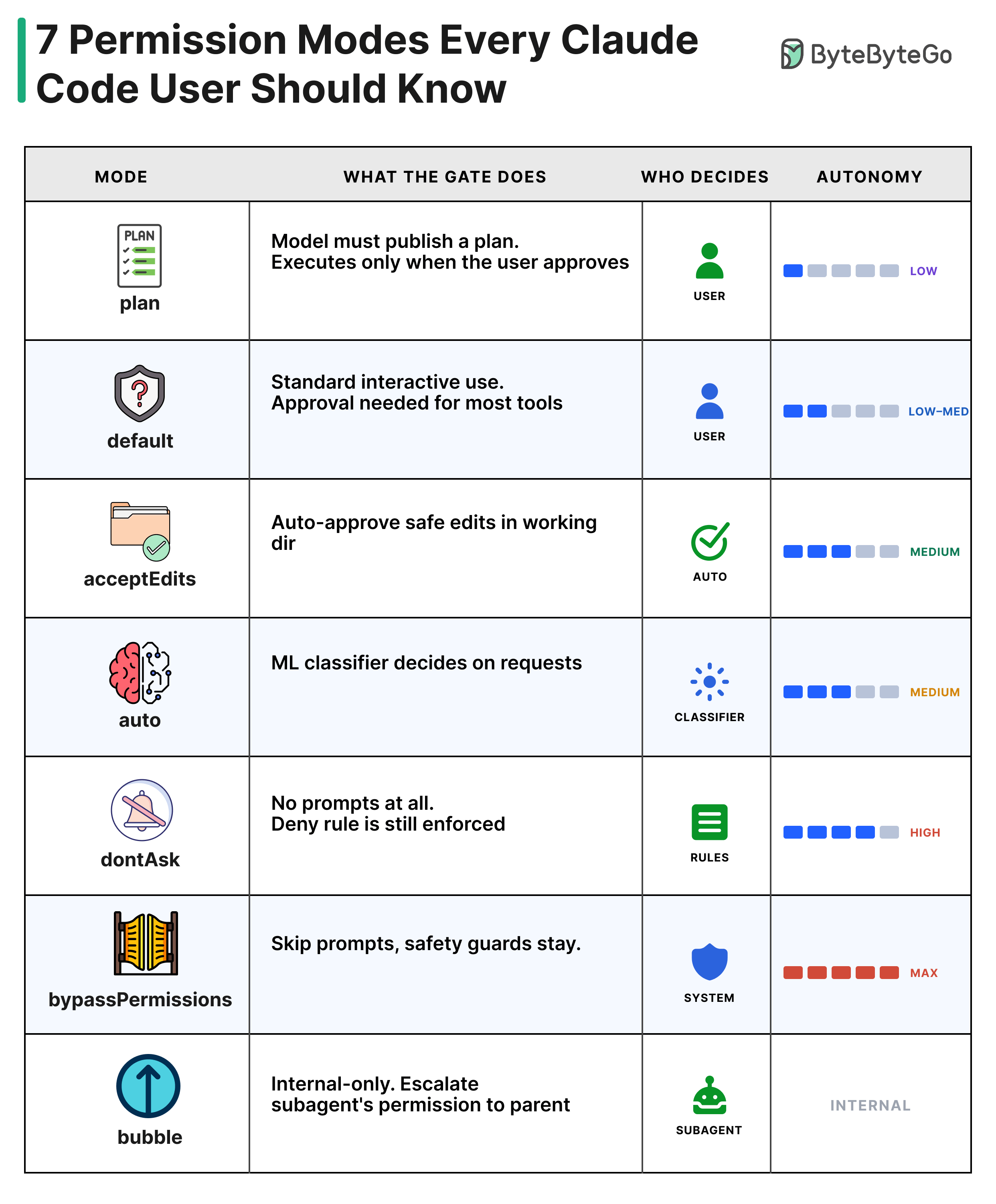
plan: The model drafts a plan. Nothing executes until the user approves.
default: Standard interactive use. Most tool calls require user approval.
acceptEdits: Edits in the working directory are auto-approved. Other shell commands still prompt.
auto: An ML classifier decides on requests that miss the fast path.
dontAsk: No prompts shown. Deny rules are still enforced.
bypassPermissions: Most prompts are skipped. Safety-critical guards still apply.
bubble: A subagent escalates its permission request to the parent.
Only 5 modes are user-selectable. “auto” is gated by a feature flag, and “bubble” is internal.
Over to you: Which mode do you reach for most, and what made you pick it?
Top AI Trends to Watch in 2026
2026 is already moving faster than anyone expected. Anthropic released Opus 4.7, OpenAI introduced GPT5.5-Codex, and open-source releases like Kimi K2.5 and GLM-5 showed impressive agentic performance.
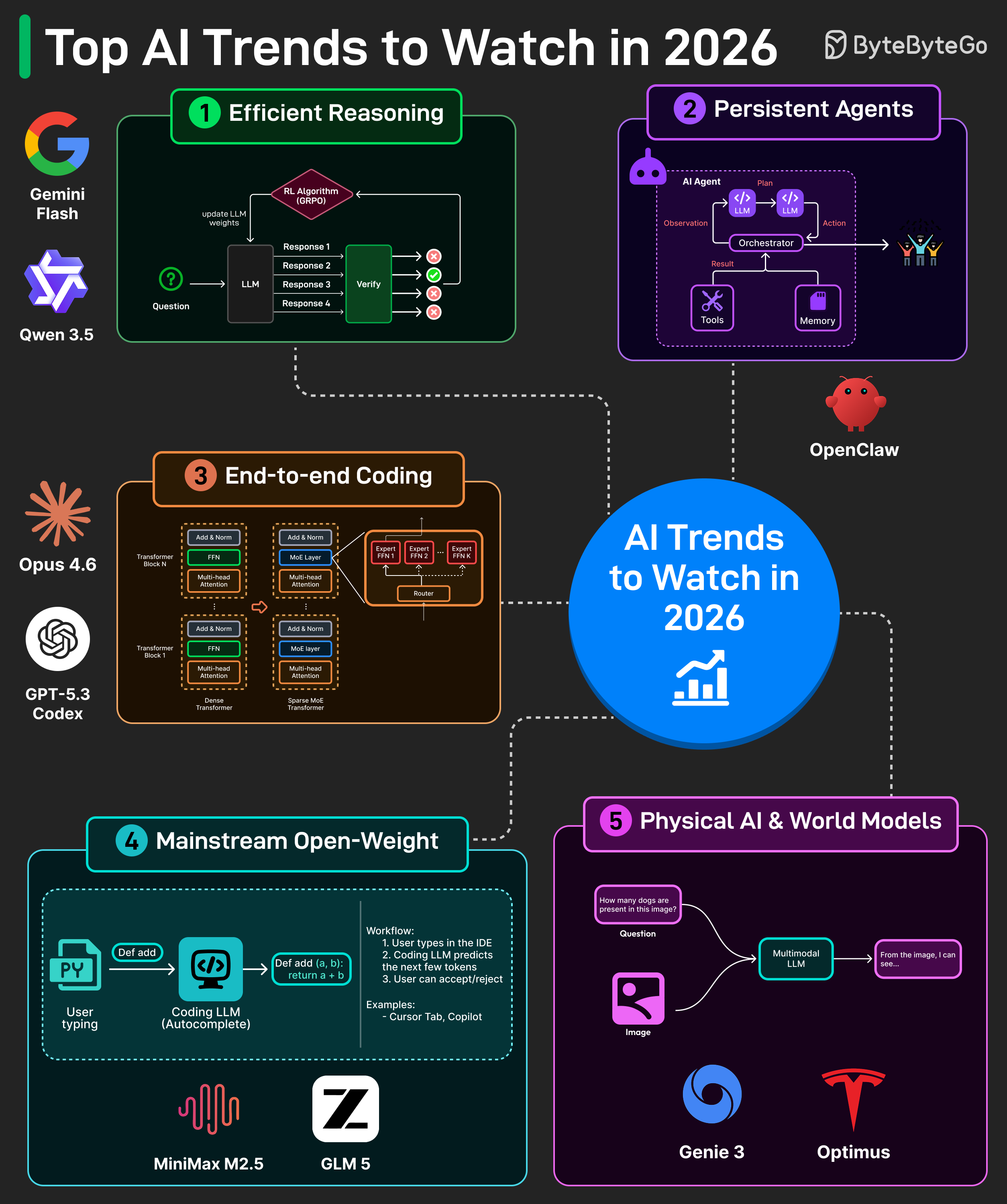
These launches point to bigger trends. Here are the five categories to closely watch in 2026.
1. Efficient Reasoning: RLVR-style training scales reasoning by auto-checking math and code. In 2026, expect more adaptive reasoning and extremely sparse architectures. Early signs include Gemini’s adaptive thinking and Qwen3.5’s sparse MoE architecture.
2. Persistent Agents: Agents now plan in loops with tools and memory, not just chat. In 2026, expect always-on personal agents that live across days, have access to your files, and can complete tasks safely. OpenClaw is an early example of this direction.
3. Repo-Scale Coding: Coding has moved from autocomplete to multi-file edits with tests, builds, and terminal tools. In 2026, expect agents that understand very large repos and can ship security-aware PRs by default.
4. Open-Weight Everywhere: Open-weight models are now strong enough to compete with closed ones. In 2026, expect more of them to get leaner, agent-ready, and easier to deploy. Models like GLM5 and Kimi K2.5 are already pushing in this direction.
5. World Models + Physical AI: Multimodal models have reached impressive quality across vision, image, and video generation. In 2026, expect these models to become the foundation for physical AI and world models, with early examples like Google Genie 3 and humanoid robots already pointing the way.
Over to you: which shift do you think will change how teams build products the most in 2026?
We’re hiring at ByteByteGo
We’re looking for multiple part-time instructors to teach AI and engineering cohort-based live courses.
This is a great fit if you love teaching, enjoy sharing what you know, and want a meaningful side thing alongside your main work.
The role has some upfront time investment to get familiar with the curriculum and prepare, but after that, it’s designed to be a limited commitment (2-5 hours bi-weekly). It offers stable income, good upside, and a chance to share your knowledge while working with ambitious learners.
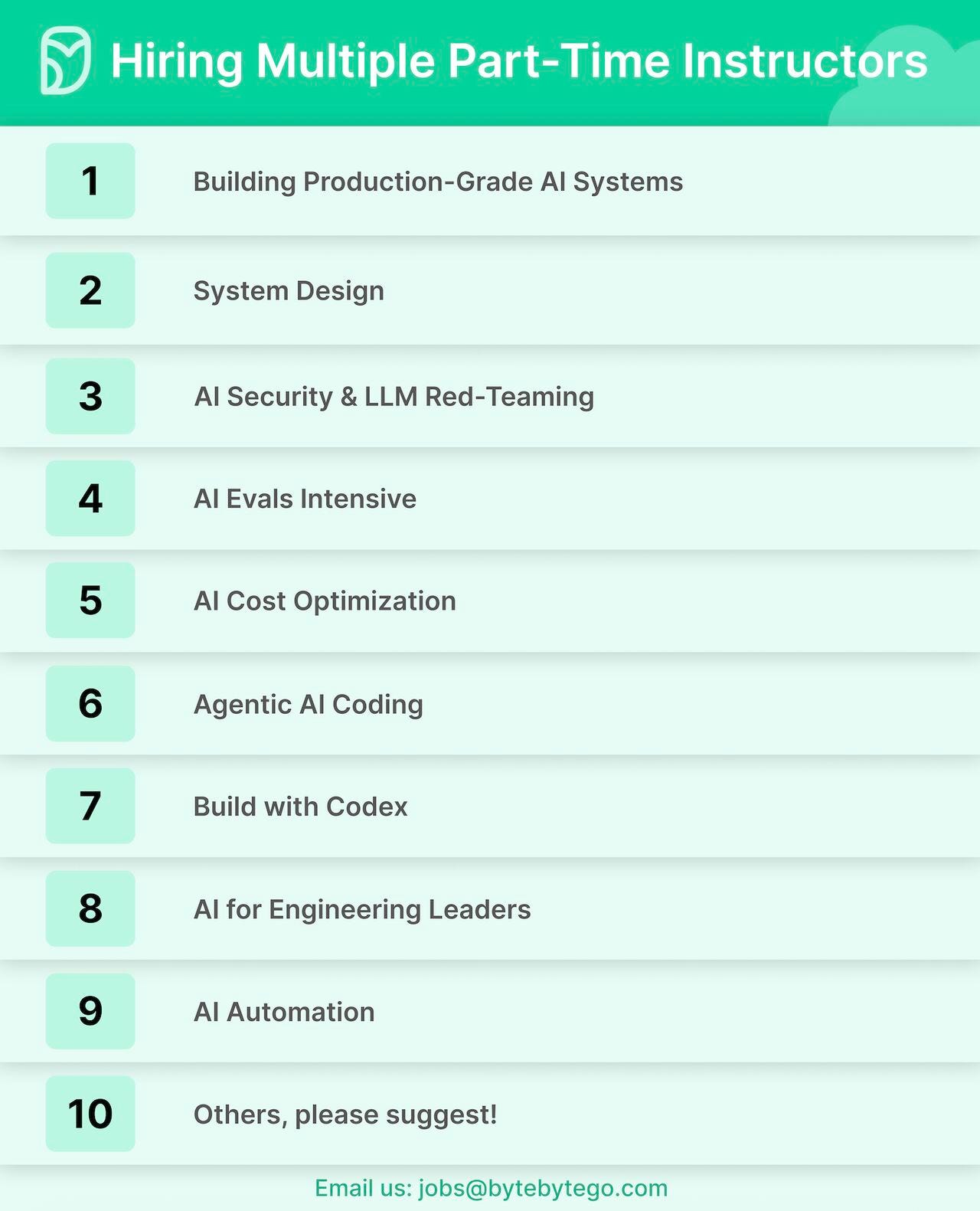
We’re especially looking for instructors in:
Building Production-Grade AI Systems
System Design
AI Security & LLM Red-Teaming
AI Evals Intensive
AI Cost Optimization
Agentic AI Coding
Build with Codex
AI for Engineering Leaders
AI Automation
Others, please suggest
Ideal instructors are hands-on, clear communicators, and excited to teach.
If this sounds like you, email us at jobs@bytebytego.com with your background, the topics you’d be excited to teach, and any teaching, writing, or speaking samples.
The TPU 8t versus 8i split illustrates something Huawei cannot do yet: bifurcate silicon for training versus inference. Ascend 910C handles both because wafer capacity constraints make two specialized product lines impractical. The result is that Chinese AI inference runs on throughput-optimized hardware where latency suffers. Not a design choice. A constraint that the throughput versus latency versus bandwidth framework describes at the silicon layer.
4. Open-Weight Everywhere < yes, I think most teams and org will switch to using more open and local models. Mostly cause of PII and just security and confidence anyways.