

Harness engineering for agentic code review (Sponsored)

Underneath every review sits a purpose-built, independent context engine. It’s the layer that decides what the agent actually sees before a single token of generation happens.
Purpose-built because code review demands a different context than chat or autocomplete: placing the relevant context fragments assembled for each review.
The engine assembles inputs across four planes:
Sandbox. Cloned repo, dependency analysis, multi-repo context and linters/SAST (ESLint, Semgrep) running on the change.
Review instructions. Your coding guidelines, AGENTS.md, path, and AST-scoped rules, tone, and learnings from past reviews.
Integrations. MCP tools, issue trackers (Jira, Linear), CI/CD failures, and web search.
LLMs. Routing across OpenAI and Anthropic.
In 2020, Figma’s data synchronization architecture was about five lines of logic. A cron job ran once a day, queried every row from a database table, dumped it into S3, and loaded it into Snowflake.
It was straightforward, easy to reason about, and it worked.
Three years later, that same simplicity was costing Figma millions of dollars a year and leaving their analytics team looking at data that was already days old by the time they could query it.
For reference, Figma is a collaborative design platform where teams create, prototype, and iterate on user interfaces together in real time. If you’ve used a modern app or website, there’s a high chance the screens were designed in Figma or that Figma was part of the workflow.
Since its early days, the product has expanded well beyond its core design tool. FigJam added collaborative whiteboarding in 2021. Dev Mode launched in 2023 to bridge the gap between designers and developers. Figma Make brought AI-powered app prototyping into the mix. The company also localized for the Brazilian, Japanese, Spanish, and Korean markets.
All of that growth meant an explosion in the volume and complexity of data flowing through Figma’s systems every day.
In this article, we will learn what happened as Figma grew and how its engineering team handled the growth in terms of the data pipeline issues.
Disclaimer: This post is based on publicly shared details from the Figma Engineering Team. Please comment if you notice any inaccuracies.
When SELECT * Becomes Your Bottleneck
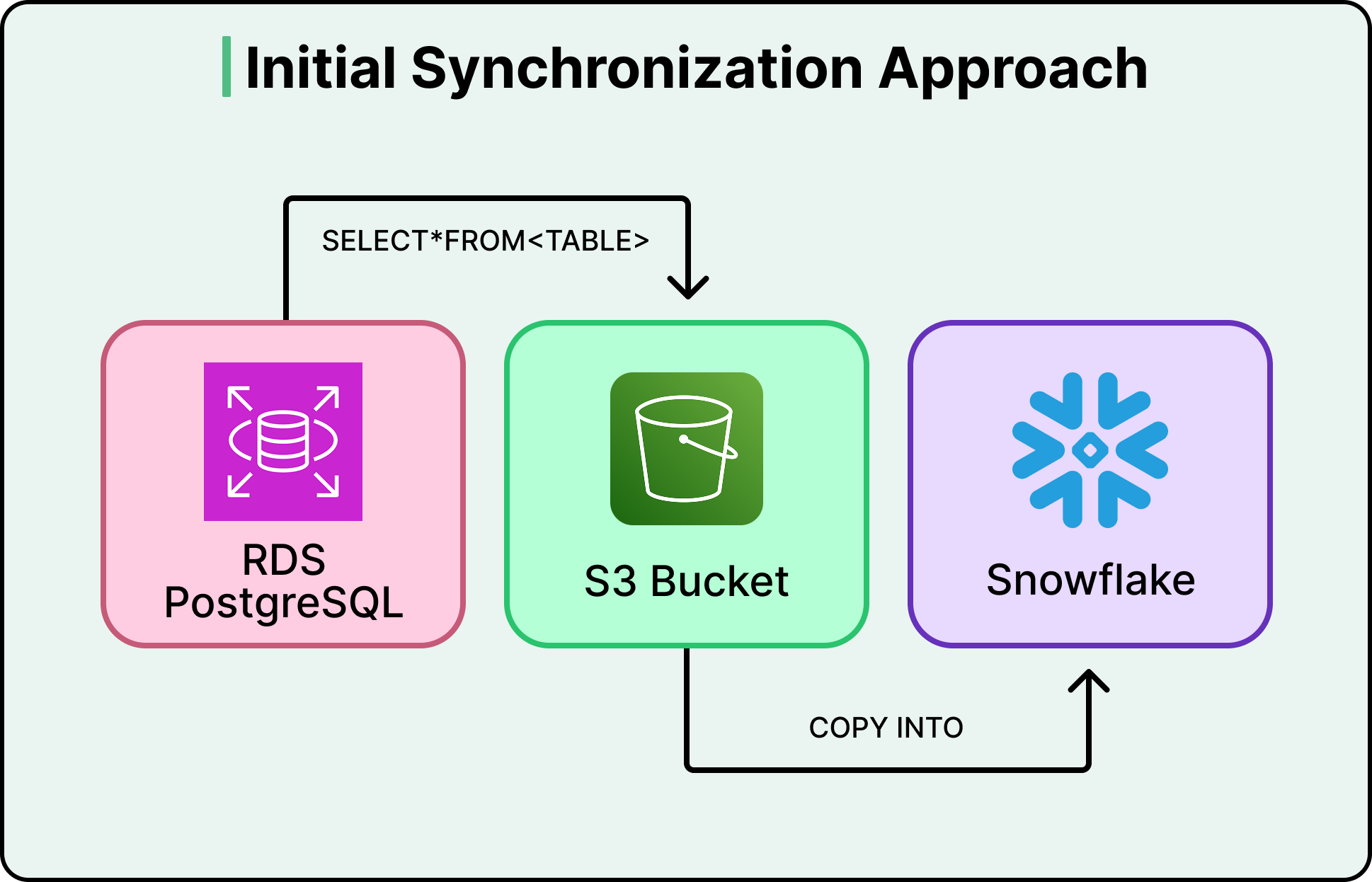
Figma’s original data pipeline did what’s called a full sync. Every run copied the entire contents of a database table, regardless of how much had actually changed since the last run. If a table had ten million rows and only fifty changed that day, the pipeline still copied all ten million. When tables are small, this is fast and cheap.
To start with, Figma’s production databases were hosted on Amazon RDS PostgreSQL and served live user traffic. Every time someone opens a file, saves a change, or loads a project, those databases handle the request. Running heavy analytical queries on these same databases, things like computing company-wide KPIs or analyzing usage trends across millions of users, would compete with live traffic and slow down the product. So like most companies at this scale, Figma maintains a separate analytics warehouse in Snowflake, a database built specifically for these kinds of large, complex queries. The catch is that data has to get from one to the other. That transfer is the synchronization pipeline.
But Figma’s tables didn’t stay small.
As mentioned, between 2021 and 2025, they launched FigJam, Dev Mode, Figma Make, and expanded localization to serve the Brazilian, Japanese, Spanish, and Korean markets. The user base grew rapidly, and so did the data.
By 2023, daily synchronization tasks were taking around six hours to complete. The largest tables took several days. To make things worse, the pipeline required dedicated database replicas just to handle the export load without affecting production traffic. Those replicas alone cost millions of dollars annually.
Figma evaluated three options to handle this:
They could keep the existing system, but sync delays and replica costs made that untenable.
They could add parallelism to speed up the full copies, but this was a band-aid that wouldn’t scale as tables continued to grow.
Or they could overhaul the pipeline entirely.
They chose the overhaul, committing to incremental synchronization. Instead of copying entire tables every run, they’d capture only what changed and apply those changes to the destination. The concept is simple, but the execution is not.
Incremental Synchronization
Incremental synchronization flips the model. Rather than asking “what does the whole table look like right now?” it asks “what changed since last time?” Only the inserts, updates, and deletes since the last sync get transferred and applied. For a table with ten million rows where fifty changed, you’re now moving fifty rows instead of ten million.
The mechanism that makes this possible is called Change Data Capture, or CDC. Every database keeps an internal log of every write operation, known as the write-ahead log, for its own crash-recovery purposes. CDC reads that log and converts it into a stream of change events. This does not add overhead to the database, and we are piggybacking on bookkeeping that the database is already doing.
The diagram below shows how CDC works on a high-level:
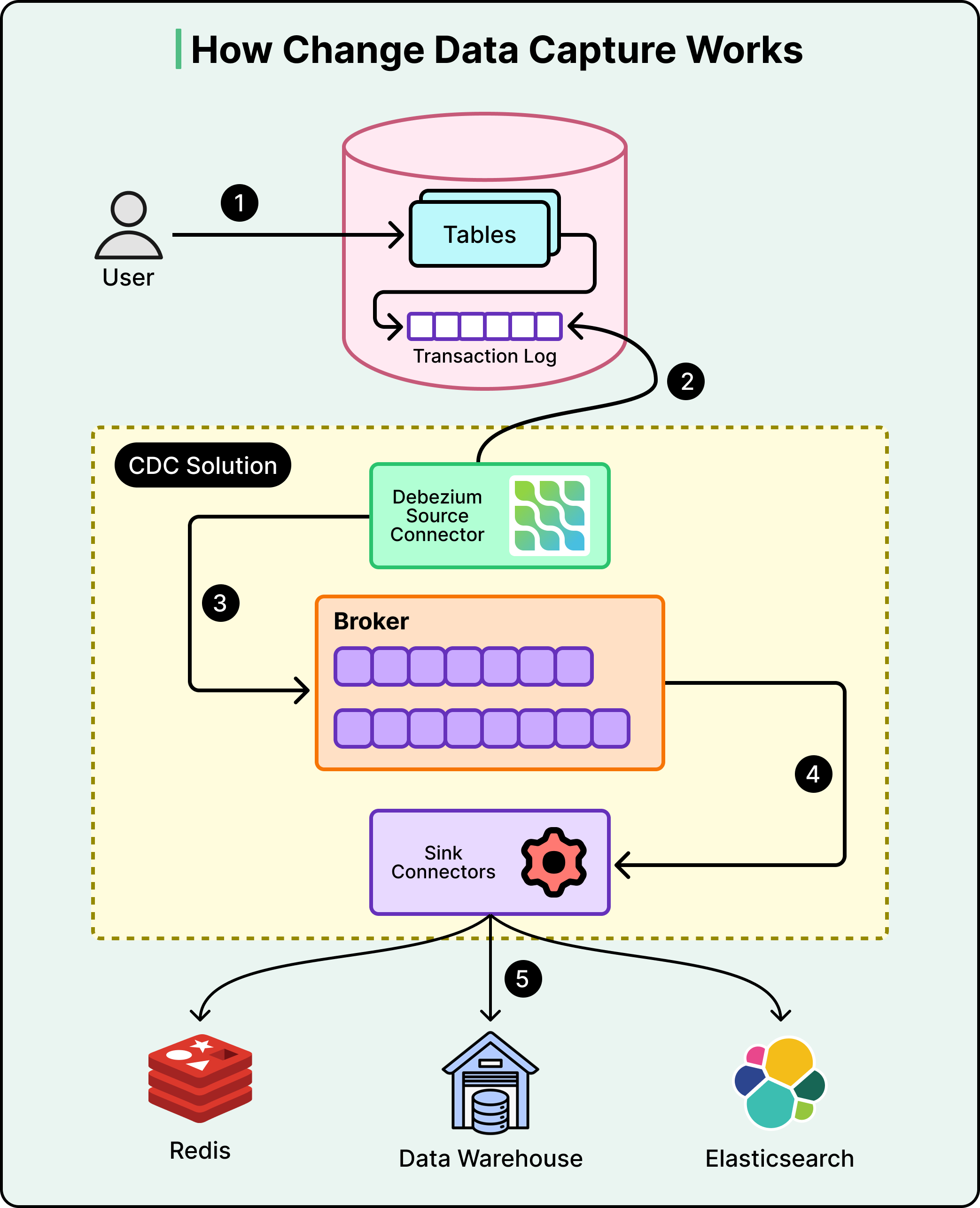
Those change events need somewhere to go. Figma uses Kafka, a distributed streaming platform that acts as a buffer between the production database and Snowflake.
As CDC captures changes, it publishes them to Kafka topics, one topic per table. Snowflake then consumes from those topics at its own pace. This decoupling ensures that the production database doesn’t need to know or care whether Snowflake is online, busy, or behind. It just writes events to Kafka, and Kafka holds onto them until the consumer is ready. If Snowflake goes down for maintenance, no data is lost. The events queue up in Kafka and get processed once Snowflake comes back.
One point to note, however, is that the stream only captures changes from the moment you start listening. It doesn’t contain the full history of the table. So on day one, the destination database is empty, and the change stream only knows about changes happening right now. There is a need for a starting point.
That starting point is a snapshot. In this approach, we take a full copy of the table at a specific moment in time, then start applying changes from before that moment forward. Here’s why the timing matters. For example, Ssy Figma kicks off a snapshot export at 2:00 AM, and the export takes two hours to complete. During those two hours, users are still active. Records are being created, updated, and deleted. The snapshot finishes at 4:00 AM, but it only reflects the state of the table as of 2:00 AM. If the change stream starts capturing events at 4:00 AM, every change between 2:00 and 4:00 AM is lost. The destination table will be missing two hours of data, with no error to flag the gap. To avoid this, Figma ensures the Kafka CDC stream’s start offset precedes the snapshot timestamp. That overlap means some events will be duplicates of what’s already in the snapshot, but duplicates can be handled during the merge step. Missing data cannot.
Figma also had to decide whether to buy an off-the-shelf solution or build its own setup. They evaluated vendor options seriously and found three problems:
Generic CDC tools couldn’t leverage Amazon RDS-specific APIs, like the ability to export snapshots directly to S3 without maintaining a separate database replica.
Vendor pricing at Figma’s scale came out to five to ten times more than an in-house build.
The tools they evaluated couldn’t reliably handle Figma’s data volume, which was still growing.
Therefore, they assembled their pipeline from lower-level components:
Amazon RDS handles snapshot exports to S3.
Kafka streams the CDC events.
Snowflake stored procedures perform the incremental merge, in other words, applying the stream of changes to bring the destination tables up to date.
Merge jobs run on a configurable schedule, defaulting to every three hours.
See the diagram below:
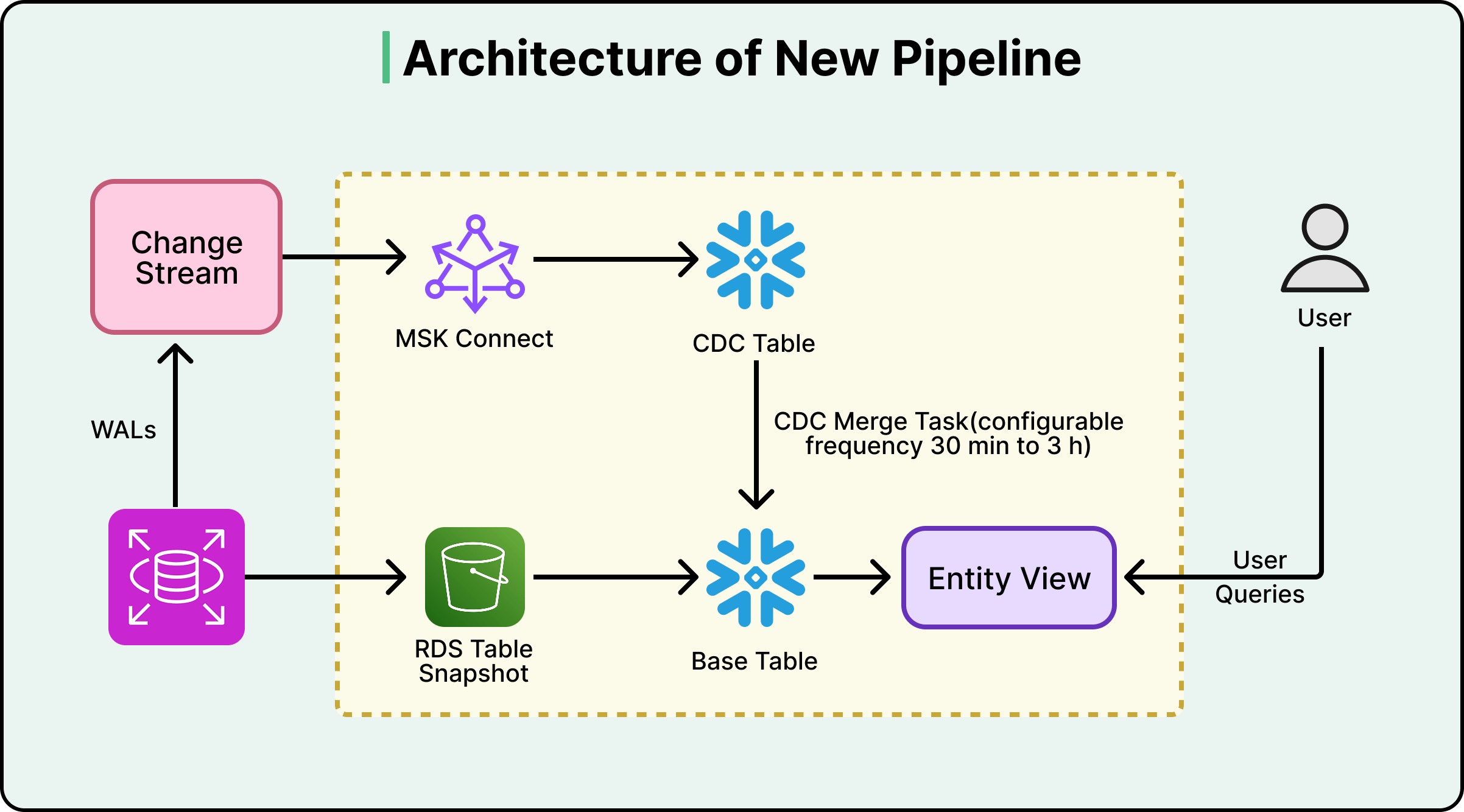
That three-hour default is a deliberate design choice, not a limitation. More frequent merges mean fresher data but higher Snowflake compute costs. Figma lets teams override the default where it matters. Their billing pipeline, for example, runs on 30-minute merge cycles. Each team pays only for the freshness they actually need.
Trust But Verify
Building the pipeline is half the job. The other half is knowing whether it’s actually working correctly.
Data pipelines can fail in ways multiple ways that don’t produce errors. For example:
A partial failure during a snapshot export
A misconfigured CDC connector
An unexpected data format from the source.
These issues don’t crash the pipeline. They just produce wrong data. And wrong data in an analytics warehouse leads to wrong KPIs, wrong business decisions, and a slow erosion of trust in the entire data platform.
Figma’s answer to this scenario is quite rigorous. They built a dedicated validation workflow that clones the live base table, runs the entire bootstrap process independently into a temporary schema, aligns both copies to the same point in time using CDC data, and then compares them cell by cell. This runs weekly for every table in the pipeline. Most teams settle for row-count checks or sampling. Figma treats its analytical warehouse with the same correctness guarantees you’d expect from a production database.
The reason this approach works is independence. If a bug exists somewhere in the main pipeline, say a CDC connector silently drops certain types of update events, any validation that reuses the same pipeline path would inherit the same bug. The corrupted data would match the corrupted check, and everything would look fine. By bootstrapping a completely separate copy through an independent process and comparing the two, Figma guarantees that an error in one path can’t silently pass the other’s checks.
Figma also built a zero-downtime re-bootstrap capability by versioning all bootstrap artifacts except the final user-facing view. When schemas evolve, or a full re-bootstrap is needed, the new version is built in parallel and promoted via an atomic view update. Live queries are never disrupted.
The other piece that holds it all together is automation. Figma structured its automation into two tiers:
First-level automations handle the actual execution. You give them a table name, and they run the bootstrap or validation and alert if something goes wrong.
Second-level automations sit above and decide when to trigger the first tier. A controller workflow checks every few hours for new tables that need onboarding. A dispatcher workflow kicks off validation for each table weekly.
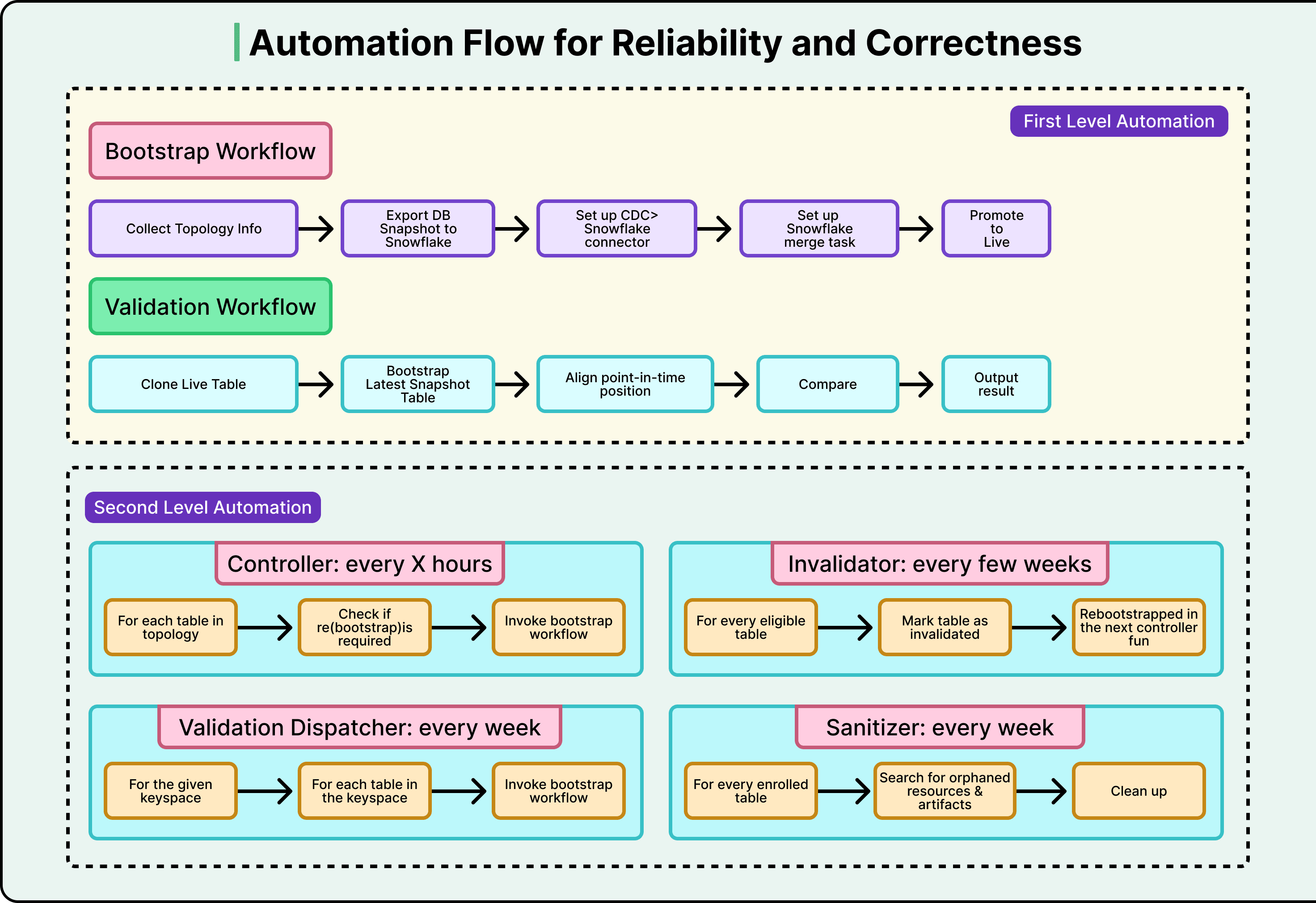
The system is largely self-operating, and developers get involved only when alerts fire.
The payoff came early. One week into testing in their staging environment, the automated re-bootstrap routine caught a severe failure mode. Had it reached production, it would have triggered a site-wide outage lasting at least twenty minutes. The old system, a daily cron job with no automated validation, could never have caught this.
Conclusion
The numbers tell the story quite clearly:
Data freshness went from 30-plus hours to under three hours, with the option to configure it down to minutes.
The pipeline handles tables over ten times larger than the old system could manage, with consistent and predictable performance.
Eliminating the dedicated export replicas produced multimillion-dollar annual savings.
Operations have seen zero major incidents during and after launch.
Beyond raw performance, the rebuild unlocked new capabilities.
For example, a sync-on-demand CLI tool lets developers trigger immediate synchronization outside the regular schedule. CDC data is now exposed to end users, so developers can query the full change history of any entity and not just its current state. During incident response, this means questions like “show me every change to this user’s record in the last 48 hours” get answered in minutes.
However, this project took a significant investment of time, effort, and resources.
The new system is much more complex than a daily cron job. Figma compensated with aggressive automation and validation, but that’s additional complexity layered on top. Ultimately, this tradeoff was worth it at Figma’s scale.
References:
“These issues don’t crash the pipeline. They just produce wrong data. And wrong data in an analytics warehouse leads to wrong KPIs, wrong business decisions, and a slow erosion of trust in the entire data platform.”
really well put. i’d say the danger here is much more than a crashed pipeline.
The validation pattern here is the underrated hero of this story. Most teams settle for row counts, but any check that reuses the same pipeline path will silently inherit the same bugs the pipeline has.
An independent re-bootstrap is the only way to catch the failure modes that don't throw errors and the fact that it caught a site-wide outage in staging is the whole ROI argument in one bullet.