

The missing piece of your AI ROI model (Sponsored)

Only 35% of engineering leaders report significant ROI from AI, and most ROI models miss the full picture.
The majority of engineering time is spent on investigating alerts, diagnosing incidents, and coordinating decisions across tools that don’t share context. The cost of that work rarely appears in ROI models.
When organizations only measure what it costs to produce code, they’re missing the downstream costs that pop up in production.
Learn how engineering teams at Zscaler, DoorDash, and Salesforce are measuring AI ROI across the full engineering lifecycle and finding the largest returns in production.
When OpenAI shipped Codex, their cloud-based coding agent, the hardest problems they had to solve had almost nothing to do with the AI model itself.
The model, codex-1, is a version of OpenAI’s o3 fine-tuned for software engineering. It was important, but it was also just one component in a much larger system. The real engineering went into everything around it.
How do you assemble the right prompt from five different sources? What happens when your conversation history grows so large it threatens to exceed the model’s memory? How do you make the same agent work in a terminal, a web browser, and three different IDEs without rewriting it each time?
When the Codex team needed their agent to work inside VS Code, they first tried the obvious approach and exposed it through MCP, the emerging standard for connecting AI models to tools. It didn’t work. The rich interaction patterns that a real agent needs, things like streaming progress, pausing mid-task for user approval, and emitting code diffs, didn’t map cleanly to what MCP offered. So the team built a new protocol from scratch.
In this article, we will look at how OpenAI built the right orchestration layer around the model.
Disclaimer: This post is based on publicly shared details from the OpenAI Engineering Team. Please comment if you notice any inaccuracies.
What is Codex?
Codex is a coding agent that can write features, fix bugs, answer questions about your codebase, and propose pull requests.
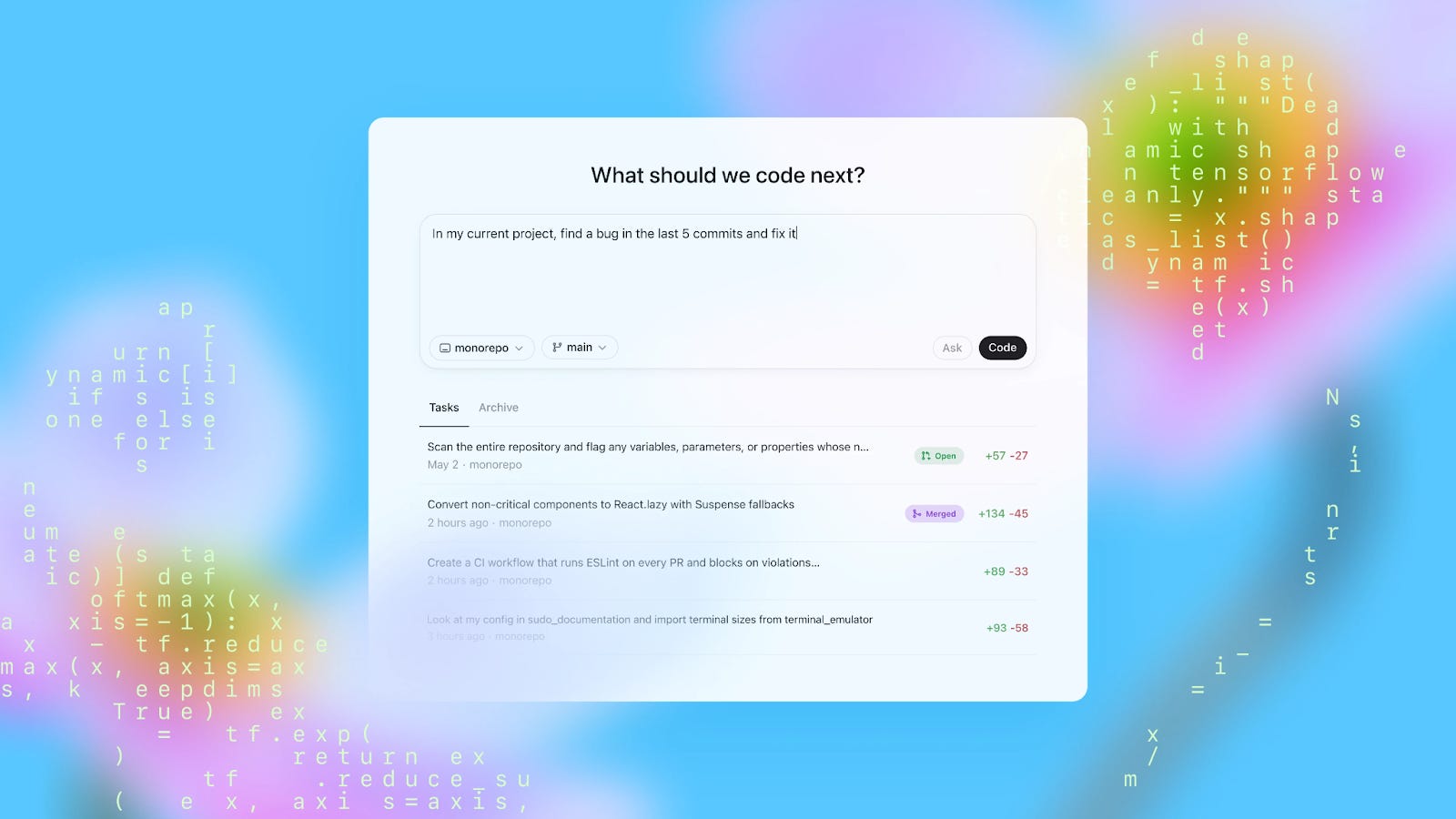
Each task runs in its own isolated cloud sandbox, preloaded with your repository. You can assign multiple tasks in parallel and monitor progress in real time.
How Codex works behind the scenes is also quite interesting. The system has three layers worth understanding: the agent loop, prompt and context management, and the multi-surface architecture that lets one agent serve many different interfaces.
The Agent Loop
At the heart of Codex is something called the agent loop. The agent takes user input, constructs a prompt, sends it to the model for inference, and gets back a response.
However, that response isn’t always a final answer. Often, the model responds with a tool call instead, something like “run this shell command and tell me what happened.” When that happens, the agent executes the tool call, appends the output to the prompt, and queries the model again with this new information. This cycle repeats, sometimes dozens of times, until the model finally produces a message for the user.
See the diagram below:
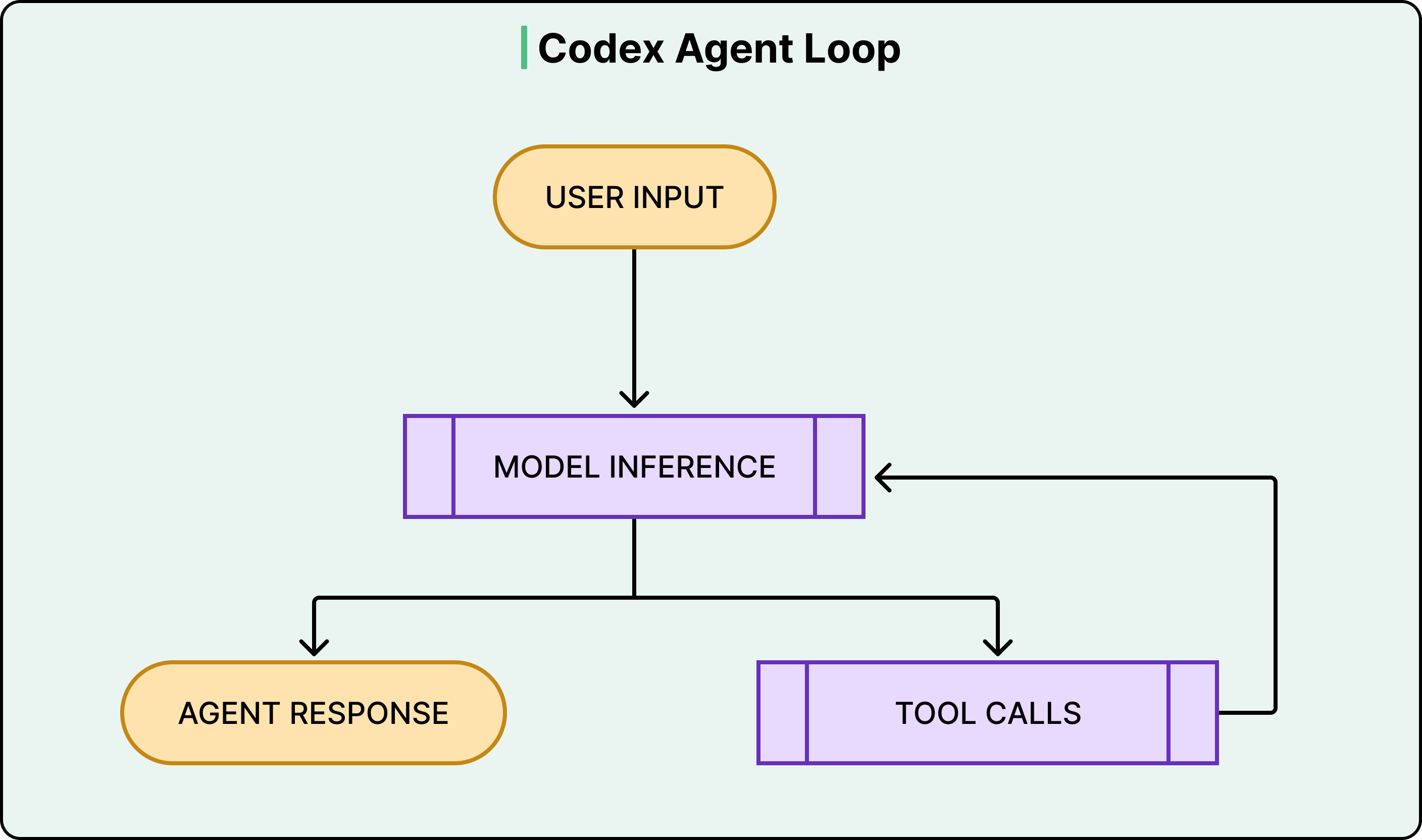
What makes this more than a simple loop is everything the harness manages along the way.
Codex can read and edit files, run shell commands, execute test suites, invoke linters, and run type checkers. A single user request like “fix the bug in the auth module” might trigger the agent to read several files, run the existing tests to see what fails, edit the code, run the tests again, fix a linting error, and run the tests one more time before producing a final commit.
The model does the reasoning at each step, but the harness handles everything else, such as executing commands, collecting outputs, managing permissions, and deciding when the loop is done.
This distinction between model and harness matters because it shapes how developers actually use Codex. OpenAI’s own engineering teams use it to offload repetitive, well-scoped work like refactoring, renaming, writing tests, and triaging on-call issues.
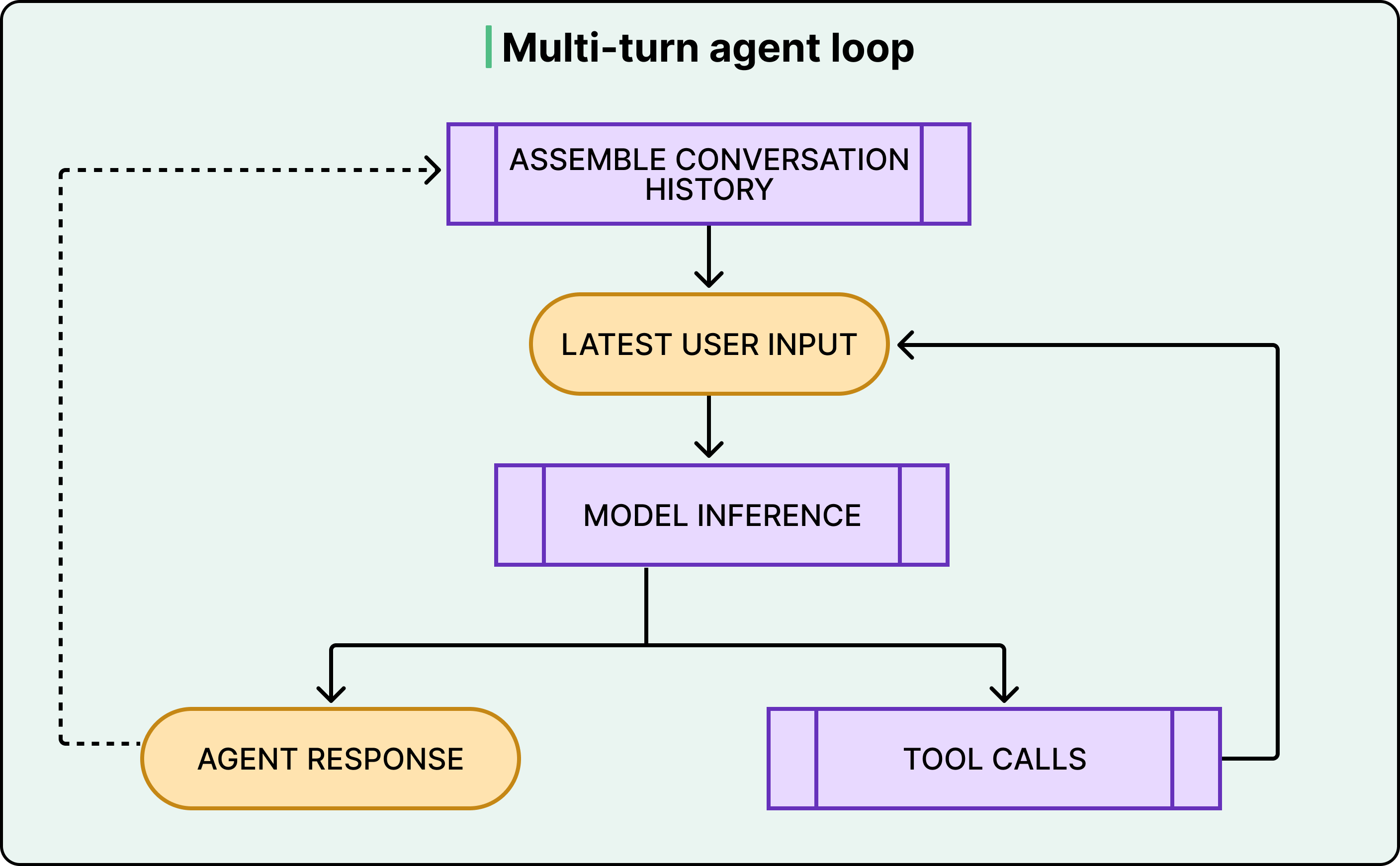
The agent loop also has an outer layer. Each cycle of inference and tool calls constitutes what OpenAI calls a “turn.” However, conversations don’t end after one turn. When the user sends a follow-up message, the entire history of previous turns, including all the tool calls and their outputs, gets included in the next prompt. This is where things get expensive, and where the next layer of complexity kicks in.
See the diagram below:
Building the Prompt, Managing the Memory
When you type a request into Codex, your message becomes the bottom layer of a much larger prompt. Above it, the system stacks environment context like your current working directory and shell, the contents of any AGENTS.md files in your repository (these are project-specific instructions for the agent, covering things like coding conventions and which test commands to run), sandbox permission rules, developer instructions from configuration files, model-specific instructions, tool definitions, and a system message.
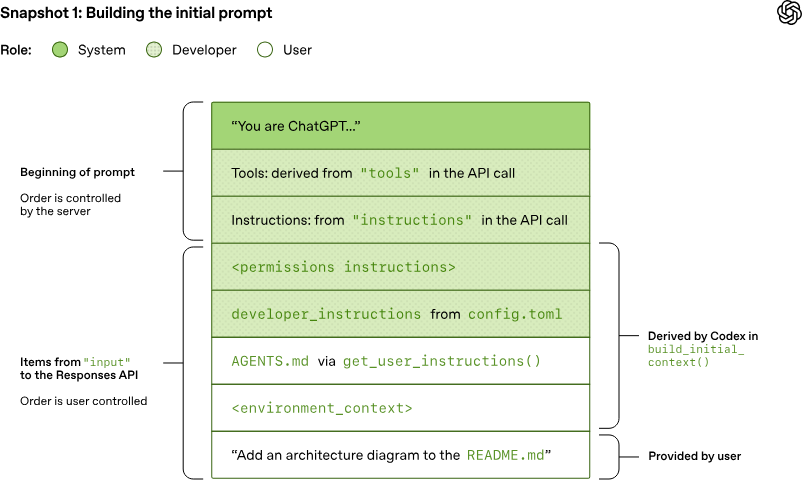
Each layer carries a role, either system, developer, or user, that signals its priority to the model. The server controls the ordering of the top layers. The client controls the rest. This layered construction means the model always has rich context about the environment it’s operating in. However, it also means the prompt is already large before the user says a single word. And it only grows from there.
Every tool call the model makes produces output that gets appended to the prompt. Every new conversation turn includes the full history of all previous turns, tool calls included.
See the diagram below:
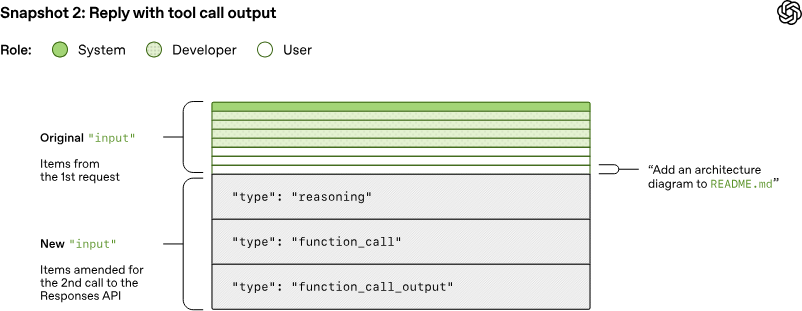
This means that the total JSON sent to the API over the course of a conversation grows quadratically. If the first turn sends X amount of data, the second turn resends all of X plus the new data, the third turn resends all of that plus more, and so on.
OpenAI accepts this cost on purpose. They could use a server-side parameter that lets the API remember previous conversation state, avoiding the need to resend everything. They chose not to because doing so would break the statelessness of each request and prevent support for customers who require Zero Data Retention. Therefore, every request is self-contained and carries the full conversation with it.
The key mitigation is prompt caching. Since Codex always appends new content to the end of the existing prompt, the old prompt is always an exact prefix of the new one. This prefix property lets OpenAI reuse computation from previous inference calls, so even though the data transfer is quadratic, the actual model computation stays closer to linear.
However, the prefix property is fragile. Anything that changes the beginning or middle of the prompt, like switching models, changing tools, or altering sandbox configuration, breaks the cache. When OpenAI added support for MCP tools, they accidentally introduced a bug where the tools weren’t listed in a consistent order between requests. That inconsistency alone was enough to destroy cache hits.
Eventually, even with caching, conversations hit the context window limit, the maximum number of tokens the model can process in a single inference call. When that happens, Codex compacts the conversation. It replaces the full history with a smaller, representative version that preserves the model’s understanding of what happened through an encrypted payload that carries the model’s latent state. In reality, the compaction mechanism involves more nuance than a simple summary, but the core idea stands: managing the context window is a first-class engineering problem, not an afterthought.
AGENTS.md files deserve a quick mention here because they represent a design decision about where context should live. Rather than hardcoding project-specific knowledge into the system, OpenAI lets developers place AGENTS.md files in their repositories, right alongside their code. These files tell Codex how to navigate the codebase, which commands to run for testing, and how to follow the project’s conventions. The model performs better with them, but also works without them.
Making It Work Everywhere
Codex started life as a CLI tool. You ran it in your terminal, and it operated on your local codebase.
Then OpenAI needed it in VS Code and then in a web app. Further, it was also needed as a macOS desktop app. Lastly, third-party IDEs like JetBrains and Xcode wanted to integrate it as well. Rewriting the agent logic for every surface was not an option.
As mentioned earlier, the first attempt was to expose Codex as an MCP server. However, the team found that MCP’s semantics couldn’t carry the full weight of what an agent conversation actually looks like. Codex needed to stream incremental progress as the model reasoned. It needed to pause mid-task and ask the user for approval before running certain commands. It needed to emit structured diffs. These interaction patterns were too rich for what MCP offered at the time.
So they built the App Server. All of the core agent logic, the agent loop, thread management, tool execution, configuration, and authentication live in a single codebase that OpenAI calls “Codex core.” The App Server wraps this core in a JSON-RPC protocol that any client can speak over standard input/output.
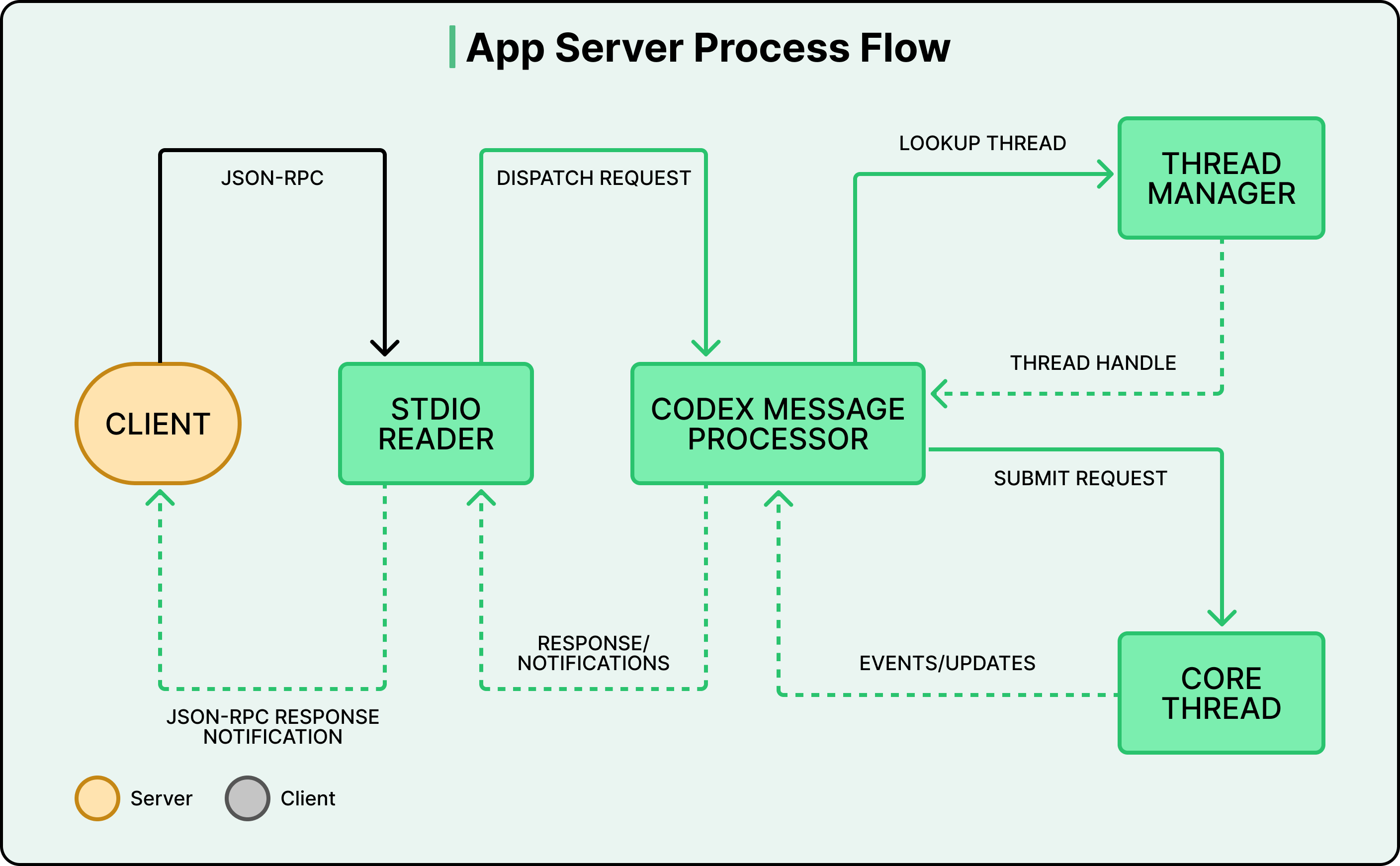
The protocol is fully bidirectional:
The client can send requests to the server (start a thread, submit a task).
The server can also send requests back to the client, for example, asking for approval before executing a shell command.
The agent’s turn pauses until the user responds with “allow” or “deny.” This lets the agent balance autonomy with human oversight without hardcoding that policy into the agent loop itself.
Different places use this architecture differently
The VS Code extension and the desktop app bundle the App Server binary, launch it as a child process, and keep a bidirectional stdio channel open.
The web app runs the App Server inside a cloud container. A worker provisions the container with the checked-out repository, launches the binary, and streams events to the browser over HTTP. State lives on the server, so work continues even if the user closes the tab.
Partners like Xcode decouple their release cycles from OpenAI’s by keeping their client stable and pointing it at newer App Server binaries as they become available. The protocol is designed to be backward compatible, so older clients can safely talk to newer servers.
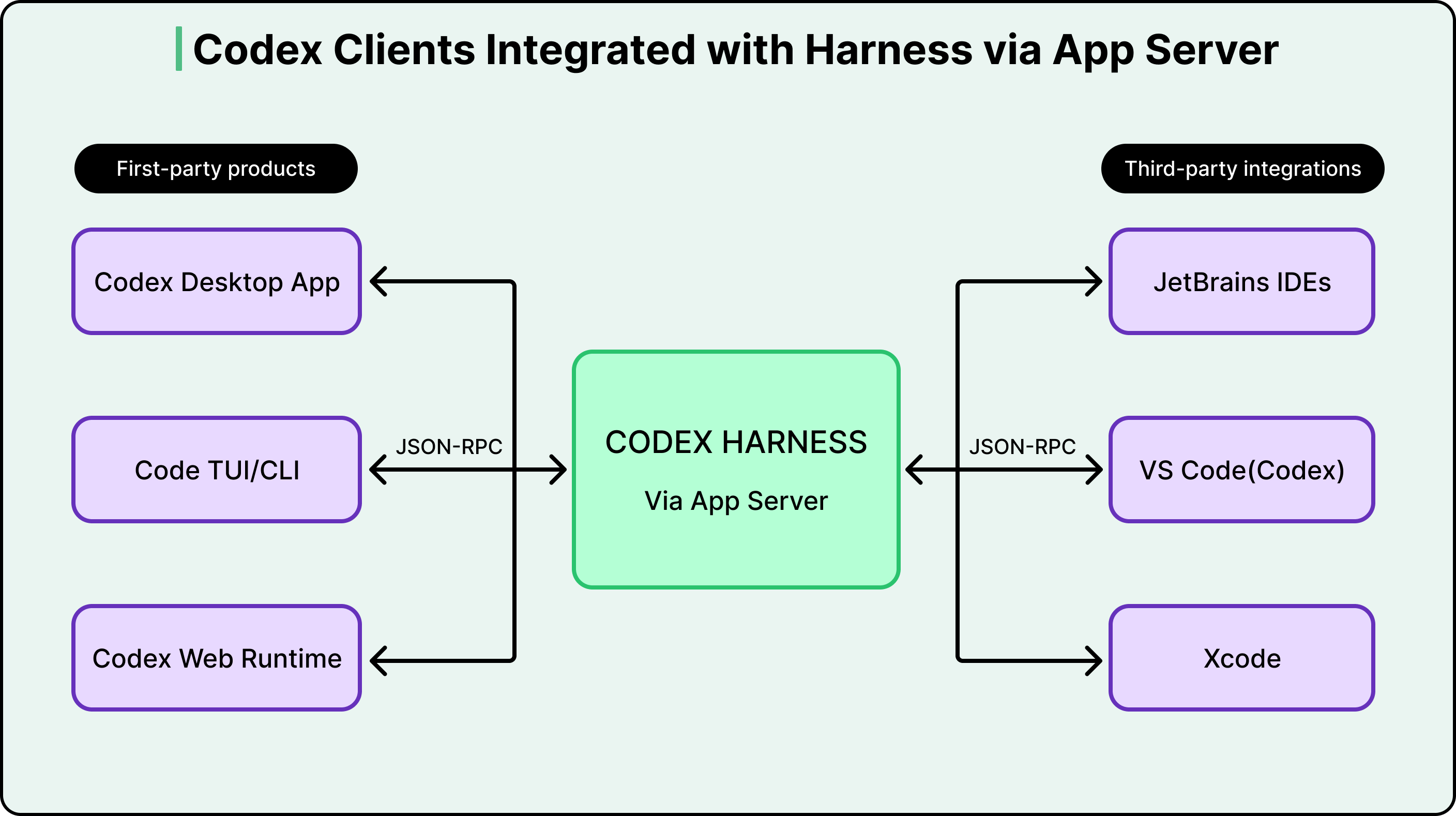
This architecture wasn’t planned from the start. It evolved from a CLI, through a failed MCP attempt, to the App Server protocol that now underpins every Codex surface. That trajectory is itself a useful lesson about system design: the right abstraction usually doesn’t exist until you’ve tried the wrong one.
Conclusion
OpenAI’s experience proves that the model is a component and the agent is the system. Most of the engineering is in the system.
If you use tools like Codex, understanding these mechanics helps you use them more effectively. Writing clear AGENTS.md files gives the agent project-specific context that meaningfully improves its output. Scoping tasks tightly works better than vague, open-ended requests because the agent loop is most effective when each cycle has a clear next step. And knowing that long conversations degrade due to context window limits and compaction explains why starting fresh threads for new tasks often gives better results.
Codex still has real constraints. It can’t accept image inputs for frontend work. You can’t course-correct the agent mid-task. Delegating to a remote agent takes longer than interactive editing, and that shift in workflow takes getting used to. OpenAI is working toward a future where interacting with Codex feels more like asynchronous collaboration with a colleague, but the gap between that vision and the current product is still significant.
References:
The core observation here is the one most agent builders miss: the model is a component, the agent is the system. Most engineering goes into the system, not the model. I've spent months building exactly that - CLAUDE.md files, memory layers, tool permission hierarchies - and the ratio feels about right. Maybe 20% of the work is model selection.
The other 80% is orchestration, context management, and deciding when to loop versus escalate. The AGENTS.md approach for project-level context is essentially what I've been doing with layered markdown files.
Different name, same principle. The bidirectional mid-task approval mechanism is the part I'd push on - in practice, most agents either run fully autonomous or fully supervised. The middle ground is harder to design than it looks.
Is the color coding in the App Server Process Flow diagram correct? Grey is referred as the Client color but never used. Or, I'm an idiot and missed something.