

Add AuthKit to your app in one command (Sponsored)

Your app needs authentication. That usually means installing an SDK, wiring up callback routes, configuring middleware, and getting your environment right. Or you can run one command: npx workos@latest install.
The WorkOS AI installer detects your supported framework and adapts AuthKit to your existing project. It installs the SDK, creates your authentication routes, and sets up environment variables, with post-installation validation on by default.
Review the generated code, test your login flow, and get back to building your product.
Caching is a super important aspect of system design, especially for large-scale systems. You can use a cache to store some data that is expensive to calculate so that it can be reused later without paying the same cost. For example, a website might cache the result of a database query instead of running that query every time someone opens a page.
The same is the case for large language models. Just like normal systems, caching in LLM applications also means storing stuff calculated as part of earlier requests so that we can reuse it later. This helps bring down processing costs and response time, especially when requests contain the same instructions, documents, or questions.
However, there are two types of ways we can cache stuff in LLMs: prompt caching and semantic caching. Both have the same general aim of reducing repeated work, but they work at different stages of a request. They also follow different rules.
In this article, we’ll look at how LLM caching works in detail. Here’s what you’ll learn:
Why an LLM request costs money
What is prompt caching
Where to place the shared content in prompt caching
What is semantic caching
The difficulty with semantic caching
Why checking the question is not enough
When to invalidate the cache
How prompt and semantic caching can work together
Disclaimer: This post is based on publicly shared details from various sources. References at the end. Please comment if you notice any inaccuracies.
Why an LLM Request Costs Money
When you send some text to an LLM, the LLM processes that text and generates a response. During processing, the text is divided into tokens. Each token is a small piece of text. A token can be a word, part of a word, or punctuation.
These tokens directly impact the cost. For a typical text-generation API, the cost has two main components:
The tokens provided as input.
The tokens generated as output.
Output tokens often cost more for obvious reasons. However, the input tokens can also cost a lot because of the size. Input can include much more than just the user’s latest question. For example, let’s say you have a customer-support application. Along with the current question, this application can also send a bunch of instructions telling the model how it should behave. It might also send examples of good answers. Relevant product documentation. Earlier conversation messages. In other words, a 10-word question can be part of a request made up of 1000s of input tokens.
Let’s say you have another application that sends a long product manual with every user request. This product manual is like an encyclopedia of all the information that the user might be looking for. One user might ask about the installation procedure. Another asks about troubleshooting. Maybe a third user asks about account settings. While their questions happen to be different, the answers are all there in the same long product manual that is part of every request.
There is another type of repetition as well. 100s of users might ask how to change their profile picture. But each user might write the query using slightly different words. In such a case, the model may end up generating the same rough answer again and again.
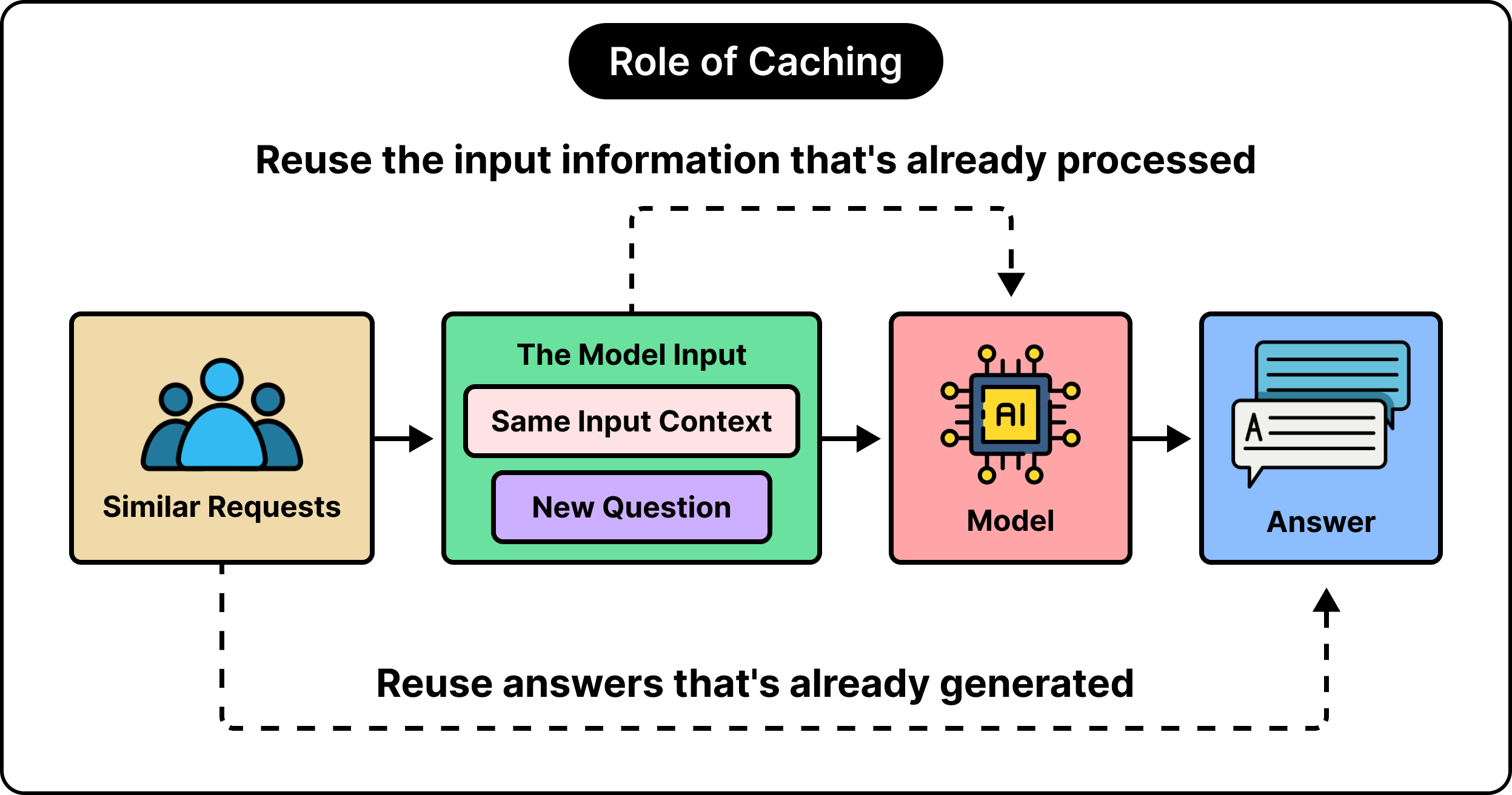
As you can notice, we have two opportunities to reduce this repetitive work and bring down costs:
What if the application can reuse the input information that has already been processed once? For example, the product manual.
What if the application can reuse a previously generated answer if it is suitable? For example, similar questions asked again and again.
Prompt caching is used to exploit the first opportunity. Semantic caching is for the second one. Let’s look at both in detail.
Prompt Caching: Reusing the Model’s Input Processing
To make caching effective, you need a rule to decide whether something is fit for reuse. This rule is the most important part of building an effective cache setup.
For prompt caching, the rule is to match the beginning of the model’s input.
A typical text-generating transformer model works in two stages:
First, it processes the input. This stage is called prefill.
Second, it generates new tokens. This stage is called decoding.
When processing the input, the model converts text to numbers. This numeric representation helps the model use information it read earlier to generate output tokens down the line. Some of these representations are called keys and values. Or KV states.
Keys help the attention mechanism find out which earlier information is useful. Values are the actual representations of that information. A KV cache stores these intermediate results so that they can be reused. This is all part of the ordinary text generation flow in an LLM.
Prompt caching piggybacks on this reuse setup. It extends the whole thing for all the compatible input requests that share the same beginning. Let’s say you have the following two requests:
Request A: Support instructions + product manual + “How is installation configured?”
Request B: Support instructions + product manual + “How are diagnostic logs enabled?”
As you can see, the support instructions and the product manual are shared across both requests. They are known as the shared prefix. The actual question is part of the suffix that keeps changing for each input request.
After the model processes Request A, the system can store the KV states for the shared prefix. When Request B arrives, the model can reuse those same KV states to process the new question and generate the answer. We’ve reused the intermediate computation for the common context. No recalculation. No reprocessing.
AI wrote the code. Who pays for the CI? (Sponsored)

More AI-written code means more CI minutes. On default runners those minutes are slow and expensive.
WarpBuild cuts both:
Twice as fast, so engineers wait less
Half the cost, so the bill shrinks as usage grows
Pay only for the minutes you use
Teams at Braintrust, Raycast, OpenRouter, Comcast and Jane Street trust WarpBuild with their GitHub Actions.
The switch is one runs-on change. Use code START50 for $50 in free credits.
Where to Place the Shared Content in Prompt Caching
For prompt caching to work, we need to put the shared content at the beginning of the request. Basically, the prefix position. The word “prefix” is important here because a token’s internal representation depends on the information that comes before it in the input.
In a typical causal language model, the tokens that come earlier in the prompt can’t look forward at the question that might appear later in the request. This is why a model can reuse the shared stuff from the beginning even when the final user question is completely different.
However, when you place a different question before the manual, it changes the way the manual is processed. The question impacts the representation of the text in the manual. The manual’s text is the same. But the processed version is completely different.
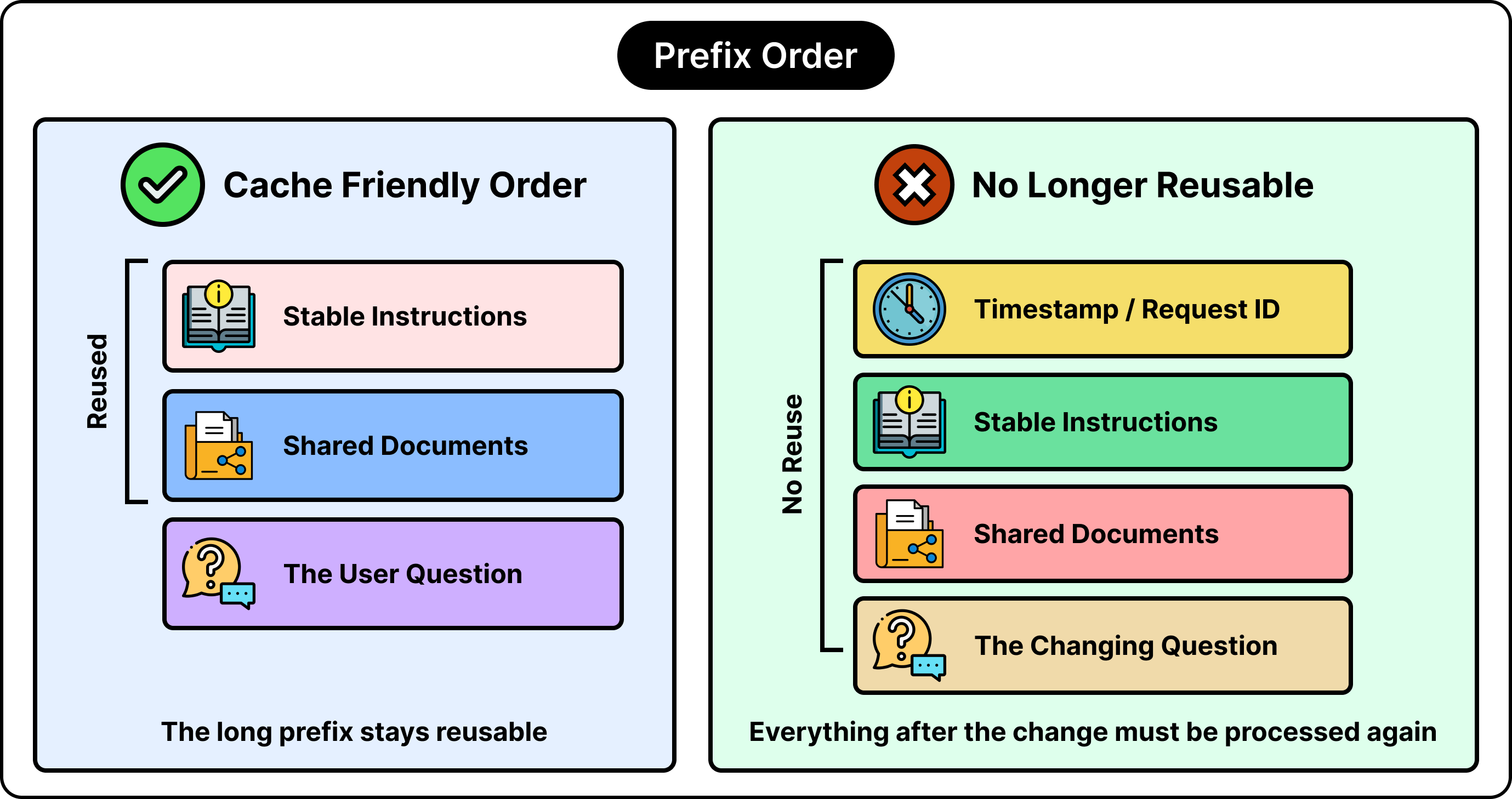
This is the reason we have to place fixed, stable instructions or any shared reference material before the request details that can change. Even if you place a seemingly unimportant timestamp or random request ID at the beginning of the input, it can stop the model from reusing a large chunk of shared stuff.
To be clear, even the instructions need to be “exactly” similar. Even if you have two instructions that might mean the same thing, you cannot use them interchangeably for prompt caching. There should be no change in wording. No change in document order. No change in request settings.
The Cost Savings from Prompt Caching
Simply caching the shared prefix doesn’t make the cost zero. Most LLM providers usually charge it at a discounted rate. Also, the output token charges stay the same because the model still generates a fresh answer.
For reference, Anthropic’s standard prompt-cache pricing uses a cache-read rate of 1/10th of the ordinary input rate. There are some exceptions for particular models. Its standard 5-minute cache write costs 1.25 times the ordinary input rate, while a 1-hour write costs twice that rate. These are total rates for the affected tokens, rather than additional charges on top of their ordinary input cost.
As an example, if processing a prefix normally costs $1, that five-minute pricing schedule makes the initial write cost $1.25 and a subsequent read cost $0.10. Therefore, one write followed by one read costs $1.35 instead of $2. The more the number of reads, the greater the savings. But if a cached prefix is never reused, you don’t get any benefit.
LLM provider and model rules also determine minimum eligible lengths, expiration, and cache-write pricing. Even if we repeat a prompt, it doesn’t guarantee a cache hit if the cache record has expired or is unavailable.
To summarize, prompt caching mainly reduces input-processing work and can reduce the wait time before we generate a response. You cannot use it to eliminate the work that goes into generating a long answer.
Semantic Caching: Reusing a Previous Answer
Semantic caching is usually part of the application that surrounds an LLM. It can also be a separate service that the application calls before it goes to the LLM for an answer. Consider a couple of example questions that you might ask an LLM:
“Where is the setting for dark mode?”
“How can I switch the app to its dark theme?”
As you can notice, the same answer may be able to satisfy both questions if there’s no change to the application features in a major way. But a simple text comparison would consider them as two separate questions with two different answers. However, a semantic comparison can identify that they are essentially the same query asked in slightly different words.
To implement semantic caching, you need an embedding model. This type of model converts text into a list of numbers called a vector. These numbers represent features of the text in a way that makes it easy to compare two pieces of text.
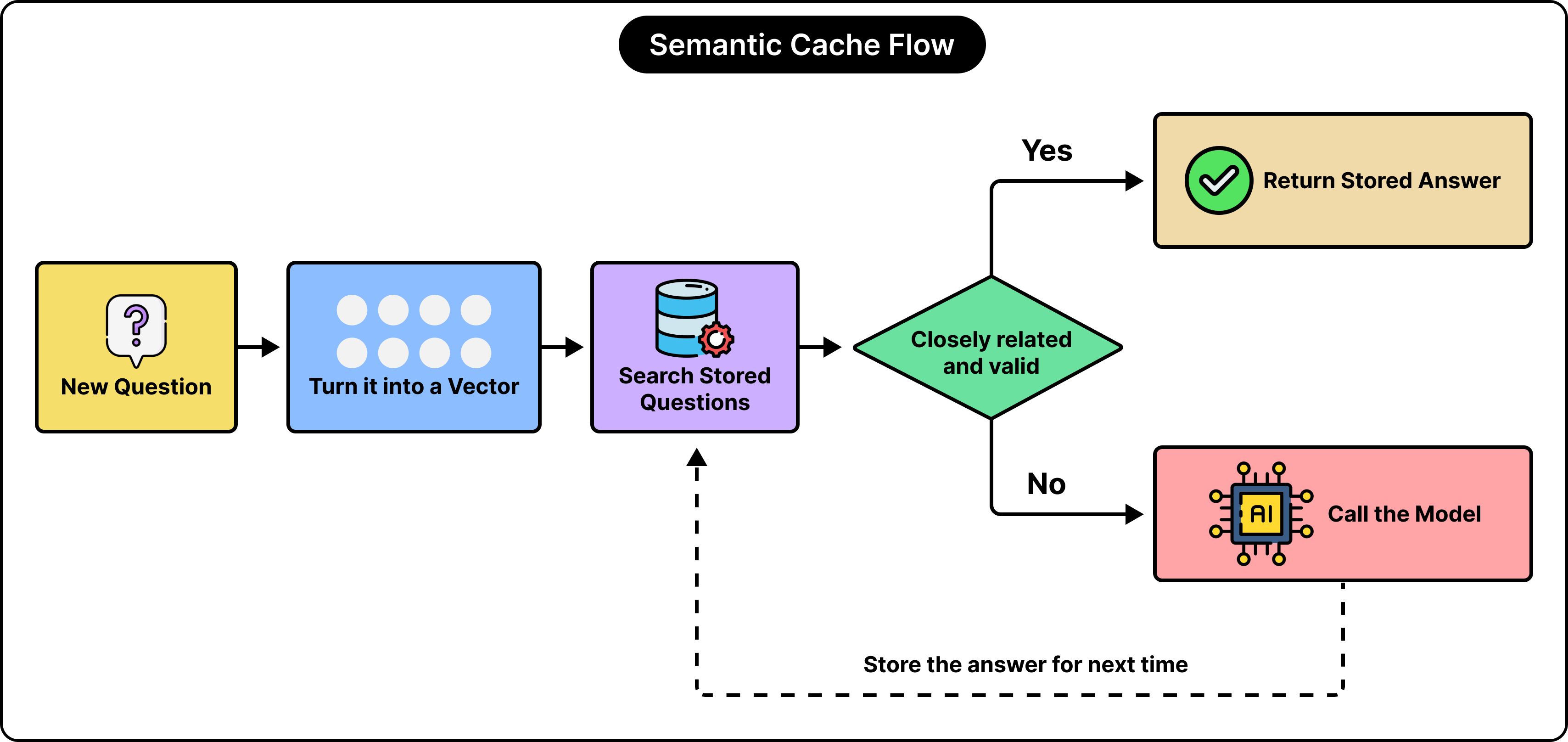
The overall flow works as follows:
The embedding model creates an embedding for the incoming question.
It searches question embeddings that are already stored for suitable candidate answers.
It checks whether a candidate answer is similar and valid for the current question.
If accepted, it returns the stored answer. Basically, a cache hit.
On a miss, it calls the LLM to generate a fresh answer. It may store the answer for future reuse.
As you can see, if there’s a cache hit, we don’t have to call the LLM to generate a fresh answer. No input and output charges in that case. However, tasks like embedding generation, lookup, and cache storage still use resources. So it’s not all free. Also, if we have a cache miss, we pay for the preliminary tasks as well as the LLM request. So a miss ends up being more costly.
The Difficulty With Semantic Caching
The most difficult part with semantic caching is to find out how similar two separate questions are.
In a semantic cache, we calculate a similarity score and compare it to some threshold. You can think of this threshold like a cutoff for accepting that the questions are similar.
If we keep a very strict threshold, we end up rejecting many more answer candidates. While this can improve accuracy and reduce inappropriate reuse, it also rejects a lot of legitimate paraphrases of the question. However, if we go for a loose threshold, more answer candidates get accepted. This increases the overall cache hit rate. But it also increases the possibility of returning an unsuitable answer. There is no single, universal threshold that works perfectly for every application. You need to decide the threshold on a case-by-case basis.
Let’s say a user asks two questions about cancelling an order before it gets shipped and after it gets shipped.
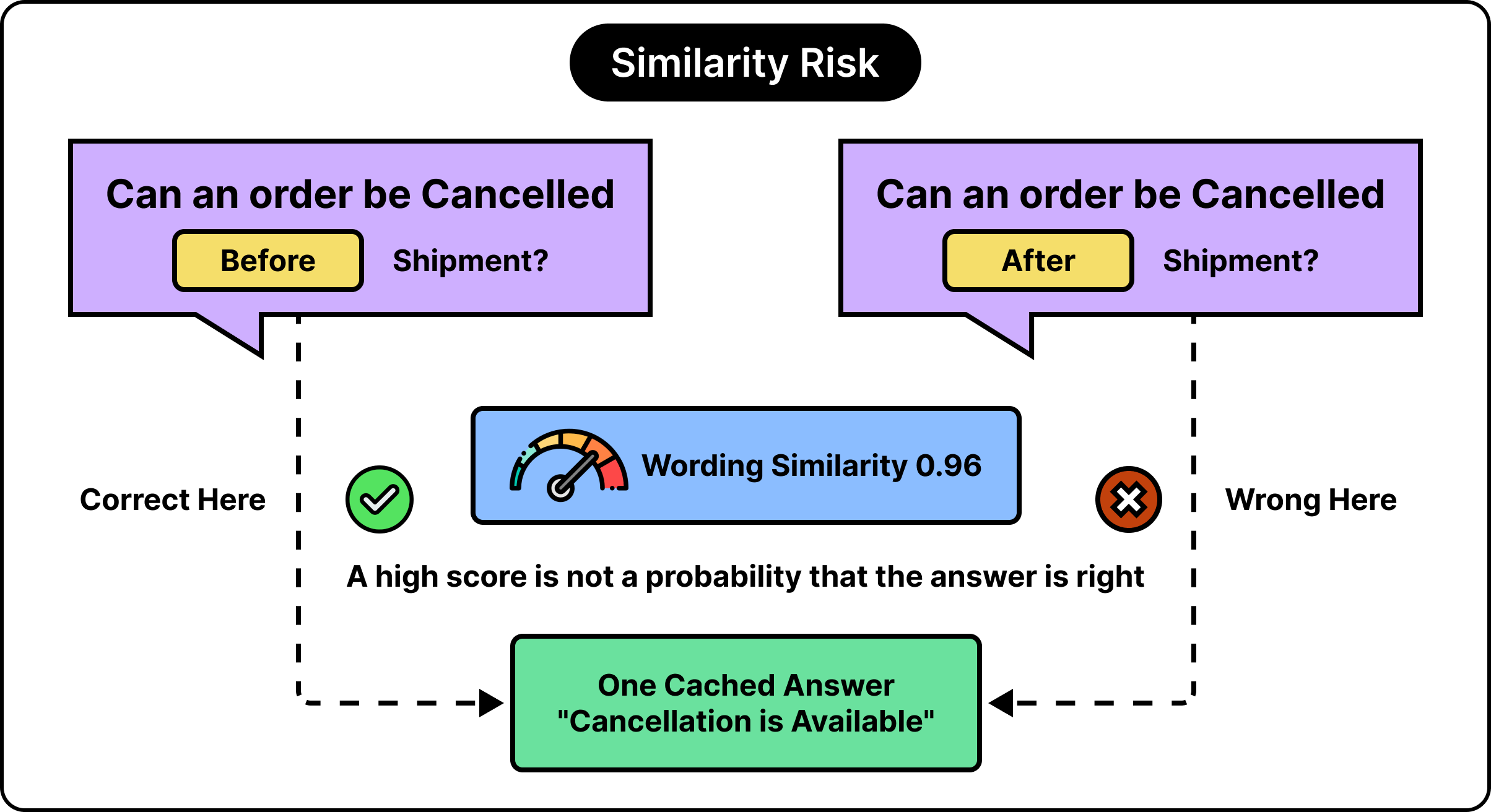
As you can see, both questions are almost the same. Except for one critical word that changes the meaning. Both questions deal with cancellation and shipping. Their embeddings may also be quite close. But a short answer of “Yes, cancellation is available” could be the correct answer for one, but totally incorrect for the other.
Data types like numbers, negation, dates, product editions, and eligibility conditions can cause similar problems while determining similarity. For example, “Does the Basic plan include backups?” cannot automatically reuse the answer to a question about the Pro plan.
Also, we cannot consider a similarity score the same as the probability of an answer being correct. For example, even if you get a similarity score of 0.92 between two questions, it doesn’t mean there is a 92% chance that the cached answer is suitable for both. The way we interpret the score depends on the embedding model and comparison method. Some systems expose a distance score instead, in which smaller values indicate closer matches.
Therefore, we need to have an evaluation process to find out the effectiveness of a semantic caching implementation. This evaluation process has to find out if a particular stored answer can satisfy a new request correctly. For testing purposes, the development team can collect a bunch of requests, identify candidate answers, and label whether reusing a specific answer is the right way. The test suite should have examples that cover legitimate paraphrases as well as difficult near-matches. This way, we have a better chance to find out the optimal threshold value.
Lastly, we need to measure the proportion of requests answered from cache and the proportion of those answers that are actually appropriate. We cannot celebrate just by achieving a high hit rate. We can also have an additional verifier that checks border cases. However, such a verifier also contributes to costs and latency.
Why We Can’t Rely On Just Checking the Question
You can ask the same question multiple times. But every time, you might expect a different answer. For example, a question like “What is my order status?” depends on the customer and the current status of the order. Similarly, a question such as “Does it support offline access?” depends on what the word “it” means in the conversation’s context. Also, if the user requests an answer in a different language, we can’t automatically respond with a cached answer generated in English.
Therefore, for a semantic cache to work, we need information beyond just the question to make the right decisions. Depending on the application’s use case, we may need to include stuff about the customer or organization, access permissions, product version, language, relevant conversation state, and source-data version.
Also, we need to enforce these conditions as part of the application. You cannot expect an embedding model to find the details of a customer just because the user included a customer identifier in the input question. Typically, semantic-cache implementations need to have metadata filters so that searches can be restricted to an appropriate scope.
There is another example that shows a specific complication. If the user asks questions such as “What’s the weather in NYC?” and “NYC weather today?”, they might look like suitable matches. But their answers depend on whether the user is looking for current conditions or a daily forecast. While generating an answer, we need to consider location, date, forecast period, units, and freshness.
When To Invalidate the Cache
There are chances that a cached answer might appear like an excellent match for a new question. But the answer might still be wrong because the source information behind the answer may have changed.
Let’s say you have an application that allowed product returns to take place within 30 days. Now the company has changed the policy. The product return time period has been reduced to 14 days. However, a cached answer might still talk about the old time period of 30 days. In this case, you might ask the same question and get the cached answer, which is no longer valid.
This is why we need to have a strategy for invalidating the cache.
Invalidation means making a cache entry unavailable for reuse. We can use multiple approaches to build an ideal invalidation setup.
The first approach is to define a TTL value. A TTL (time-to-live) adds an expiration time to a cached record. Deciding the TTL value is the key. If we keep a short TTL, we place a strong limit on how long stale information can stay eligible within the system. But there is still some gap that will always remain. TTL cannot guarantee freshness of data before expiration. For example, if a policy changes immediately after an answer is cached, that answer can be stale till the TTL expires.
The second approach is to use versioning. You can allow reuse of data based on a specific version. For example, an answer cached under policy_version=12 is ineligible when the application expects version 13.
It’s much easier to have a version that contains the entire knowledge base. But there’s a disadvantage. One small update can make the entire knowledge base invalid. All the cached answers are suddenly stale. However, if we invalidate only those things that have changed, it’s much more efficient. Much more selective. But to make it work, we need to track which answers depend on which documents or records.
The third approach that can impact cache invalidation is the overall settings we have used to generate answers. Things like high-level instructions. Output formats. Model behaviour guidelines. And so on. These settings matter a lot when deciding when to invalidate a cache. If these settings are changed, we should invalidate the earlier answers.
Invalidating a prompt cache is different from its cousin. If the application sends an updated policy in the prompt, the modified prefix cannot reuse an incompatible old version from the point at which the policy changed. However, if there is an unchanged earlier portion, it might still be reusable. Also, if the application keeps providing the old policy as part of every input, prompt caching cannot automatically find out if the actual business rule has changed somewhere. It’s the application’s responsibility to fetch the current policy information and feed it to the model.
Can Prompt and Semantic Caching Work Together
You can use prompt caching and semantic caching in the same setup. They are complementary. For example, you can have the application first look for a valid existing answer using semantic caching. If no such answer is available, only then does the application call the LLM and take advantage of any reusable prompt prefix.
If we get a semantic-cache hit, we don’t need to go for the main generation request. On the other hand, prompt caching reduces the cost of requests that still reach the LLM. We can also have an exact-answer cache that is checked before any semantic lookup happens. It can handle repeated identical requests cheaply.
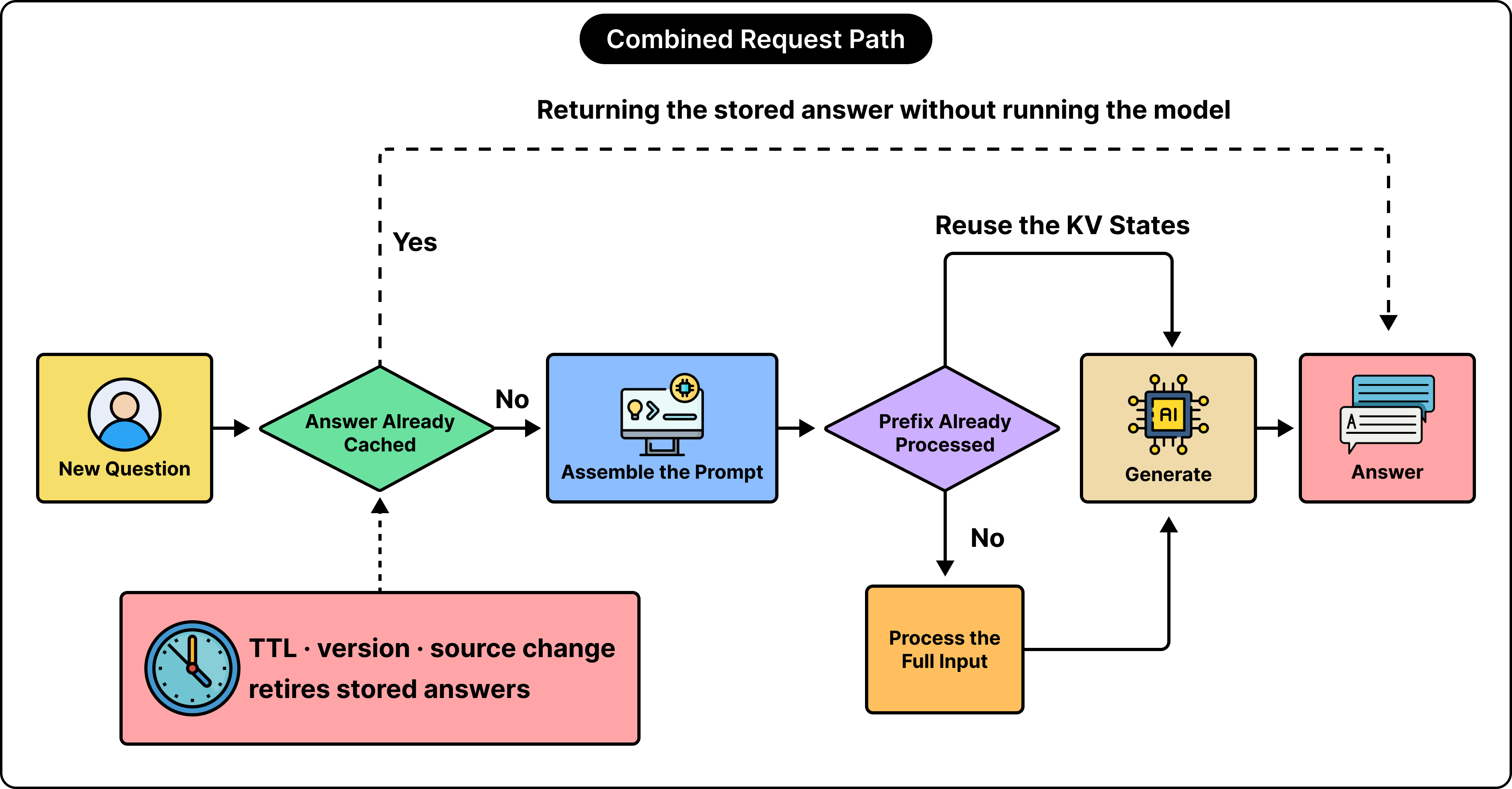
It’s not necessary that we have a cache lookup at the very beginning of the flow. For example, if the application must retrieve current source versions to validate an answer, that particular check should happen even earlier.
Conclusion
Prompt caching is a natural choice in scenarios where you need to generate fresh answers for different questions. But those answers have to be generated from a shared context. This common context could be a general product manual, a set of instructions, stable tool definitions, or a long conversation history.
Semantic caching is great for cases where the same answer is good enough for many different requests. For example, product FAQs. Stable support instructions. However, semantic caching doesn’t work well when you want to generate highly personalized answers. Or if the answer depends on rapidly changing facts. Also, when there is a need for fresh creative output.
We need to have even greater care for action requests. For example, a cached message saying “The subscription has been cancelled” cannot be a substitute for making a real cancellation.
For a practical implementation of these caching strategies, we need to have some measurements. In the case of prompt caching, we need to measure how many input tokens are reused. This is because there is a major cost difference between serving a request that reuses a tiny prefix and one that reuses a long manual. For semantic caching, we need to evaluate metrics like accepted answers, freshness, and scope. Only those answers that satisfy the application’s quality requirements should be turned into reusable entries.
The ultimate goal with either approach is to lower cost and provide faster responses while preserving answer quality.
References: