

If Your API Isn’t Fresh, Your Agents Aren’t Either. (Sponsored)

In the agentic era, outdated retrieval breaks workflows. This API Benchmark Report from You.com shows how each major search API performs to reveal which can best answer real-world, time-sensitive queries.
What’s inside:
Head-to-head benchmarks comparing You.com, Google SerpAPI, Exa, and Tavily across accuracy, latency, and cost
Critical performance data to identify which APIs best handle time-sensitive queries
A data-driven analysis of the Latency vs. Accuracy trade-off to help you select the best retrieval layer for enterprise agents
Curious who performed best?
Disclaimer: The details in this post have been derived from the details shared online by the OpenAI Engineering Team. All credit for the technical details goes to the OpenAI Engineering Team. The links to the original articles and sources are present in the references section at the end of the post. We’ve attempted to analyze the details and provide our input about them. If you find any inaccuracies or omissions, please leave a comment, and we will do our best to fix them.
Imagine teaching a computer to recognize objects not by showing it millions of labeled photos, but by letting it browse the internet and learn from how people naturally describe images. That’s exactly what OpenAI’s CLIP does, and it represents a fundamental shift in how we teach machines to understand visual content.
CLIP (Contrastive Language-Image Pre-training) is a neural network that connects vision and language. Released in January 2021, it can classify images into any categories you want without being specifically trained for that task. Just tell it what you’re looking for in plain English, and it can recognize it. This “zero-shot” capability makes CLIP different from almost every computer vision system that came before it.
In this article, we will look at how CLIP works and the problems it tries to solve.
The Problem CLIP Solves
Traditional computer vision followed a rigid formula. If you want a model to distinguish cats from dogs, you need thousands of labeled photos. For different car models, you need another expensive dataset. For reference, ImageNet, one of the most famous image datasets, required over 25,000 workers to label 14 million images.
This approach created three major problems:
First, datasets were expensive and time-consuming to build.
Second, models became narrow specialists. An ImageNet model could recognize 1,000 categories, but adapting it to new tasks required collecting more data and retraining.
Third, models could “cheat” by optimizing for specific benchmarks.
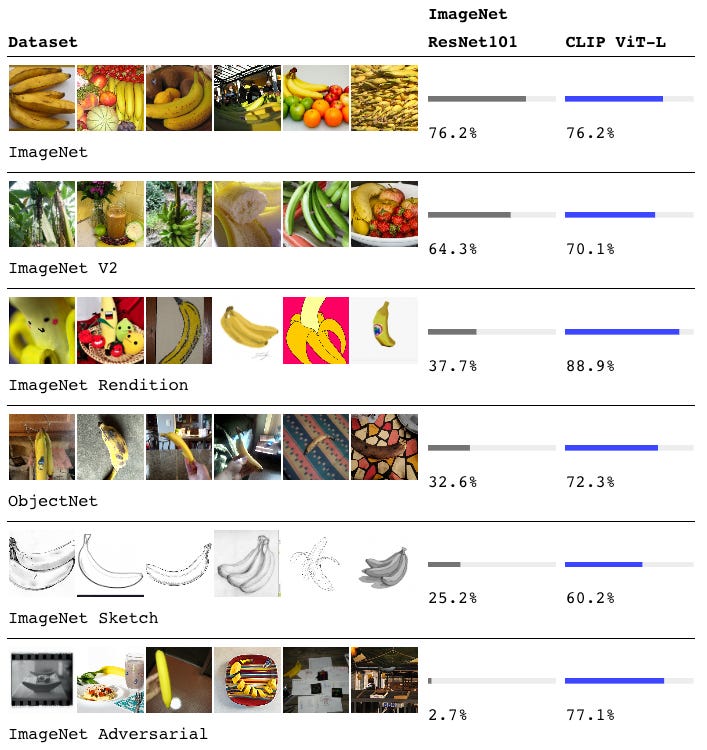
For example, a model achieving 76% accuracy on ImageNet might drop to 37% on sketches of the same objects, or plummet to 2.7% on slightly modified images. Models learned ImageNet’s quirks rather than truly understanding visual concepts.
CLIP’s approach is radically different. Instead of training on carefully labeled datasets, it learns from 400 million image-text pairs collected from across the internet. These pairs are everywhere online: Instagram photos with captions, news articles with images, product listings with descriptions, and Wikipedia entries with pictures. People naturally write text that describes, explains, or comments on images, creating an enormous source of training data.
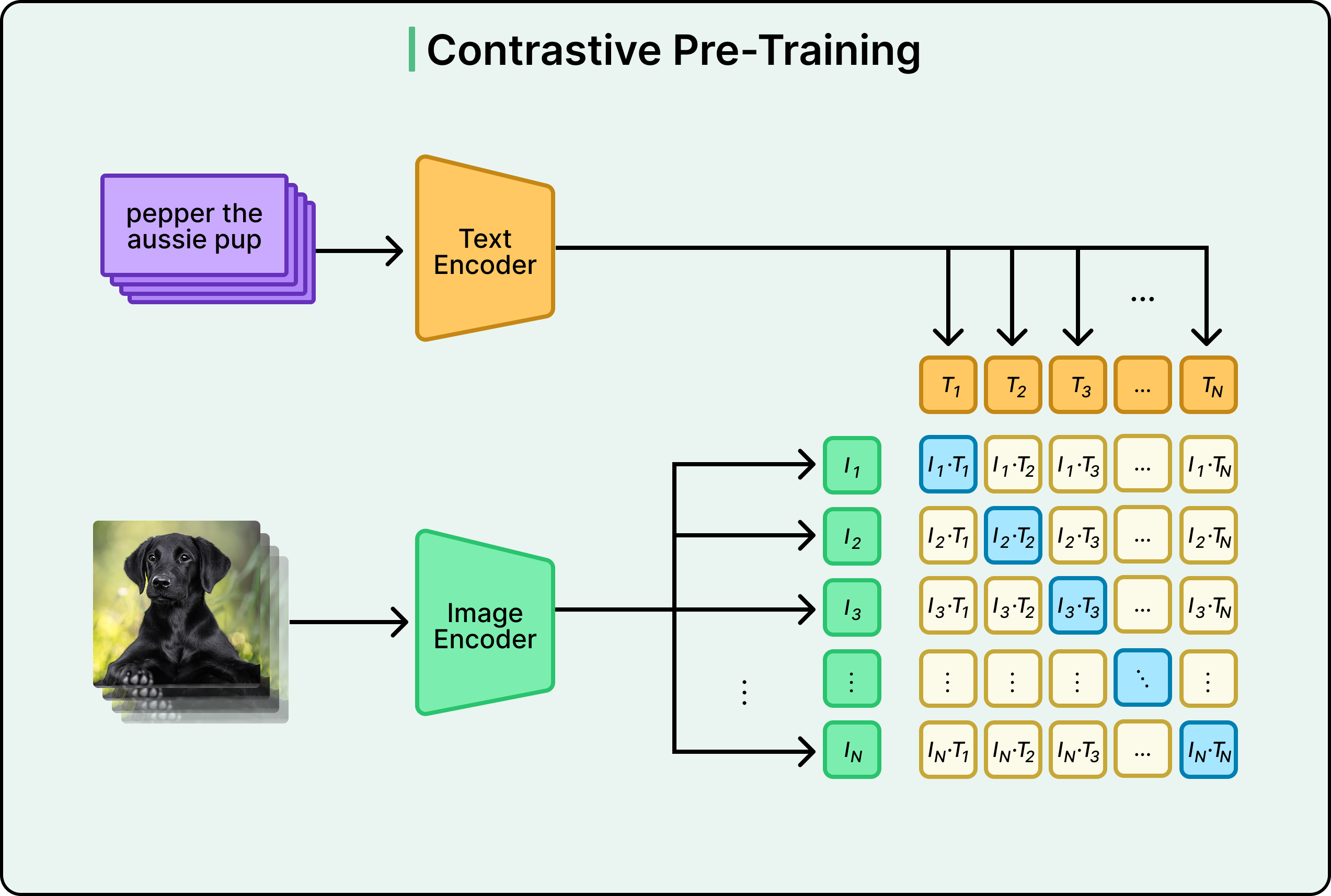
However, CLIP doesn’t try to predict specific category labels. Instead, it learns to match images with their corresponding text descriptions. During training, CLIP sees an image and a huge batch of text snippets (32,768 at a time). Its job is to determine which text snippet best matches the image.
Think of it as a massive matching game. For example, we show the system a photo of a golden retriever playing in a park. Among 32,768 text options, only one is correct: maybe “a golden retriever playing fetch in the park.” The other 32,767 options might include “a black cat sleeping,” “a mountain landscape at sunset,” “a person eating pizza,” and thousands of other descriptions. To consistently pick the right match across millions of such examples, CLIP must learn what objects, scenes, actions, and attributes look like and how they correspond to language.
By solving this matching task over and over with incredibly diverse internet data, CLIP develops a deep understanding of visual concepts and their linguistic descriptions. For example, it might learn that furry, four-legged animals with wagging tails correspond to words like “dog” and “puppy”. It might learn that orange and pink skies over water relate to “sunset” and “beach.” In other words, it builds a rich mental model connecting the visual and linguistic worlds.
👋 Goodbye low test coverage and slow QA cycles (Sponsored)

Bugs sneak out when less than 80% of user flows are tested before shipping. However, getting that kind of coverage (and staying there) is hard and pricey for any team.
QA Wolf’s AI-native solution provides high-volume, high-speed test coverage for web and mobile apps, reducing your organization’s QA cycle to minutes.
They can get you:
80% automated E2E test coverage in weeks—not years
Unlimited parallel test runs
24-hour maintenance and on-demand test creation
Zero flakes, guaranteed
The benefit? No more manual E2E testing. No more slow QA cycles. No more bugs reaching production.
With QA Wolf, Drata’s team of engineers achieved 4x more test cases and 86% faster QA cycles.
⭐ Rated 4.8/5 on G2
The Technical Foundation
Under the hood, CLIP uses two separate neural networks working in tandem: an image encoder and a text encoder.
The image encoder takes raw pixels and converts them into a numerical vector (called an embedding). The text encoder takes words and sentences and also outputs a vector. The key insight is that both encoders output vectors in the same dimensional space, making them directly comparable.
Initially, these encoders may produce completely random, meaningless vectors. For example, an image of a dog might become [0.2, -0.7, 0.3, ...] while the text “dog” becomes [-0.5, 0.1, 0.9, ...]. These numbers have no relationship whatsoever. But here’s where training works its magic.
The training process uses what’s called a contrastive loss function. This is simply a mathematical way of measuring how wrong the model currently is. For correct image-text pairs (like a dog image with “dog playing fetch”), the loss function says these embeddings should be very similar. For incorrect pairs (like a dog image with “cat sleeping”), it says they should be very different. The loss function produces a single number representing the total error across all images and texts in a batch.
See the diagram below:
Then comes backpropagation, the fundamental learning mechanism in neural networks. It calculates exactly how each weight in both encoders should change to reduce this error. The weights update slightly, and the process repeats millions of times with different batches of data. Gradually, both encoders learn to produce similar vectors for matching concepts. For example, images of dogs start producing vectors near where the text encoder puts the word “dog”.
In other words, through the continuous pressure to match correct pairs and separate incorrect ones across millions of diverse examples, the encoders evolve to speak the same language.
Zero-Shot Classification in Action
Once CLIP is trained, its zero-shot capabilities become evident. Suppose we want to classify images as containing either dogs or cats. We don’t need to retrain CLIP or show it labeled examples.
Instead, we can simply take the image and pass it through the image encoder to get an embedding. Next, we can take the text “a photo of a dog” and pass it through the text encoder to get another embedding. Further on, we can take the text “a photo of a cat” and get a third embedding. Compare which text embedding is closer to the image embedding, which would be the answer.
See the diagram below:
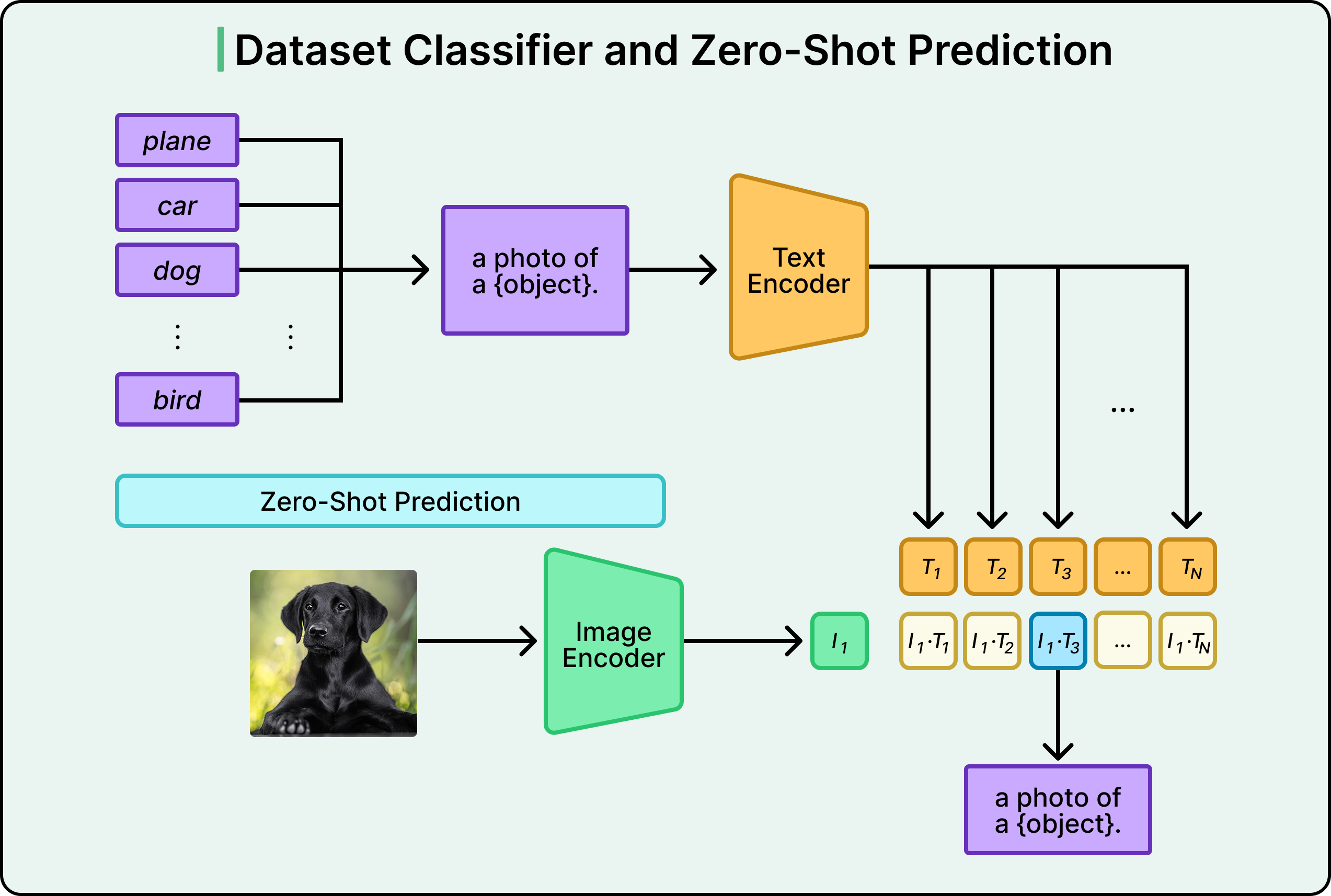
CLIP is essentially asking: “Based on everything learned from the internet, would this image more likely appear with text about dogs or text about cats?”
Since it learned from such diverse data, this approach works for nearly any classification task you can describe in words.
Want to classify types of food? Use “a photo of pizza,” “a photo of sushi,” “a photo of tacos” as your categories. Need to analyze satellite imagery? Try “a satellite photo of a forest,” “a satellite photo of a city,” “a satellite photo of farmland.” Working with medical images? You could use “an X-ray showing pneumonia” versus “an X-ray of healthy lungs.” You just change the text descriptions. No retraining required.
This flexibility is transformative. Traditional models needed extensive labeled datasets for each new task. CLIP can tackle new tasks immediately, limited only by your ability to describe categories in natural language.
Design Choices That Made CLIP Possible
CLIP’s success wasn’t just about the core idea. OpenAI made two critical technical decisions that made training computationally feasible.
First, they chose contrastive learning over the more obvious approach of training the model to generate image captions. Early experiments tried teaching systems to look at images and produce full text descriptions word by word, similar to how language models generate text. While intuitive, this approach proved incredibly slow and computationally expensive. Generating entire sentences requires much more computation than simply learning to match images with text. Contrastive learning turned out to be 4 to 10 times more efficient for achieving good zero-shot performance.
Second, they adopted Vision Transformers for the image encoder. Transformers, the architecture behind GPT and BERT, had already revolutionized natural language processing. Applying them to images (treating image patches like words in a sentence) provided another 3x computational efficiency gain over traditional convolutional neural networks like ResNet.
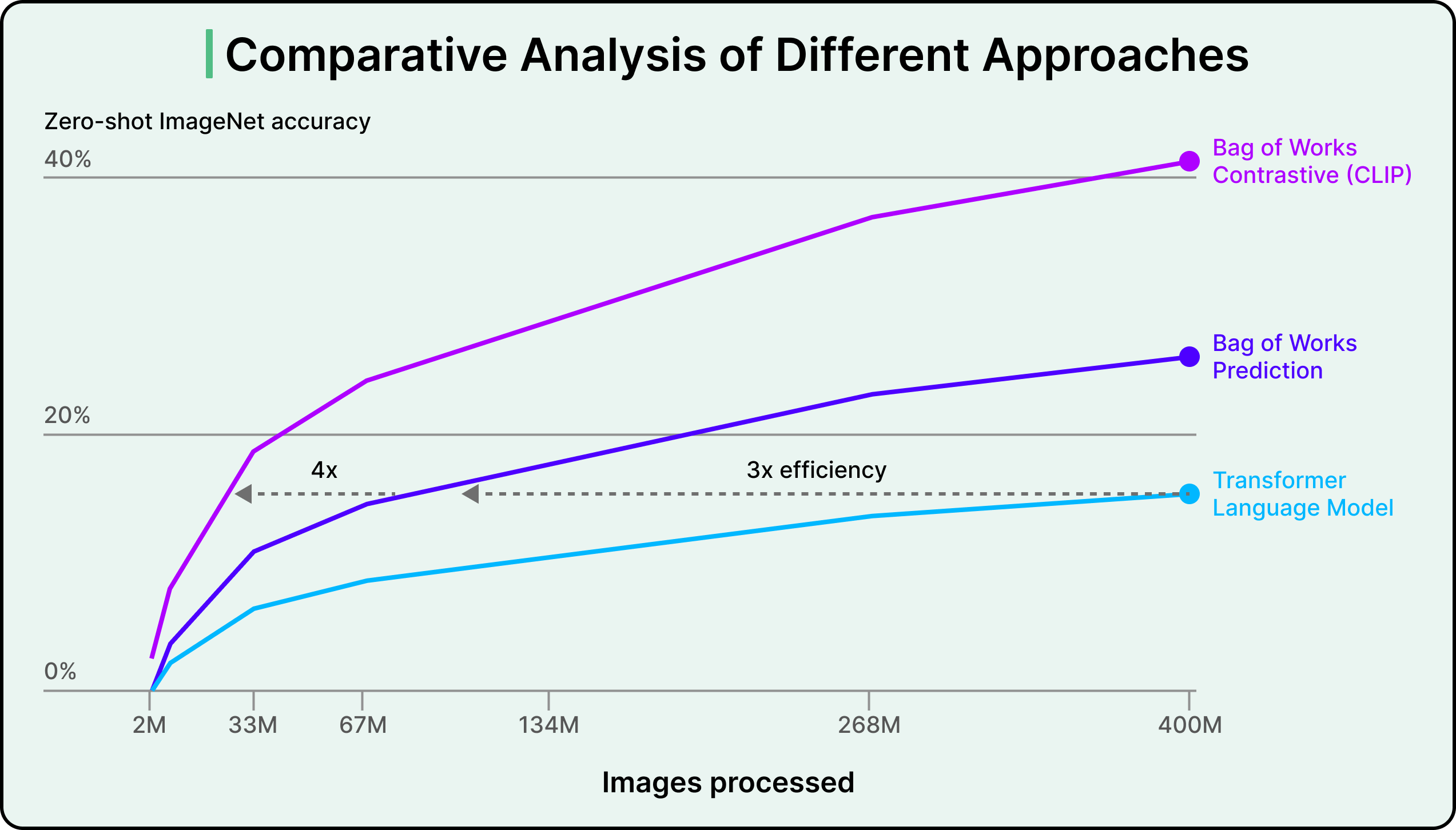
Combined, these choices meant CLIP could be trained on 256 GPUs for two weeks, similar to other large-scale vision models of the time, rather than requiring astronomically more compute.
Conclusion
OpenAI tested CLIP on over 30 different datasets covering diverse tasks: fine-grained classification, optical character recognition, action recognition, geographic localization, and satellite imagery analysis.
The results validated CLIP’s approach. While matching ResNet-50’s 76.2% accuracy on standard ImageNet, CLIP outperformed the best publicly available ImageNet model on 20 out of 26 transfer learning benchmarks. More importantly, CLIP maintained strong performance on stress tests where traditional models collapsed. On ImageNet Sketch, CLIP achieved 60.2% versus ResNet’s 25.2%. On adversarial examples, CLIP scored 77.1% compared to ResNet’s 2.7%.
However, the model still struggles with some things, such as:
Tasks requiring precise spatial reasoning or counting. It also has difficulty with very fine-grained distinctions, like differentiating between similar car models or aircraft variants where subtle details matter.
When tested on handwritten digits from the MNIST dataset (a task considered trivial in computer vision), CLIP achieved only 88% accuracy, well below the 99.75% human performance.
CLIP exhibits sensitivity to how you phrase your text prompts. Sometimes it requires trial and error (”prompt engineering”) to find wording that works well.
CLIP inherits biases from its internet training data. The way we phrase categories can dramatically influence model behavior in problematic ways.
However, despite the limitations, CLIP demonstrates that the approach powering recent breakthroughs in natural language processing (learning from massive amounts of internet text) can transfer to computer vision. Just as GPT models learned to perform diverse language tasks by training on internet text, CLIP learned diverse visual tasks by training on internet image-text pairs.
Since its release, CLIP has become foundational infrastructure across the AI industry. It’s fully open source, catalyzing widespread adoption. Modern text-to-image systems like Stable Diffusion and DALL-E use CLIP-like models to understand text prompts. Companies employ it for image search, content moderation, and recommendations.
References:
SPONSOR US
Get your product in front of more than 1,000,000 tech professionals.
Our newsletter puts your products and services directly in front of an audience that matters - hundreds of thousands of engineering leaders and senior engineers - who have influence over significant tech decisions and big purchases.
Space Fills Up Fast - Reserve Today
Ad spots typically sell out about 4 weeks in advance. To ensure your ad reaches this influential audience, reserve your space now by emailing sponsorship@bytebytego.com.