

Sonar Summit: global conversation building software in the AI era (Sponsored)

Join us for Sonar Summit on March 3rd, a global virtual event, bringing together the brightest minds in software development.
In a world increasingly shaped by AI, it’s more crucial than ever to cut through the noise and amplify the ideas and practices that lead to truly good code. We created Sonar Summit to help you navigate the future with clarity and knowledge you need to build better software, faster.
OpenAI recently launched ChatGPT Atlas, a web browser where the LLM acts as your co-pilot across the internet. You can ask questions about any page, have ChatGPT complete tasks for you, or let it browse in Agent mode while you work on something else.
Delivering this experience wasn’t trivial. ChatGPT Atlas needed to start instantly and stay responsive even with hundreds of tabs open. To make development faster and avoid reinventing the wheel, the team built on top of Chromium, the engine that powers many other modern browsers.
However, Atlas is not just another Chromium-based browser with a different skin. Most Chromium-based browsers embed the web engine directly into their application, which creates tight coupling between the UI and the rendering engine. This architecture works fine for traditional browsing, but it makes certain capabilities extremely difficult to achieve.
Therefore, OpenAI’s solution was to build OWL (OpenAI’s Web Layer), an architectural layer that runs Chromium as a separate process, thereby unlocking capabilities that would have been nearly impossible otherwise.
In this article, we learn how the OpenAI Engineering Team built OWL and the technical challenges they faced around rendering and inter-process communication.
Disclaimer: This post is based on publicly shared details from the OpenAI Engineering Team. Please comment if you notice any inaccuracies.
Why Chromium?
Chromium was the natural choice as the web engine for Atlas. Chromium provides a state-of-the-art rendering engine with strong security, proven performance, and complete web compatibility. It powers many modern browsers, including Chrome, Edge, and Brave. Furthermore, Chromium benefits from continuous improvements by a global developer community. For any team building a browser today, Chromium is the logical starting point.
However, using Chromium comes with significant challenges. The OpenAI Engineering Team had ambitious goals that were difficult to achieve with Chromium’s default architecture:
First, they wanted instant startup times. Users should see the browser interface immediately, not after waiting for everything to load.
Second, they needed rich animations and visual effects for features like Agent mode, which meant using modern native frameworks like SwiftUI and Metal rather than Chromium’s built-in UI system.
Third, Atlas needed to support hundreds of open tabs without degrading performance.
Chromium has strong opinions about how browsers should work. It controls the boot sequence, the threading model, and how tabs are managed.
While OpenAI could have made extensive modifications to Chromium itself, this approach had problems. Making substantial changes to Chromium’s core would mean maintaining a large set of custom patches. Every time a new Chromium version was released, merging those changes would become increasingly difficult and time-consuming.
There was also a cultural consideration. OpenAI has an engineering principle called “shipping on day one,” where every new engineer makes and merges a code change on their first afternoon. This practice keeps development velocity high and helps new team members feel immediately productive. However, Chromium takes hours to download and build from source. Making this requirement work with traditional Chromium integration seemed nearly impossible.
OpenAI needed a different approach to integrate Chromium that would enable rapid experimentation, faster feature delivery, and maintain their engineering culture.
Your Trusted Source for Cloud Solutions, AI Apps, and Agents (Sponsored)

With the largest catalog of AI apps and agents in the industry, Microsoft Marketplace is a single source of cloud and AI needs. As a software company, Marketplace is how you connect your solution to millions of global buyers 24/7, helping reach new customers and sell with the power of Microsoft.
Publish your solution to the Microsoft Marketplace and grow pipeline with trials and product-led sales. Plus, you can simplify sales operations by streamlining terms, payouts, and billing.
Expand your product reach with Microsoft Marketplace
The Solution: OWL Architecture
The answer was OWL, a new architectural layer that fundamentally changes how Chromium integrates with the browser application.
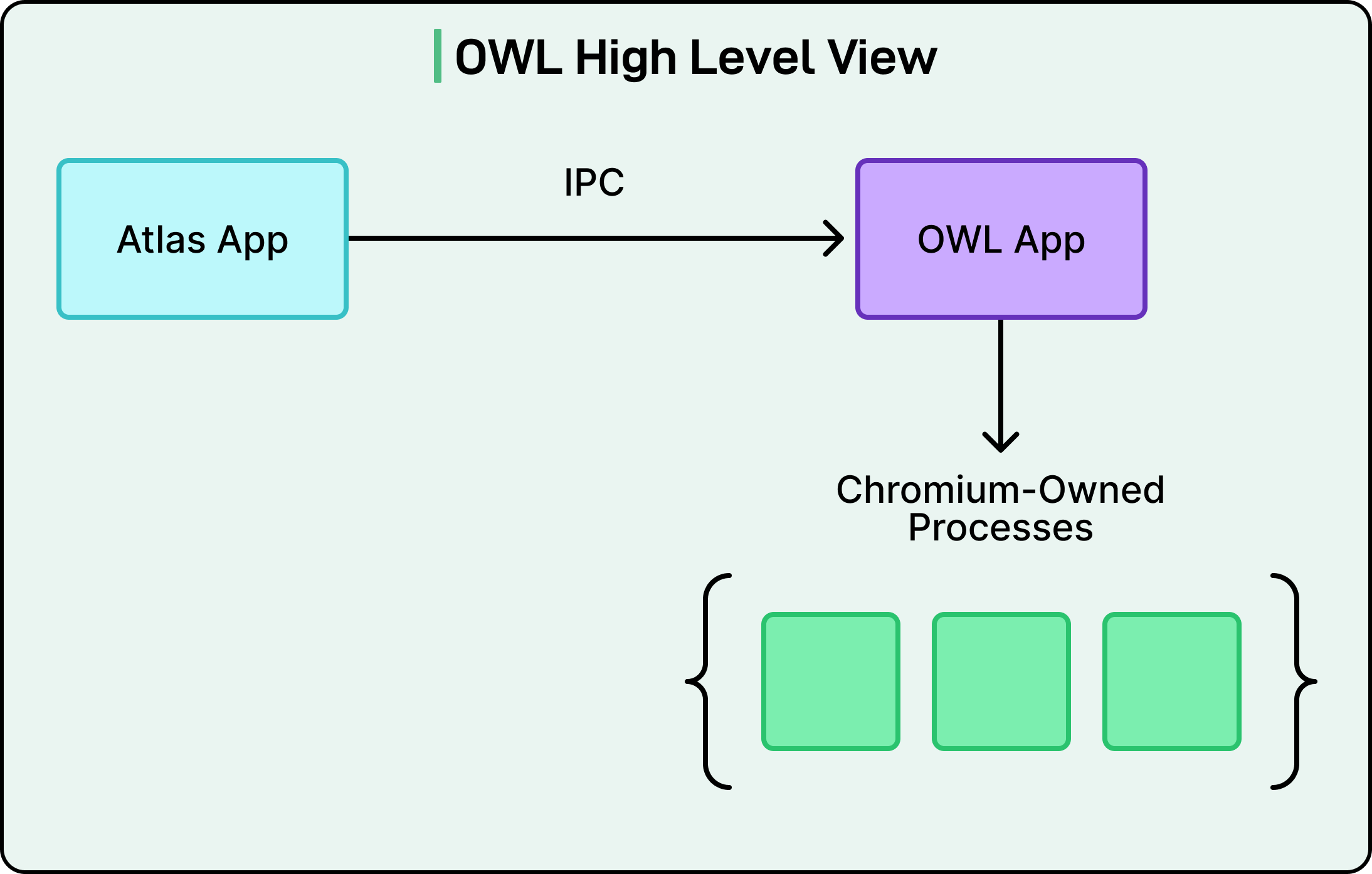
The key tenet behind the architecture is that instead of embedding Chromium inside the Atlas application, OpenAI runs Chromium’s browser process outside the main Atlas application process.
In this architecture, Atlas is the OWL Client, and the Chromium browser process is the OWL Host. These two components communicate through IPC using Mojo, which is Chromium’s own message-passing system. OpenAI wrote custom Swift and TypeScript bindings for Mojo, allowing their Swift-based Atlas application to call Chromium functions directly.
See the diagram below:
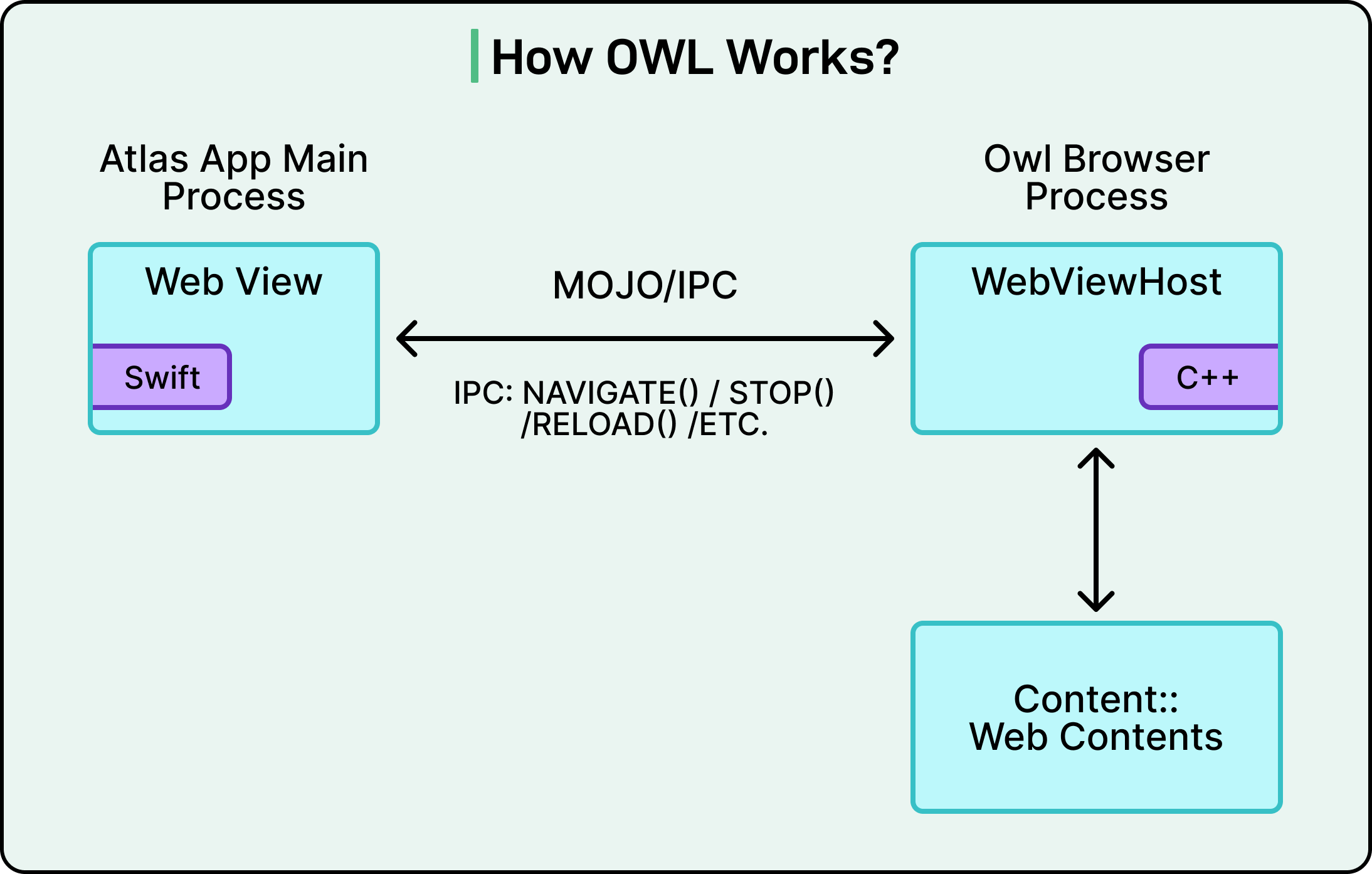
The OWL client library exposes a clean Swift API that abstracts several key concepts:
Session: Configures and controls the Chromium host globally
Profile: Manages browser state for a specific user profile (bookmarks, history, etc.)
WebView: Controls individual web pages, handling navigation, zoom, and input
WebContentRenderer: Forwards input events into Chromium and receives feedback
LayerHost/Client: Exchanges compositing information between Atlas UI and Chromium
Additionally, OWL provides service endpoints for managing high-level features like bookmarks, downloads, extensions, and autofill.
Rendering Across Process Boundaries
One of the most complex aspects of OWL is rendering.
How do you display web content that Chromium generates in one process within Atlas windows that exist in another process?
OpenAI solved this using a technique called layer hosting. Here is how it works:
On the Chromium side, web content is rendered to a CALayer, which is a macOS graphics primitive. This layer has a unique context ID.
On the Atlas side, an NSView (a window component) embeds this layer using the private CALayerHost API. The context ID tells Atlas which layer to display.
See the diagram below:
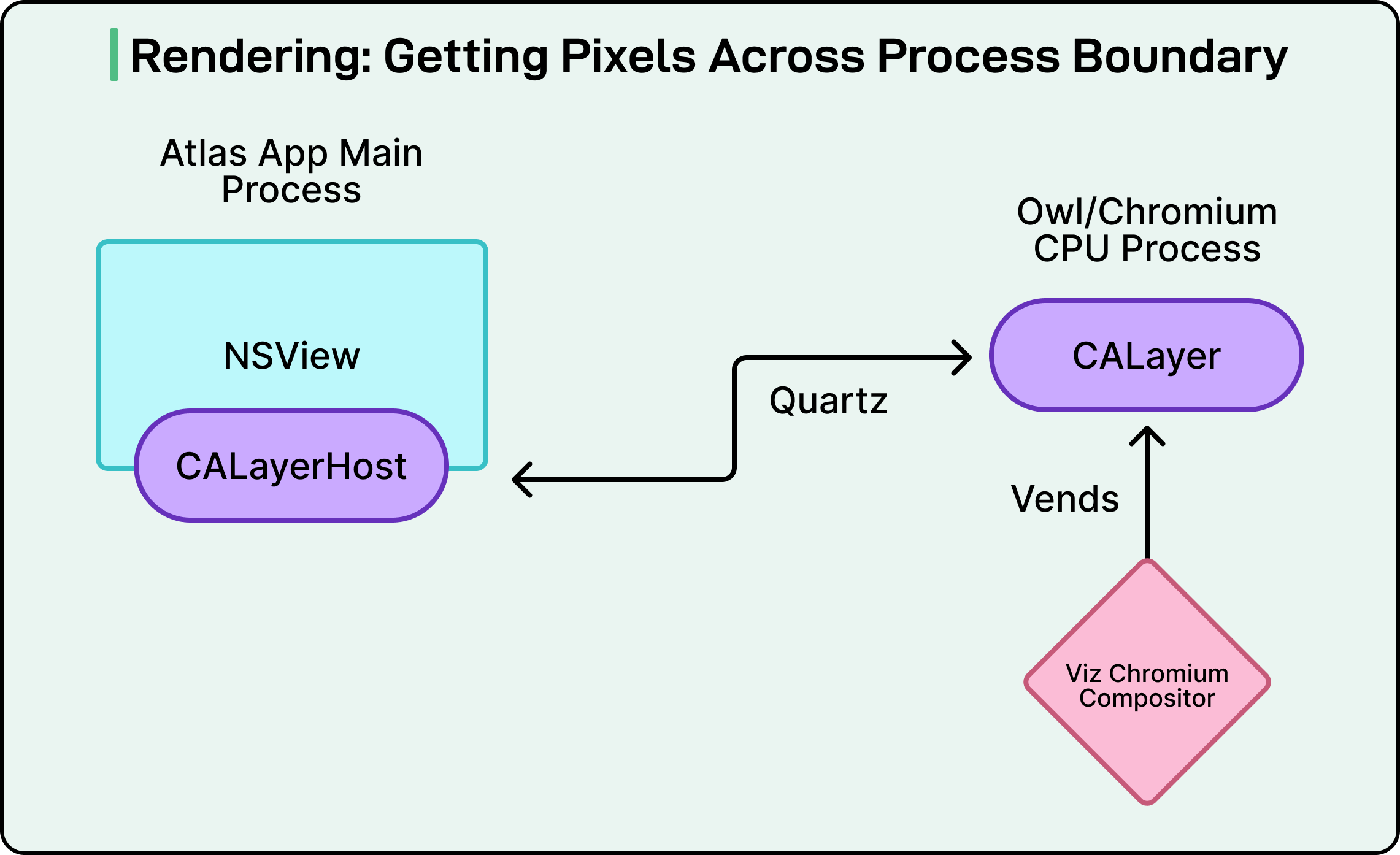
The result is that pixels rendered by Chromium in the OWL process appear seamlessly in Atlas windows. The GPU compositor handles this efficiently because both processes can share graphics memory. Multiple tabs can share a single compositing container. When you switch tabs, Atlas simply swaps which WebView is connected to the visible container.
This technique also works for special UI elements like dropdown menus from select elements or color pickers. These render in separate pop-up widgets in Chromium, each with its own rendering surface, but they follow the same delegated rendering model.
OpenAI also uses this approach selectively to project elements of Chromium’s native UI into Atlas. This is useful for quickly bootstrapping features like permission prompts without building complete replacements in SwiftUI. The technique borrows from Chromium’s existing infrastructure for installable web applications on macOS.
Input Event Handling
User input requires careful handling across the process boundary. Normally, Chromium’s UI layer translates platform events like mouse clicks or key presses from macOS NSEvents into Blink’s WebInputEvent format before forwarding them to web page renderers.
In the OWL architecture, Chromium runs without visible windows, so it never receives these platform events directly. Instead, the Atlas client library performs the translation from NSEvents to WebInputEvents and forwards the already-translated events to Chromium over IPC.
See the diagram below:
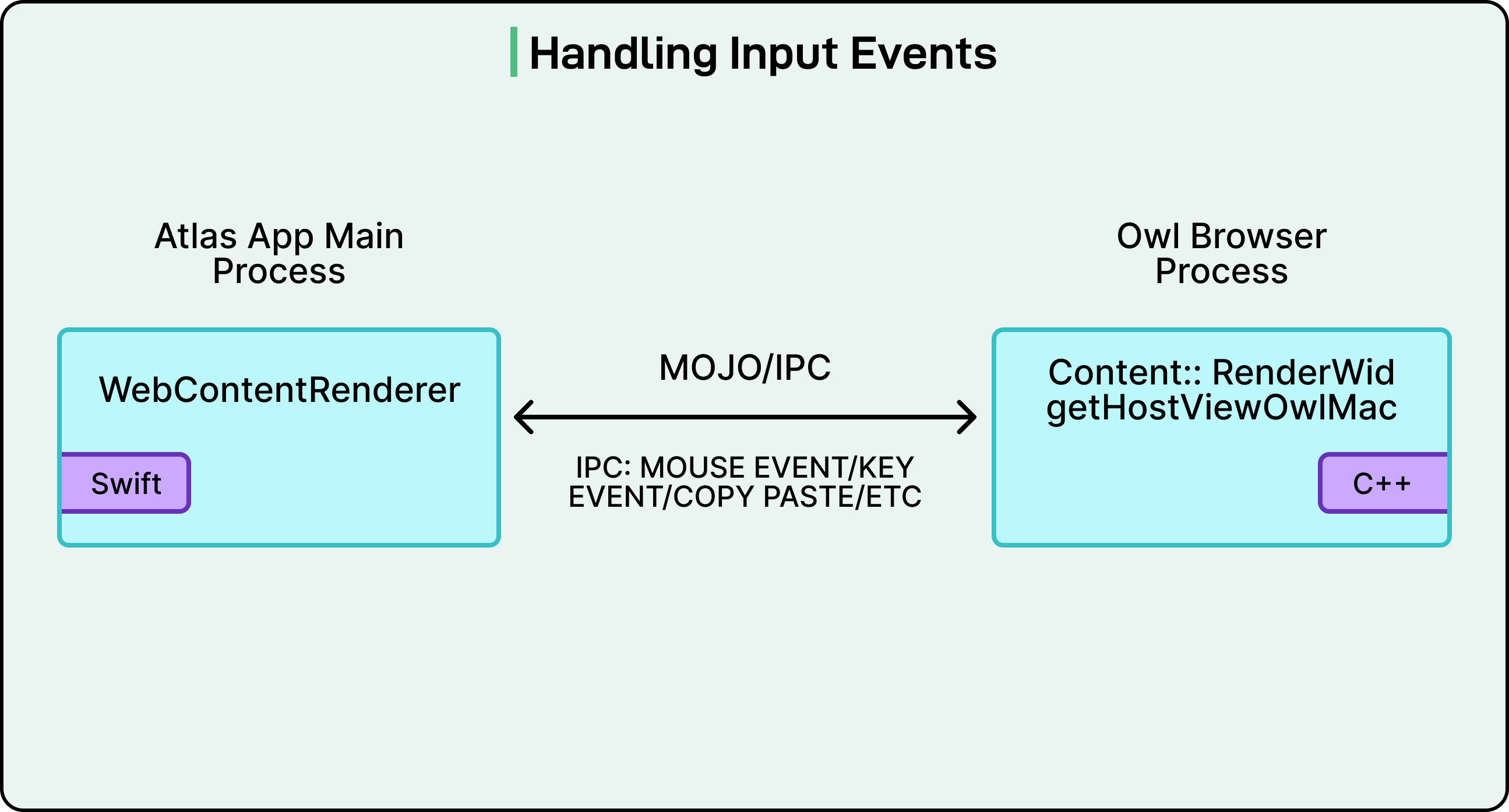
From there, events follow the same lifecycle they would normally follow for web content. If a web page indicates it did not handle an event, Chromium returns it to the Atlas client. When this happens, Atlas resynthesizes an NSEvent and gives the rest of the application a chance to handle the input. This allows browser-level keyboard shortcuts and gestures to work correctly even though the web engine is in a separate process.
Special Considerations for Agent Mode
Atlas includes an agentic browsing feature where ChatGPT can control the browser to complete tasks. This capability poses unique challenges for rendering, input handling, and data storage.
The computer use model that powers Agent mode expects a single screenshot of the browser as input. However, some UI elements, like dropdown menus, render outside the main tab bounds in separate windows. To solve this, Atlas composites these pop-up windows back into the main page image at their correct coordinates in Agent mode. This ensures the AI model sees the complete context in a single frame.
For input events, OpenAI applies a strict security principle. Agent-generated events route directly to the web page renderer and never pass through the privileged browser layer. This preserves the security sandbox even under automated control. The system prevents AI-generated events from synthesizing keyboard shortcuts that would make the browser perform actions unrelated to the displayed web content.
Agent mode also supports ephemeral browsing sessions. Instead of using the user’s existing Incognito profile, which could leak state between sessions, OpenAI uses Chromium’s StoragePartition infrastructure to create isolated, in-memory data stores. Each agent session starts completely fresh. When the session ends, all cookies and site data are discarded. You can run multiple logged-out agent sessions simultaneously, each in its own browser tab, with complete isolation between them.
Benefits of the OWL Architecture
The OWL architecture delivers several critical benefits that enable OpenAI’s product goals.
Atlas achieves fast startup because Chromium boots asynchronously in the background while the Atlas UI appears nearly instantly. Users see pixels on screen within milliseconds, even though the web engine may still be initializing.
The application is simpler to develop because Atlas is built almost entirely in SwiftUI and AppKit. This creates a unified codebase with one primary language and technology stack, making it easier for developers to work across the entire application.
Process isolation means that if Chromium’s main thread hangs, Atlas remains responsive. If Chromium crashes, Atlas stays running and can recover. This separation protects the user experience from issues in the web engine.
OpenAI maintains a much smaller diff against upstream Chromium because they are not modifying Chromium’s UI layer extensively. This makes it easier to integrate new Chromium versions as they are released.
Most importantly for developer productivity, most engineers never need to build Chromium locally. OWL ships internally as a prebuilt binary, so Atlas builds completely in minutes rather than hours.
Engineering Trade-offs
Every architectural decision involves trade-offs:
Running two separate processes uses more memory than a monolithic architecture.
The IPC layer adds complexity that must be maintained.
Cross-process rendering could potentially add latency, although OpenAI mitigates this through efficient use of CALayerHost and GPU memory sharing.
However, OpenAI determined that these trade-offs were worthwhile. The benefits of stability, developer productivity, and architectural flexibility outweigh the costs. The clean separation between Atlas and Chromium creates a foundation that will support future innovation, particularly for agentic use cases.
Conclusion
OWL is not just about building a better browser today.
It creates infrastructure for the future of AI-powered web experiences. The architecture makes it easy to run multiple isolated agent sessions, add new AI capabilities, and experiment with novel interactions between users, AI, and web content. The built-in sandboxing for agent actions provides security by design rather than as an afterthought.
Building ChatGPT Atlas required rethinking fundamental assumptions about browser architecture. By running Chromium outside the main application process and creating the OWL integration layer, the OpenAI Engineering Team solved multiple challenges simultaneously. They achieved instant startup, maintained developer productivity, enabled rich UI capabilities, and built a strong foundation for agentic browsing.
References:
Very useful content
Hi! The part about how Atlas handles coordination across distributed components was especially interesting. It’s easy to underestimate how much planning goes into making systems scale without falling apart under load. In a way, it reminds me of expanding a house — you can’t just bolt something on and hope it works, it has to tie into the existing structure properly. That’s kind of how thoughtful room additions work too (https://qualityrenovation.com/services/home-additions). The integration matters just as much as the expansion itself. Really appreciate how clearly you explained the trade-offs here.